Containers are not virtual machines. Yet, they feel isolated. Why is that?

##
##
🎯 What This Article Covers
- Two Linux kernel mechanisms Docker (containers) use to implement isolation
- Namespace — Isolating what is visible
- cgroups — Limiting how much can be used
- Things that are NOT isolated — Pitfalls to know for security design
- Comparison of isolation levels between Virtual Machines (VMs) and containers
📌 Introduction / Background
When first learning Docker, one of the most common phrases you hear is:
Containers are isolated environments.
That’s correct. But to what extent are they isolated?
Many developers and operators mistakenly believe that containers are completely independent environments, like VMs. As a result, they become vulnerable to Container Escape exploits, or encounter situations where a single container monopolizes the entire host’s CPU.
To properly understand Docker’s isolation, you need to know what happens at the Linux kernel level. Today, we’ll peel back the layers and explore its internals.
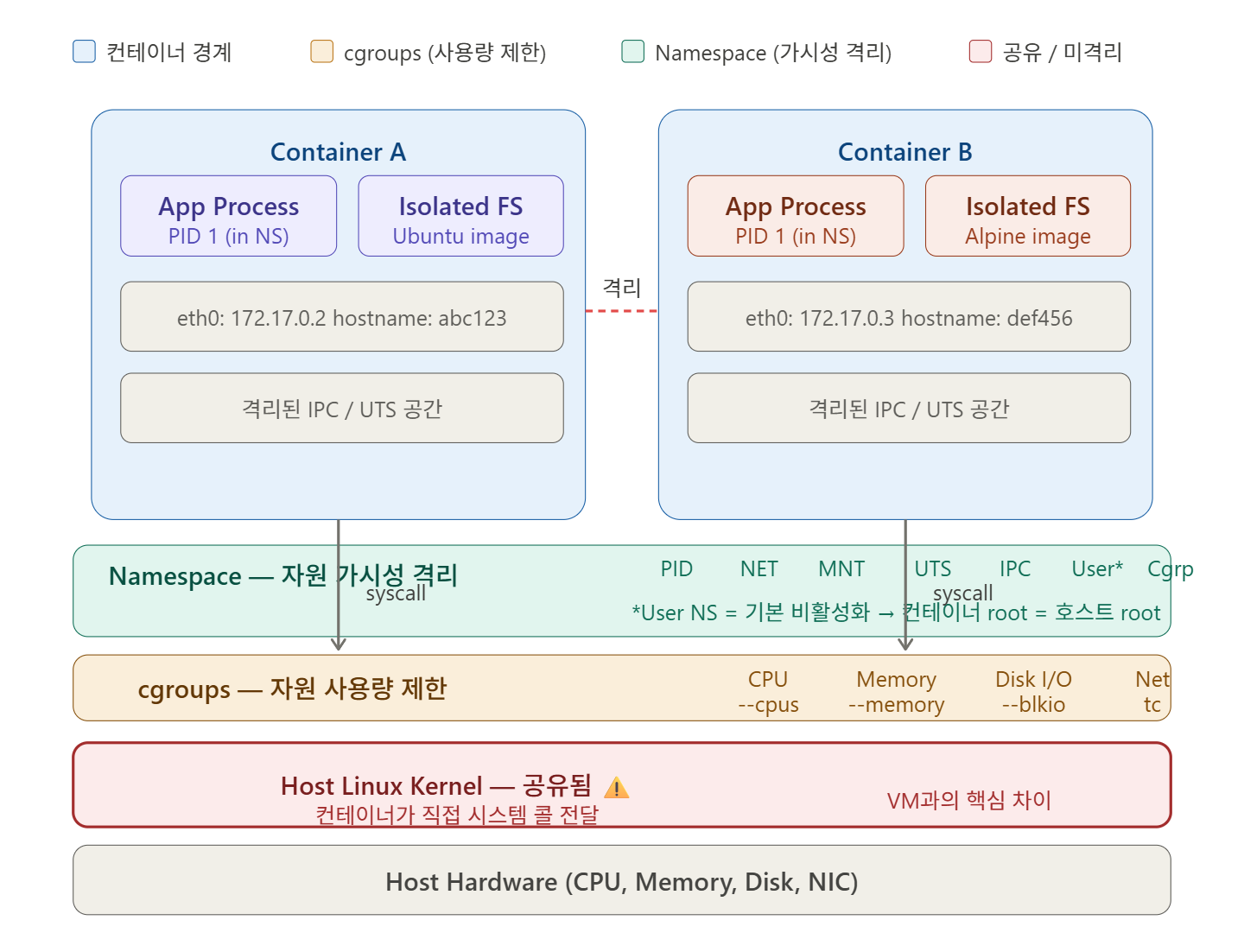
🔍 1. Namespace — Isolating “What is Visible”
Linux Namespace is a kernel feature that limits the scope of system resources a process can see. Although on the same host, processes inside a container feel as if they have their own world.
Docker uses a total of 7 types of Namespaces.
###
🗂️ PID Namespace — Process ID Isolation
When you run `ps aux` inside a container, you only see its own processes. Hundreds of processes running on the host are not visible.
The first process inside a container always appears as PID 1. However, when viewed from the host, it has a completely different PID number.
# Check on the host
$ docker run --rm ubuntu sleep 1000 &
$ ps aux | grep sleep
root  12345  ...  sleep 1000   # Host PID: 12345

# Check inside the container
$ docker exec <container_id> ps aux
PID  USER  COMMAND
1    root  sleep 1000          # Inside the container, PID 1
###
🌐 Network Namespace — Network Isolation
Each container has its own virtual network interface, IP address, and routing table. If you run `ifconfig` in Container A, Container B’s network interfaces are not visible.
Docker typically creates a bridge network called `docker0` and connects each container with a virtual Ethernet pair (veth pair).
###
📁 Mount Namespace — Filesystem Isolation
Containers have their own root filesystem (/). This is why `apt` works when you run an Ubuntu image, and `apk` works when you run an Alpine image.
The host’s filesystem is not visible by default, unless explicitly mounted with the `-v` option.
###
👤 UTS Namespace — Hostname Isolation
Containers have their own hostname and domain name. Running `hostname` inside a container will show the container ID, not the host’s name.
###
🔐 IPC Namespace — Inter-Process Communication Isolation
This isolates System V IPC (shared memory, semaphores, message queues). It prevents processes in Container A from accessing shared memory in Container B.
###
👥 User Namespace — User ID Isolation
A user who is `root` (UID 0) inside a container can be mapped to a non-root user on the host. This feature is key to enabling Rootless containers, but it is not enabled by default in Docker.
###
🔗 Cgroup Namespace — cgroup View Isolation
This limits a container to seeing only its own cgroup hierarchy. (The explanation of cgroups itself is covered immediately below.)
🔍 2. cgroups — Limiting “How Much Can Be Used”
cgroups (Control Groups) is a kernel feature that limits, measures, and isolates the amount of system resources a process group can use.
While Namespaces deal with
Leave a Reply