If a single rule is a warrior, YARA wielded by Python is a legion.
The first step towards true automation beyond the command line.
>

What This Article Covers
- Why use yara-python instead of CLI, and when it becomes necessary
- The entire process from library installation to rule compilation, file, memory, and byte scanning
- Clean patterns for recursive directory scanning and handling matching results
- Techniques for dynamically controlling rules with callback functions and external variables (externals)
- Common pitfalls and avoidance methods in production environments
Introduction — Beyond CLI to Automation
The yara command is a familiar knife in an analyst’s hand, but there are areas it cannot reach. When thousands of samples arrive daily and need automatic classification, or when detection results must be fed into a SIEM pipeline, or when specific patterns within a memory dump need to be tracked by process ID — in all these situations, analysts ultimately end up writing code.
yara-python is the official Python binding for YARA, exposing all functionalities of the YARA engine, written in C, as Python objects. Compilation, caching, callbacks, external variables, to memory scanning, tasks that are awkward or impossible with the CLI become a single-line method call.
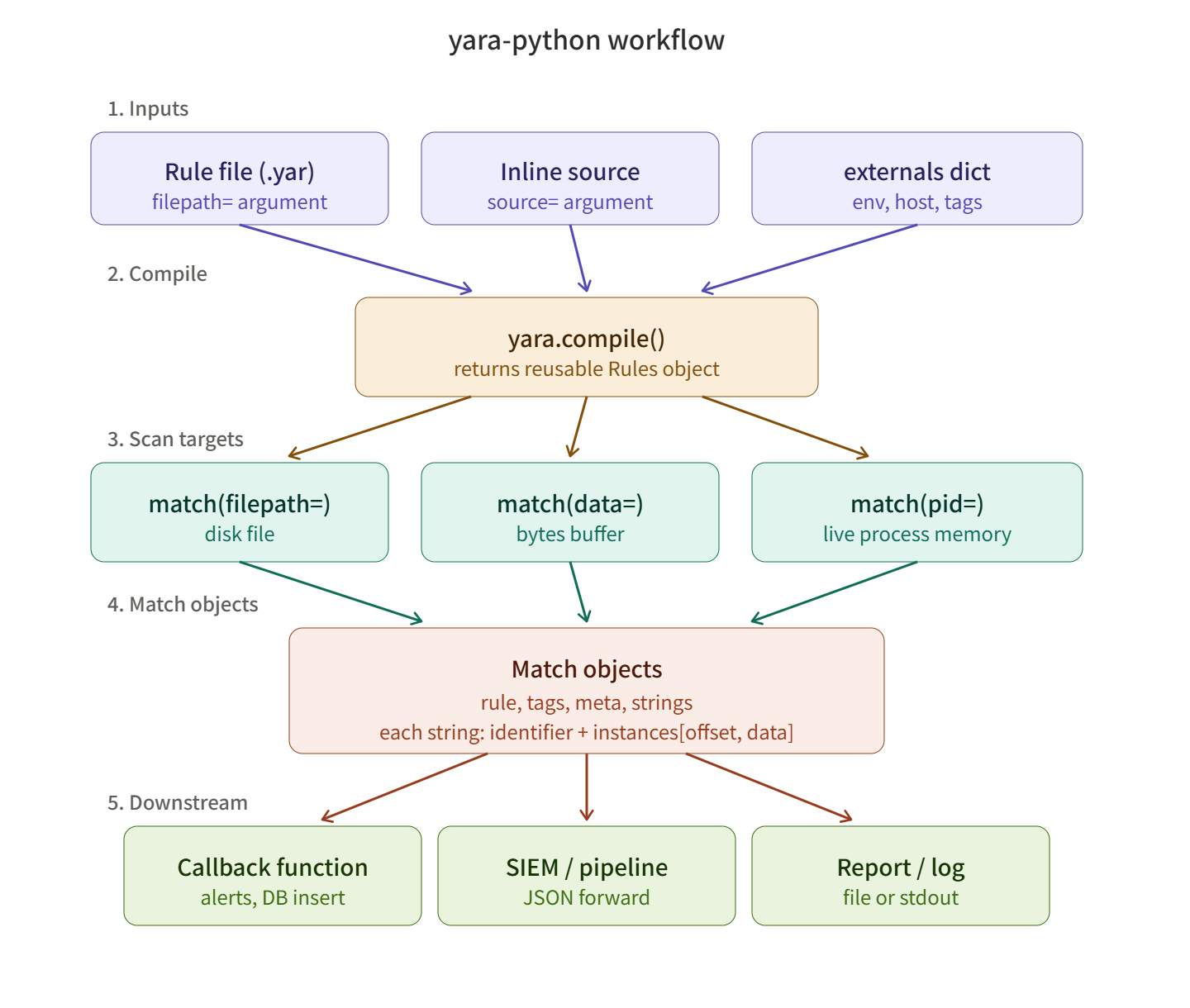
Core Components of yara-python
The usage flow of the library is simple.
- yara.compile() — Compiles rules into a reusable Rules object. It can accept files, strings, or multiple sources at once.
- rules.match() — Takes any of file paths, byte data, or process PIDs as scan targets.
- Match object — The matching result returns an object containing the rule name, metadata, matched strings, and offsets.
Mastering these three allows you to build any automation.
Hands-on — Building a Hunter with Code
Step 0. Environment Setup
# The YARA engine must already be installed
sudo apt install -y yara                # Debian / Ubuntu
brew install yara                       # macOS

# Install Python binding
pip install yara-python

# Verify installation
python -c "import yara; print(yara.__version__)"
Step 1. Creating Sample Files for Detection
As before, we’ll use harmless dummy files. This time, we’ll generate them directly with a Python script.
# create_sample.py
SAMPLE = """#!/bin/bash
# Internal task runner v1.0
TASK_ID=ACME-EDU-2026
echo "Starting backup process..."
curl -s http://example-edu-lab.local/healthcheck
echo "Token: EDULAB_SIGNATURE_TOKEN_42"
exit 0
"""

with open("suspicious_sample.txt", "w", encoding="utf-8") as f:
    f.write(SAMPLE)
print("[+] sample file created")
Step 2. Writing YARA Rules
We’ll keep the rule file as is, but this time we’ll handle it in Python in two ways — by loading an external .yar file and by directly compiling a source string.
// edulab_detector.yar
rule EDULAB_Suspicious_Script
{
    meta:
        author      = "주군의 보안 강의실"
        description = "EDULAB 식별자와 토큰을 포함한 셸 스크립트 탐지"
        date        = "2026-05-23"
        severity    = "medium"

    strings:
        $magic = "#!/bin/bash"
        $id    = "ACME-EDU-2026" ascii
        $token = "EDULAB_SIGNATURE_TOKEN_42" ascii

    condition:
        filesize < 10KB
        and $magic at 0
        and all of ($id, $token)
}
Step 3. Writing the First Scanner
Let’s put the core flow of compile → scan → output results into a single file.
# scanner_basic.py
import yara

# (1) Compile rules — load from file
rules = yara.compile(filepath="edulab_detector.yar")

# (2) Scan target file
matches = rules.match(filepath="suspicious_sample.txt")

# (3) Output results
if not matches:
    print("[-] No matches.")
else:
    for m in matches:
        print(f"[!] Rule matched: {m.rule}")
        print(f"    Tags     : {m.tags}")
        print(f"    Meta     : {m.meta}")
        for s in m.strings:
            for inst in s.instances:
                offset = inst.offset
                data   = inst.matched_data.decode("utf-8", errors="replace")
                print(f"    {s.identifier} @ 0x{offset:x}  ->  {data!r}")
If it operates normally, the following output will be displayed.
[!] Rule matched: EDULAB_Suspicious_Script
    Tags     : []
    Meta     : {'author': '주군의 보안 강의실', ...}
    $magic @ 0x0  ->  '#!/bin/bash'
    $id @ 0x35  ->  'ACME-EDU-2026'
    $token @ 0xa9  ->  'EDULAB_SIGNATURE_TOKEN_42'
Version Note: Since yara-python 4.3.0, match.strings has become a list of StringMatch objects, where each object has an identifier and instances. In previous versions (3.x), it was a list of (offset, identifier, data) tuples. Please be sure to check yara.__version__ before writing code.
Step 4. Compiling Rules Directly from a String
This is useful when dynamically creating and testing rules within code without configuration files. It particularly shines in CI pipelines or unit tests.
# scanner_inline.py
import yara

RULE_SOURCE = """
rule QuickHexSig {
    meta:
        description = "Detects bash shebang via hex pattern"
    strings:
        $hex = { 23 21 2F 62 69 6E 2F 62 61 73 68 }
    condition:
        $hex at 0
}
"""

rules = yara.compile(source=RULE_SOURCE)

# You can also scan byte data directly — without file I/O!
with open("suspicious_sample.txt", "rb") as f:
    data = f.read()

for m in rules.match(data=data):
    print(f"[!] {m.rule} matched in-memory buffer.")
The `data=` argument becomes a crucial weapon when instantly inspecting payloads received from memory buffers or networks.
Step 5. Recursive Directory Scanner
In practice, you’ll scan an entire tree, not just one file. We’ll package this neatly with error handling.
# scan_tree.py
import os
import sys
import yara

def build_rules(rule_path: str) -> yara.Rules:
    try:
        return yara.compile(filepath=rule_path)
    except yara.SyntaxError as e:
        print(f"[error] rule syntax error: {e}", file=sys.stderr)
        sys.exit(1)

def scan_tree(rules: yara.Rules, root: str) -> None:
    hit_count = 0
    for dirpath, _, filenames in os.walk(root):
        for name in filenames:
            path = os.path.join(dirpath, name)
            try:
                matches = rules.match(filepath=path, timeout=10)
            except yara.TimeoutError:
                print(f"[warn] timeout: {path}", file=sys.stderr)
                continue
            except (PermissionError, yara.Error) as e:
                print(f"[skip] {path}: {e}", file=sys.stderr)
                continue

            for m in matches:
                hit_count += 1
                print(f"[HIT] {m.rule}  ->  {path}")
    print(f"
[+] Scan complete. {hit_count} hit(s).")

if __name__ == "__main__":
    if len(sys.argv) != 3:
        print("Usage: python scan_tree.py <rules.yar> <target_dir>")
        sys.exit(1)
    rules = build_rules(sys.argv[1])
    scan_tree(rules, sys.argv[2])
Pay attention to the `timeout` argument. It protects against endlessly hanging when encountering huge binaries or compressed files.
Step 6. Fine-grained Control with Callbacks and External Variables
The true charm of yara-python lies in its callback functions and external variables. By registering a function to be called every time a match occurs, you can naturally integrate side effects such as sending immediate notifications or logging to a database.
# scanner_callback.py
import yara

def on_match(data):
    """매칭 발생 시 호출되는 콜백"""
    if data["matches"]:
        print(f"[CALLBACK] Rule '{data['rule']}' fired")
        print(f"           Namespace: {data['namespace']}")
        print(f"           Tags     : {data['tags']}")
        # Handle Slack notifications, DB inserts, SIEM forwarding, etc. freely here
    return yara.CALLBACK_CONTINUE

# Declare external variables to be referenced in rules
RULE = """
rule HighRiskHost {
    condition:
        env == "production" and filesize < 5KB
}
"""

rules = yara.compile(source=RULE, externals={"env": "staging"})

# External variable values can be dynamically swapped at scan time
rules.match(
    filepath="suspicious_sample.txt",
    externals={"env": "production"},
    callback=on_match,
    which_callbacks=yara.CALLBACK_MATCHES,
)
Externals provide an elegant way to inject contextual information like environment variables, host tags, or user groups into rules. This allows the same rule to trigger in a production environment but remain silent in a development environment.
⚠️ Cautions — Pitfalls in Production
- Compilation Cost: yara.compile() is not lightweight. If you repeatedly use the same rules, you should reuse the once-compiled Rules object or cache it to disk using rules.save() / yara.load().
- Thread Safety: Rules objects are thread-safe, but calling match() concurrently with the same object can incur internal synchronization costs. For high performance, consider multiprocessing.
- Memory Scan Permissions: To scan the memory of another process using rules.match(pid=1234), appropriate permissions (root, CAP_SYS_PTRACE, etc.) are required. A yara.Error will be raised if permissions are insufficient.
- External Variable Type Matching: If the type of the value passed to externals (string, integer, float, boolean) differs from the type declared in the rule, compilation will fail.
- Encoding Trap: Matched bytes are always of `bytes` type. Do not print them directly; always wrap them with .decode(…, errors=”replace”) to avoid crashing on broken characters.
✅ Summary — Become a Hunter with Code
yara-python is not just a simple binding; it’s a bridge that transforms YARA into a true automation system. The days of receiving CLI output as text and parsing it again are over. Now, we can receive matching results as objects and feed them directly into data pipelines.
If you proceed to the next steps, these paths will unfold:
- Building an in-house scanning API by wrapping with FastAPI / Flask
- Building a distributed scan queue with Celery or RQ
- Applying YARA to memory forensics by combining it with Volatility3 plugins
- Automating in-house threat intelligence workflows with a VirusTotal API + yara-python combination
- Automating rule generation with tools like mkYARA, yaraGen → a pipeline for verification with code
A single rule protects hundreds of servers, and one function in code executes that rule thousands of times. The lord’s hunt is now carried out not by hand, but by code. ️
Leave a Reply