“How do I know if this file is dangerous?”
To the eternal question of security analysts, YARA provides the most elegant answer.
<
>

What this article covers
- What YARA is and why it’s an essential tool for security analysts
- The three core components of a YARA rule (meta, strings, condition)
- The entire process of creating a sample file, extracting signatures, and writing detection rules
- How to run rules and verify that matching actually occurs
- Common pitfalls and evasion techniques encountered in the field
Introduction — Why YARA?
Imagine a suspicious file sitting on a malware analyst’s desk. The antivirus engine is silent, and searching VirusTotal with its hash yields no particular information. Still, something feels off. At this point, the analyst asks: “What part of this file indicates malware? And how do I catch similar files if they appear?”
YARA was born to answer precisely this question. Created by Victor Alvarez of VirusTotal, this tool simplifies the task of “describing malware patterns with human-readable rules and quickly scanning files, memory, and processes with those rules.” Today, almost all security vendors, EDR solutions, and threat intelligence platforms internally utilize YARA.
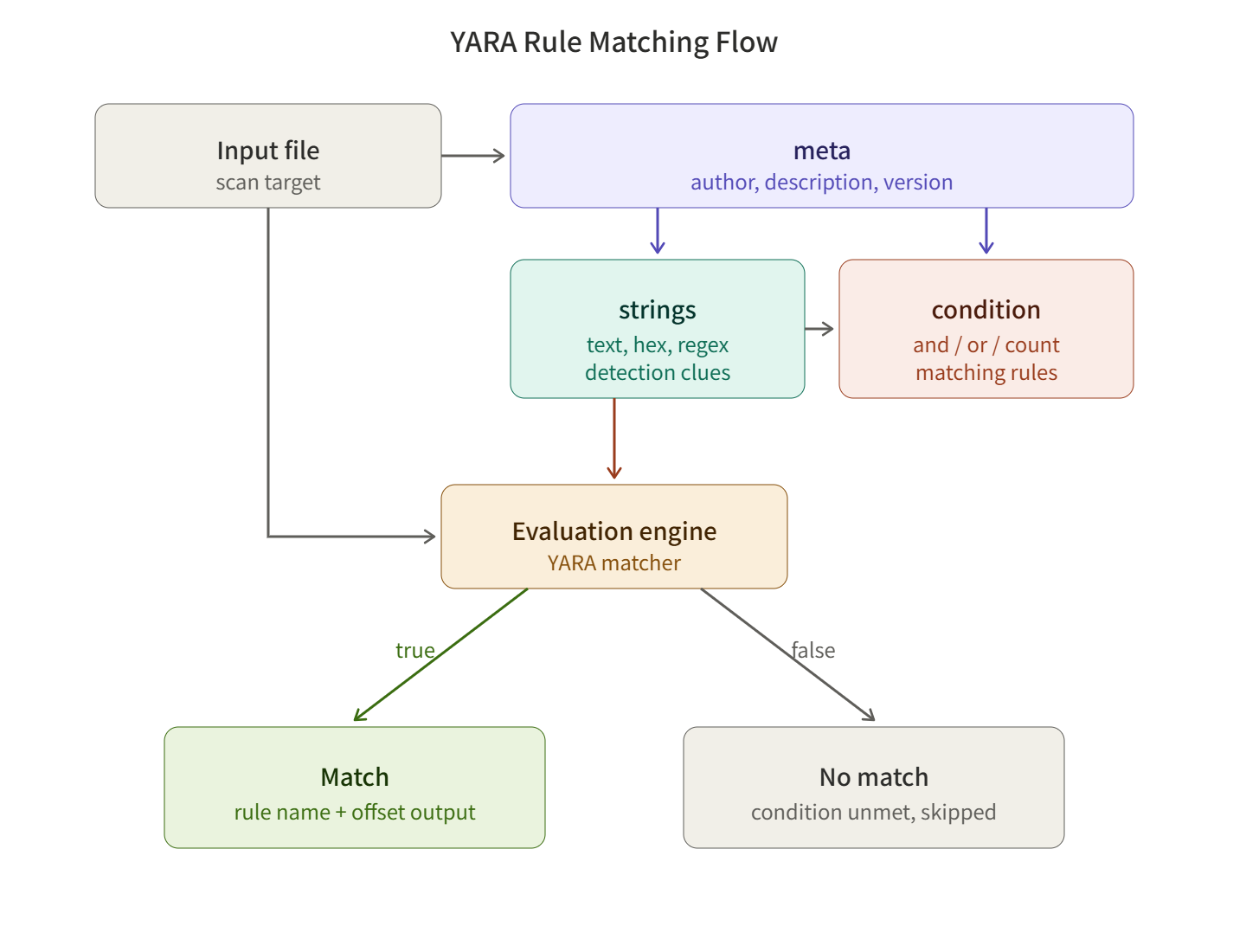
Anatomy of a YARA Rule
A YARA rule is like a warrant. It consists of three parts: who to look for (meta), what clues to use (strings), and under what conditions to apprehend them (condition).
1) meta — The Rule’s ID Card
This section records the rule’s name, author, description, references, etc. It does not affect detection behavior but is crucial for collaboration and maintenance.
2) strings — Detection Clues
This defines the patterns to search for. There are three types:
- Text strings: “powershell -enc” — Regular ASCII/UTF-8 strings
- Hexadecimal bytes: { 4D 5A ?? ?? 50 45 } — Binary patterns like PE file magic bytes (?? is a wildcard)
- Regular expressions: /cmd.exes+/c/i — Flexible pattern matching
3) condition — Matching Rules
This specifies under what combination of conditions the clues defined in the strings section should be considered a detection. You can freely use `and`, `or`, `not`, count comparisons, file size conditions, and more.
Hands-on — From File Creation to Detection
Step 0. Install YARA
# Ubuntu / Debian
sudo apt update && sudo apt install -y yara

# macOS (Homebrew)
brew install yara

# Verify installation
yara --version
Step 1. Create a sample file for detection
Let’s create a harmless file for practice. We’ll assume it’s a hypothetical “suspicious script.” We will never use actual malware; instead, we’ll use a dummy file where we’ve embedded signatures ourselves.
cat > suspicious_sample.txt << 'EOF'
#!/bin/bash
# Internal task runner v1.0
TASK_ID=ACME-EDU-2026
echo "Starting backup process..."
curl -s http://example-edu-lab.local/healthcheck
echo "Token: EDULAB_SIGNATURE_TOKEN_42"
exit 0
EOF
Pay attention to two characteristics of this file: the identifier ACME-EDU-2026 and the token EDULAB_SIGNATURE_TOKEN_42. If these two strings appear together, we can accurately identify this group of files.
Step 2. Extract signatures
Decide which patterns from the sample file to use as clues. Examine candidates using the `strings` command.
strings suspicious_sample.txt | head -20Analysts choose signatures based on three criteria:
- Uniqueness: Is it a string that rarely appears in normal files?
- Stability: Is it a pattern likely to persist even if variants emerge?
- Combinability: Can it be combined with other patterns to reduce false positives?
Here, we adopt ACME-EDU-2026, EDULAB_SIGNATURE_TOKEN_42, and the shell script magic bytes #!/bin/bash.
Step 3. Write YARA rules
Now, let’s write the actual rule. The filename will be `edulab_detector.yar`.
rule EDULAB_Suspicious_Script
{
    meta:
        author      = "주군의 보안 강의실"
        description = "EDULAB 식별자와 토큰을 포함한 셸 스크립트 탐지"
        date        = "2026-05-23"
        version     = "1.0"
        severity    = "medium"
        reference   = "internal-training-only"

    strings:
        $magic   = "#!/bin/bash"
        $id      = "ACME-EDU-2026" ascii
        $token   = "EDULAB_SIGNATURE_TOKEN_42" ascii
        $hex_sig = { 23 21 2F 62 69 6E 2F 62 61 73 68 }   // Hex of "#!/bin/bash"

    condition:
        filesize < 10KB
        and $magic at 0
        and all of ($id, $token)
}
Let’s interpret the `condition` part of the rule line by line.
- filesize < 10KB — Narrows the scope to small scripts only. This helps both performance and accuracy.
- $magic at 0 — `#!/bin/bash` must be at offset 0 of the file. That is, it must be a genuine shell script.
- all of ($id, $token) — Both the identifier and the token must exist for a match.
These three conditions are linked by `and`, ensuring that ordinary scripts containing only the “bash” string are not caught.
Step 4. Rule validation and scanning
First, validate the syntax of the rule you’ve written.
# Perform syntax validation only
yara -w edulab_detector.yar suspicious_sample.txt

# Output matched strings as well
yara -s edulab_detector.yar suspicious_sample.txt
If written correctly, you’ll see results similar to the following:
EDULAB_Suspicious_Script suspicious_sample.txt
0x0:$magic: #!/bin/bash
0x35:$id: ACME-EDU-2026
0xa9:$token: EDULAB_SIGNATURE_TOKEN_42
Each line shows the matched offset and the actual matched byte sequence. Analysts can quickly grasp “where, what, and how” something was caught from this output.
Step 5. Scan entire directory
In actual operation, you would scan an entire directory tree.
# Recursively scan all files under /var/log
yara -r edulab_detector.yar /var/log

# To apply all .yar files in the rule directory at once
yara -r rules_dir/ /target/path
⚠️ Caution — Pitfalls encountered in the field
- False Positive Bomb: Too short and common strings like `$short = “GET”` will match almost every file. A unique sequence of at least 7-8 bytes is recommended.
- Missing Encoding: Windows malware often stores strings in UTF-16 (wide). You should specify both, like `$str = “malware” ascii wide`, to avoid missing them.
- Signature Evasion: If attackers split strings into small pieces or use XOR encoding, simple string matching becomes ineffective. In such cases, consider using hexadecimal patterns or structure-based detection with the `pe` module.
- Performance Burden: Too many regular expressions can drastically slow down scanning. If possible, use simple strings and hex patterns first, and reserve regex as a last resort.
- Ethical Boundaries: When dealing with actual malware, always use an isolated analysis environment (sandbox, VM), and distribution for purposes other than education/research is prohibited.
✅ Summary — The Hunter’s First Footprint
YARA is not just a tool; it is the language of security analysts. Describing suspicious patterns in a human-readable format, sharing them with colleagues, and integrating them into automated pipelines — all of this begins with a single small rule file.
Today, we created the most basic rule from start to finish. If you wish to move on to the next steps, follow this path:
- Utilizing `pe`, `elf`, `hash`, `math` modules — structure-based and entropy-based detection
- Performance comparison of YARA-X (next-generation engine rewritten in Rust)
- Workflow for converting automatically extracted patterns from `floss`, `capa` into rules
- Sigma → YARA conversion, ATT&CK matrix mapping
A single line of a rule can protect thousands of servers. May your first signature hunt well in the Lord’s security classroom. ️
Leave a Reply