Android usage restriction apps determine ‘whether to allow this app now’ and apply that decision on the actual device. Understanding the code structure and making the operating system enforce that decision require different verifications.
REA stands for Reverse Engineer Anything, an analysis tool that connects an agent to investigate the structure and behavior of an application or binary. Finding classes or call relationships with REA does not conclude that the app restriction policy is correct, that the necessary Android permissions have been secured, or that the blocking will persist on a real phone. Official REA Repository
This article distinguishes between analysis, policy decision, and Android enforcement based on a hypothetical Demo Controller and an example app, and designs synthetic emulator tests. This article did not perform APK analysis, emulator, or real phone tests. It should not be read as a reverse engineering or completion review of commercial apps, or a report of past test results.

Conceptual image generated by AI. Does not represent actual app/phone screens or test success.
1. Start by separating what can be known from APK analysis
An APK is a package for distributing Android apps. By examining its structure, you can see what components are declared in the app, what code calls which APIs, and where policies are stored or read. This provides a basis for narrowing down the execution paths to investigate.
The official REA Android guide describes investigating APK manifests, classes, decompiled methods, and references via JADX. REA serves to connect analysis results and evidence to the agent. Decompiled descriptions are clues to review and do not replace execution results. REA Android Analysis Guide
Let’s assume that in a hypothetical Demo Controller, we found a ‘function that determines policy expiration’ and a ‘function that calls an Android API’. The questions to confirm afterward are:
- Is the analyzed APK the same as the build to be verified now?
- Is the discovered function called in the actual execution path?
- Are the necessary administrative permissions and profile scope available when called?
- Is the same policy applied after failure, offline, or reboot?
If an old debug APK was analyzed, the result is evidence of the structure of that artifact. It should not be extended to confirm the behavior of the latest implementation or the internal implementation of other apps. Conditions inferred from decompilation must be re-verified with self-written code and tests.
2. Separate the policy engine and enforcement adapter
The policy engine is the part that makes decisions like allow, restrict, or hold based on input states. The enforcement adapter is the part that connects those decisions to Android’s provided APIs or approved device management means.
정책·허용 기간·현재 상태
           ↓
정책 엔진: 허용 / 제한 / 확인 대기
           ↓
Android 집행 어댑터: 권한과 적용 범위 확인 → API 호출
           ↓
실제 상태 확인: 대상 앱 진입, 실패 항목, 복구 상태
The decision to restrict an example app now and the actual inability to launch the example app are separate observations. Even if the policy engine’s unit tests succeed, if the enforcement API is rejected, the device state may differ from expectations.
Test records also maintain this distinction.
| Observation | Meaning | What is still unconfirmed |
|---|---|---|
| Policy result is ‘restricted’ | Decision function selected restriction for the given input | Whether it was applied on Android |
| Enforcement call executed | Adapter called the API | Return value, failure, actual app state |
| Example app Activity launch blocked | Entry restriction observed for the user/setting | State after different profiles/OS/reboot |
| Emulator scenario passed | Conditions of the test environment met | Real phone and manufacturer behavior |
This separation also helps when evaluating implementations. It allows investigating whether policy conditions were wrong, permissions were missing, application failures were overlooked, or device state verification was insufficient, each separately.
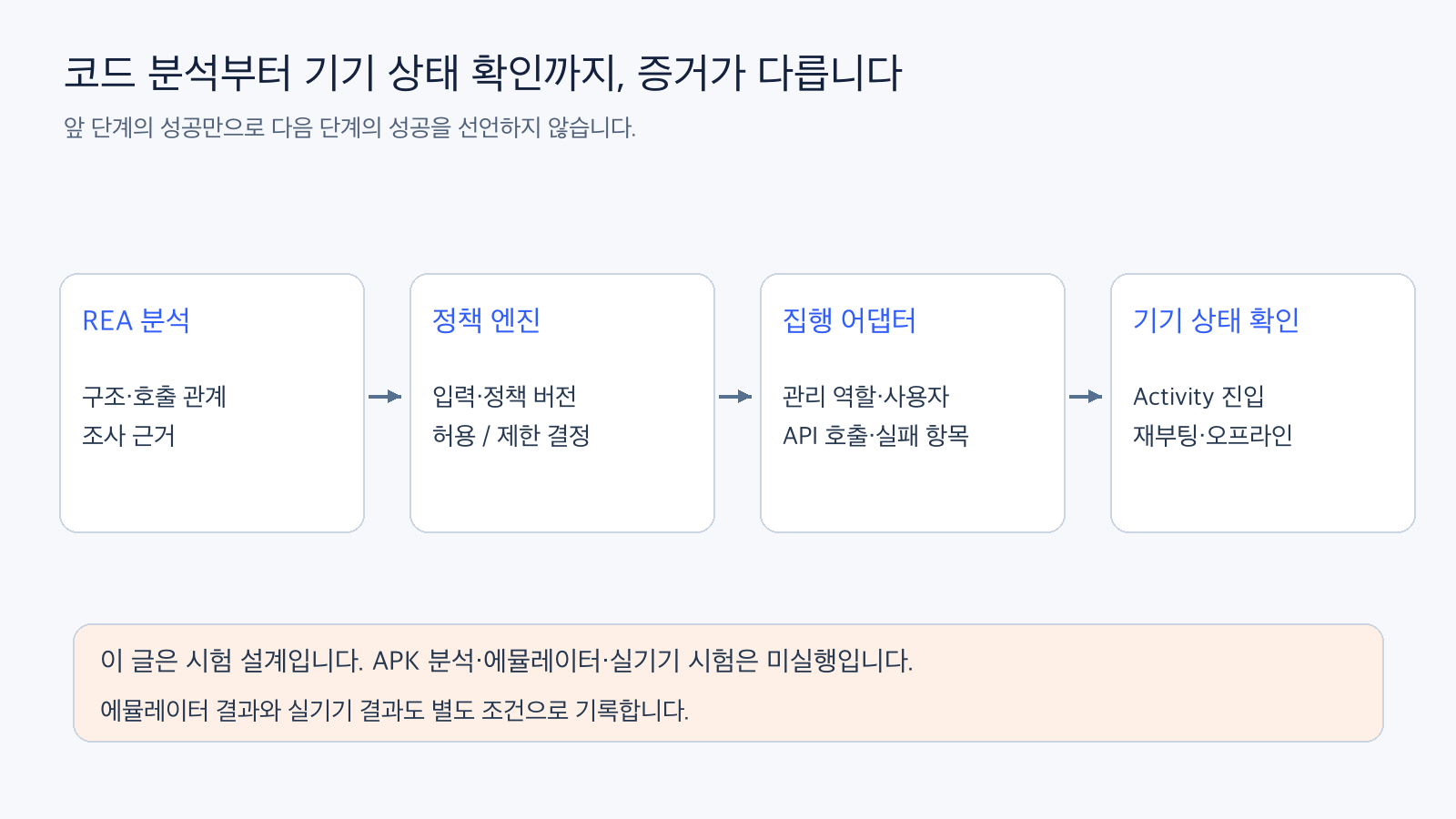
Figure: Distinction between analysis, decision, enforcement, and observation stages. Reconstructed based on official documentation and not development/test results executed in this article. Official Reference 1
3. DevicePolicyManager does not grant the same permissions to just any app
DevicePolicyManager is Android’s device management policy API. For example, setPackagesSuspended() is a function that sets a user’s package to a suspended state, and it has call conditions such as device owner, profile owner, or a specified delegation scope. A regular app does not gain that permission simply by knowing the method name. DevicePolicyManager Official API)
Here, device owner and profile owner are Android’s administrative roles. The management scope of a profile owner should not be interpreted as permission to control the entire personal area. You must check the current user, administrative role, and delegation conditions for the API you intend to call.
According to official documentation, suspended packages are restricted from starting Activities, etc., but some essential apps cannot be suspended. Also, the API returns a list of packages that were not set to the requested state. Do not just log ‘called’ but also check the failure list and the actual state of the target.
App restriction and forced termination of all running processes/services are not synonymous. To make tests accurate, you must first define what entries and behaviors are being blocked. The ‘app blocking’ test in this article is designed with specified conditions, including blocking Activity entry for the example app.
Provisioning, which creates administrative roles, is also a separate procedure. Android’s managed provisioning is a flow that informs the user of the meaning of management and sets the owner of the device or managed profile. Device owner setup also has prerequisites like initial setup state, so it cannot be described as simply adding general permissions to an existing personal device. Android Managed Device Provisioning
In experiments, the management conditions of a dedicated, resettable emulator are recorded first. During the writing of this manuscript, no actual devices were initialized or registered as administrators. It is not recommended to test enforcement without confirmed permission conditions and legitimate management scope.
4. Check ‘time is up’ with two types of clocks
In a hypothetical example, let’s assume an app, once allowed, is restricted again after a certain period. Calendar time and elapsed time are different criteria.
Android’s wall clock, i.e., date and time, can be changed by the user or corrected. SystemClock.elapsedRealtime() represents the elapsed time since boot, including deep sleep, and is a monotonically increasing clock. This provides a basis for distinguishing between testing by moving the system date backward and testing allowance periods based on elapsed time. Android SystemClock
Using a monotonically increasing clock does not automatically solve reboot issues. Values based on boot cannot be directly compared with values from a previous boot. Policy versions, stored allowance states, recovery conditions after reboot, and re-verification methods must be designed separately.
For offline termination, we distinguish between whether it only operates upon receiving a termination command from a server or if it determines termination based on locally preserved policies. How much to trust policy expiration, renewal, or revocation information when not connected to a server, and what state to maintain when unconfirmed, are conditions to be determined by the designer.
The author’s recommendation is to define specifications to prevent indefinite extension of unconfirmed allowances for restricted apps, while also designing recovery paths that maintain management screens and necessary emergency functions. This is not an official Android rule to unconditionally block all functions, nor is it a verified complete implementation in this article.
5. In synthetic emulators, prepare both normal control and failure injection
The table below outlines the test design to be performed in the future. These are not results executed during this writing. A dedicated emulator with only the example app and Demo Controller installed will be used, and Android version, administrative role, user, and build identification will be fixed as test conditions.
| Test | Synthetic Condition | Expected Result |
|---|---|---|
| Normal Control | Allowance policy and necessary permissions prepared | Example app accessible, no excessive restrictions |
| App Restriction | Policy engine decides restriction | API failure items and example app entry status match |
| Insufficient Permissions | Conditions without administrative role or scope | Do not record application failure as restriction success |
| Offline Termination | Allowance period ends without connection | Local decision/enforcement as per spec, check for unconfirmed extension |
| Clock Backward Movement | Wall clock changed in synthetic environment | Elapsed time policy not extended by calendar movement alone |
| Reboot Recovery | Dedicated emulator with saved state rebooted | Re-evaluation of policy/permissions/enforcement state and recovery sequence |
| Lock/Sleep | Re-entry into app after lock/idle | Defined time allowance tolerance and recovery state |
| New Install/Policy Change | Example app reinstalled or policy version changed | Previous state not incorrectly reused |
Normal control is necessary for judgment. An example app that was not originally installed or is broken should not be counted as a successful block. Confirm whether entry was possible before changing the policy, and whether it was restricted for the expected reason after policy application.
A single screenshot showing ‘Restricted’ on the screen is not sufficient evidence. The judgment result, API failure list, actual example app behavior, and pre/post-boot/offline states must be read together. If the stored policy version and the test build differ, do not combine those results into a single verification.
Reboot tests also specify data access before and after unlock and the recovery sequence. Since actual apps involve conditions for scheduling, background execution, storage, and device management, the result of a single Python judgment function should not be re-expressed as the overall Android enforcement result.
Include failure judgment and recovery completion conditions in the test table
Each test case should be designed to include build identification, Android version and user, administrative role, policy version, expected result, API failure list, and actual Activity entry result. Only logging ‘Restricted’ on the app screen and whether the API was called can miss permission denials or failures for some packages. This approach compares the failure list of setPackagesSuspended() with the expected policy result and separately verifies if the example app is actually accessible. Android Package Suspension API)
Recovery scenarios include whether the example app can be restarted after a restriction release request, whether management screens and necessary emergency functions are maintained, and whether policy versions and permissions are re-verified after reboot. This list is the design for future tests. Since they have not yet been executed, no pass counts or success rates are attached.
For time tests, not only the type of clock but also the expected termination time and tolerance should be defined in advance. Even if elapsed time has passed, the actual enforcement time can be affected by scheduling and background execution conditions, so the mere fact of using elapsedRealtime() does not declare successful blocking at an exact time. The results must be observed separately on emulators and real devices.
6. Record emulator results and real device results in separate lists
Emulators are useful for repeating conditions and injecting failures, but they do not represent all manufacturer-specific power management, OS updates, actual device lock/settings, and usage patterns. Real phone verification requires separate authorized equipment, management scope, and recovery plans.
In this article, official REA and Android documentation were reviewed, and the judgment criteria for the above tests were written. REA/JADX execution, APK acquisition/analysis, Android policy API calls, and emulator/real device tests were not performed. Actual implementation results should be evaluated with separate verification records, along with build, management conditions, and execution scope.
When looking at the state of an independent usage restriction implementation, three questions remain: What artifact was analyzed, what policy input was verified, and under what Android permissions and device conditions was enforcement confirmed? Separating these three allows judging the performance of analysis tools and the actual restriction capabilities of an app without combining them under the same success indicator.
Leave a Reply