“A different dock changes your workstation. We’ll properly explain the differences between the three products.”
🎯 What This Article Covers
- Complete spec comparison of CalDigit TS4 / TS5 / TS5 Plus
- Practical performance differences from Thunderbolt 4 to 5
- Key differences in port count, power delivery, Ethernet, and USB controllers
- “Which one should I buy?” Situation-based recommendation guide
- Current prices and purchasing considerations in 2025
📌 Introduction — Why CalDigit?
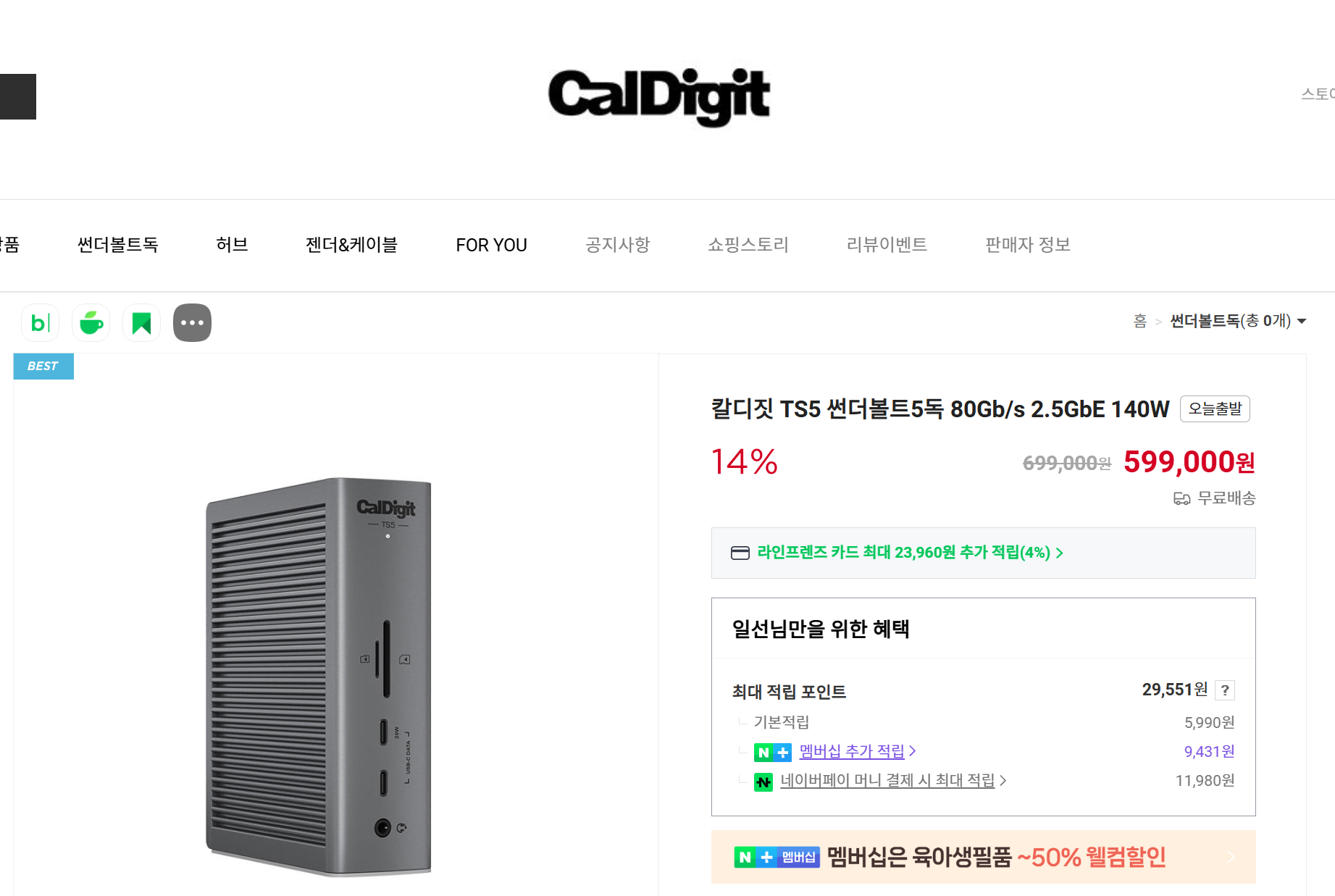
https://smartstore.naver.com/caldigitkr/products/12286427949?nl-query=%EC%B9%BC%EB%94%94%EC%A7%93%20ts5&nl-au=1cca3a9732c14c7c96339d55b073c3e2&NaPm=ci%3D1cca3a9732c14c7c96339d55b073c3e2%7Cct%3Dmncf7jo8%7Ctr%3Dnslpsb%7Csn%3D%7Chk%3Daaa35adc7846660bdfddb475f3eabc982af41bd7
The desire to place your MacBook Pro on your desk and connect everything with a single cable is something many have felt. External monitors, external SSDs, wired internet, USB hubs, audio interfaces… plugging them all in separately creates a cable mess, but connecting them to a single dock brings up the question, “Which dock should I buy?”
CalDigit has been a leading brand in the Thunderbolt dock market since 2013. From the days when the TS3 Plus was called “the best dock for Mac users” to when the TS4 became the standard for Thunderbolt 4 — and now in 2025, the TS5 and TS5 Plus, equipped with Thunderbolt 5, have been released.
With all three products simultaneously available on the market, what should you choose? Let’s now delve into the practical differences that are hard to discern from a spec sheet alone.
🔍 What is Thunderbolt 5? — First, Understand the Underlying Technology
To understand the CalDigit TS series, you first need to know about Thunderbolt versions.
| Standard | Bandwidth | Max PD | Features |
| Thunderbolt 4 | 40Gbps | 100W | Current mainstream standard |
| Thunderbolt 5 | 80Gbps (120Gbps with Boost) | 240W | Next-gen, 8K display support |
Thunderbolt 5 doubles the data bandwidth, and especially in Bandwidth Boost mode, it can allocate up to 120Gbps to storage without display connections. You’ll really feel the difference if you use an external NVMe SSD.
However, to fully enjoy the benefits of Thunderbolt 5, your host computer must also support TB5. As of now, this includes M4 Pro / M4 Max MacBook Pros and some Intel Arrow Lake PCs. If you have an M3 or earlier MacBook, connecting a TS5 will only operate at TB4 speeds.
📊 3-Product Core Spec Comparison Table
| Item | TS4 | TS5 | TS5 Plus |
| Thunderbolt Standard | TB4 | TB5 | TB5 |
| Total Ports | 18 | 15 | 20 |
| TB Downstream Ports | 2×TB4 | 4×TB5 | 2×TB5 |
| USB-A (10Gbps) | 3 | 3 | 5 |
| USB-C (10Gbps) | 2 | 2 | 5 |
| Ethernet | 2.5GbE | 2.5GbE | 10GbE ✨ |
| DisplayPort | None | None | DP 2.1 ✨ |
| SD/microSD | UHS-II | UHS-II | UHS-II |
| Host PD | 98W | 140W | 140W |
| Power Adapter | 230W | Undisclosed | 330W |
| USB Controller | Single | Single | Dual ✨ |
| Launch Price | ~$250 (currently discounted) | $369.99 | $499.99 |
| Color | Space Gray | Silver Aluminum | Dark Space Black |
> ✨ Indication = TS5 Plus’s differentiating points
🔍 3 Key Differences — This is All You Need to Know
1️⃣ Ethernet: 2.5GbE vs 10GbE
TS4 and TS5 offer 2.5GbE Ethernet. There’s no difference in typical home internet or Gigabit router environments. However, if you’re connecting to a NAS, an internal 10GbE switch, or a large-capacity file server, the TS5 Plus’s 10GbE makes a real difference. It’s 4 times faster wired speed compared to 2.5GbE.
2️⃣ USB Controller: Single vs Dual
This is the most crucial difference between the TS5 and TS5 Plus. Most docks (including TS4, TS5) have a single controller managing all USB ports. If you connect multiple external SSDs simultaneously, the bandwidth is shared, leading to bottlenecks.
The TS5 Plus features a dual USB controller, which processes port groups separately. Tasks like reading from an external SSD while simultaneously backing up to another drive during video editing — you’ll notice the difference in such situations.
3️⃣ Power Delivery: 98W → 140W
The most regrettable aspect of the TS4 was its 98W PD. It couldn’t match the maximum charging speed of a 16-inch MacBook Pro (140W), sometimes even causing the battery to drain during high-load tasks while connected to the dock.
Both TS5 and TS5 Plus support 140W PD, allowing you to charge a 16-inch MacBook Pro at full speed while working. Thanks to its 330W adapter, the TS5 Plus also distributes ample power to other ports.
💻 TB5 Port Configuration Differences — TS5 vs TS5 Plus
While the TS5 has 15 ports and the TS5 Plus has 20, it’s not just about an increase in port count.
The TS5 offers four 80Gbps TB5 connections, whereas the TS5 Plus reduces the number of TB5 ports to three but adds DisplayPort 2.1, 10GbE, and a dual USB controller. AppleInsider
In other words, the TS5 has more TB5 downstream ports. If you plan to connect multiple TB5 external SSDs or TB5 monitors, the TS5 might actually be a more advantageous configuration.
TS5  : TB5 업스트림 1개 + TB5 다운스트림 3개 = 총 4개 TB5
TS5+ : TB5 업스트림 1개 + TB5 다운스트림 2개 = 총 3개 TB5
       (대신 DP 2.1, 10GbE, 듀얼 USB 컨트롤러 추가)
🖥️ Display Support
For Macs, all three products support a maximum of two external displays. (M1/M2/M3 Macs are limited to one.) Windows PCs can support up to three.
The DisplayPort 2.1, exclusive to the TS5 Plus, is a port that allows direct connection of a monitor with a DP cable. This is useful when connecting high-resolution monitors (e.g., some 4K/8K professional monitors) that use DP cables rather than Thunderbolt cables.
⚠️ Cautions and Known Issues
🔥 Heat Generation Issues (TS5 Series)
As of August 2025, there are numerous reports of significant heat generation from the TS5, with some cases reaching external case temperatures of 55°C. AppleInsider is currently in discussions with CalDigit. AppleInsider It’s important to consider that heat generation may be higher than the TS4 generation. Proper air circulation is crucial when placed vertically.
💰 Price-Performance Consideration
The TS5 Plus ($499) costs as much as a Mac mini. AppleInsider If you don’t have TB5 compatible devices, purchasing the TS4 at a discounted price is much more reasonable.
🖥️ M1/M2/M3 Mac Users
Since there are no TB5 ports, M1/M2/M3 Mac users will not receive any TB5 speed benefits from the TS5/TS5 Plus. External monitors are also limited to one. In this case, the TS4 is the most cost-effective choice.
🔌 Backward Compatibility
The TS5/TS5 Plus are compatible with TB4 and USB4 devices, but they will not achieve TB5 speeds. AppleInsider
✅ Situation-based Recommendation Guide
👤 Recommend TS4 if:
- You are an M1 ~ M3 MacBook user (no TB5 benefits)
- 18 ports are sufficient for your needs
- You have a tight budget and are looking for the currently discounted TS4
- You are a 13-inch/15-inch MacBook Air user for whom 98W charging is sufficient
👤 Recommend TS5 if:
- You have just upgraded to an M4 Pro / M4 Max MacBook Pro
- You want as many TB5 downstream ports as possible (4 ports)
- 10GbE Ethernet is not necessary for you
- Budget: $369.99
👤 Recommend TS5 Plus if:
- You are a video editor / creator who connects multiple high-speed external SSDs simultaneously
- You use a 10GbE wired internet environment (NAS, broadcast station, studio)
- You own a monitor with direct DP 2.1 connection
- You are a power user with the philosophy “buy the best, use it longest”
- Budget: $499.99
🔚 Summary
To summarize the positioning of the three products in one line:
TS4 = TB4 Gold Standard (Value for Money)
TS5 = TB5 Entry (Port Count Priority)
TS5 Plus = TB5 Premium (Performance Priority)
As CalDigit’s dock series advances generations, the price increases, but power and bandwidth also increase proportionally. The key is whether your MacBook supports TB5, and whether 10GbE or a dual USB controller is actually needed in your workflow.
As a next step, we recommend checking the TB support version of your specific MacBook model and reviewing the latest specs on CalDigit’s official comparison page (caldigit.com/compare-thunderbolt-stations).
Leave a Reply