“My code is perfect, so why doesn’t it work on the server?” — The first deployment experience of countless developers
🎯 What This Article Covers
- Real problems that arise when developers don’t understand infrastructure
- Why DevOps and IaC (Infrastructure as Code) have become a developer’s domain
- How infrastructure knowledge changes code quality itself
- Minimum infrastructure concepts developers should know in the cloud era
- Practical Terraform + GitHub Actions examples for immediate use
📌 Introduction / Background

Just 10 years ago, the roles of developers and operators were strictly separated. Developers wrote code, and the operations team (Ops) deployed it to servers. Work proceeded even if developers didn’t understand infrastructure.
But now, things are different.
As cloud computing became widespread and microservices architecture became the standard, infrastructure itself began to be managed as code. Cloud platforms like AWS, Azure, and GCP made it possible to create servers with a few clicks, and at the same time, much of that responsibility shifted to developers.
Let’s face reality.
- Most startups don’t have a dedicated infrastructure team.
- Even large corporations, with the adoption of DevOps culture, have developers directly managing pipelines.
- Many of you have probably experienced deployments being delayed by two weeks after saying, “That’s an ops team job.” 😅
This is an era where developers need to understand infrastructure. Let’s explore the reasons one by one.
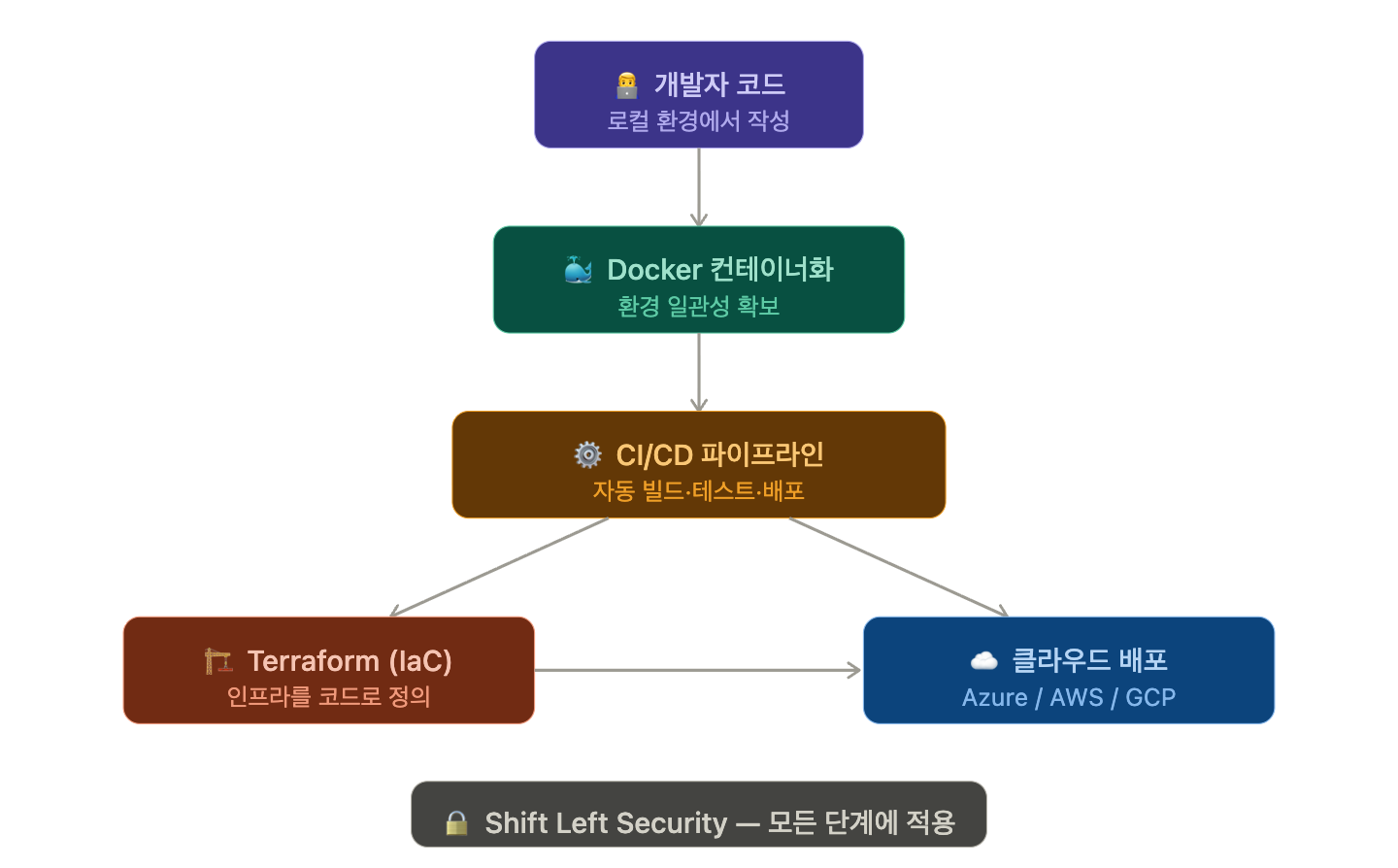
🔍 Reason 1: Code Flows Through Environments
Development environment (Local), Test environment (Staging), Production environment (Production) — what happens if these three environments differ?
A classic developer’s nightmare unfolds.
“It works on my local machine.”
If you think about why this phrase comes up, it’s ultimately due to differences in environment settings. For example, local might be Python 3.11 while the server uses 3.9, environment variables might be set differently, or database connection methods might vary.
The key tools to solve this are Docker and containers. A container packages “my code + execution environment” into a single unit, ensuring it runs identically everywhere.
This is why developers must be able to write and manage Dockerfiles themselves. Instead of asking the operations team to “match the environment,” developers should be able to directly define the environment in which their code operates.
# Example: Python Web App Dockerfile
FROM python:3.11-slim

WORKDIR /app

# Copy dependencies first (leverage cache)
COPY requirements.txt .
RUN pip install --no-cache-dir -r requirements.txt

# Copy source
COPY . .

# Expose port
EXPOSE 8000

# Run command
CMD ["uvicorn", "main:app", "--host", "0.0.0.0", "--port", "8000"]
This single file clearly defines: “In a Python 3.11 environment, install these packages, and execute it like this.” The operations team, fellow developers, and the CI/CD pipeline all understand it identically. 🎯
🔍 Reason 2: Lack of Infrastructure Knowledge Leads to Inefficient Code
Let’s consider common mistakes made by developers without infrastructure knowledge.
💸 Unnecessary Resource Waste
What if you write code that establishes and closes a new DB connection for every API request? When traffic surges, the DB will hit its connection limit and go down. If you understand the concept of a Connection Pool, you wouldn’t write such code in the first place.
🐌 Unnecessary Network Hops
In a microservices environment, when designing a structure where Service A calls B, and B calls C — if they are placed within the same VPC (Virtual Private Cloud), latency can be less than 1ms, but if they go through the external internet, it can jump to over 100ms. Developers who understand network topology consider this during the architecture design phase.
💣 Hardcoded Configuration Values
# Bad example — never do this
DB_HOST = "192.168.1.100"
DB_PASSWORD = "mypassword123"  # 😱
# Good example — separate with environment variables
import os
DB_HOST = os.getenv("DB_HOST")
DB_PASSWORD = os.getenv("DB_PASSWORD")Developers who understand infrastructure know that configuration values differ across environments. Therefore, they write code from the outset considering secret management tools like environment variables, Kubernetes Secrets, or Azure Key Vault.
🔍 Reason 3: IaC (Infrastructure as Code) — Infrastructure is Now Code
IaC is a method of defining infrastructure configurations like server creation, network settings, and firewall rules using code files instead of clicks.
Why is it important? Think about it.
- If you manually created a server in the console, you wouldn’t know “how was this server created?” later.
- Defining it as code allows for version control with Git. You can track who, when, and why changes were made.
- Need to create 10 identical environments? Just run the code once.
A representative IaC tool is Terraform.
# Terraform example for creating a Resource Group and Virtual Machine in Azure
provider "azurerm" {
  features {}
}

# Create Resource Group
resource "azurerm_resource_group" "example" {
  name     = "my-app-rg"
  location = "Korea Central"
}

# Create Virtual Network
resource "azurerm_virtual_network" "example" {
  name                = "my-app-vnet"
  address_space       = ["10.0.0.0/16"]
  location            = azurerm_resource_group.example.location
  resource_group_name = azurerm_resource_group.example.name
}
This code file is essentially the infrastructure blueprint. If developers can read and modify this file, communication costs with the infrastructure team are dramatically reduced.
🔍 Reason 4: CI/CD Pipeline — Taking Ownership of Deployment Automation
CI/CD is a pipeline that automatically tests and deploys code changes.
- CI (Continuous Integration): Automatically builds and tests code upon merging.
- CD (Continuous Delivery/Deployment): Automatically deploys to staging or production environments upon successful testing.
Who creates and manages this pipeline? In the past, it was the exclusive domain of DevOps engineers, but now developers often write it themselves. Tools like GitHub Actions, GitLab CI, and Azure DevOps define pipelines based on code.
# GitHub Actions — Example of automatic testing + Azure deployment on PR creation
name: Deploy to Azure

on:
  push:
    branches: [main]

jobs:
  build-and-deploy:
    runs-on: ubuntu-latest

    steps:
      # Checkout code
      - uses: actions/checkout@v3

      # Build Docker image
      - name: Build Docker image
        run: docker build -t myapp:${{ github.sha }} .

      # Azure login (using Managed Identity or Service Principal)
      - name: Azure Login
        uses: azure/login@v1
        with:
          creds: ${{ secrets.AZURE_CREDENTIALS }}

      # Push to Azure Container Registry
      - name: Push to ACR
        run: |
          az acr login --name myregistry
          docker tag myapp:${{ github.sha }} myregistry.azurecr.io/myapp:latest
          docker push myregistry.azurecr.io/myapp:latest

      # Deploy to Azure App Service
      - name: Deploy to App Service
        run: |
          az webapp config container set
            --name my-web-app
            --resource-group my-app-rg
            --docker-custom-image-name myregistry.azurecr.io/myapp:latest
Developers who can read and modify this YAML file can control the deployment process themselves. There’s no need to wait for the operations team when a deployment is stuck. 🚀
🔍 Reason 5: Security Starts in the Development Phase
One of the things developers who don’t understand infrastructure often miss is security settings.
For example:
- Mistake of opening public access when creating an S3 bucket (file storage) → Customer data exposure incident
- Opening firewall ports entirely (0.0.0.0/0) for development convenience → Exposure to external attacks
- Printing passwords or API keys in logs → Information leakage through log collection tools
There’s a concept called Shift Left Security. It’s about applying security reviews from the development phase, rather than after deployment. This is only possible when developers understand infrastructure security concepts.
Principles like Least Privilege, network isolation, and secret management must be reflected in the code design phase.
⚠️ Cautions / Common Mistakes
① Postponing infrastructure study “for later” The idea that “just writing good code comes first” is true, but infrastructure knowledge affects code design itself. Learning it later might lead to situations requiring large-scale refactoring of existing code.
② Relying solely on the cloud console Practicing server creation only through GUI means no automation or reproducibility. Get into the habit of learning with CLI or IaC tools from the start.
③ Provisioning resources without cost awareness If you spin up a high-performance VM for development testing and forget about it, you’ll be charged 😅. The cloud is convenient, but beware of cost overruns. Always set up Budget Alerts.
④ The misconception that “DevOps is for DevOps engineers” The boundaries of roles are increasingly blurring. Especially in startups or small teams, it’s almost the default for developers to handle infrastructure as well.
✅ Summary / Conclusion
Here’s a summary of why developers need to understand infrastructure deployment:
| Reason | Key Takeaway |
| Environment Consistency | Code execution environments with Docker to escape “It only works on my local” |
| Code Quality | Understanding network and DB structures enables more efficient code writing |
| IaC | Infrastructure managed with Git is the norm; Terraform is a necessity, not an option |
| CI/CD | True autonomy comes from being able to design and operate deployment pipelines yourself |
| Security | Security from the development phase, not after deployment — Shift Left |
The era of thinking of infrastructure deployment as “a DevOps engineer’s job” is over. In a cloud-native environment, developers must be able to freely cross the boundaries between code and infrastructure.
You don’t need to know everything from the start. Try experiencing Docker → GitHub Actions → Terraform in order. The code quality of developers who have personally handled deployments will clearly differ from those who haven’t. 💪
Leave a Reply