“Doesn’t Kubernetes handle everything automatically if you put it on a container?”
A common misconception many developers have when first encountering Kubernetes.
>

🎯 What this article covers
- Conditions under which you can put a DB on Kubernetes and reasons why you shouldn’t
- Why log collection tools (Fluent Bit, Loki, etc.) are okay to configure as containers
- The real reasons for separating production DBs outside of Kubernetes
- Legal retention obligations for log data (based on Korean laws)
- Common configuration patterns and examples used in practice
📌 Introduction / Background
As Kubernetes has become widespread, the trend of “everything in containers!” has grown strong. Naturally, the question arises, “Can’t I put a DB on Kubernetes too?”
The short answer: “You can. But you need to be cautious in a production environment.”
Kubernetes is a platform optimized for stateless workloads. Applications like web servers and API servers that receive requests and send responses don’t have major issues if a Pod dies and restarts. But DBs are different. Because if data disappears, it’s over.
What about logs? Log collection agents and log storage DBs are different from production DBs. And legal considerations are also intertwined here.
Let’s break them down one by one.
🔍 Characteristics of Kubernetes: Why is its compatibility with DBs tricky?
Kubernetes is a platform with an “ephemeral” philosophy
Kubernetes assumes that Pods can be terminated and recreated at any time. This is called the Ephemeral characteristic. Node failures, scaling, rolling updates… in all situations, Pods can disappear at any time.
DBs conflict with this philosophy. The core of a DB is data persistence.
Kubernetes provides PV/PVC (Persistent Volume / Persistent Volume Claim) to solve this problem, but it is not a perfect solution.
5 reasons to move production DBs out of Kubernetes
① Difficulty in ensuring data persistence
Even with PVs, there’s a risk of data loss if an entire node dies or there’s an issue with the storage backend. Cloud-managed DBs (AWS RDS, Azure Database, etc.) inherently offer multi-AZ replication, automatic backups, and Point-in-Time Recovery (PITR).
② Operational complexity of StatefulSet
To operate a DB on Kubernetes, you need to use StatefulSet. StatefulSet assigns a unique ID and storage to each Pod, ensuring ordered deployment/deletion. However, directly managing clustering, failover, and leader election logic for things like MySQL InnoDB Cluster, PostgreSQL HA, and MongoDB ReplicaSet is a significant operational burden.
# StatefulSet Example — When operating DB on K8s
apiVersion: apps/v1
kind: StatefulSet
metadata:
  name: postgres
spec:
  serviceName: "postgres"
  replicas: 3
  selector:
    matchLabels:
      app: postgres
  template:
    metadata:
      labels:
        app: postgres
    spec:
      containers:
      - name: postgres
        image: postgres:15
        volumeMounts:
        - name: pgdata
          mountPath: /var/lib/postgresql/data
  volumeClaimTemplates:           # Create a separate PVC for each Pod
  - metadata:
      name: pgdata
    spec:
      accessModes: ["ReadWriteOnce"]
      resources:
        requests:
          storage: 50Gi
Even this setup looks complex. Add backup CronJobs, monitoring Exporters, network policies, and security contexts, and the operational team’s burden doubles.
③ Network latency and storage I/O performance
Kubernetes’ network operates via an overlay network (CNI). DBs require high-speed I/O and low latency, and containerization-induced network overhead and storage abstraction layers can affect performance. In particular, there can be a performance difference compared to bare-metal DBs that directly access NVMe SSDs.
④ Difficulty in security isolation
Containers share the OS kernel. If another container on the same node accesses the node through a vulnerability, DB data could be at risk. Managed DB services are operated in dedicated infrastructure with isolation.
⑤ License and operational tool compatibility
Commercial DBs like Oracle and MS SQL Server have complex licensing policies for container environments, and official support levels are often lower than for bare metal.
🪵 So, can log DBs be placed on Kubernetes?
Characteristics of log collection architecture
Log systems are broadly divided into three layers:
| Layer | Role | Example Tools |
| Collection Agent | Collect logs from each Pod/Node | Fluent Bit, Filebeat |
| Aggregation/Processing | Parsing, filtering, routing | Fluentd, Logstash |
| Storage/Query | Store and search logs | Loki, Elasticsearch, ClickHouse |
Collection Agents — Operating them as containers is natural
Log collection agents like Fluent Bit are typically deployed as DaemonSets. A DaemonSet deploys one Pod per node. This is because their role is to access log files at the node level (/var/log/containers/) and collect logs.
# Core part of Fluent Bit DaemonSet
apiVersion: apps/v1
kind: DaemonSet
metadata:
  name: fluent-bit
  namespace: logging
spec:
  selector:
    matchLabels:
      app: fluent-bit
  template:
    spec:
      containers:
      - name: fluent-bit
        image: fluent/fluent-bit:2.2
        volumeMounts:
        - name: varlog
          mountPath: /var/log          # Mount host log directory
          readOnly: true
        - name: containers
          mountPath: /var/lib/docker/containers
          readOnly: true
      volumes:
      - name: varlog
        hostPath:
          path: /var/log
      - name: containers
        hostPath:
          path: /var/lib/docker/containers
The agent itself does not store state. If a Pod dies, it can simply restart and resume collecting logs from that point (a slight gap in collection may occur but is not critical).
Log Storage DBs — Where to put them depends on requirements
Placing log storage DBs (e.g., Loki, Elasticsearch) on Kubernetes has a broader acceptable range than operational DBs.
The reasons are as follows:
- ✅ Logs are often not critical to business even if some are lost
- ✅ Log data is not irreproducible original data (the source is in the application)
- ✅ Both Loki and Elasticsearch provide official Helm Charts that support Kubernetes environments
- ✅ The Grafana + Loki + Fluent Bit stack is the de facto standard for Kubernetes-native logging
However, if the logs have a legal retention obligation, the story changes. This is covered in detail in the next section.
⚖️ Legal Issues — How should logs be stored?
This part is often overlooked in practice but is very important.
Log retention obligations under major Korean laws
| Law | Subject | Retention Items | Retention Period |
| Personal Information Protection Act | All personal information handlers | Access records of personal information processing systems | Minimum 6 months (10,000 or more individuals or sensitive information: 2 years) |
| Act on Promotion of Information and Communications Network Utilization and Information Protection, etc. | Information and communication service providers | Access records of personal information handlers | Minimum 6 months |
| Electronic Financial Transactions Act | Financial institutions, electronic financial businesses | Electronic financial transaction records | 5 years |
| Act on Consumer Protection in Electronic Commerce, etc. | Online shopping malls, etc. | Contract/subscription records, payment records, etc. | 5 years (contracts), 3 years (complaint handling) |
| Medical Service Act | Medical institutions | Medical records, computerized medical records | 10 years (based on medical charts) |
> 📌 Enforcement Decree of the Personal Information Protection Act Article 30: Obligation to retain and inspect access records. For personal information handlers of 10,000 or more data subjects or those processing unique identification information/sensitive information, a minimum of 2 years retention and monthly inspection is required.
Reasons why legally mandated retention logs should not be kept only on Kubernetes
PVs within Kubernetes are at risk of deletion due to infrastructure changes, cluster migration, or operational errors. Legally mandated retention logs must meet the following conditions:
- ✅ Prevention of deletion/alteration: Access control + immutable storage (WORM, Write Once Read Many)
- ✅ Long-term preservation: Stable retention for the mandatory period
- ✅ Search and audit: Immediately available upon request from retention agencies or investigative bodies
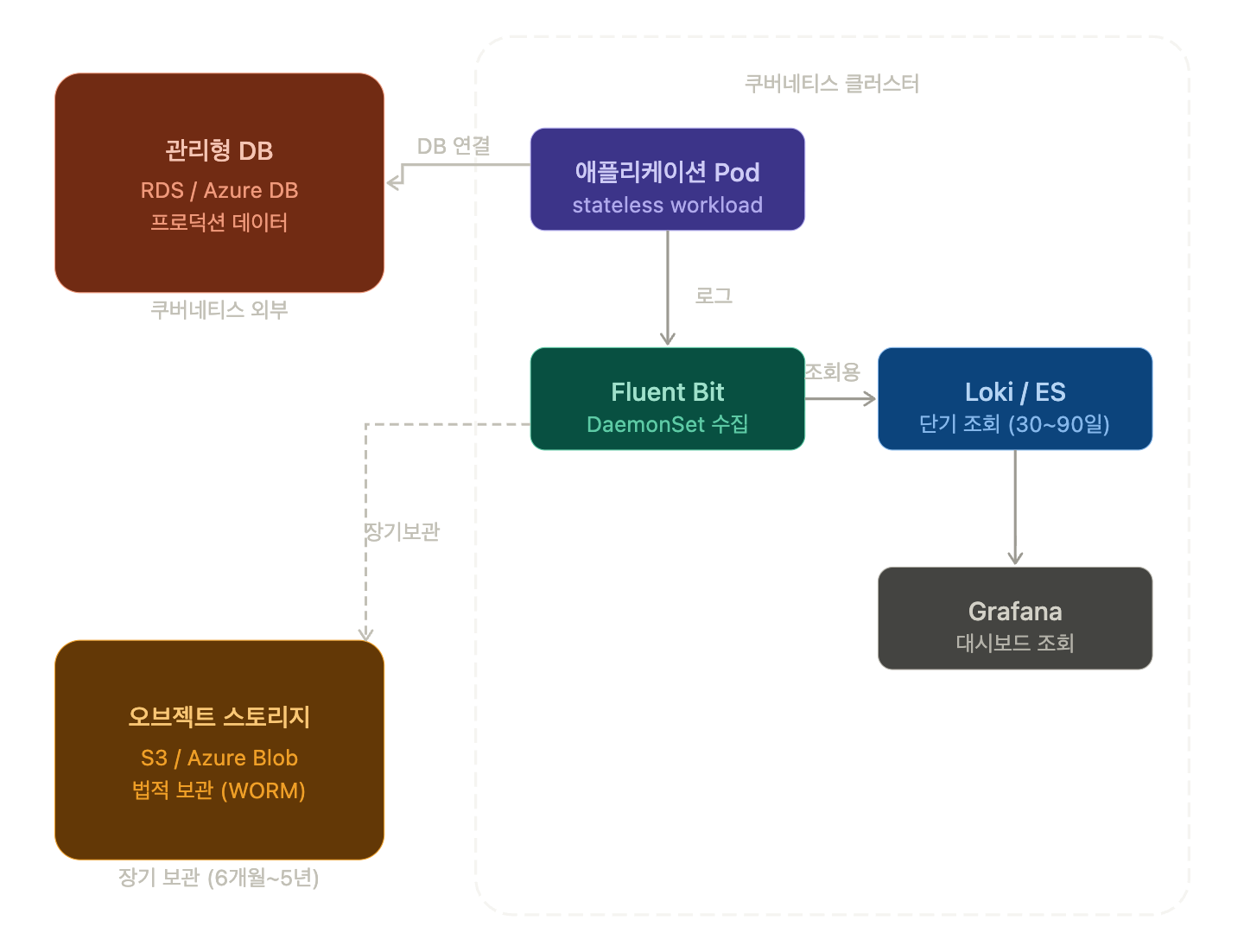
Recommended Architecture: It is recommended to use a dual structure where logs collected from Kubernetes are stored long-term in cloud object storage (AWS S3, Azure Blob Storage, NCP Object Storage), and the log DB within Kubernetes is used only for short-term querying.
[Pod 로그]
    → Fluent Bit (DaemonSet, K8s 내)
    → Loki or Elasticsearch (K8s 내, 단기 조회용: 30~90일)
    → S3 / Azure Blob (장기 보관용, WORM 설정: 법정 기간)
💻 Practical Example: Fluent Bit → S3 Dual Output Configuration
# fluent-bit.conf — Simultaneously send logs to Loki (for viewing) and S3 (for long-term storage)

[SERVICE]
    Flush        5
    Daemon       Off
    Log_Level    info

[INPUT]
    Name             tail
    Path             /var/log/containers/*.log
    Parser           docker
    Tag              kube.*
    Refresh_Interval 5

# Output 1: Loki (for short-term viewing)
[OUTPUT]
    Name             loki
    Match            kube.*
    Host             loki.monitoring.svc.cluster.local
    Port             3100
    Labels           job=fluentbit

# Output 2: S3 (for legal retention, long-term)
[OUTPUT]
    Name                         s3
    Match                        kube.*
    bucket                       my-log-archive-bucket
    region                       ap-northeast-2
    s3_key_format                /logs/%Y/%m/%d/$TAG[4].%H%M%S.gz
    compression                  gzip
    use_put_object               On
    total_file_size              100M      # Store in 100MB chunks
    upload_timeout               600       # Force upload every 10 minutes
⚠️ Precautions / Common Mistakes
① PV deletion error
A single kubectl delete pvc command can delete a DB volume. Always check the reclaimPolicy: Retain setting.
apiVersion: v1
kind: PersistentVolume
spec:
  persistentVolumeReclaimPolicy: Retain  # ← Must be set to Retain
② Granting excessive permissions to log collection agents
Granting cluster-admin privileges to Fluent Bit is a security risk. Grant only the necessary RBAC permissions according to the principle of least privilege.
③ Storing legally mandated retention logs only within the K8s cluster
If the cluster is deleted or PVs are lost, audit response becomes impossible. Be sure to configure the dual storage structure described above.
④ Failure to check for personal information in logs
If API request logs or error logs contain personal information such as names, emails, or IP addresses, the logs themselves constitute personal information processing. The purpose of processing, retention period, and destruction criteria must be clearly defined according to the Personal Information Protection Act.
✅ Summary / Conclusion
Category Kubernetes Operation Recommended Alternative
| Category | Operation on Kubernetes | Recommended Alternative |
| Production DB | ⚠️ Possible but high operational burden | Managed DB service (RDS, Azure DB, etc.) |
| Log Collection Agent | ✅ Recommended (DaemonSet pattern) | — |
| Log Storage DB (short-term) | ✅ Possible (Loki, ES) | — |
| Legally Mandated Retention Logs | ❌ Risky to store solely on K8s | Object storage + WORM in parallel |
Key Summary:
- 🐳 Production DB: Separate from Kubernetes. Utilize managed services.
- 🪵 Log Agent: Standard to deploy on Kubernetes as a DaemonSet.
- 📦 Log Storage DB: For short-term viewing, within K8s; for legally mandated retention logs, store separately in object storage.
- ⚖️ Legal Obligations: Check relevant laws (e.g., Personal Information Protection Act, Electronic Financial Transactions Act) and comply with retention periods and methods.
As a next step, I recommend practicing configuring the Grafana + Loki + Fluent Bit stack directly with Helm.
Leave a Reply