A VM (Virtual Machine) is a virtual computer that runs a separate operating system within a host computer. Disabling a VM’s network can reduce communication with the internet, but it does not mean that the file, clipboard, and device transfer channels configured between the host and guest also disappear.
This article is a hypothetical example explicitly using Oracle VirtualBox 7.2. We will examine what data and in which direction shared folders, shared clipboards, drag-and-drop, and USB passthrough allow. These features are normal functions for convenience and are not considered vulnerabilities simply by being enabled.
Unlike previous practices such as static analysis exercises, AI skill permission control, and agent suspension and budget verification, this article focuses on the configuration contract of non-network data channels without repeating installation procedures and general safety measures. No actual VMs were started, settings changed, or files transferred.

Conceptual image generated by AI. Not an actual VirtualBox screen or transfer test result.
1. Clearly Define ‘No Network’
The phrase ‘network disabled’ could mean that a virtual NIC (Network Interface Card) was not configured, or that only the connection of a configured NIC was disconnected. A NIC is a network interface used by the operating system for IP communication. The first example in this article is a VM with no virtual NIC configured.
This example also lacks a typical IP-based SSH management access path. The concept is to manage the screen and settings from the host’s VirtualBox management interface. A VM provided with a separate network for SSH management is a different configuration. We do not group both states as ‘complete network isolation’.
구성 A: 가상 NIC 없음 → 일반 IP/SSH 관리 경로 없음
구성 B: 관리용 NIC 있음 → 승인한 SSH 관리 경로와 네트워크 경계가 따로 존재
Configuration B is not always wrong. However, it is necessary to separately record what destinations, directions, and services were allowed. This article does not assume the presence of SSH tunnels or management networks while explaining the sharing features of Configuration A.
Furthermore, NIC settings are just one of the channels between the host and guest. If other interfaces, such as USB network devices, are passed through, the network conditions themselves must be re-evaluated. The USB example below is limited to virtual removable storage devices, not network devices.
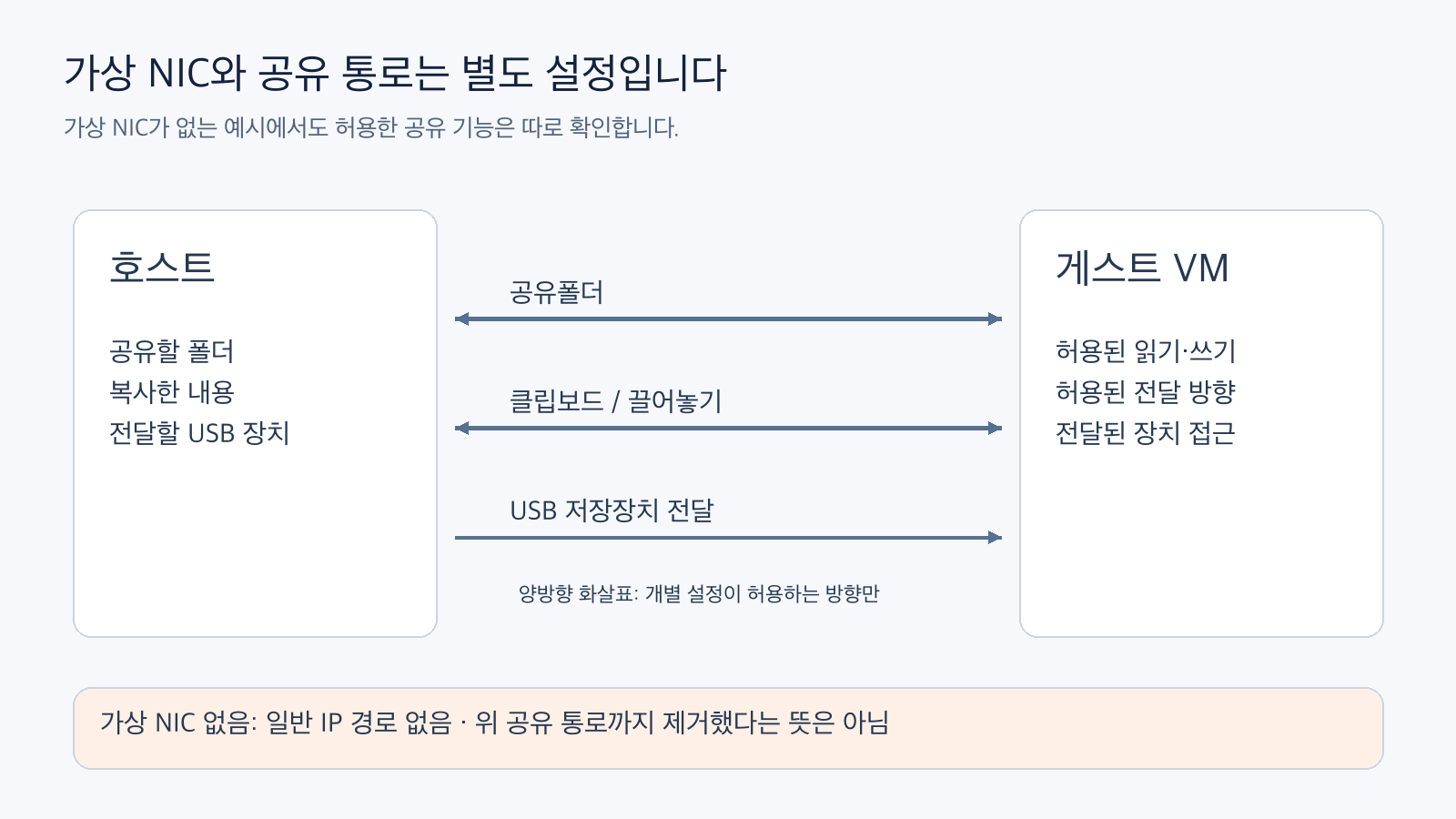
Figure: Distinction between virtual NICs and non-network data channels. Reconstructed based on official documentation, arrows indicate transfer possibilities based on allowed conditions. Official Reference 1 · Official Reference 2
2. VirtualBox Shared Folders Operate Without a Network
VirtualBox’s shared folders provide a host directory for guest access. Official documentation explains that shared folders can be used even without a guest network, utilizing the Guest Additions filesystem driver for this purpose. Guest Additions are components that provide integrated features between the guest and VirtualBox. VirtualBox 7.2 Shared Folders
Even if accessed by the guest as a network drive, it should not be considered the same as sharing that requires an external IP network. This feature is a separate path providing the host-side directory.
Consider a dedicated folder containing a single hypothetical DEMO_ONLY.txt. The table below explains the meaning of the settings, not actual transfer results.
| Sharing Condition | Can guest read host files? | Can guest write to host shared area? |
|---|---|---|
| No Sharing | No access via this shared folder path | No writing via this path |
| Read-Only Sharing | Allowed files can be read | Shared folder writing is restricted |
| Read/Write Sharing | Allowed files can be read | Can write to shared folder |
Read-only means write restriction. It does not mean the guest cannot read the file content. Therefore, sensitive host data cannot be connected simply because it is read-only. It must first be determined which files are allowed to be read.
The author’s recommendation is to provide a dedicated folder with only necessary synthetic data within the minimum scope and to separate read/write needs by task. Sharing a broad host directory expands the data scope visible to the guest. This article did not add sharing to actual host directories or existing research VMs.
3. Separate Clipboard Direction Restriction and Drag-and-Drop
Shared clipboard allows copied data to travel between the host and guest. Bidirectional opens read and write directions for both sides, while Host to Guest or Guest to Host restricts it to one direction. Even with direction restricted, the transfer itself remains for the allowed direction. VirtualBox Security Guide: Clipboard
Host to Guest: 호스트의 복사 내용 → 게스트로 전달할 수 있음
Guest to Host: 게스트의 복사 내용 → 호스트로 전달할 수 있음
Bidirectional: 두 방향 모두 허용
Disabled:     이 공유 클립보드 경로를 사용하지 않음
For example, let’s assume a hypothetical description about DEMO_ONLY.txt was copied on the host. Host to Guest is the direction where the guest can use that copied content. The judgment ‘since it’s not bidirectional, no host information goes to the guest at all’ is incorrect.
Drag-and-drop is another setting. Even if the clipboard is disabled, if drag-and-drop is allowed, that transfer path may remain in supported host, guest, and frontend combinations. Official documentation distinguishes Disabled, Host To Guest, Guest To Host, and Bidirectional modes for drag-and-drop, and explains that there are limitations on supported operating systems and methods. VirtualBox Drag-and-Drop
Therefore, observing ‘pasting doesn’t work’ alone is not sufficient to conclude that all file transfer channels are closed. Shared folders, shared clipboard, and drag-and-drop should be checked as separate settings. It is also necessary to read what values are used in existing VMs or saved configurations, and not to assume the default values of a new VM represent the current state of all VMs.
4. USB Passthrough Adds Permissions for Storage Devices
USB passthrough is a feature that allows a guest to use a USB device. The Oracle Security Guide explains that the guest can access the passed-through device and handle not only the file content of external storage devices but also areas like partition tables. VirtualBox Security Guide: USB Passthrough
This is a different permission than designating a shared folder as read-only. The write restriction of shared folders should not be assumed to apply directly to USB storage devices. If a passed-through storage device contains data from the host, a path exists for the guest to handle that data, even without a network.
The hypothetical example is a virtual storage device containing only DEMO_ONLY.txt. No actual USB was connected, and no automatic connection filters were changed. Before actual application, the device to be passed through, its content, and automatic transfer conditions need to be separately approved.
We also do not group shared folder paths provided by Guest Additions and USB passthrough as the same feature. It is necessary to check what each feature provides, including guest device drivers and support conditions. This article does not claim successful USB passthrough in a specific Mac/guest combination.
5. Record Data, Direction, and Write Permissions for Each Channel
When reviewing a virtual VM, the meaning of settings can be recorded as shown below. This is an example of items to review, not a record of all channels actually tested.
| Channel | Content to record first | What cannot be replaced by a single setting |
|---|---|---|
| Virtual NIC | None, management network, or allowed communication range | Shared folder/clipboard blocking |
| Shared Folder | Folder to provide, read/write scope | Interpreting read-only as read-forbidden |
| Shared Clipboard | Transfer direction and allowed data | Drag-and-drop settings |
| Drag-and-Drop | Direction and support conditions | Shared folder settings |
| USB Passthrough | Device to pass, device content, connection conditions | Read-only permission of shared folder |
The author’s inspection sequence is to first read the settings list, create a plan to retain only the channels necessary for the task, and then, in an authorized separate test environment, use synthetic data like DEMO_ONLY.txt to verify both allowed and forbidden directions. Connecting actual data first and then checking channels later is not the premise of this example.
Consider how access permissions for sharing features are conveyed to the executing entity within the guest. The Oracle Security Guide explains that remotely connected users can also access folders shared with the guest. In configurations with a management network, network authentication and host data access scope must be re-examined together. However, this practice did not assume remote users in a NIC-less configuration.
Disabling a setting is different from deleting previously transferred data. If copies or outputs have already been created, the preservation or deletion of that data is a separate issue. Since no files were moved in this article, there is no result of deletion being completed.
Separate ‘Setting Disabled’ from ‘No Data Remaining’
Review results should record setting values and actual test results in separate columns. For example, ‘Shared Clipboard set to Disabled’ is a configuration observation, while ‘Synthetic marker not transferred to the other side when copied’ is a separate transfer test. To avoid counting a transfer failure due to unsupported conditions as successful direction blocking, a normal control transfer under allowed conditions is also necessary.
Already transferred copies must be handled separately even after the channel is disabled. This article’s configuration model does not include features for data preservation/deletion or reverting host file changes. A single ‘Disabled’ entry in the configuration review table should not be expanded to mean complete deletion of previous data or recovery of external effects.
6. 10 Conditions Verified in Local Synthetic Model
The attached
Comments
Leave a Reply