ChatGPT Business is a team subscription that allows multiple people to use ChatGPT in an organization’s workspace, with administrators managing members and costs. When transitioning from a personal subscription to a team one, the expectation isn’t just about getting good answers. It also becomes important whether invited individuals can actually join, if they can use the necessary models, and where to find solutions if problems arise.
This was precisely what emerged first in my initial operational experience. There were instances where invitation emails weren’t visible, but users could join the workspace after signing up. Even after receiving approval for a separate feature, I was stuck trying to find member permission settings. The process of contacting support due to issues with the model management screen also followed. Currently, Daybreak is actually usable. However, it’s not possible to manage it individually for each member in Models. It’s not yet at the stage where long-term productivity or cost-saving effects can be discussed.
This article is based on initial experiences from September-October 2026. It distinguishes between issues encountered with personal accounts and official explanations confirmed on October 6, 2026. It does not imply that problems in a specific workspace are common across all of Business, and Daybreak’s usability has been personally verified. The official provision of member-specific access control and the current status of past Models page loading issues have not been separately confirmed.

1. Reasons for Reviewing Business: From Individual Usage to Team Operations
When looking into Business, my interest was in how to operate an environment used by multiple people. I was curious if it was possible to pay monthly and adjust seats when the number of members changed, and if there was a contract method suitable for short periods. These were questions I had while reviewing purchasing and operations. I cannot rephrase this as an experience where costs were actually reduced by decreasing seats or where a short-term contract was concluded.
The experience of using personal Pro should also be separated from the results of Business usage. It’s easy to assume that models or high usage familiar from a personal subscription will continue in the same way in a team workspace. However, a personal account’s usage rights, an organization’s purchased seats, a member’s role, and the currently selected workspace are all distinct items.
Official Explanation · Confirmed 2026-10-06
Business is a self-service team workspace with centralized billing and user/role management. Standard and Premium are types of paid seats allocated within the same organization, requiring a minimum of two paid seats. A seat is purchased usage capacity, and a member is the person assigned to it. ChatGPT Business Overview
Therefore, what I aim to evaluate at this stage is less about “how many times better are the answers compared to personal use” and more about “can team access and costs be managed in the expected way?” How much time has been saved by collaboration features, or how much the quality of collaborative work has improved, are questions to be addressed after separate usage records have accumulated.
2. Sign-up and Invitation: Even if the Email Wasn’t Visible, Actual Participation Status Had to Be Verified Separately
During the initial member invitation process, there were instances where invitation emails were not received. However, upon signing up with the address used for the invitation, users could immediately enter the Business workspace. The confirmed result was that “the invitation email was not visible, but participation was successful.”
This experience alone cannot confirm the cause of email delivery errors or the sign-up path. This is because I did not directly isolate and verify what influenced it among existing invitations, workspace search settings, or screen behavior at the time of sign-up. There is also no basis to inform everyone that they can automatically sign up without an email.
From an operational perspective, it was necessary to separately verify the fact that an invitation was sent, the fact that an email was received, and the fact that the person actually joined as a member. To move on to the next issue, it’s important to look at both which workspace the invited person selected and their participation status on the management screen. A method of verifying one person’s sign-up and execution of necessary functions before inviting multiple people at once can be helpful.
Official Explanation · Confirmed 2026-10-06
Invitations and seat purchases are separate. Sending an invitation does not purchase or reserve a seat; it checks if the necessary type of seat is available upon acceptance. You can also switch between personal and Business workspaces. Official sign-up guidance and current member status must be checked together. Managing Members, Seat Types, and Roles
3. The Most Confusing Aspect of Organization Management: Approvals, Roles, and Seats Are Different
Another roadblock was member permissions for Daybreak, which requires separate access approval. Daybreak is a model access program for approved defensive security operations. I understood that the approval process was complete and that I just needed to enable the necessary permissions for members, but I couldn’t find the relevant settings on the management screen and contacted support multiple times.
The current status I’ve personally verified is that Daybreak is actually usable, but it cannot be managed individually for each member in Models. Whether a model can be executed and whether an administrator can assign access to each person are different questions.
The OpenAI Support response provided by the user explained that a gap was identified where essential access control for Daybreak was not provided in Business. It then stated that a temporary measure was applied to this workspace, allowing all members to access it without individual role assignments. This is the scope of the action explained by support, and it does not mean that I tested every member’s account individually. Nor can it be generalized that the same measure has been applied to all Business workspaces.
Support stated that they aimed to provide official access control by ‘the end of this month’ at the time of the response, but explained that there was no confirmed ETA (Estimated Time of Arrival). Since the reply’s send date is not confirmed, I will not change this to a specific month-end date. The current temporary access and future official member-specific management features must be distinguished.
Official Explanation · Confirmed 2026-10-06
Daybreak access depends on the approval and provision status for approved users or services, ChatGPT workspaces or API organizations/projects, models, and usage screens. Business payment itself cannot be considered automatic qualification for Daybreak. Application/identity verification does not guarantee approval, nor does Blue approval automatically grant Red access. Models and Trusted Access
Even in general Business management, roles and seats must be distinguished. A role is the authority to change settings, and a seat type is usage capacity. If roles like Owner, Admin, Member and seats like Standard, Premium are considered in the same category, misunderstandings arise such as “administrators use more capacity” or “Premium users can change all settings.” Official Role and Seat Management Guide
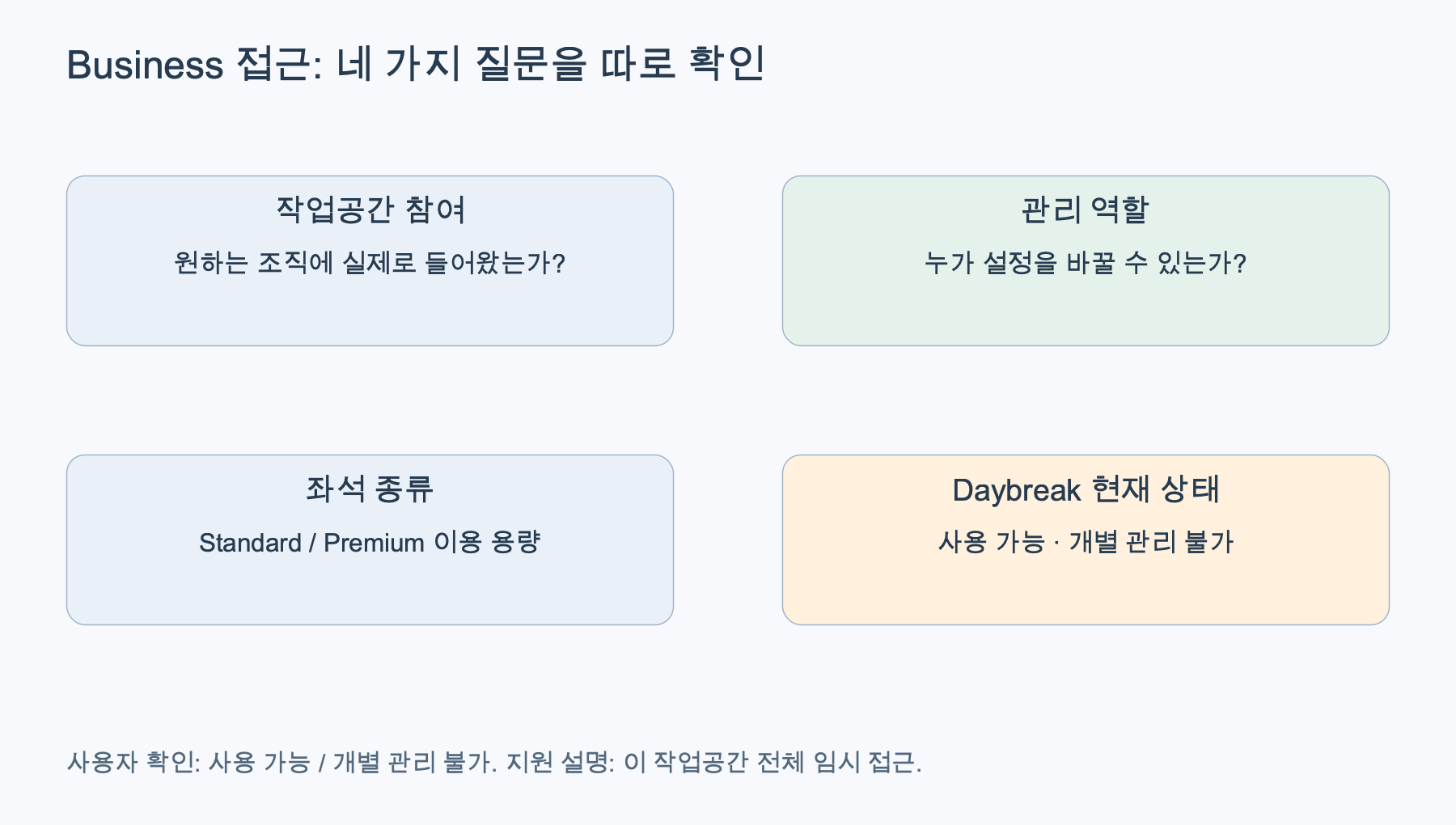
Checklist reconstructed based on official documentation. The four items are different questions. Daybreak usability/lack of individual management is user-verified, and temporary access for this entire workspace is explained by support’s response. Business Member Management, Daybreak Access Documentation
Even when a required model is not visible, product-specific screens must first be distinguished. Model selection for Chat, Work, and Codex are not the same. Current official documentation explains that model availability can vary depending on workspace settings and deployment status. Premium is a seat name, and Chat’s Pro option is a model option. Similar names do not imply identical control. Business Models and Limits
4. Screen Issues and Support Process: Temporary Access and Official Management Must Be Distinguished
During initial operations, I also experienced issues with the Models management page not loading. In my support inquiry, I also tried to report the problem of models not being visible. However, management page loading failure and model availability issues are different symptoms. There is no basis to confirm a single cause or to generalize it as a common failure across all of Business. Since the current status of past loading failures has not been separately confirmed, I do not assert that the page is still not loading.
During the support process, repeated guidance felt like automated responses, and I intended to request that the issue be escalated to a human. This is my subjective perception of the interaction. It is not an independent verification that all support staff were AI or that no human intervention occurred.
In a subsequent reply, I was informed of an escalation for technical investigation, along with an explanation that I didn’t need to send additional information immediately, but should retain screenshots and diagnostic logs for future reference if needed. Subsequently, support explained that temporary access measures had been applied to that workspace, and I confirmed that Daybreak was actually usable. Individual management per member is still not possible. I do not extend this result to confirm that past Models page loading failures have also been resolved.
When summarizing such issues, it’s better to list symptoms separately rather than just stating “permissions are not working.” Whether a page doesn’t open, only a setting item is missing, a model cannot be selected, or execution fails after selection are different questions. This is an operational judgment derived from this initial experience, and it is not an explanation that support guarantees any particular answer.
It’s also good to categorize statuses like “inquired,” “escalated for investigation,” “received change notification,” and “re-verified on usage screen.” This time, I personally confirmed Daybreak’s usability, but the official provision of access control and the current status of past page loading issues remain separate verification targets. Even if it becomes necessary to provide diagnostic data to support, there’s no need to attach originals containing account identification information or actual business content as evidence for a public review.
5. Fees and Seats: It’s Difficult to Judge Flexibility Solely by “Monthly Payment”
I was interested in monthly payments and seat count adjustments. For a short operational period, the billing period is important, but actual costs depend not only on the billing cycle but also on the number of seats purchased and when changes are applied. This review is not a verified case of actual seat reduction or successful refund.
Below is not a personal experience but the current official pricing explanation. It is based on dollar figures, and actual payment amounts may vary depending on country, currency, and taxes. The monthly unit price of annual payments should not be interpreted as a payment amount that can be freely canceled each month.
“5x” or “no 5-hour limit” also does not mean unlimited use of all models. Current documentation distinguishes between Chat’s model-specific allowances and Work/Codex usage. For example, Chat’s Pro messages are 15 per month for Standard and 50 per week for Premium, with GPT-6 Pro and GPT-5.6 Sol Pro sharing the same allowance. Changing models does not reset this quantity. These are documented conditions, not results I measured by fully utilizing the limits. Official Models and Limits Documentation
Official Explanation · Confirmed 2026-10-06
Adding paid seats incurs a prorated charge for the remainder of the current billing cycle. Seat reductions apply at the start of the next billing cycle. Even if members are removed, creating empty seats, the number of purchased seats does not automatically decrease. Additional seats for annual payments are committed until the end of the current annual term. Seat and Billing Management Guide
Therefore, for teams with changing operational staff, “who is currently in” and “how many seats have been purchased” must be managed separately. Even when considering short usage periods or weekly contracts, it’s necessary to first check the self-service conditions provided for monthly/annual terms and the actual renewal timing. The fact that I inquired about weekly usage possibilities does not constitute an experience where such contracts were actually offered or concluded.
Workspace credits for additional usage are also separate from seats. The official explanation states that shared credits can be used for eligible usage exceeding the included amount, and purchasing is optional. The amount used in personal Pro cannot be directly converted to Business credit consumption. Official Flexible Pricing Guide
6. Data and Collaboration: Distinguishing Between Provision Conditions and Usage Performance
A crucial condition in Business’s official explanation is that workspace data is not used for model training by default. This is a necessary policy for organizational adoption decisions. However, exclusion from training, whether data is sent externally, data retention, and the scope of provision to third-party apps are not the same questions. Organizations must decide for themselves what data to input. OpenAI Business Data Protection Explanation
Just because it’s a team workspace doesn’t mean administrators automatically read all members’ private conversations. The official FAQ explains that each member has their own conversations and Codex records, and by default, administrators/owners cannot view all private conversations. Operations that distinguish between shared materials and personal work are necessary. Business General FAQ
What I haven’t discussed here yet is the performance of collaborative work. Whether review time has been reduced by sharing features, if document reuse has become easier, or if the quality of deliverables has improved can only be evaluated with actual use cases and comparative records. The mere fact that a feature is provided does not mean I have achieved its benefits.
For the same reason, I do not immediately list a specific security research request that was blocked in another environment as a drawback of Business. If the plan and scope of application at that time are not confirmed, it is difficult to link it to product evaluation. Questions about whether a usage environment can be provided to external users are also not used as actual provision experiences.
7. Who Is It For: First, It’s Necessary to Verify the Full Path for Small Teams
Based on current official features, Business is an option that teams looking to manage multiple people’s access and payments within a single workspace can consider. When not everyone uses the same amount, a mixed structure of Standard and Premium also becomes a point of comparison. This is a judgment of suitability based on features and conditions. It is not a conclusion that cost-effectiveness has been proven in my experience.
Conversely, for teams where separate approval features are essential, it’s difficult to finalize adoption decisions based solely on the subscription name. They must first verify whether the necessary screens and models are provided in actual member accounts. If contractual support levels or stronger organizational control are essential, the Business pricing table and Enterprise contract terms must be compared separately. OpenAI Business·Enterprise Comparison
Based on this initial operational experience, the adoption checklist can be summarized into the following six questions:
- Sign-up: Has the invited person actually joined the desired workspace?
- Permissions: Have the administrative roles, seat types, executability of separate approval features, and member-specific access management capabilities been individually verified?
- Execution: Are the necessary tasks executable on the member’s Chat, Work, and Codex screens?
- Costs: Have the number of purchased seats, renewal cycle, reduction effective date, and additional usage conditions been confirmed?
- Data: Have the data to be input, sharing scope, and external app connection scope been defined?
- Support: Is there a person responsible for isolating symptoms and re-verifying resolution results when problems occur?
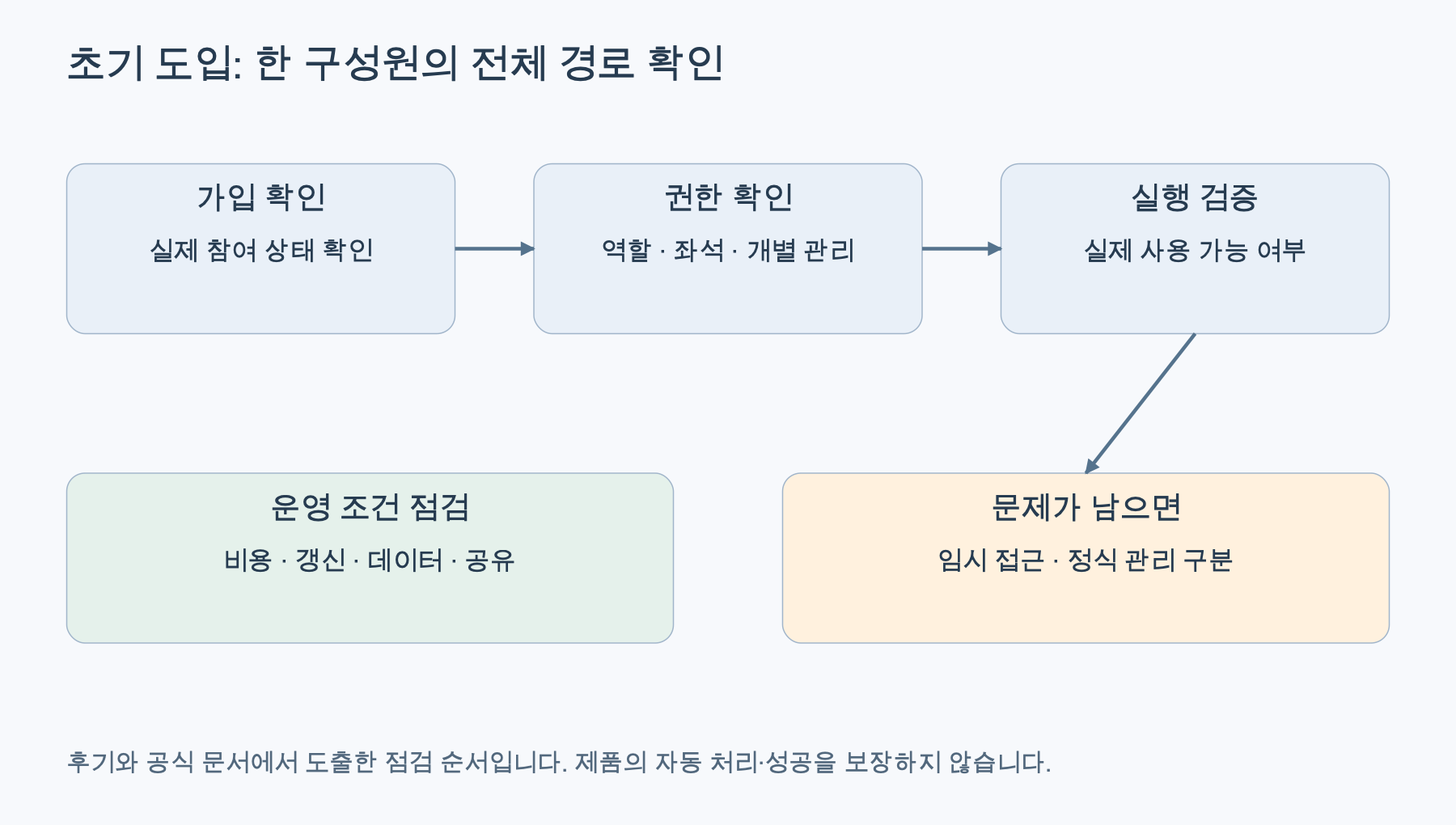
Adoption checklist reconstructed based on official management documentation and initial experience. This is not an automated process or a product procedure that guarantees success. Business Member Management, Billing and Seat Management
Initially, instead of adding many people simultaneously, it’s possible to check the entire path from one member signing up and executing necessary functions to the administrator verifying their status and costs. Expanding the operational scope later can help reduce the burden of dealing with invitation and feature issues all at once. This is not a story of my actual success in large-scale deployment, but rather the next direction for verification derived from this experience.
8. Current Assessment: Actual Access Path Came Before Feature List
My confirmed initial experience is clear. There were instances where invitation emails were not visible, but users joined after signing up; I couldn’t find member settings for a separately approved feature; and the process of contacting support due to model management screen issues continued. Currently, Daybreak is actually usable, and individual management per member in Models is not possible. Support explained that temporary access without individual role assignments was applied to all members of this workspace. I do not generalize this experience as a universal failure or a conclusion about the entire service.
Currently, Business offers a clear structure with team seats, centralized billing, and member management. However, there are steps to verify between the list of purchased features and the actual usability for each member. For me, this review is a record of checking that initial operational path.
In a long-term usage review, business performance, actual costs, and problem resolution results must also be verified. For now, I believe it is more useful for those considering this plan to record what was actually experienced and what results are yet to be confirmed, rather than adding false satisfaction or time savings.
9. FAQ: What Has Been Confirmed and What Remains to Be Confirmed
Can Daybreak be used now?
I have personally confirmed that it is actually usable. However, individual management per member in Models is not possible.
Can all Business members automatically access it?
It cannot be generalized that way. Support explained that a temporary measure was applied to this workspace, allowing all members to access it without individual role assignments. This does not mean that every member’s account was individually tested or that it represents a general provision policy for all of Business.
When will official access control be provided?
At the time of the support response, ‘the end of this month’ was the target, but there was no confirmed ETA. Since the send date is not confirmed, it cannot be fixed to a specific month or date.
Has the Models page loading issue also been resolved?
The current status has not been separately confirmed. While Daybreak’s usability and the inability for member-specific management have been confirmed, these two alone cannot determine the resolution or persistence of past page loading issues.
Leave a Reply