A server created with a single console click, no one knows who made it.
If you don’t leave it as code, that infrastructure will soon become a ghost.
>

>
Expressing the consistency and control of IaC, which repeatedly deploys the same infrastructure with a single piece of code, as ‘a city built simultaneously from blueprints’.
>
🎯 What this article covers
- What AWS is and why it became the cloud standard
- What Terraform is and why IaC (Infrastructure as Code) is necessary
- The power of automation created by the AWS + Terraform combination
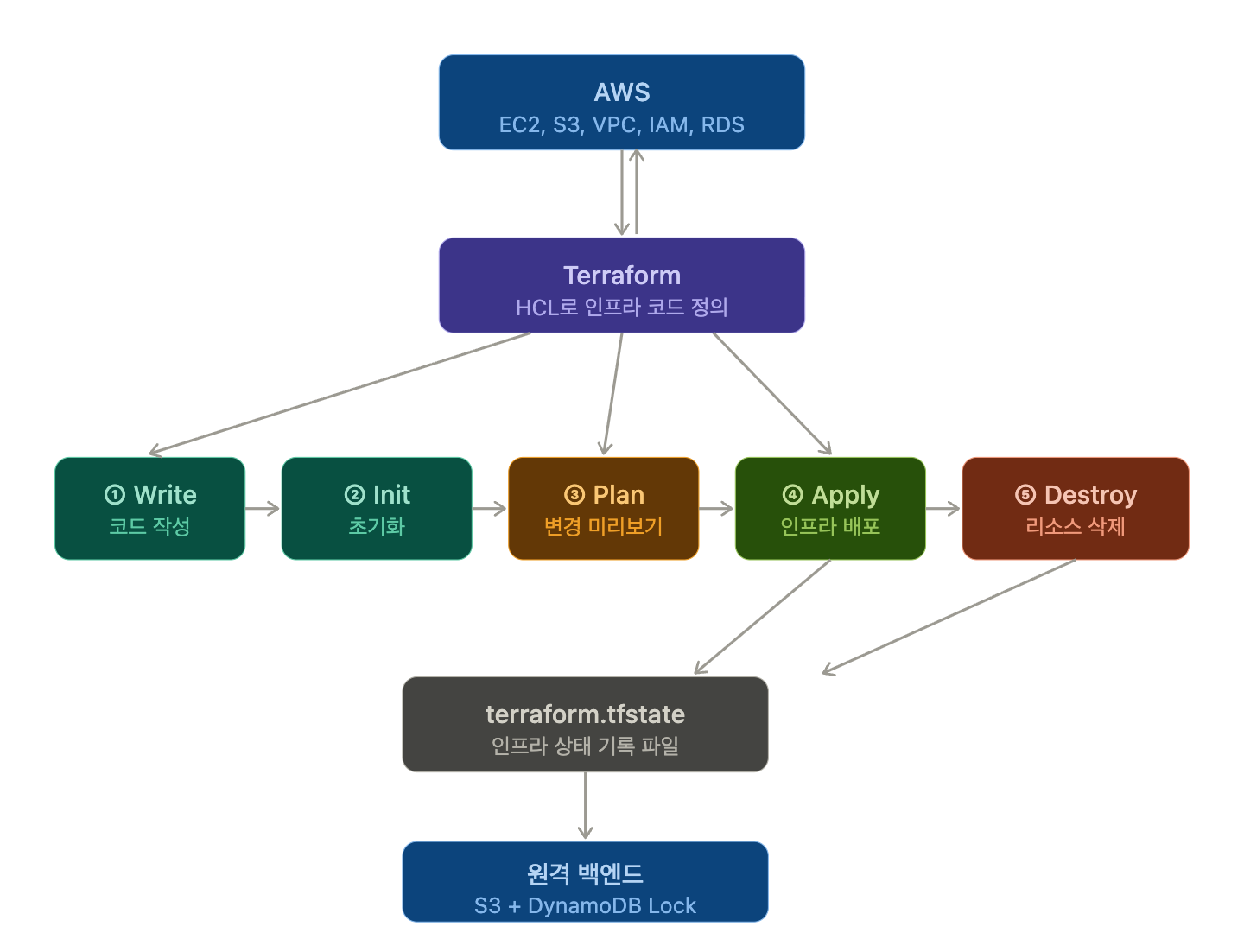
- Terraform’s core 5-step workflow (init → plan → apply → destroy)
- How teams manage infrastructure together in practice
📌 Introduction / Background
Imagine you manually created an EC2 instance in the AWS console.
Region ap-northeast-2, instance type t3.medium, security group configured with port 22 open… clicked one by one to complete. Satisfying. But six months later, what if you need to create another identical environment for a staging server? What were those settings again?
This is the trap of manual infrastructure management.
- No record of settings
- No tracking of who changed what
- Subtle differences between environments
- New team members need to be explained everything from scratch
To solve this problem, IaC (Infrastructure as Code) emerged, and its representative tool is Terraform.
🔍 What is AWS?
AWS (Amazon Web Services) is a global cloud computing platform operated by Amazon. It has data centers in dozens of regions worldwide, allowing companies to rent computing resources over the internet without having to buy their own servers.
AWS Core Services
| Category | Service | One-line description |
| Compute | EC2 | Virtual Server (VM) |
| Storage | S3 | Object Storage (file storage) |
| Serverless | Lambda | Run code without servers |
| Network | VPC | Virtual Private Cloud |
| Security/Access Control | IAM | Permission Management |
| Database | RDS | Managed Relational DB |
AWS’s biggest feature is its pay-as-you-go structure. You can turn off unused resources, and if traffic surges, you can scale up in minutes.
🔍 What is Terraform?
Terraform is an IaC tool created by HashiCorp. It allows you to define and manage infrastructure as code, and can manage AWS, Azure, GCP, and even on-premise environments with a single language.
HCL — Terraform’s Language
Terraform uses a dedicated language called HCL (HashiCorp Configuration Language). It looks like JSON but is much easier to read.
# AWS provider configuration
provider "aws" {
  region = "ap-northeast-2"
}

# Create EC2 instance
resource "aws_instance" "web_server" {
  ami           = "ami-0c9c942bd7bf113a2"  # Amazon Linux 2
  instance_type = "t2.micro"

  tags = {
    Name = "MyWebServer"
  }
}
This single code file replaces tasks that would require 10 clicks in the AWS console.
Provider Concept
To communicate with AWS, Terraform needs a Provider. A provider is a plugin that connects Terraform with a specific cloud service.
terraform {
  required_providers {
    aws = {
      source  = "hashicorp/aws"
      version = "~> 5.0"
    }
  }
}
In addition to AWS, there are hundreds of providers such as azurerm (Azure) and google (GCP).
🔍 AWS + Terraform, why use them together?
In an enterprise environment, using AWS quickly leads to situations like this:
- Development Team → Needs Development Environment VPC
- QA Team → Needs Test Environment VPC
- Operations Team → Needs Production Environment VPC
The three environments have the same structure but slightly different settings. What if you create each manually?
- Mistakes happen
- Later, the three environments differ slightly, leading to “It worked in my environment, why not in production?” problems.
If you codify it with Terraform, you can deploy three environments identically by just changing one variable.
# variables.tf
variable "environment" {
  description = "배포 환경"
  type        = string
  default     = "dev"
}

variable "instance_type" {
  description = "EC2 인스턴스 타입"
  type        = string
  default     = "t2.micro"
}
💻 Terraform Basic Workflow 5 Steps
Here is the core workflow for managing AWS infrastructure with Terraform.
Step 1: Write Code
Define infrastructure in a .tf file. This is the HCL code writing step seen earlier.
my-terraform-project/
├── main.tf          # Define core resources
├── variables.tf     # Declare variables
├── outputs.tf       # Define output values
└── provider.tf      # Provider configuration
Step 2: terraform init — Initialization
terraform initThis command must be run when starting a project for the first time. When executed, it:
- Creates a .terraform/ folder
- Automatically downloads necessary provider plugins
- Initializes external modules
Initializing provider plugins...
- Finding hashicorp/aws versions matching "~> 5.0"...
- Installing hashicorp/aws v5.31.0...
- Installed hashicorp/aws v5.31.0 (signed by HashiCorp)
💡 Tip: Be sure to add the .terraform/ folder to .gitignore. It’s large and should be downloaded directly in each environment.
Step 3: terraform plan — Review Plan
terraform planDoes not actually change anything, but only outputs the expected changes. This is a mandatory review step before deployment.
Terraform will perform the following actions:

  # aws_instance.web_server will be created
  + resource "aws_instance" "web_server" {
      + ami           = "ami-0c9c942bd7bf113a2"
      + instance_type = "t2.micro"
      ...
    }

Plan: 1 to add, 0 to change, 0 to destroy.
+ means creation, ~ means modification, – means deletion. If you see a -, always confirm it’s an intended deletion.
Step 4: terraform apply — Actual Deployment
terraform applyApplies the changes confirmed in the plan to actual AWS. It asks for confirmation once more before execution.
Do you want to perform these actions?
  Terraform will perform the actions described above.
  Only 'yes' will be accepted to approve.

  Enter a value: yes
Once deployment is complete, a terraform.tfstate file is created/updated. This file is the core file that records the current infrastructure state.
⚠️ Caution: You can skip confirmation with terraform apply -auto-approve, but never use it in a production environment.
Step 5: terraform destroy — Delete Infrastructure
terraform destroyDeletes all created resources. Used for cleaning up test environments or deleting resources after development is complete. Very effective for AWS cost savings.
🔍 Practical Workflow — Managing with a Team
Increase Reusability with Modularity
Common components are made into modules for reuse.
# VPC module reuse example
module "dev_vpc" {
  source      = "./modules/vpc"
  environment = "dev"
  cidr_block  = "10.0.0.0/16"
}

module "prod_vpc" {
  source      = "./modules/vpc"
  environment = "prod"
  cidr_block  = "10.1.0.0/16"
}
Reuse the same VPC module in development/production environments. Maintain consistency without code duplication.
Remote State Management — S3 + DynamoDB
If multiple team members run terraform apply simultaneously, state file conflicts will occur. To prevent this, configure remote state management.
terraform {
  backend "s3" {
    bucket         = "my-terraform-state-bucket"
    key            = "prod/terraform.tfstate"
    region         = "ap-northeast-2"
    dynamodb_table = "terraform-lock"  # Prevent concurrent execution (Lock)
    encrypt        = true
  }
}- S3: Stores state files centrally
- DynamoDB: Manages locks to prevent multiple people from applying simultaneously
Integration with Git + CI/CD
In practice, Terraform is used in conjunction with Git branching strategies.
feature 브랜치 → PR 생성 → terraform plan 자동 실행 → 코드 리뷰 → main 병합 → terraform apply 자동 실행This process can be fully automated using GitHub Actions or GitLab CI.
⚠️ Cautions / Common Mistakes
🔴 Do not commit state files to Git
terraform.tfstate can contain resource IDs, IPs, and even passwords in plain text. Always add it to .gitignore and use a remote backend like S3.
# .gitignore
*.tfstate
*.tfstate.backup
.terraform/
🔴 Use terraform destroy with caution
Accidentally running it in a production environment will delete all resources. Make it a habit to add prevent_destroy settings to important resources.
resource "aws_db_instance" "production" {
  lifecycle {
    prevent_destroy = true  # Error when executing destroy command
  }
}
🔴 Do not hardcode Access Keys in your code
# ❌ Never do this
provider "aws" {
  access_key = "AKIAXXXXXXXXXXXXXXXX"
  secret_key = "wJalrXUtnFEMI/K7MDENG/bPxRfiCYEXAMPLEKEY"
}

# ✅ Use environment variables or IAM Role
provider "aws" {
  region = "ap-northeast-2"
  # Automatic authentication with AWS CLI environment variables or IAM Role
}
✅ Summary / Conclusion
Here’s a summary of the AWS and Terraform combination.
| Category | Content |
| AWS | Platform providing cloud resources |
| Terraform | Tool for managing those resources as code |
| Core Workflow | init → plan → apply → destroy |
| Key for Team Collaboration | S3 Remote State + DynamoDB Lock + Git Branching Strategy |
| Greatest Strengths | Consistency, Reusability, Change Tracking, Automation |
As cloud infrastructure becomes more complex, the limitations of manual management quickly become apparent. By adopting the habit of managing infrastructure as code with Terraform, you can confidently deploy and maintain environments as they grow.
Recommended next steps for learning:
- Utilize Terraform Module Registry (registry.terraform.io)
- Build GitOps pipelines using Terraform Cloud / Atlantis
- Import existing manually created resources into code with terraform import
Leave a Reply