The era of SSHing into each node to modify configs is over.
Control the entire cluster with a single ConfigMap.
>

>
The narrative of uniformly controlling the certificate renewal cycle for all worker nodes in a cluster with a single ConfigMap — the precision of a watchmaker synchronizing dozens of clocks (nodes) simultaneously.
🎯 What this article covers
- Structure and role of the kubelet-config ConfigMap in the kube-system namespace
- Full procedure to apply rotateCertificates: true by modifying the ConfigMap
- How to reflect changes in /var/lib/kubelet/config.yaml on worker nodes
- How to verify that auto-renewal is actually working
- Issues with settings being overwritten during upgrades and how to handle them
📌 Introduction / Background
kubelet client certificates typically have a validity period of 1 year. As the cluster grows, manually SSHing into each worker node to modify /var/lib/kubelet/config.yaml becomes impractical.
Clusters configured with kubeadm already have a structure to address this. During the TLS bootstrap process using Bootstrap Tokens, kubeadm downloads the kubelet-config ConfigMap and writes it to /var/lib/kubelet/config.yaml. This means that modifying the ConfigMap in kube-system and having each node download and apply it is officially supported.
When rotateCertificates: true is set, kubelet automatically submits a CSR at approximately 70-90% of the certificate’s total lifespan. The kube-controller-manager monitors this, signs and approves it with the cluster CA key, thereby automatically renewing the client certificate.
🔍 Concept Explanation
Relationship between ConfigMap and local config.yaml
In a kubeadm cluster, kubelet configuration exists in two places.
| Location | Role |
| kube-system/kubelet-config (ConfigMap) | Cluster-wide standard configuration (Single Source of Truth) |
| /var/lib/kubelet/config.yaml (Each node) | Actual configuration file read by kubelet on the node |
These two files are not automatically synchronized. After modifying the ConfigMap, it is necessary to manually download and apply it on each worker node. This is the key point.
The settings stored in the ConfigMap and the contents of /var/lib/kubelet/config.yaml are not automatically synchronized. To permanently maintain local node settings, you must manually update /var/lib/kubelet/config.yaml directly or add flags to /var/lib/kubelet/kubeadm-flags.env and restart kubelet.
How rotateCertificates works
If kubelet is configured to bootstrap with the –bootstrap-kubeconfig flag, it connects to the Kubernetes API with an initial certificate and submits a CSR. If the CSR meets certain criteria, the controller-manager automatically approves it and delivers a certificate signed for the duration specified by the –cluster-signing-duration parameter to kubelet. As the expiration date approaches, kubelet automatically submits a new CSR at some point between 10% and 30% of the remaining time.
💻 Hands-on / Example Code
Step 0. Check current status
# Check ConfigMap name (name format may vary by version)
kubectl get configmap -n kube-system | grep kubelet

# For Kubernetes 1.24+: kubelet-config
# For older versions: kubelet-config-1.{minor} (e.g., kubelet-config-1.27)
# Check current ConfigMap full content
kubectl get configmap kubelet-config -n kube-system -o yamlCheck the data.kubelet section in the output example:
data:
  kubelet: |
    apiVersion: kubelet.config.k8s.io/v1beta1
    kind: KubeletConfiguration
    authentication:
      ...
    rotateCertificates: false   # ← Change this part to true
Step 1. Modify ConfigMap (on control plane)
Method A — kubectl edit (interactive editing)
kubectl edit configmap kubelet-config -n kube-systemWhen the editor opens, find and modify the rotateCertificates entry within the data.kubelet block. If it doesn’t exist, add it manually.
# Before modification
rotateCertificates: false

# After modification
rotateCertificates: true
Save and exit the editor, and the ConfigMap will be updated immediately.
Method B — kubectl patch (suitable for script-based automation)
# Extract current kubelet configuration
kubectl get configmap kubelet-config -n kube-system
  -o jsonpath='{.data.kubelet}' > /tmp/kubelet-config-current.yaml

# Check rotateCertificates entry
grep rotateCertificates /tmp/kubelet-config-current.yaml
# Change value with sed (false → true, or add if not present)
sed -i 's/rotateCertificates: false/rotateCertificates: true/'
/tmp/kubelet-config-current.yaml
# If rotateCertificates entry is completely missing
grep -q 'rotateCertificates' /tmp/kubelet-config-current.yaml ||
echo "rotateCertificates: true" >> /tmp/kubelet-config-current.yaml# Apply modified content to ConfigMap
kubectl create configmap kubelet-config
-n kube-system
--from-file=kubelet=/tmp/kubelet-config-current.yaml
--dry-run=client -o yaml | kubectl apply -f -Step 2. Apply settings on worker nodes
Even if the ConfigMap is modified, the kubelet on worker nodes does not immediately recognize the changes. The following procedure must be performed on each worker node.
Method A — Using kubeadm upgrade node (recommended)
# Run on worker node (after SSH connection)
sudo kubeadm upgrade node phase kubelet-config

# Restart kubelet
sudo systemctl daemon-reload
sudo systemctl restart kubelet
The kubeadm upgrade node phase kubelet-config command downloads the kubelet-config ConfigMap stored in the cluster and upgrades the kubelet configuration on that node.
Method B — Directly download and replace ConfigMap
# Run on worker node (requires kubectl access)

# Extract kubelet configuration from ConfigMap
kubectl get configmap kubelet-config -n kube-system
  -o jsonpath='{.data.kubelet}' > /tmp/kubelet-config-new.yaml

# Backup existing config
sudo cp /var/lib/kubelet/config.yaml
  /var/lib/kubelet/config.yaml.bak.$(date +%Y%m%d)

# Apply new settings
sudo cp /tmp/kubelet-config-new.yaml /var/lib/kubelet/config.yaml

# Verify application
grep rotateCertificates /var/lib/kubelet/config.yaml
# Restart kubelet
sudo systemctl daemon-reload
sudo systemctl restart kubelet
# Check restart status
sudo systemctl status kubeletStep 3. Apply to multiple nodes at once (script)
If there are multiple nodes, you can use the script below for batch processing.
#!/bin/bash
# apply-kubelet-rotate.sh
# Apply rotateCertificates setting to all worker nodes in batch

WORKER_NODES=$(kubectl get nodes
  --selector='!node-role.kubernetes.io/control-plane'
  -o jsonpath='{.items[*].metadata.name}')

for NODE in $WORKER_NODES; do
  echo "=== 처리 중: $NODE ==="

  # 1. Download latest ConfigMap settings
  ssh $NODE "sudo kubeadm upgrade node phase kubelet-config"

  # 2. Restart kubelet
  ssh $NODE "sudo systemctl daemon-reload && sudo systemctl restart kubelet"

  # 3. Verify application result
  ssh $NODE "grep rotateCertificates /var/lib/kubelet/config.yaml"

  echo "=== $NODE 완료 ==="
  sleep 3  # Interval between nodes
done

echo "전체 완료"
chmod +x apply-kubelet-rotate.sh
./apply-kubelet-rotate.shStep 4. Verify automatic renewal operation
# Check if rotateCertificates is enabled (on each node)
sudo grep rotateCertificates /var/lib/kubelet/config.yaml

# Check current certificate expiration date
sudo openssl x509
  -in /var/lib/kubelet/pki/kubelet-client-current.pem
  -noout -enddate

# Check kubelet logs for certificate renewal attempts
sudo journalctl -u kubelet --since "1 hour ago" | grep -i rotate
sudo journalctl -u kubelet --since "1 hour ago" | grep -i certificate
# Check CSR list for automatically submitted requests (on control plane)
kubectl get csr | grep "system:node"
# Output example — Normal if status is Approved,Issued
# NAME SIGNERNAME REQUESTOR CONDITION
# csr-abc12 kubernetes.io/kube-apiserver-client-kubelet system:node:worker-1 Approved,Issued# Real-time verification of actually applied kubelet settings (using API proxy)
kubectl proxy &
curl -s http://127.0.0.1:8001/api/v1/nodes/<노드명>/proxy/configz |
python3 -m json.tool | grep rotateCertificatesStep 5. RBAC — Check prerequisites for auto-approval
rotateCertificates: true alone is not enough. The node group must have RBAC permissions to automatically approve CSRs.
# Check client certificate auto-renewal permissions
kubectl get clusterrolebinding | grep "auto-approve"
kubectl get clusterrolebinding | grep "node-client"
If not, create it with the following command:
# Grant client certificate auto-renewal permissions to node group
kubectl create clusterrolebinding auto-approve-renewals
  --clusterrole=system:certificates.k8s.io:certificatesigningrequests:selfnodeclient
  --group=system:nodes
⚠️ Cautions / Common Mistakes
1. Modifying ConfigMap is not the end Even if the ConfigMap is modified, the running kubelet does not automatically reload it. You must execute kubeadm upgrade node phase kubelet-config or directly replace the file and then systemctl restart kubelet.
2. Beware of overwriting during kubeadm upgrades During a kubeadm upgrade, the contents of /var/lib/kubelet/config.yaml may be overwritten with the contents of the cluster-wide kubelet-config ConfigMap. Therefore, to permanently maintain settings, you must modify the ConfigMap itself or add flags to /var/lib/kubelet/kubeadm-flags.env.
3. Serving certificates are not automatically approved rotateCertificates controls client certificate auto-renewal. Serving certificates (serverTLSBootstrap: true) are a separate setting, and in this case, the controller-manager does not automatically approve them, requiring the administrator to manually execute kubectl certificate approve.
4. ConfigMap names vary by version For kubeadm versions prior to 1.24, the format is kubelet-config-1.{minor}. Check the exact name first with the command below.
kubectl get configmap -n kube-system | grep kubelet-config5. Beware of YAML indentation errors The data.kubelet field of ConfigMap has a structure where YAML is nested within a YAML string. If the indentation is incorrect when using kubectl edit, kubelet will not be able to parse the settings, so always review before saving.
✅ Summary / Conclusion
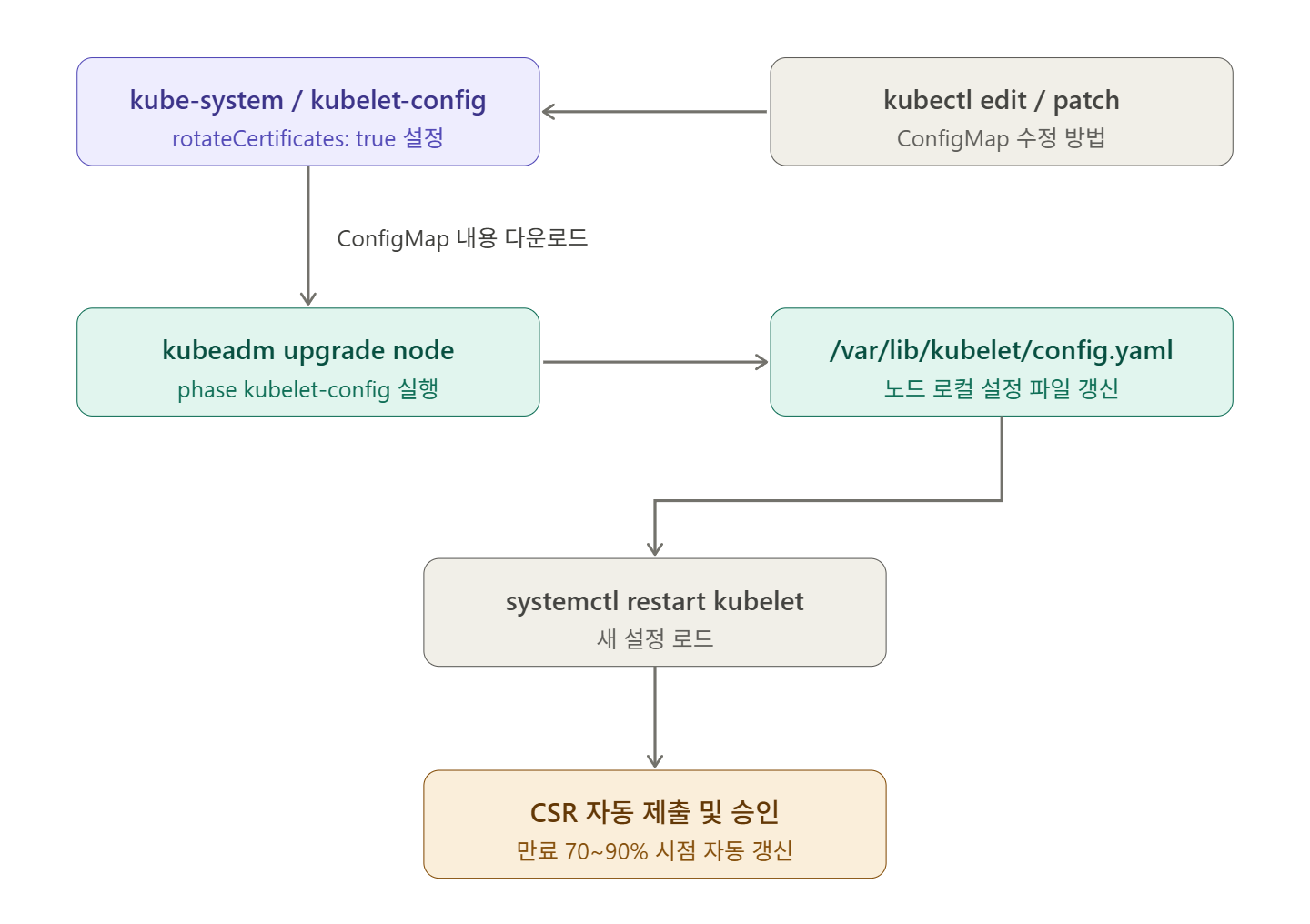
The ConfigMap-based rotateCertificates setup flow is as follows:
- Check current settings with kubectl get configmap kubelet-config -n kube-system
- Apply rotateCertificates: true with kubectl edit or patch
- Execute kubeadm upgrade node phase kubelet-config on each worker node
- Restart with systemctl restart kubelet
- Verify normal operation with kubectl get csr and certificate expiration date
The key advantage of this method is that ConfigMap acts as a Single Source of Truth. When new nodes are added in the future, running only kubeadm join will automatically deploy the same settings. This structure significantly reduces management complexity.
Leave a Reply