As of 2026, for AI to properly understand HCL, an “official textbook” is needed.
HashiCorp’s self-developed Agent Skills is precisely that.
>

🎯 What This Article Covers
- Why HashiCorp Agent Skills were created and how they differ from MCP
- Two ways to install them in Claude Code and Antigravity
- List of included Skills and their uses
- How to use them with Terraform MCP Server
- How to verify their actual operation
📌 Background — Why AI “Gets Terraform HCL Wrong”
If you ask Claude or GPT to write Terraform code… most of the time it works. But there’s a problem.
Their training data might be outdated, they might not know HashiCorp’s internal style guides, or they might not be aware of the latest Provider schemas. This leads to them using deprecated attributes or writing code in patterns not recommended by HashiCorp.
HashiCorp Agent Skills emerged to solve this problem. It is an open-format, domain-specific knowledge package that addresses the fundamental issue of AI assistants lacking the specific technical context needed to reliably perform complex tasks.
Upon initial release, it includes Skills for Terraform and Packer, providing AI assistants with expertise in areas such as plugin framework architecture, schema definitions, and the latest best practices.
🔍 Agent Skills vs MCP — What’s the Difference?
These two concepts are easily confused, but their roles are completely different.
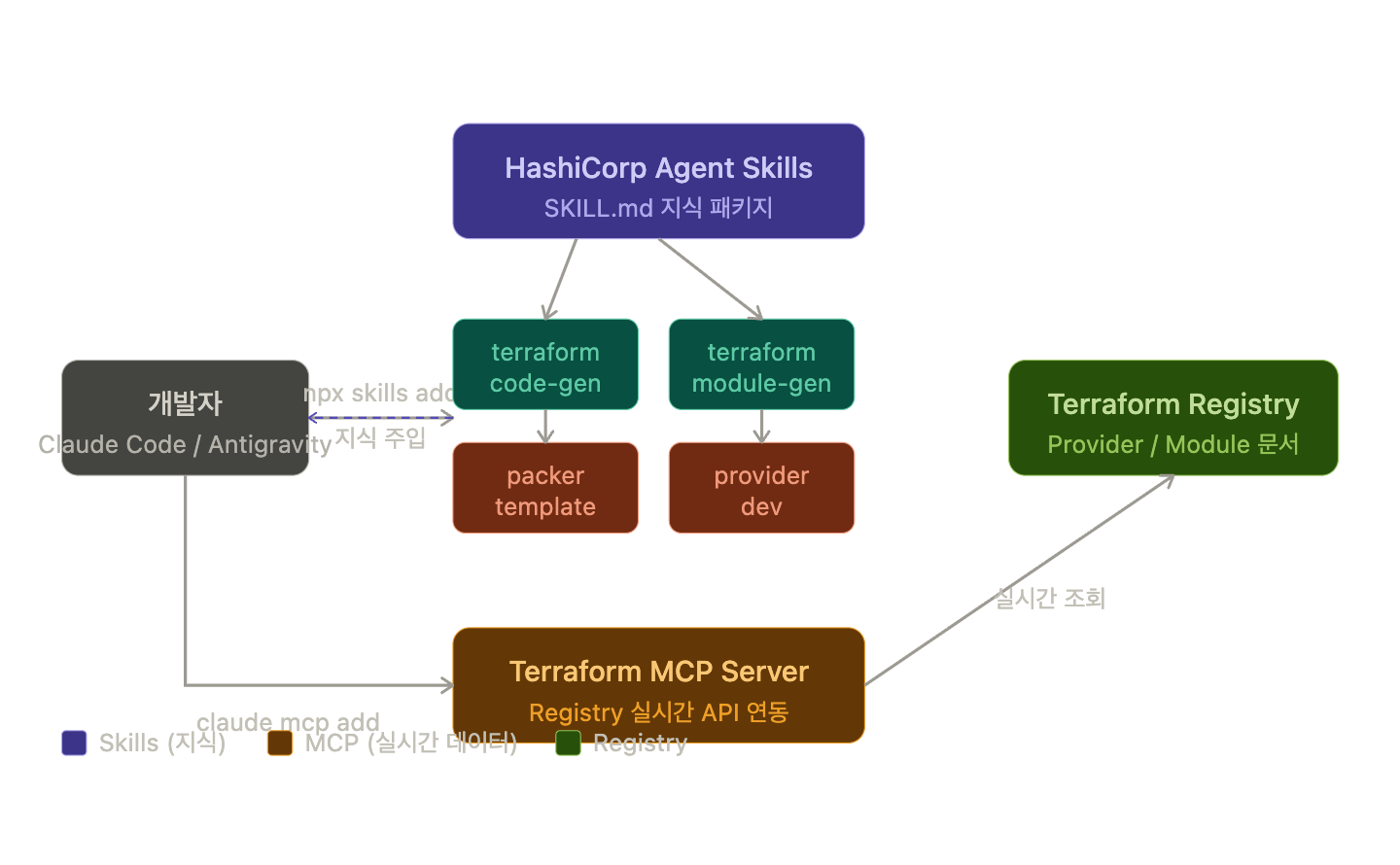
MCP is a “pipe” or server interface that connects data to AI, while Agent Skills is a “textbook” of knowledge. They are complementary and, when used together, can create a powerful and context-aware assistant.
Claude Skills provide structured and repeatable workflows without the overhead of running an MCP server or building custom tooling.
Here’s a summary:
| Category | Agent Skills | Terraform MCP Server |
| Role | Injects “knowledge” into AI | AI calls Registry API in real-time |
| Execution Method | Loads SKILL.md files | Runs as a separate server process |
| Required Infrastructure | None (files only) | Docker or local server |
| Main Use | Style guides, patterns, architecture | Latest Provider docs, Registry search |
—
💻 Installation Methods — Based on Claude Code
Method 1: Install with npx skills command (Recommended)
To check the full list of available Skills and install a specific Skill, follow these steps:
# Check available Skills list
npx skills add hashicorp/agent-skills --list

# Install all HashiCorp Skills at once
npx skills add hashicorp/agent-skills

# Install only a specific Skill (e.g., Terraform Style Guide)
npx skills add hashicorp/agent-skills/terraform/code-generation/skills/terraform-style-guide
The installation location is automatically ~/.claude/skills/ directory. Claude Code recognizes it immediately without needing a restart.
Method 2: Use the Claude Code Plugin Marketplace
Installation via the Claude Code Plugin Marketplace is also supported.
# Add HashiCorp Marketplace
claude plugin marketplace add hashicorp/agent-skills

# Install individual plugins
claude plugin install terraform-code-generation@hashicorp
claude plugin install terraform-module-generation@hashicorp
claude plugin install terraform-provider-development@hashicorp
How to Install in Antigravity
Antigravity IDE installs Skills with the following command:
# Use Antigravity-specific flag
npx antigravity-awesome-skills --antigravity

# Selectively install only HashiCorp Skills
npx skills add hashicorp/agent-skills -a antigravity
Alternatively, you can manually copy the Skills folder to the ~/.gemini/antigravity/skills/ directory.
📦 List of Included Skills
The initial HashiCorp Agent Skills pack addresses the most common challenges faced by Terraform and Packer users.
Currently available key Skills:
Terraform Related
- terraform-code-generation — Adherence to HashiCorp style conventions when generating HCL code
- terraform-module-generation — Creation of reusable module structures
- terraform-provider-development — Development of new Providers (based on the plugin framework)
- terraform-style-guide — Naming conventions, file structure, and formatting guides
Packer Related
- packer-template-generation — Generation of Packer templates and HCL2 configurations
🔗 Using with Terraform MCP Server
Using Skills (knowledge) and MCP Server (real-time data) together makes them even more powerful.
The Terraform MCP Server allows AI models to access the latest Provider documentation, modules, and policies from the Terraform Registry in real-time. This enables AI to generate accurate and up-to-date Terraform configurations instead of relying on potentially outdated training data.
How to add MCP Server to Claude Code:
# Run MCP Server with Docker
docker run -i --rm hashicorp/terraform-mcp-server:0.2.3

# Register with Claude Code
claude mcp add --transport http terraform http://localhost:8080/mcp
If you use HCP Terraform Enterprise, add authentication as well:
# Configure in ~/.gemini/.env file
TFE_ADDRESS=your_tfe_address_here
TFE_TOKEN=your_tfe_token_here
⚠️ Be Careful About These
Skill descriptions determine trigger accuracy. The description field of a Skill is crucial. Vague descriptions lead to unstable activation, while descriptions containing clear trigger phrases activate consistently. When customizing Skills, write specific description phrases.
Operate MCP Server for local use only. For security reasons, the MCP Server is currently designed for local use only. Do not hardcode credentials in your code; manage them as environment variables.
Skills and existing CLAUDE.md coexist. CLAUDE.md in the project root or commands in .claude/commands/ remain as they are. Skills are added; they do not overwrite existing settings.
✅ Summary
HashiCorp Agent Skills is the “official textbook that enables AI to properly understand Terraform.” Both Claude Code and Antigravity can install it with a single line: npx skills add hashicorp/agent-skills. When used with Terraform MCP Server, the combination of knowledge (Skills) + real-time Registry data (MCP) allows for the generation of much more accurate HCL code.
If you want to automate Terraform Provider development or integrate AI into your Packer AMI build workflows, refer to the detailed guides for each Skill: github.com/hashicorp/agent-skills
Leave a Reply