“I’ve rotated the key, so security is all set, right?”
This thought can be the beginning of a disaster during an actual security incident.
>

🎯 What This Article Covers
- What AWS KMS automatic key rotation actually does and doesn’t do
- Comparison of services that automatically re-encrypt data during rotation vs. services that require manual re-encryption
- How “key replacement” differs from rotation during a security incident
- Practical summary of service-specific key replacement procedures during incident response
📌 Introduction — The Misconception That “Rotation Is On, So We’re Safe”
AWS security guides always mention this: “Enable KMS CMK automatic rotation.” Many people think this single setting completes key security, but in fact, this is only half true.
Even with key rotation enabled, most services do not automatically re-encrypt already encrypted data with the new key. And more importantly, in a situation where a real security incident occurs and keys need to be completely replaced, rotation alone solves nothing. A completely different procedure is required.
Let’s clarify these two points now.
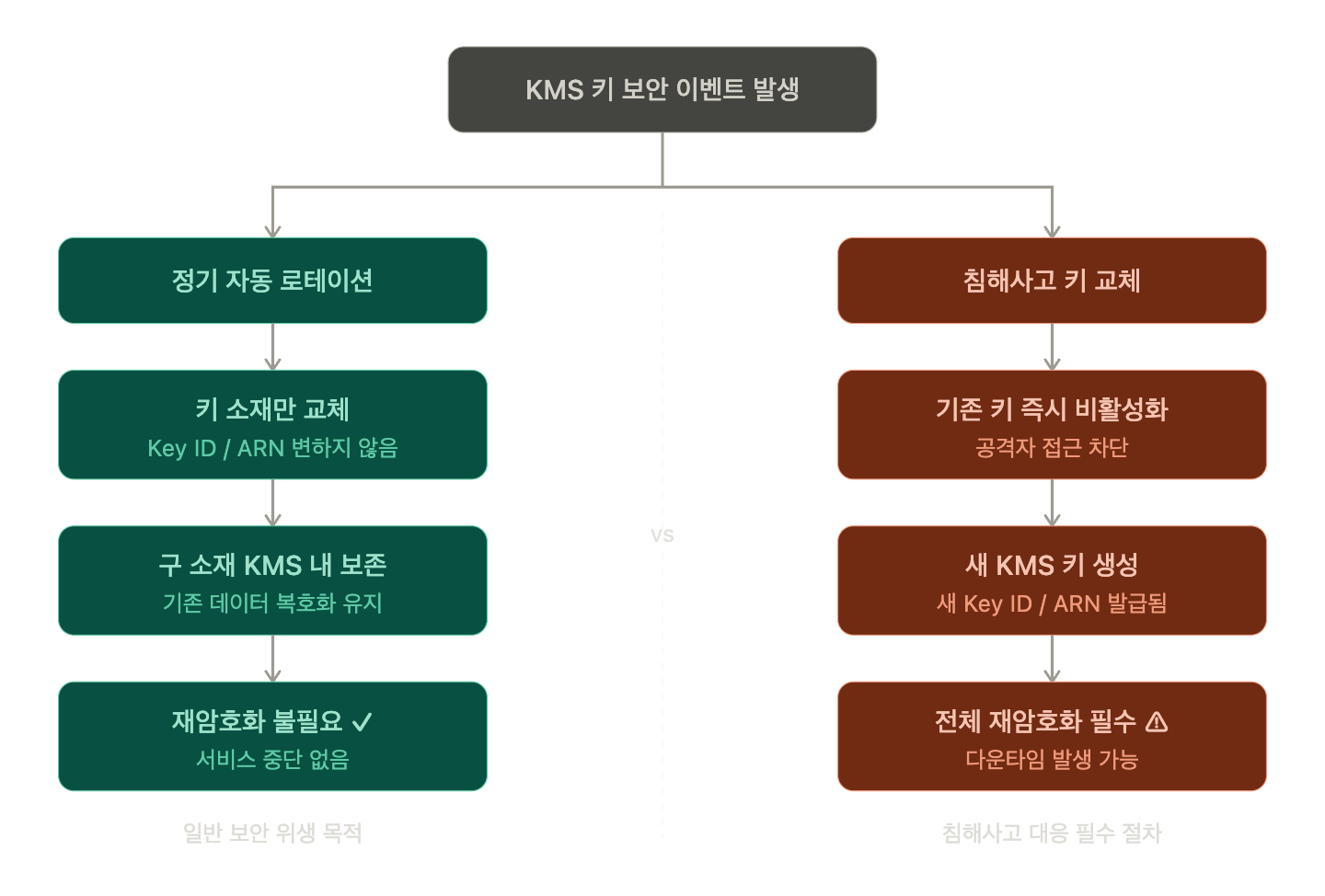
🔍 What is AWS KMS Key Rotation? — What Exactly Happens
The Reality of Rotation: Key ID Remains, Only the Inner Material Changes
When you enable Automatic Key Rotation in KMS, new Backing Key Material is generated annually (or at the configured interval). Here’s what’s important:
- ✅ KMS Key ID / ARN does not change → No need to change existing application settings
- ✅ Previous key material is retained within KMS → Data encrypted in the past can still be decrypted
- ✅ Newly encrypted data is encrypted with the new key material
- ❌ Existing encrypted data is not automatically re-encrypted with the new key material
To use an analogy, the apartment number (Key ID) remains the same, and a new key (Key Material) is made, but the existing locks (encrypted data) are still locked with the old key. However, KMS keeps a copy of the old key, so the door can still be opened.
Two Rotation Methods
자동 로테이션: KMS가 주기적으로 키 소재 자동 생성
  → Customer Managed Key (CMK)에서 설정 가능
  → AWS Managed Key는 자동으로 3년마다 로테이션

수동 로테이션: 사용자가 직접 새 KMS 키를 생성 후 서비스에 연결
  → 침해사고 시 필요한 방식
  → Key ID/ARN이 완전히 바뀜 → 재암호화 필수
📊 Service-Specific Re-encryption Behavior During Automatic Rotation
✅ Services That Automatically Re-encrypt Existing Data During Rotation
| Service | Re-encryption | Operating Condition |
|---|---|---|
| AWS Secrets Manager | Immediately re-encrypts when the KMS key for a secret value is changed | When update-secret –kms-key-id is executed |
| AWS Systems Manager Parameter Store | Re-encrypts when a SecureString parameter is updated | When the parameter value is put again |
| Amazon Redshift | Built-in cluster encryption key rotation feature | Using rotate-encryption-key API |
The commonality among these services is that “key replacement = data re-encryption” is designed as a single, atomic operation. Operators do not need to migrate data separately.
❌ Services That Do Not Automatically Re-encrypt — Manual Action Required
| Service | Existing Data State | Re-encryption Method |
|---|---|---|
| Amazon S3 | Existing objects remain as is | s3 cp or S3 Batch Operations |
| Amazon EBS | Existing volumes/snapshots remain as is | Copy snapshot + Create new volume |
| Amazon RDS / Aurora | Existing DB instances remain as is | Restore snapshot + Specify new KMS key |
| Amazon DynamoDB | KMS key for table cannot be changed | Export → Create new table → Import |
| Amazon EFS | Existing file systems remain as is | Create new EFS + Migrate data |
| AWS Lambda Environment Variables | Existing encrypted values retained | Automatic re-encryption upon function update |
> 💡 It’s not that “re-encryption doesn’t happen” for S3, EBS, and RDS causes a security problem. KMS retains the previous key material, so decryption is always possible. However, it means that older data remains encrypted with the older key material.
⚡ “Key Replacement” During a Security Incident — A Completely Different Story from Rotation
Rotation vs. Key Replacement, What’s the Difference?
| Item | Automatic Rotation | Security Incident Key Replacement |
|---|---|---|
| Key ID/ARN | Does not change | Completely new key generated |
| Existing Key Material | Retained within KMS | To be discarded (known by attacker) |
| Purpose | General security hygiene | Block impact of exposed key |
| Re-encryption Required? | Optional | Mandatory |
| Downtime | None | Possible depending on service |
The reason “key replacement” is needed during a security incident is simple. If an attacker has obtained the key material (or IAM credentials that can use the key), even if you create new key material through rotation, the attacker can still decrypt via the KMS API. It’s meaningless if the old key material is still alive in KMS and the attacker’s permissions still exist.
True key replacement should follow this sequence:
🛠️ Key Replacement Procedure During a Security Incident
Step 1 — Isolation: Immediately block existing keys and permissions
# Deactivate existing KMS key (immediate decryption prevention)
aws kms disable-key --key-id <compromised-key-id>

# Immediately revoke IAM role/user permissions that used the key
aws iam detach-role-policy --role-name <role> --policy-arn <policy-arn>

# Check recent key usage history with CloudTrail
aws cloudtrail lookup-events
  --lookup-attributes AttributeKey=ResourceName,AttributeValue=<key-id>
⚠️ Deactivating a key will immediately make existing encrypted data undecryptable. Plan your re-encryption strategy before proceeding.
Step 2 — Create a new KMS key
# Create a new Customer Managed Key
aws kms create-key
  --description "replacement-key-after-incident"
  --key-usage ENCRYPT_DECRYPT
  --key-spec SYMMETRIC_DEFAULT

# Set alias
aws kms create-alias
  --alias-name alias/new-data-key
  --target-key-id <new-key-id>

# Enable automatic rotation
aws kms enable-key-rotation --key-id <new-key-id>
Step 3 — Service-specific re-encryption
S3 — Utilizing S3 Batch Operations
# Method 1: Copy single bucket object (SSE-KMS key replacement)
aws s3 cp s3://my-bucket/ s3://my-bucket/
  --recursive
  --sse aws:kms
  --sse-kms-key-id <new-key-id>
  --metadata-directive REPLACE

# Method 2: For large scale, S3 Batch Operations Job creation is recommended
# (Manifest → Copy operation → Specify New KMS Key)
EBS — Snapshot copy method
# 1. Create snapshot of existing volume
aws ec2 create-snapshot
  --volume-id vol-xxxxxxxx
  --description "pre-key-rotation-snapshot"

# 2. Copy snapshot with new KMS key (re-encrypt)
aws ec2 copy-snapshot
  --source-region ap-northeast-2
  --source-snapshot-id snap-xxxxxxxx
  --encrypted
  --kms-key-id <new-key-id>
  --description "reencrypted-snapshot"

# 3. Create volume from new snapshot → Replace existing volume
aws ec2 create-volume
  --snapshot-id <new-snap-id>
  --availability-zone ap-northeast-2a
  --volume-type gp3
RDS — Snapshot restore method
# 1. Create manual snapshot
aws rds create-db-snapshot
  --db-instance-identifier mydb
  --db-snapshot-identifier mydb-snapshot-for-rekey

# 2. Copy snapshot (re-encrypt with new KMS key)
aws rds copy-db-snapshot
  --source-db-snapshot-identifier mydb-snapshot-for-rekey
  --target-db-snapshot-identifier mydb-snapshot-reencrypted
  --kms-key-id <new-key-id>

# 3. Restore DB instance from new snapshot
aws rds restore-db-instance-from-db-snapshot
  --db-instance-identifier mydb-new
  --db-snapshot-identifier mydb-snapshot-reencrypted
Secrets Manager — Simplest
# KMS key replacement + immediate re-encryption (single command)
aws secretsmanager update-secret
  --secret-id my-secret
  --kms-key-id <new-key-id>
DynamoDB — Most complex, causes downtime
# 1. Existing table Point-in-Time Recovery or Export to S3
aws dynamodb export-table-to-point-in-time
  --table-arn arn:aws:dynamodb:...:table/MyTable
  --s3-bucket my-export-bucket

# 2. Create new table with new KMS key
aws dynamodb create-table
  --table-name MyTable-New
  --sse-specification Enabled=true,SSEType=KMS,KMSMasterKeyId=<new-key-id>
  # ... Other table settings

# 3. Import data from S3
aws dynamodb import-table
  --s3-bucket-source S3Bucket=my-export-bucket,S3KeyPrefix=...
  --input-format DYNAMODB_JSON
  --table-creation-parameters ...
⚠️ Precautions / Common Mistakes
🚨 Mistake 1 — Deleting the old key too quickly
침해사고라고 해서 기존 키를 즉시 삭제하면
재암호화 전 데이터가 영구 손실됩니다.

올바른 순서: 비활성화 → 재암호화 완료 → 삭제 예약(최소 7일)
🚨 Mistake 2 — Mistaking rotation alone for complete incident response
If an attacker has stolen IAM credentials with kms:Decrypt permissions, key rotation is meaningless. IAM permission revocation + new key creation + re-encryption is the complete set.
🚨 Mistake 3 — Leaving the old key state after re-encrypting all services
# After confirming re-encryption is complete, be sure to schedule deletion
aws kms schedule-key-deletion
  --key-id <old-key-id>
  --pending-window-in-days 30
🚨 Mistake 4 — Underestimating DynamoDB key replacement
DynamoDB does not have an API to directly change the KMS key of an existing table. The process of export → recreate → import can lead to downtime or data consistency issues, so be sure to establish a change management procedure.
✅ Summary / Conclusion
The essence of AWS KMS key management can be summarized in one sentence:
Rotation protects the future, key replacement protects the present.
| Situation | Correct Response |
|---|---|
| General security hygiene | Enable automatic rotation |
| Suspected credential exposure | Immediately deactivate + Create new key + Re-encrypt |
| Automatic re-encryption supported | Secrets Manager, Parameter Store, Redshift |
| Manual re-encryption required | S3, EBS, RDS, DynamoDB, EFS |
As a next step, you can complete your KMS-based security system by configuring AWS Config Rules to automatically detect unconfigured CMK rotation and CloudTrail + EventBridge to build alerts for unusual key usage.
Leave a Reply