“AI is not just my personal assistant. Its true value emerges when a team starts using it together.”
>

What this article covers
- Key differences between Individual (Free/Pro) plans and Team (Team/Enterprise) plans
- Comparison from a security and management perspective (SSO, audit logs, data protection)
- Pricing, user conditions, and usage limit structure
- Decision-making framework for choosing based on practical criteria
Why is this distinction important?
Anyone can easily use Claude Pro to boost their individual work efficiency. However, an increase in one person’s productivity does not directly translate to an increase in organizational productivity. If prompts created by one person, well-organized projects, and internal knowledge are not shared with colleagues, it ultimately remains “every-man-for-himself” AI utilization.
And there’s a more practical issue. Putting company secrets into a personal account is a security incident. There’s no log tracking, and no way to recover the account of a departing employee. At this point, “Team Claude” becomes the answer.
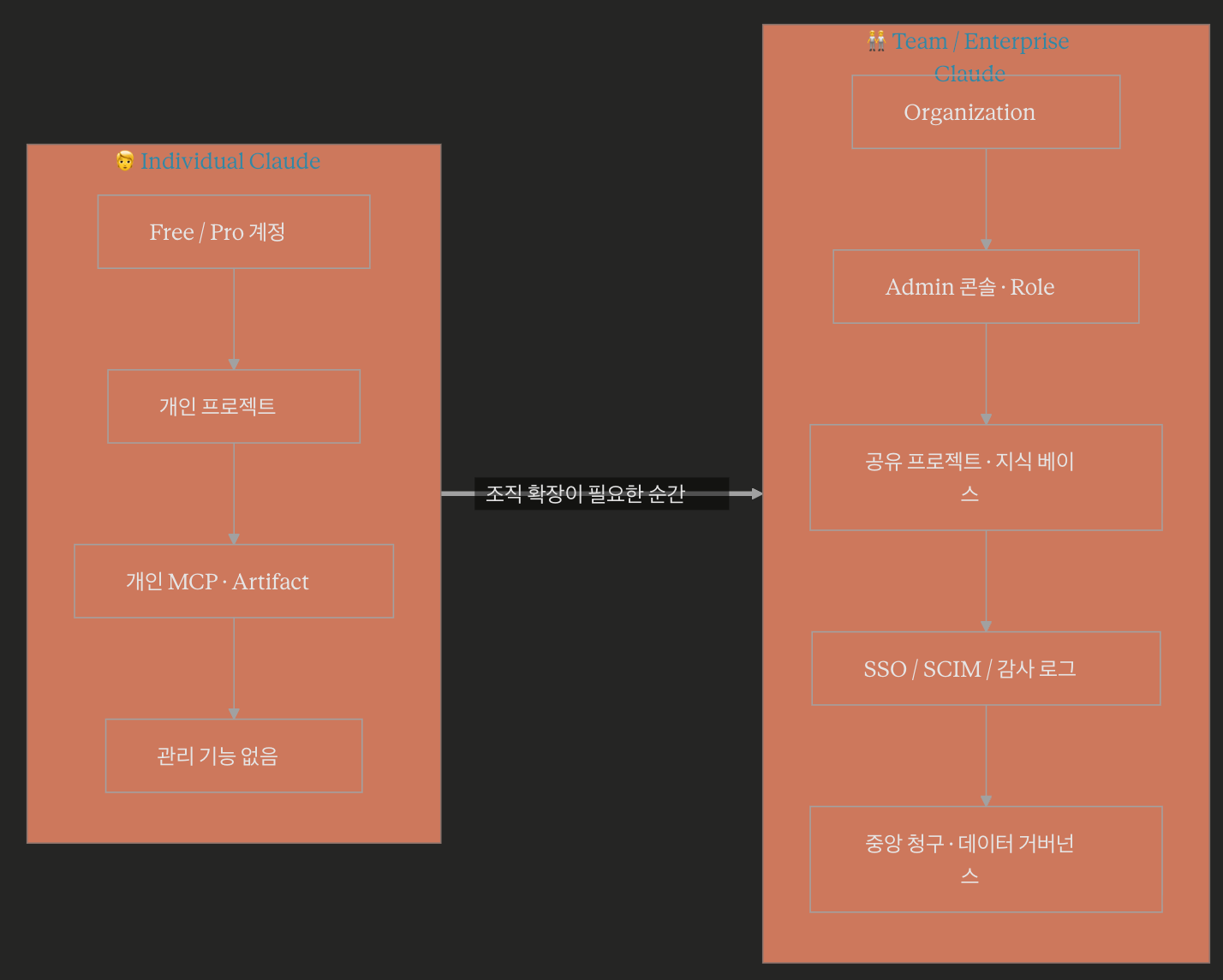
Key Differences — At a Glance
Dividing it into three axes makes it clear.
1) Sharing & Collaboration
- Individual: My projects, my conversations, my knowledge only
- Team: Share projects with team members, build an organizational common knowledge base
2) Management & Security
- Individual: One account, no management features
- Team: Admin console, add/delete users, assign roles, SSO/SAML (Enterprise), audit logs (Enterprise)
3) Data Protection
- Common: Anthropic generally does not use user conversations for model training
- Team/Enterprise: Additionally, centralized data governance, retention policy adjustments possible (varies by plan)
Individual — When is it sufficient?
For freelancers, solo planners, students, and professionals primarily using it for “their own work,” Pro is sufficient.
- Analyzing long documents, coding assistance, drafting proposals alone
- Completing workflows solely with projects, Artifacts, and MCP settings accumulated in one’s own account
- When you want to quickly pay and use it without separate administrator approval
The limitations are clear. You cannot directly reuse excellent prompts or knowledge bases created by colleagues in the same company. Ultimately, it becomes AI utilization dependent on “individual skill.” Since results are determined by the proficiency of individual members rather than team quality, you hit a wall when trying to scale it across the entire organization.
Team — When is it absolutely necessary to switch?
From an organizational perspective, if any of the following three signals appear, it’s time to switch to Team:
- Company secrets, customer data, or code have started to be put into Claude → Audit logs and account control are essential.
- Knowledge of “people who use AI well” has started to accumulate within the department → Assetize it with shared projects.
- Payments are being made separately for multiple accounts → Gain cost visibility through centralized billing and settlement.
With the Enterprise plan, “what security teams demand” such as SSO/SAML, SCIM-based automatic account provisioning, Domain Capture, advanced audit logs, and data retention control are fully added. In regulated industries (finance, healthcare, public sector), it’s often impossible to even consider adoption without these features.
Structural Differences — Looking Inside
An individual account is literally “one person’s workspace.” Conversations, projects, Custom Instructions, and connected MCP servers are all tied to that one person.
A Team account is different. Users (Workspace Members) are placed on top of an Organization container, and Shared Projects are arranged below it. In other words, the “organization,” not the “person,” becomes the subject of licenses and data. If an employee leaves, account deactivation and transfer of work ownership are possible. It’s not shadow IT, but a proper SaaS governance structure.
⚠️ Common Misconceptions and Cautions
- “Can’t I just buy multiple Pro accounts?” → While technically possible, lack of account management ultimately leads to shadow IT. Problems arise the moment an employee leaves.
- “If I use Team, will Anthropic train with my data?” → The policy is that user data is generally not used for model training, but you must reconfirm the latest terms and conditions. It’s standard practice to verify this with a DPA (Data Processing Agreement) during the security review phase.
- “Individual Pro has more features?” → Most features are provided identically. The difference lies in the “layer of use: alone or as an organization.”
- “Does Team have a minimum number of users?” → Yes, it does. Generally, Team plans have a minimum seat requirement, and Enterprise plans are handled through separate sales consultations. Always check the latest conditions before adoption.
⏱️ Usage Limits — The Real Differentiating Factor
Many people stop at “Pro and Team Standard seats have almost the same features?” But there’s a point where the difference becomes very noticeable as you use it: usage limits.
Anthropic’s officially stated multipliers are as follows:
- Pro — Baseline (1x)
- Team Standard Seat — 1.25 times more session usage than Pro
- Team Premium Seat — 6.25 times more session usage than Pro
In other words, even within the same Team plan, there’s a distinction between “Standard” and “Premium.” A Standard seat is “a bit more generous” than Pro, while a Premium seat is an entirely different class.
Two Windows for Limits
Limits aren’t applied in just one place. Two windows operate simultaneously.
First, the 5-hour rolling session. The limit accumulates for 5 hours from the moment the first message is sent. For reference, Pro is known to have a limit of approximately 40-45 messages per 5 hours, based on industry observation. However, Anthropic does not publicly state “exactly how many” messages, as the consumption per message can vary significantly depending on conversation complexity, attachment size, and the model used (Opus or Sonnet).
Second, the Weekly Cap. This upper limit was added in mid-2025. It resets 7 days after the session starts, and there are separate overall model caps and Opus-specific caps. Premium seat users receive a separate “overall cap + Sonnet-specific cap” structure here.
If either of these two windows fills up first, it stops there. Even if you send fewer messages within 5 hours, if the weekly cap is reached first, that week is over.
Team Limits are “Per Individual”
This part is important. The limits for Team plans are not a shared pool for the entire team, but rather individually allocated per seat.
- Even if colleague A uses up their limit → my limit is not affected
- Even if I exhaust my weekly cap → the entire team does not stop
The perceived experience is closer to “multiple individual Pro accounts neatly bundled together.” Instead, it comes with shared projects and Admin features on top.
So, what should I buy?
Here’s the one-line guideline:
- If you’re using it alone → It’s correct to go up in the order of Pro → Max. Team Standard has a minimum requirement of 5 seats, making it inefficient for “individuals who only want to increase their limit.”
- If you’re collaborating with a team (TAs, students, colleagues) → The default is Team Standard, and a hybrid approach of mixing in Premium seats for heavy users (e.g., developers running Claude Code, large document analysis specialists) is realistic.
In summary, the limit size is in the order of Pro < Team Standard < Max < Team Premium. Plan selection should first determine “alone or team,” then decide on Premium based on “are there heavy users?”
⚠️ One more thing — Anthropic frequently adjusts limits.
The weekly limit was first introduced in July 2025, and since then, the exact number of “messages” has been quietly adjusted. This change occurred as workloads requiring thousands of tokens per call, like Claude Code, increased.
Therefore, stating “X messages as of today” is a dangerous number to embed in a blog post. It’s recommended to check the official pricing page and Help Center again before adoption.
Selection Criteria — Just Answer These Questions
Let’s ask three questions in order.
- Does the data I put into Claude contain company secrets? → If Yes, Team or higher.
- Do I want to reuse the same prompts and knowledge with colleagues? → If Yes, Team.
- Is SSO, audit logs, or DLP integration required by regulations/internal policies? → If Yes, Enterprise.
If the answer to even one of these three questions is Yes, staying on an Individual plan is not “cost saving” but “risk accumulation.”
✅ Summary
- Individual is “my personal productivity tool,” Team is “an organization’s AI productivity platform.”
- The moment company data enters Claude, it is a principle to move to Team/Enterprise from a security perspective.
- If you want to turn individual “AI know-how” into an organizational asset, shared projects are not an option but a necessity.
- Next steps: When you integrate the Admin console structure, SSO integration, and MCP-based team common connectors, “Team Claude” truly begins to shine.
Leave a Reply