“I’ve launched containers, but how do I manage them?”
— A common concern for developers new to AWS
🎯 What this article covers
- Key concepts and architectural differences between ECS and EKS
- Pros, cons, and cost structures of each service
- Example infrastructure configuration code (Task Definition, Helm Chart)
- Selection criteria by team size and workload
- Pitfalls to consider during migration
📌 Introduction / Background
As container technology has become widespread, the question “how to stably operate multiple containers” has emerged. Installing only Docker on a single server is only feasible in a development environment; for actual production, orchestration — that is, a tool that automatically handles container deployment, scaling, and fault recovery — is necessary.
In AWS, two main services handle this role:
- 🟠 Amazon ECS (Elastic Container Service): AWS’s self-developed container orchestrator
- 🔵 Amazon EKS (Elastic Kubernetes Service): Managed Kubernetes service provided by AWS
Both services share the goal of “running containers on a cluster,” but their philosophies and operational methods are completely different. In this article, we will thoroughly explore these differences.
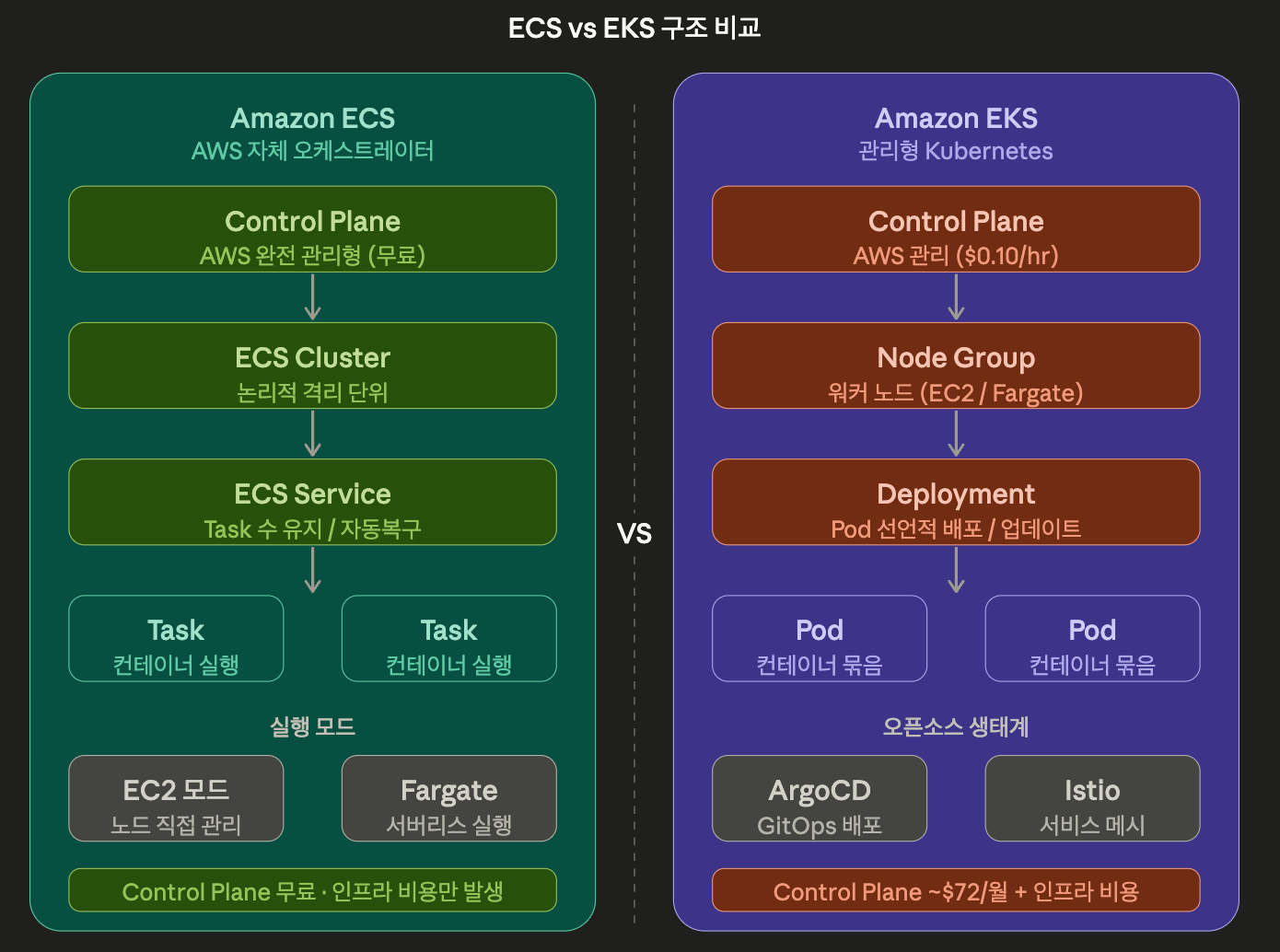
🔍 What is ECS? — AWS’s proprietary solution
Core Structure
ECS is a container platform developed independently by AWS. It is designed to be usable without any knowledge of Kubernetes, and most tasks can be performed using only the AWS console.
The core components of ECS are as follows:
| Component | Description |
| Task Definition | Container execution specification. Defines image, CPU/memory, environment variables, etc. |
| Task | Actual container instance running based on Task Definition |
| Service | Maintains a specified number of Tasks and handles automatic recovery/scaling |
| Cluster | Logical isolation unit where Tasks and Services run |
Two Execution Modes
ECS supports two modes depending on where containers are executed.
1️⃣ EC2 Mode: Directly provision EC2 instances and run containers on them. User is responsible for node management.
2️⃣ Fargate Mode: Serverless. No need to provision EC2; AWS automatically runs containers based on your definition. The most ECS-like usage.
ECS Task Definition Example
{
  "family": "web-app",
  "networkMode": "awsvpc",
  "requiresCompatibilities": ["FARGATE"],
  "cpu": "512",
  "memory": "1024",
  "containerDefinitions": [
    {
      "name": "web",
      "image": "123456789.dkr.ecr.ap-northeast-2.amazonaws.com/web:latest",
      "portMappings": [
        {
          "containerPort": 80,
          "protocol": "tcp"
        }
      ],
      "environment": [
        {
          "name": "APP_ENV",
          "value": "production"
        }
      ],
      "logConfiguration": {
        "logDriver": "awslogs",
        "options": {
          "awslogs-group": "/ecs/web-app",
          "awslogs-region": "ap-northeast-2",
          "awslogs-stream-prefix": "ecs"
        }
      }
    }
  ]
}
💡 When using the awsvpc network mode, each Task is assigned an ENI (Elastic Network Interface) and gets an independent IP within the VPC. Security groups can be applied at the Task level, which is advantageous for security.
🔍 What is EKS? — Kubernetes on AWS
Why is Kubernetes so popular?
Kubernetes (K8s) is an open-source orchestrator inspired by Google’s internal system Borg. Since its open-source release in 2014, it is now managed by the CNCF (Cloud Native Computing Foundation) and has become the de facto standard for cloud-native applications.
EKS is a managed service that provides Kubernetes on AWS. AWS manages the Control Plane (master nodes), while users operate the worker nodes (EC2 or Fargate).
EKS Core Components
| K8s Resource | Role |
| Pod | Smallest execution unit of containers (a group of one or more containers) |
| Deployment | Declarative deployment and update management of Pods |
| Service | Provides a stable network endpoint for Pods |
| Namespace | Logical isolation unit within the cluster |
| ConfigMap / Secret | Manages configuration values and sensitive information separately |
| HPA | Automatic horizontal scaling of Pods based on load |
EKS Deployment Example
# deployment.yaml
apiVersion: apps/v1
kind: Deployment
metadata:
  name: web-app
  namespace: production
spec:
  replicas: 3  # Maintain 3 Pods
  selector:
    matchLabels:
      app: web
  template:
    metadata:
      labels:
        app: web
    spec:
      containers:
        - name: web
          image: 123456789.dkr.ecr.ap-northeast-2.amazonaws.com/web:latest
          ports:
            - containerPort: 80
          resources:
            requests:
              cpu: "250m"      # 0.25 vCPU
              memory: "256Mi"
            limits:
              cpu: "500m"
              memory: "512Mi"
          env:
            - name: APP_ENV
              value: "production"
---
# service.yaml
apiVersion: v1
kind: Service
metadata:
  name: web-service
  namespace: production
spec:
  selector:
    app: web
  ports:
    - port: 80
      targetPort: 80
  type: ClusterIP
HPA (Horizontal Pod Autoscaling) Configuration
apiVersion: autoscaling/v2
kind: HorizontalPodAutoscaler
metadata:
  name: web-hpa
  namespace: production
spec:
  scaleTargetRef:
    apiVersion: apps/v1
    kind: Deployment
    name: web-app
  minReplicas: 2
  maxReplicas: 10
  metrics:
    - type: Resource
      resource:
        name: cpu
        target:
          type: Utilization
          averageUtilization: 70  # Scale out when CPU exceeds 70%
⚖️ ECS vs EKS Key Comparison
| Item | ECS | EKS |
| Learning Curve | ⭐⭐ (Low) | ⭐⭐⭐⭐ (High) |
| AWS Dependency | Strong (AWS-specific) | Low (Multi-cloud capable) |
| Control Plane Cost | Free | Approx. $0.10/hour (~$72/month) |
| Ecosystem | AWS service-centric | CNCF Open Source Ecosystem |
| Customization | Limited | Highly flexible |
| Operational Complexity | Low | High |
| Fargate Support | Full support | Limited support |
| Multi-cloud | ❌ | ✅ |
| Service Mesh | App Mesh integration | Free choice of Istio, Linkerd, etc. |
| RBAC | IAM-based (Simple) | K8s RBAC + IAM (Granular) |
—
💡 Which one should I choose? — Practical Selection Criteria
When ECS is suitable ✅
- Teams primarily using the AWS ecosystem: Integrates naturally with ELB, CloudWatch, and IAM.
- Small teams or startups: When there is no dedicated Kubernetes operations staff.
- Fast time-to-market is a priority: When you want to deploy containers immediately without a steep learning curve.
- Serverless-oriented architecture: When you want to minimize infrastructure management by combining with Fargate.
- Operating only on AWS: When there are no plans to migrate to other clouds.
When EKS is suitable ✅
- Multi-cloud or hybrid strategy: When you want to operate in the same way as GKE or AKS.
- Complex microservices: When you need to precisely manage dozens to hundreds of services.
- Dedicated DevOps/SRE team: When you have professional staff to operate Kubernetes.
- Leveraging the open-source ecosystem: When actively utilizing Istio, ArgoCD, Prometheus, Grafana, etc.
- Granular resource management: When you need to precisely tune CPU/memory requests and limits at the Pod level.
💰 Understanding Cost Structure
ECS Costs
The ECS Control Plane itself is free. Costs arise from the infrastructure you run.
- EC2 Mode: Cost of the EC2 instances you use
- Fargate Mode: Billed per second based on vCPU and memory usage
Fargate 요금 예시 (서울 리전 기준):
- vCPU: $0.04048 / vCPU-hour
- Memory: $0.004445 / GB-hour

0.5 vCPU + 1GB 메모리 Task를 한 달 실행 시:
약 $0.04048 × 0.5 × 720 + $0.004445 × 1 × 720
= $14.57 + $3.20 ≈ 월 $17.77
EKS Costs
EKS incurs separate Control Plane costs.
EKS 클러스터 기본 요금:
- Control Plane: $0.10/시간 = 약 월 $72

+ 워커 노드(EC2 또는 Fargate) 비용
+ 로드밸런서, NAT Gateway 등 부가 인프라 비용
⚠️ For small services, the EKS Control Plane cost ($72/month) might be a burden. However, for large-scale services, this amount becomes a tiny fraction of the total infrastructure cost.
💻 Practical Deployment Flow Comparison
ECS + Fargate Deployment (AWS CLI)
# 1. Push image to ECR
aws ecr get-login-password --region ap-northeast-2 |
  docker login --username AWS --password-stdin
  123456789.dkr.ecr.ap-northeast-2.amazonaws.com

docker build -t web-app .
docker tag web-app:latest 123456789.dkr.ecr.ap-northeast-2.amazonaws.com/web-app:latest
docker push 123456789.dkr.ecr.ap-northeast-2.amazonaws.com/web-app:latest

# 2. Register Task Definition
aws ecs register-task-definition
  --cli-input-json file://task-definition.json

# 3. Create Service (Fargate)
aws ecs create-service
  --cluster my-cluster
  --service-name web-service
  --task-definition web-app:1
  --desired-count 2
  --launch-type FARGATE
  --network-configuration "awsvpcConfiguration={subnets=[subnet-xxx],securityGroups=[sg-xxx],assignPublicIp=ENABLED}"
EKS Deployment (kubectl)
# 1. Configure kubeconfig
aws eks update-kubeconfig
  --region ap-northeast-2
  --name my-eks-cluster

# 2. Push ECR image (Same as ECS)

# 3. Deploy K8s resources
kubectl apply -f deployment.yaml
kubectl apply -f service.yaml

# 4. Check deployment status
kubectl rollout status deployment/web-app -n production

# 5. Check Pod list
kubectl get pods -n production -o wide
⚠️ Cautions / Common Mistakes
Common Mistakes in ECS
1. Confusing Task Role and Execution Role 🚨
Task Execution Role: ECS가 ECR에서 이미지를 pull하고 CloudWatch에 로그를 쓰는 권한
Task Role:          컨테이너 내 애플리케이션이 AWS API를 호출하는 권한

둘 다 필요하지만 목적이 다릅니다!
2. Not configuring EFS mount for Fargate: When deploying stateful applications to Fargate without persistent storage, data will be lost.
3. Not configuring Service Discovery: In microservice communication, if hardcoded IPs are used, connections will break when Tasks restart. Use AWS Cloud Map or Service Connect.
Common Mistakes in EKS
1. Not setting Resource Requests/Limits 🚨
# ❌ This allows unlimited use of node resources
containers:
  - name: web
    image: my-app:latest

# ✅ Must specify
containers:
  - name: web
    image: my-app:latest
    resources:
      requests:
        cpu: "100m"
        memory: "128Mi"
      limits:
        cpu: "500m"
        memory: "512Mi"
2. Not applying IRSA (IAM Roles for Service Accounts): When Pods use AWS services, using the node’s IAM Role directly violates the principle of least privilege. Grant independent permissions per Pod with IRSA.
3. Not configuring etcd encryption: Secret resources are by default stored in etcd as Base64 encoded (not encrypted!). You must enable Envelope Encryption when creating an EKS cluster.
✅ Summary / Conclusion
ECS vs EKS, ultimately it’s not about “which is better” but “which is right for our team.”
| Situation | Recommendation |
| AWS-only, small team, fast time-to-market | ECS + Fargate |
| Multi-cloud, large-scale microservices | EKS |
| Learning Kubernetes | EKS (Connects to practical skills) |
| Minimize operational burden | ECS + Fargate |
In practice, it’s common to use both services in combination. For example, simple batch jobs might run on ECS, while complex microservice groups run on EKS.
For the next steps, we recommend learning about EKS cluster automation with Terraform, GitOps deployment using ArgoCD, and node autoscaling with Karpenter. 🚀
Leave a Reply