“A secret known by two is no secret.”
— But what if thousands of users need to trust each other?
KDC makes that impossible possible.
<
>>

What This Article Covers
- What KDC (Key Distribution Center) is and why it’s needed
- The roles of the two core modules that make up KDC: AS and TGS
- The difference between the three types of keys managed by KDC (master key, session key, ticket)
- Mastering the ticket-based key distribution flow in 5 steps
- Common KDC pitfalls and security principles encountered in practice
Introduction — Why Do We Need KDC?
Let’s imagine a company with 1,000 employees. How many secret keys would be needed for all employees to communicate securely with each other? The answer is approximately 499,500 (n×(n-1)/2). How would you issue, renew, and revoke all of these? It’s enough to make you sigh.
The most elegant solution to this problem is the KDC (Key Distribution Center). The KDC acts as a “central trusted secret repository,” enabling two parties to establish a secure communication channel even when they meet for the first time. This is the core of the familiar Kerberos authentication system, the mechanism internally run by Active Directory, and the standard for authentication in cloud and big data platforms (Hadoop, Spark, etc.).
What is KDC? — The Center of Trust
KDC, as its name suggests, is a “central server that distributes keys.” All users and services pre-register their secret keys (master keys) with the KDC, and whenever they need to communicate with someone else, they ask the KDC, “Please enable me to talk securely with them.”
KDC consists of two main services:
| Component | English | Role |
| Authentication Server | AS (Authentication Server) | Verifies who the user is and issues the first ticket (TGT) |
| Ticket Granting Server | TGS (Ticket Granting Server) | Issues service tickets used for actual service access |
The reason for separating authentication and ticket issuance is simple: to use the user’s password (master key) as little as possible. The idea is to use the password only once a day, and thereafter use a temporary ID (TGT) instead.
️ Three Keys Handled by KDC
To understand KDC’s key management, it’s essential to clearly distinguish between the types of keys.
1. Master Key (Long-term Key)
This is a permanent secret key created when a user or service registers with the KDC. It’s usually generated from a hash of the user’s password.
- Lifespan: Valid until password change (several months to years)
- Storage Location: KDC’s database + user’s own memory
- Important Principle: Never travels over the network. The master key is used only for “encrypting other keys.”
2. Session Key
This is a one-time symmetric key used by two parties for short-term communication. The KDC generates a new one each time.
- Lifespan: Typically 8-10 hours (adjustable by policy)
- Characteristic: Newly generated each time, so exposure has limited impact
- Advantage: Enables secure communication between two parties without directly exposing the master key
3. Ticket
This is an encrypted access pass issued by the KDC. It contains a session key, user information, and validity period.
- TGT (Ticket Granting Ticket): A ticket submitted to the TGS. Issued by the AS.
- Service Ticket: A ticket submitted to the actual service server. Issued by the TGS.
By analogy, a TGT is an “amusement park admission ticket,” and a Service Ticket is a “ride pass for each attraction.” Once you have an admission ticket, you can enjoy various rides all day without re-authentication.
KDC Key Distribution Flow — Mastering 5 Steps
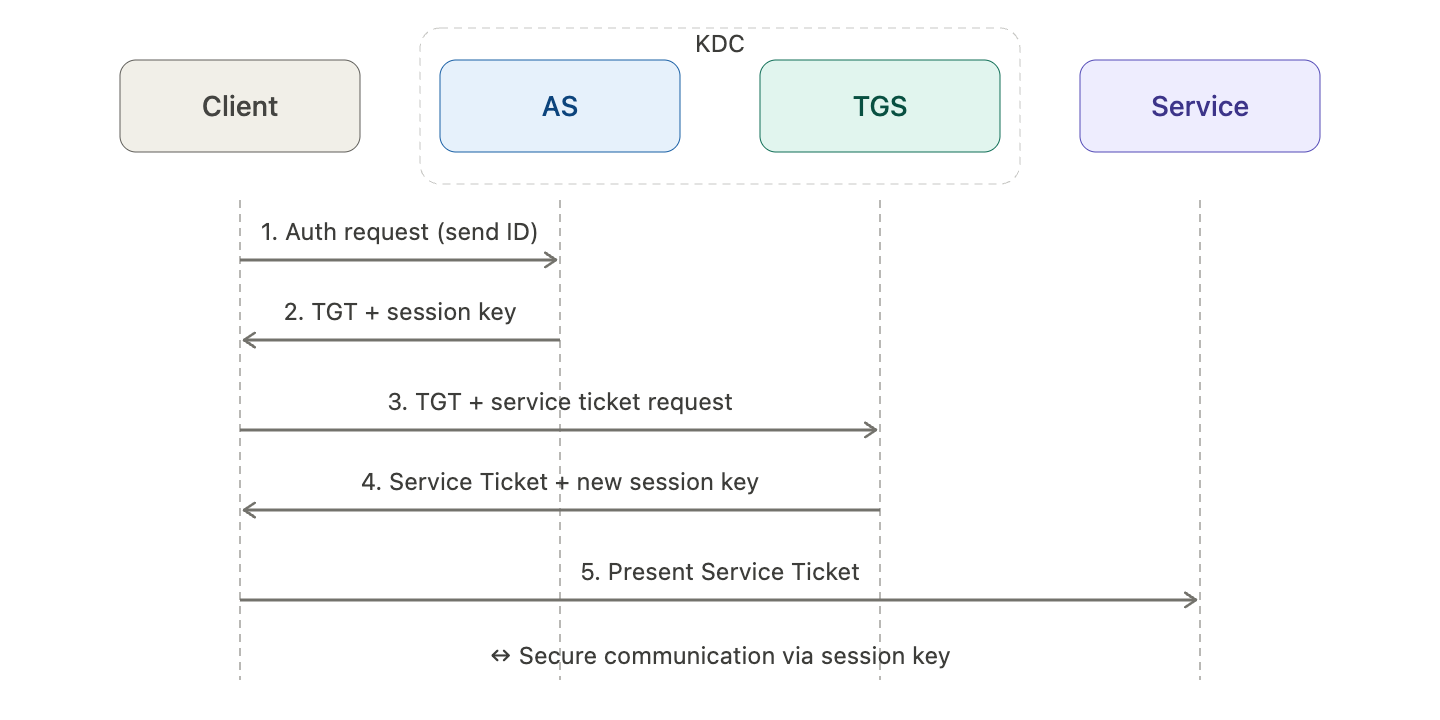
Now for the really interesting part. What happens between the user and the KDC when a user accesses a service? Let’s follow along with the diagram below. (The diagram is at the bottom of the main text.)
[Step 1] User → AS: Authentication Request The user (Alice) sends her ID in plaintext to the AS. She does not send her password. From this point, KDC’s sophisticated design shines.
[Step 2] AS → User: TGT + Session Key The AS responds by creating two things:
- TGT: Encrypted with TGS’s master key so only the TGS can decrypt it.
- Session Key (for Alice ↔ TGS): Encrypted with Alice’s master key and enclosed.
Alice uses her password to derive her master key and decrypt the response. If successful, authentication is complete. At this point, the password has not traveled over the network even once.
[Step 3] User → TGS: Service Ticket Request Now Alice sends the TGT and “which service she wants to access” to the TGS. Since only the TGS can decrypt the TGT, it cannot be tampered with.
[Step 4] TGS → User: Service Ticket + New Session Key The TGS again creates two things:
- Service Ticket: Encrypted with the master key of the target service server.
- New Session Key (for Alice ↔ Service): Encrypted with the existing session key.
[Step 5] User → Service Server: Access Alice presents the Service Ticket to the service server. The service server decrypts the ticket with its master key to obtain Alice’s session key, and now the two can communicate securely.
The core can be summarized in one sentence:
“KDC uses its master key to securely implant a common session key into two parties who have never met.”
️ KDC Key Management Security Principles
There’s a reason KDC has survived for over 30 years. It’s thanks to the following principles:
- Master Key Non-Transmission Principle: The master key is never transmitted, not even between the KDC and the client. It is used only for encrypting other keys.
- Session Key Transience: Session keys have a short lifespan and are automatically discarded upon expiration. This minimizes the impact of key exposure.
- Timestamp-based Replay Prevention: All messages include a timestamp (Authenticator) to prevent replay attacks, where someone intercepts and retransmits packets.
- Ticket Self-Sufficiency: Service servers can validate tickets using only their master key, without having to ask the KDC every time. This distributes the load on the KDC.
- Symmetric Key Efficiency: Uses symmetric key algorithms like AES-256 for fast encryption/decryption.
⚠️ Cautions — Common Pitfalls When Operating KDC
When operating KDC (especially in Kerberos/AD environments) in practice, you will inevitably encounter these issues:
- Single Point of Failure (SPOF) Trap: If the KDC goes down, all authentication is paralyzed. It must be configured with master KDC + slave KDC for redundancy.
- Clock Skew Issue: Due to timestamp verification, if the time difference between the client and KDC exceeds 5 minutes (default), authentication will fail. NTP server synchronization is essential.
- Offline Dictionary Attack Possibility: A weak password’s master key can be guessed offline from intercepted responses. Strong password policy + Pre-authentication activation is required.
- Kerberoasting Attack: Attacks targeting weak service account passwords are very common in practice. Service accounts are recommended to use random passwords of 30+ characters or gMSA (group Managed Service Account).
- Ticket Lifetime Management: Setting the TGT lifetime too long increases the risk if it’s stolen. Limiting it to typically within 10 hours is standard.
✅ Summary — What to Remember About KDC
KDC’s key management can ultimately be summarized in three lines: “Hide the master key, frequently rotate session keys, and delegate with tickets.” It’s a sophisticated design that allows two parties who have never met to immediately begin secure communication, without ever exposing the user’s password on the network.
For the next learning steps, we recommend these topics:
- Thoroughly read Kerberos 5 RFC 4120 — it contains all the protocol details.
- Analyze the KDC implementation in Active Directory — most commonly encountered in practical environments.
- PKINIT Extension — a method for AS authentication using certificates instead of passwords.
- Kerberos in Cloud Environments — how AWS Managed AD and Azure AD DS work.
Next time, a good topic to continue with would be “Kerberoasting and Golden Ticket Attacks — Real-world Attack Scenarios Targeting KDC.”
Leave a Reply