“Using Terraform with AI” has now become commonplace.
However, which AI you use it with determines the outcome.
The newcomer Kiro, nurtured by AWS, and,
the versatile powerhouse Claude Code, chosen by developers worldwide.
Who would be a better partner for Terraform?
>

What this article covers
- Fundamental philosophical differences between Kiro and Claude Code (Spec-driven vs Prompt-native)
- Their respective Terraform integration methods (Kiro Powers vs MCP Server)
- Trade-offs between AWS native integration vs multi-cloud/vendor-neutrality
- Selection guide by practical scenario
- Common pitfalls when writing AI-based IaC
Why this comparison is important now
Just 1-2 years ago, writing Terraform was an arduous task: opening Registry documents, sifting through official module READMEs, and verifying version compatibility in old blog posts. However, by late 2025, the landscape has completely changed.
AWS officially launched an AI-based IDE called Kiro, and at re:Invent 2025, partnered with HashiCorp to unveil Terraform Power. Concurrently, Anthropic’s Claude Code, integrated with HashiCorp’s official Terraform MCP Server, evolved beyond simple code auto-completion into an agent that interacts with the Registry API in real-time.
In other words, we’ve entered an era where the option of “writing Terraform with AI” has split into two paths. If you fail to determine which one suits your team, initial productivity might increase, but long-term maintenance costs could rise.
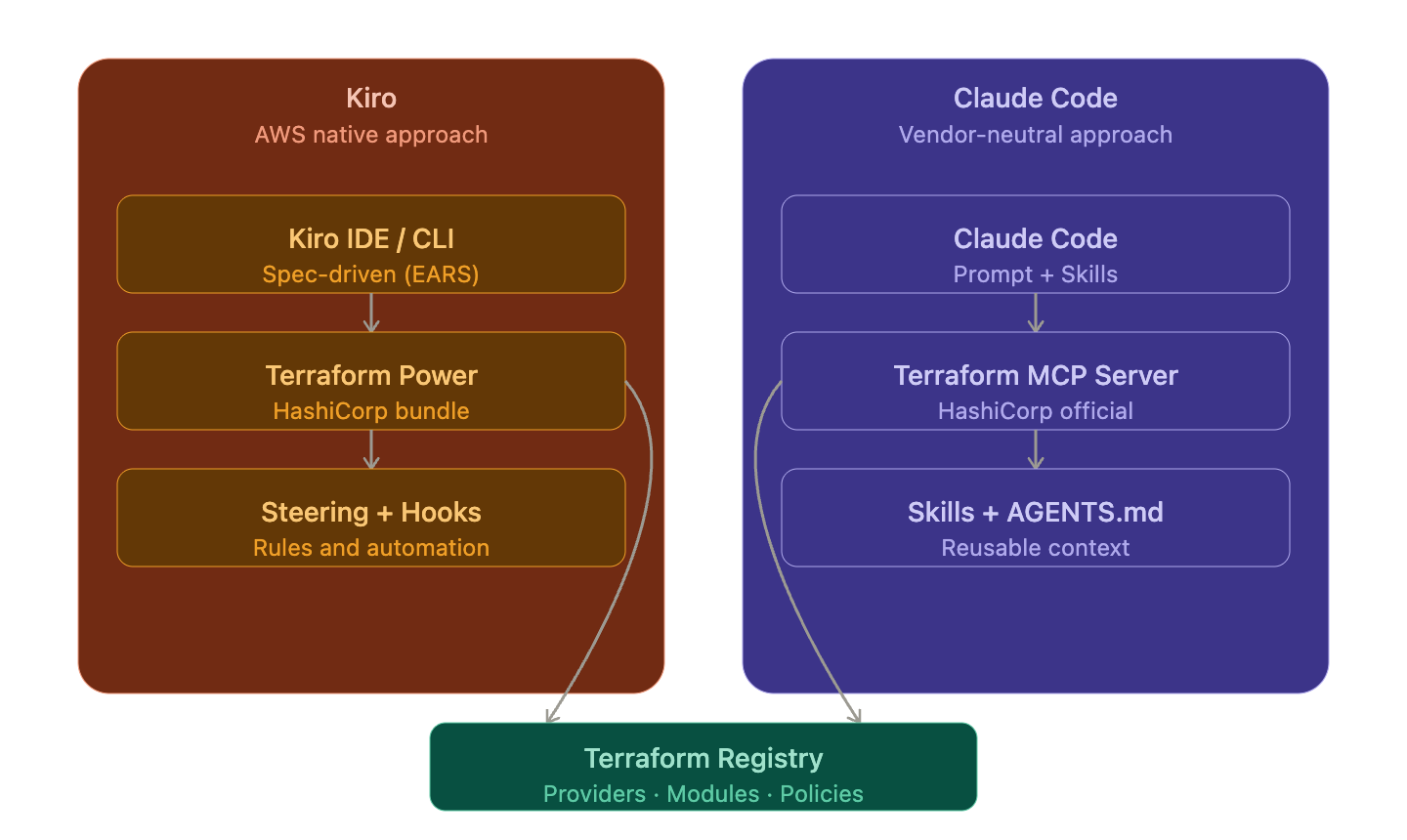
Kiro — An “Spec-driven” IDE Designed Directly by AWS
Kiro’s Identity
Kiro is an agentic AI IDE (+CLI) introduced by AWS in the summer of 2025. Its most significant feature is Spec-driven Development, meaning it automatically generates specifications in three stages—Requirements → Design → Tasks—before coding, and executes them after user review. Requirements are written using the official notation called EARS Notation.
Simply put, it’s a structure that maintains the benefits of Vibe coding (coding by intuition) while preventing AI from running wild in complex projects by using specifications as a fence.
Kiro’s Terraform Integration Method — “Powers”
Kiro features a unique extension mechanism called Powers. A Power bundles an MCP server, steering files (guidelines), and hooks (automation tasks) into a single package. When Terraform Power, with HashiCorp as a direct launch partner, is installed, it automatically activates only when words like “Terraform” or “infrastructure” appear in the conversation.
The advantages of this structure are clear:
- Token/Context Saving: Specialized knowledge is loaded only when needed.
- Deep AWS Ecosystem Integration: Native integration with AWS Cost Optimization Hub, Cost Explorer, IAM, Bedrock, and MCP servers.
- Consistent Governance: Organization rules like “Lambda uses ARM64 Graviton, S3 defaults to Intelligent-Tiering” are permanently stored in Steering files.
When Kiro Shines
When undertaking legacy modernization projects in an AWS environment, Kiro analyzes existing codebases and generates IaC (CloudFormation/CDK/Terraform) according to organizational preferences. Internally, it orchestrates EKS/ECS MCP, Cost MCP, Diagram MCP, and more, making it a Swiss Army knife for “AWS-only teams.”
Claude Code — Vendor-Neutral, Flexible Generalist Powerhouse
Claude Code’s Identity
Claude Code is an agentic coding tool based on Anthropic’s Claude model. It supports terminal CLI, VS Code/JetBrains plugins, GitHub Actions, and Slack integration. While Kiro emphasizes “specs first,” Claude Code is closer to
“flexible exploration through natural language conversation”
.
Recently, a feature called Skills was added, allowing Claude to automatically load and follow best practices for specific domains (e.g., Terraform, HCP Terraform). While functionally similar to Kiro’s Powers, its design is more open.
Claude Code’s Terraform Integration Method — “MCP Server + Skills”
By connecting HashiCorp’s officially maintained Terraform MCP Server to Claude Code, Claude directly interacts with the Terraform Registry API. The setup is simple:
# Register Terraform MCP Server with Claude Code
claude mcp add terraform -s user -t stdio
  -- docker run -i --rm hashicorp/terraform-mcp-server
If you use HCP Terraform (formerly Terraform Cloud), you can pass the token along:
claude mcp add terraform -s user -t stdio
  -e TFE_TOKEN=your-token-here
  -- docker run -i --rm hashicorp/terraform-mcp-server
With this setup, Claude will query the latest provider versions and schemas in real-time during subsequent conversations to write code. This significantly reduces issues like using resource arguments that disappeared due to learning data cutoffs or frequently using deprecated syntax.
Simple Prompt Example
Using the latest AWS provider, generate a Terraform module named `vpc_subnet`
that creates a VPC with a configurable CIDR, a variable number of public and
private subnets, NAT gateways per AZ, route tables, and outputs the VPC ID
and subnet IDs. Use official HashiCorp modules where possible.
Claude uses the MCP to check the latest usage of the official terraform-aws-modules/vpc/aws module from the Registry and generates a scaffold based on it. Additionally, it can easily integrate with other MCPs for security checks (Checkov, tfsec) or GitHub Actions, making it strong in multi-tool orchestration.
When Claude Code Shines
- Multi-cloud (AWS + Azure + GCP) or hybrid cloud environments
- Teams that want to maintain their existing VS Code/JetBrains/terminal-centric workflows
- Teams that want to integrate Claude Code into GitHub Actions to run agentic workflows like “weekly Provider update detection”
⚖️ Head-to-Head Comparison Table
| Item | Kiro | Claude Code |
| Developer | AWS | Anthropic |
| Core Philosophy | Spec-driven (EARS Notation) | Prompt-native + Skills |
| Primary Interface | Standalone IDE + CLI | Terminal CLI + VS Code/JetBrains Plugin |
| Terraform Integration | Terraform Power (HashiCorp Official Bundle) | Terraform MCP Server + Terraform Skill |
| Cloud Affinity | AWS Native (EKS/ECS/Cost MCP etc. built-in) | Vendor Neutral (AWS/Azure/GCP equally supported) |
| Governance Storage | Steering File (Permanent Rules) | AGENTS.md, Skill File |
| Automation Hooks | Hooks (fmt/lint/scan auto-execution) | GitHub Actions-based Agentic Workflow |
| Learning Curve | Requires familiarity with spec stages | Easier entry, closer to general chat |
| Offline/Air-gapped | Limited | Limited (MCP can run locally with Docker) |
—
Same Task, Different Approaches — “ECS Fargate + ECR” Deployment Scenario
Workflow in Kiro
- Natural language request in chat window → Requirements.md automatically generated with EARS notation
- After review and approval, Design.md is created (reflecting HashiCorp official module usage, etc.)
- Execute tasks divided into Tasks.md one by one or in bulk
- Hooks automatically run terraform fmt, tfsec, checkov
"terraform-infra 디렉터리에 멀티 아키텍처 Docker 이미지를 빌드해
ECR에 푸시하고, ECS Fargate로 프론트/백엔드 2티어를 배포하는 스펙을 만들어줘.
kreuzwerker/docker와 aws provider를 사용하고, 백엔드는 Task Role로
Secrets Manager에서 OpenAI API 키를 읽게 해줘."
Workflow in Claude Code
- Register Terraform MCP + AWS Diagram MCP in .mcp.json
- Natural language prompt → Claude queries Registry and immediately writes HCL
- If necessary, feed terraform plan execution results back to Claude → iterative modification
- Integrate Claude Code into GitHub Actions workflow for PR-based review automation
Both approaches yield excellent results. The difference lies in whether you want to “leave structured deliverables (spec/requirements/tasks) for the organization” vs. “take the shortest path through quick conversation and iteration.”
⚠️ Precautions / Common Mistakes
1. Do not apply AI-generated IaC as-is
Especially in cases where Kiro’s Vibe mode was used experimentally, there have been reports of a request like “Deploy a Hello World container” transforming into a production-grade EKS cluster costing $150-200 per month. AI’s “helpful defaults” can be fatal to your bill.
2. MCP servers should be local-only as a principle
The HashiCorp Terraform MCP Server officially warns
“never use with untrusted MCP clients or LLMs”
in its documentation. Exposing Terraform state or TFE tokens to an untrusted remote MCP endpoint means your infrastructure keys are compromised instantly.
3. Do not put credentials in Steering/Skill files
While it’s an advantage that AI can permanently remember rules, inadvertently including passwords or API keys means they will follow the context forever. Only record references to Secrets Manager/SSM Parameter Store.
4. Balance between AI dependency and engineering capability
The state of “I don’t know why the VPC Claude generated works well” is a seed of disaster. AI is a force-multiplier, not a substitute for architectural understanding. Especially for junior engineers, thoroughly reviewing specifications/generated code and incorporating it into the learning loop is essential.
✅ Summary / Conclusion
To conclude, neither one is absolutely superior. The selection criteria are simple:
- If your entire organization is on AWS and you want to leave spec-driven deliverables → Kiro
- If you are multi-cloud/hybrid or want to maintain existing VS Code/GitHub Actions workflows → Claude Code
- If you want to enforce security and governance rules at an organizational level → Kiro’s Steering + Hook combination is advantageous
- If you want to integrate agentic automation (e.g., weekly Provider update detection) into CI → Claude Code + GitHub Actions
Personally, I use both tools not as exclusive choices but as complementary tools. I entrust Kiro with initial design and spec drafts, and hand over actual module refactoring, multi-cloud bridging, and CI automation to Claude Code.
Ultimately, what AI has changed is not Terraform itself, but “where engineers spend their time.” We can delegate memorizing syntax and checking versions to AI, and focus on architectural decisions and cost/security reviews. That is the new way of working for IaC engineers in 2026.
Leave a Reply