The most expensive tool is not always the best tool.
The tool you use every day in the field is the best tool.
>

What this article covers
- 5 free web scanners most used in practice as of 2026
- Strengths, limitations, and real-world usage scenarios for each tool
- Examples of executable commands you can copy and use immediately
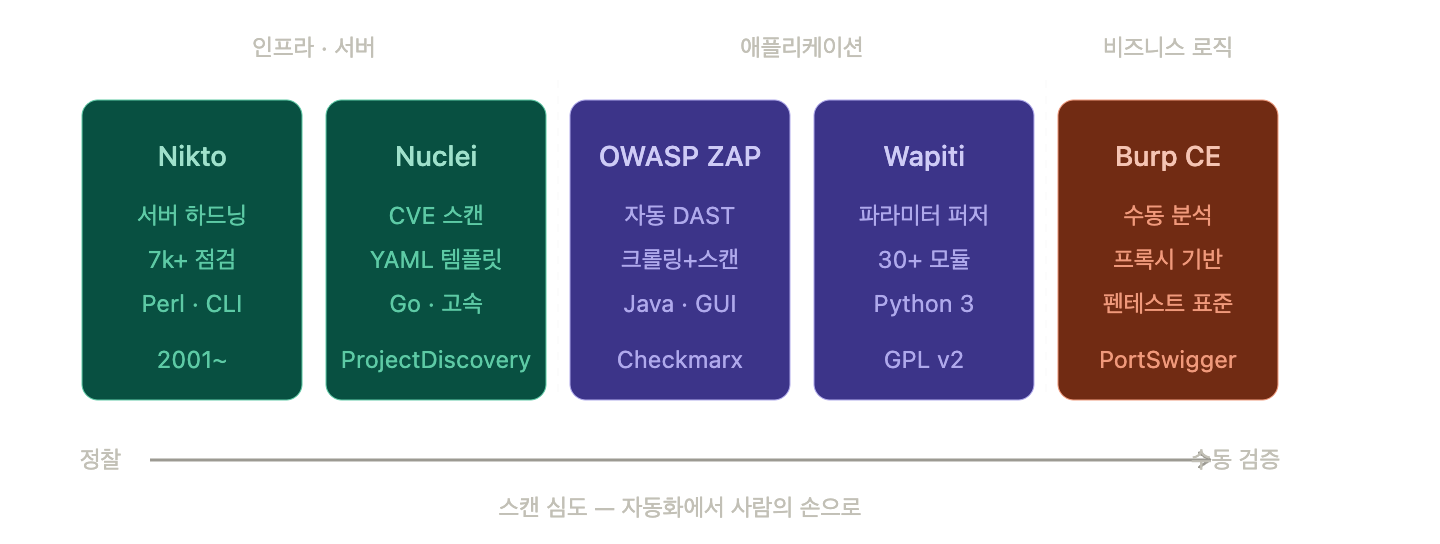
- How to combine these five tools to achieve coverage comparable to commercial products
Why “Free Scanners” now?
With the cloud, API, and SaaS era in full swing, web applications are the very front door of enterprises. Dozens of new CVEs are disclosed daily, and even classic vulnerabilities like SQL injection, XSS, and SSRF still bring down perfectly sound companies. However, commercial DAST licenses easily exceed tens of millions of won annually, posing a significant financial burden for startups and learners.
Fortunately, free tools from the open-source community are no longer just for “hobbies.” Independent benchmarks show that ZAP’s detection rate, based on standard vulnerability classes, remains within a 10-15% difference compared to commercial tools. This means that with the right combination, practical-level scanning is possible with zero budget.
1. OWASP ZAP (ZAP by Checkmarx) — The DAST Throne
At a Glance
- License: Apache 2.0 (Completely free, including commercial use)
- Language: Java
- Type: DAST + Intercepting Proxy
- Platform: Windows / macOS / Linux / Docker
ZAP was transferred from OWASP to the Software Security Project (SSP) in 2023, and in September 2024, its core development team joined Checkmarx, leading to it also being known as “ZAP by Checkmarx.” While many users were concerned by rumors of a change in ownership, the promise remains that the community edition is fully free without feature restrictions, and ZAP Desktop, CLI, and Docker images are all free.
Why #1?
It supports both proxy mode and automated scan mode. It offers an experience similar to Burp Suite Pro, yet is 100% free. It includes automated vulnerability scanning, passive and active scanning, spidering, fuzzing, REST API for CI/CD integration, and a plugin ecosystem, covering everything from individual learning to enterprise pipelines. With the 5.3.0 release in February 2026, SPA support has significantly improved, with enhancements like JSON-RPC scanning, a rewritten Modern AJAX Spider that understands SPA frameworks, and DOM XSS sink detection.
Quick Start
# Docker Baseline Scan (Simplest)
docker run -t ghcr.io/zaproxy/zaproxy:stable zap-baseline.py
  -t https://example.com

# Full Automated Scan + HTML Report
docker run -v $(pwd):/zap/wrk/:rw -t ghcr.io/zaproxy/zaproxy:stable
  zap-full-scan.py -t https://example.com -r report.html
Drawbacks
Being Java-based, it consumes a fair amount of memory. For full Client-Side Rendering (CSR) applications, there are some omissions compared to commercial scanners. Initial tuning is required to integrate it into a CI pipeline.
2. Nuclei — The Template Revolution
At a Glance
- Creator: ProjectDiscovery
- Language: Go (Speed shines)
- Type: Template-based CVE & Misconfiguration Scanner
- Core: YAML Templates + Parallel Scanning
Created by ProjectDiscovery, Nuclei is a fast and flexible scriptable scanner specialized in automation through template-based detection. Written in Go, it can send hundreds of requests per second while consuming minimal resources. The community YAML templates number in the thousands, and new CVE detection templates are often uploaded within hours of a CVE’s disclosure. As of 2026, it is virtually the standard for “quickly finding assets exposed to the latest CVEs.”
Strengths
- Overwhelming speed (Go + Concurrency)
- CVE disclosure → Template registration within hours
- Ability to write custom templates for organization-specific checks
- Excellent compatibility with Docker and GitHub Actions
Quick Start
# Installation
go install -v github.com/projectdiscovery/nuclei/v3/cmd/nuclei@latest

# Update Templates
nuclei -update-templates

# Apply Critical/High-Risk CVE Templates to a Single Target
nuclei -u https://example.com -t cves/ -severity critical,high

# Batch Scan Asset List
nuclei -l targets.txt -rate-limit 150 -o nuclei_report.txt
Drawbacks
Nuclei does not crawl and relies on template-based target scanning. This means you need to provide URLs directly or feed it a list collected by other tools. Therefore, the combination of ZAP (crawling, endpoint discovery, fuzzing) and Nuclei (known CVE and misconfiguration detection) is considered the most effective pairing in 2026.
3. Nikto — The 22-Year Veteran’s Consistency
At a Glance
- Creator: Chris Sullo (2001~)
- Language: Perl
- Type: Web Server Hardening Scanner
Born in 2001, this tool is still pre-installed in Kali Linux. Nikto acts as a server hardening checker, examining over 7,000 types of outdated server software, dangerous default files, and common misconfigurations. In other words, it checks the “door security” at the server level, not the application logic.
Strengths
- Checks over 7,000 dangerous files, settings, and default paths
- Extremely simple to install and run
- Provides results within 5 minutes during the external reconnaissance (Recon) phase
Quick Start
# Pre-installed in Kali. Otherwise apt / brew
nikto -h https://example.com

# Force SSL + HTML Report
nikto -h https://example.com -ssl -o nikto_report.html -Format html

# Run Specific Tuning Options Only (9: SQL Injection, 4: File Inclusion)
nikto -h https://example.com -Tuning 9,4
Drawbacks
It does not test application logic, does not perform crawling or form interaction, and has a high false positive rate. So, as long as you remember that “Nikto is the start, not the end,” it remains a powerful opening pitcher.
4. Wapiti — The Python Fuzzer Standard
At a Glance
- License: GPL v2
- Language: Python 3 (3.12 / 3.13 / 3.14)
- Type: Black-box Fuzzing DAST
- Attack Modules: 30+
Wapiti is a command-line black-box fuzzer that crawls deployed web applications without reading source code, extracts links and forms, and then sends attack payloads via GET/POST parameters, cookies, and HTTP headers. Its 30+ attack modules cover injection flaws, known CVEs like Log4Shell, Spring4Shell, and Shellshock, server misconfigurations, and also scans APIs by reading Swagger/OpenAPI specifications.
Strengths
- Easy to customize due to the Python ecosystem
- Supports OpenAPI-based API scanning
- Clean for integration into CI pipelines
Quick Start
# Installation (Python 3.12+)
pip install wapiti3

# Basic Scan
wapiti -u https://example.com

# Run SQLi, XSS, XXE Modules Only
wapiti -u https://example.com --module sql,xss,xxe

# API Scan based on OpenAPI Specification
wapiti -u https://api.example.com --swagger openapi.json
Drawbacks
Wapiti supports headless Firefox, but its SPA handling is limited compared to ZAP or Burp. The lack of a GUI can be a barrier for beginners, but it’s cleaner from an automation perspective.
5. Burp Suite Community Edition — The Standard for Manual Testing
At a Glance
- Creator: PortSwigger
- Type: Intercepting Proxy-based Manual Analysis Tool
While Burp Suite Pro is virtually the industry standard, the Community Edition also offers core manual testing features like request interception, Repeater, Decoder, and Comparer, all for free. Although it lacks an automated scanner, the assessment that Burp Suite remains the most widely recognized tool for advanced manual web application penetration testing is still valid in 2026.
Strengths
- The most frequently used tool by OSCP holders, bug bounty hunters, and professional penetration testers
- Unparalleled freedom in request manipulation
- Rich community extensions (BApp Store)
Drawbacks
No automated vulnerability scanning. It has speed limitations (throttling), making it slower than Pro. Project saving is not possible, making session continuation cumbersome. Nevertheless, for “moments when I want to find vulnerabilities with my own brain,” it’s still the top choice.
How to combine the five tools
The combination formula that works in practice in 2026 is roughly as follows:
- Quickly review server-level issues with Nikto in 5 minutes (exposed .git, default admin paths, old Apache versions, etc.)
- Perform crawling + passive/active scans with OWASP ZAP (SQLi, XSS, session, headers)
- Precisely target the latest CVEs and misconfigurations with Nuclei
- Further reinforce with parameter fuzzing using Wapiti
- Manually verify business logic vulnerabilities missed by automated scanners with Burp Suite Community
Even just running this sequence properly can cover over 80% of what a single commercial DAST product achieves for small to medium-sized web assets.
⚠️ Precautions
- Unauthorized scanning is illegal. Under domestic information and communication network laws, unauthorized scanning of another’s system alone can be subject to punishment. Use only with written consent, SOW, or within the scope of an official bug bounty program.
- Direct scanning of production networks is a last resort. Scanners intentionally generate abnormal traffic. This can lead to DB locks, session floods, WAF blocking, or service outages. Prioritize staging or mirror environments.
- False positives are normal. All DAST tools produce false positives. An alarm from a scanner is “the starting point for manual verification,” not the conclusion of a report.
✅ Summary
These free tools should absolutely not be underestimated. A setup centered around ZAP and Nuclei, supported by Nikto, Wapiti, and Burp Community, creates surprisingly broad coverage even with a zero-budget constraint. What’s important is not “which tool is the best,” but the ability to understand what each tool excels at and combine them effectively.
In the next article, I will cover a practical recipe for integrating these five tools into a CI pipeline automatically using GitHub Actions.
Leave a Reply