“Scaling up in 0 seconds, scaling down in 5 minutes.”
We delve into why Kubernetes HPA intentionally introduces a delay in scale-down operations.
What this article covers
- Why HPA was designed with asymmetric scaling for Scale Up and Scale Down
- Real-world problems that arise without a stabilization window — flapping, cold starts, lingering requests
- How to tune K8s HPA v2 using the behavior field in practice
- Why other clouds like AWS Auto Scaling Group and GCP MIG follow the same philosophy
Introduction — “Traffic decreased, but why aren’t the pods decreasing?”
This is a scene that anyone who has operated HPA for the first time has probably experienced.
When traffic spikes momentarily, HPA rapidly increases pods. New pods appear in less than 10 seconds. However, once the traffic subsides, the pods do not decrease for a considerable time. The question “CPU usage has already dropped, so why isn’t this guy budging?” naturally arises.
To get straight to the point, this is not a bug. Kubernetes designers intentionally put a brake on the scale-down speed. On the contrary, this ‘slow reduction’ is a defense line that protects services from numerous failures.
Core Concept — Asymmetric Scaling
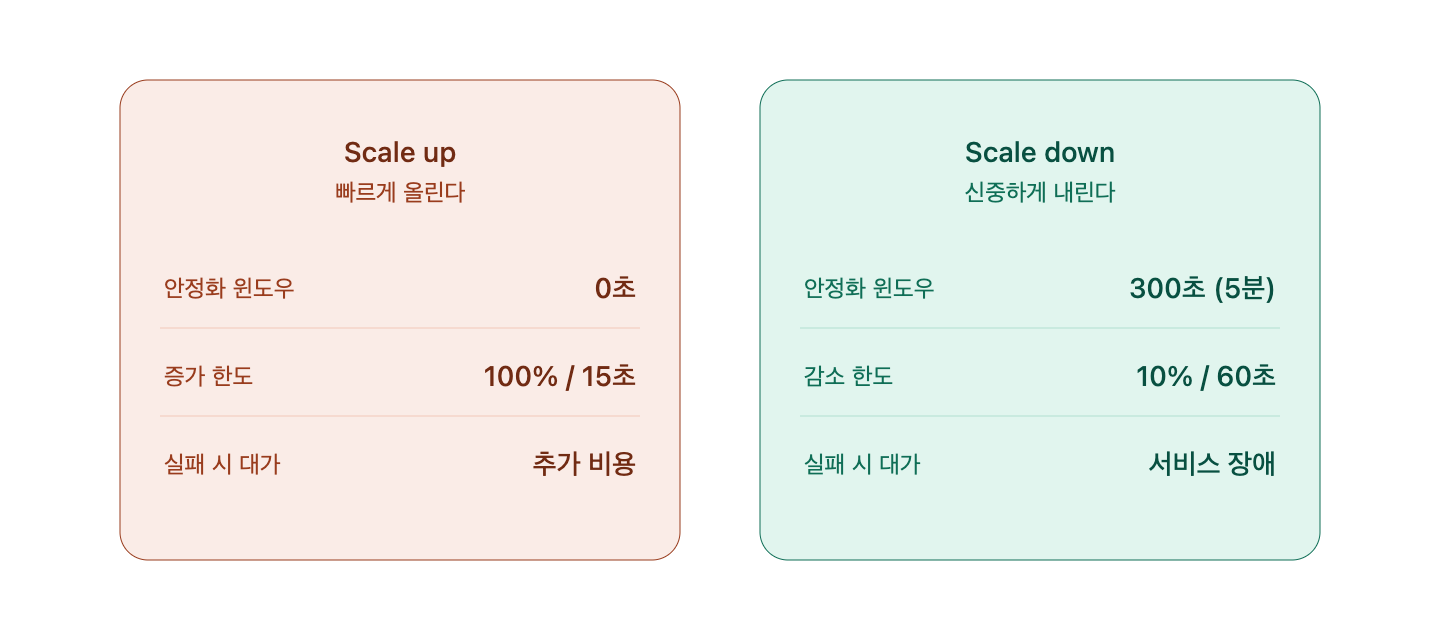
Auto-scaling fundamentally follows the asymmetric principle of “scale up quickly, scale down slowly.” This is not unique to Kubernetes. AWS Auto Scaling Group’s cooldown, GCP MIG’s stabilization period, and Azure VMSS’s cooldown all stand on the same philosophy.
The weight of scale-up vs. scale-down decisions
The cost of failure for these two decisions is completely different.
- When a scale-up decision is wrong: A few extra pods are running → slight cost waste
- When a scale-down decision is wrong: Traffic surges immediately after reducing pods → service outage, customer churn, SLA violation
The former hurts the wallet, the latter collapses the business. This asymmetric risk is the basis for asymmetric scaling.
Kubernetes default settings
- –horizontal-pod-autoscaler-downscale-stabilization: Default 5 minutes (300 seconds)
- Scale Up stabilization window: Default 0 seconds (immediate)
A whopping 300x difference. This number was not set lightly but is an experience gained from countless failure cases.
Why introduce a delay — 5 structural reasons
1️⃣ Preventing Flapping
Traffic moves like waves. It’s common for services to experience requests surging and subsiding every 30 seconds. If scale-down were immediate, this would happen:
- Traffic decreases → 2 pods scaled down
- 30 seconds later, traffic increases again → 3 pods scaled up
- Decreases again → scaled down…
This endless loop is called flapping or thrashing. It not only wastes cluster resources but also causes the ‘lingering request’ problem to erupt simultaneously as pods are continuously created/deleted.
2️⃣ Handling Lingering Requests (Graceful Shutdown)
Taking down a pod is different from deleting a file. That pod is still processing requests at this very moment.
- Completion of responses for ongoing HTTP requests
- Waiting for DB transaction commits
- Receiving results from external API calls
- Propagation delay until the pod is removed from service endpoints
Kubernetes ensures this time through terminationGracePeriodSeconds (default 30 seconds). However, if HPA decides to scale down every 5 seconds, pods will always end their lives in a Terminating state. Users would then see 5xx errors.
3️⃣ Cold Start Cost
One might think, “How long could it take for a pod to start?” but in reality, it’s quite long.
- Image Pull: Several seconds to tens of seconds (depending on image size)
- Container Start: 1-5 seconds
- Application Initialization: Often 10+ seconds for JVM-based applications
- Readiness Probe Pass: Additional several seconds
- Total: From a short 15 seconds to over a minute
To bring up a pod that was scaled down, this entire time must be paid. Can the remaining pods withstand the traffic during that time? Response delays often spike or timeouts occur during cold starts.
4️⃣ Maintaining a Warmed-Up State
This is a frequently overlooked point. A live pod is not just “a process in memory.”
- JVM JIT Compilation: Frequently called methods are compiled into native code
- DB Connection Pool: Pre-opened TCP connections are secured
- OS Page Cache: Frequently read files are loaded into memory
- Application Internal Cache: Session information, query results, etc.
When a pod is scaled down, all these warmed-up assets are lost. Newly launched pods will receive requests in a slow state for a while, which directly leads to p99 latency spikes.
5️⃣ Filtering Metric Noise
CPU usage or request counts can spike momentarily. A single garbage collection or batch job can significantly fluctuate the numbers.
If you immediately scale down based on a 5-second metric decrease, you are actually reacting to noise. By having a 5-minute observation window, such momentary fluctuations can be averaged out to determine the true trend of traffic decrease.
Actual Configuration — HPA v2 behavior tuning
From Kubernetes HPA v2, this asymmetry can be finely adjusted using the behavior field.
apiVersion: autoscaling/v2
kind: HorizontalPodAutoscaler
metadata:
  name: my-app-hpa
spec:
  scaleTargetRef:
    apiVersion: apps/v1
    kind: Deployment
    name: my-app
  minReplicas: 2
  maxReplicas: 20
  metrics:
    - type: Resource
      resource:
        name: cpu
        target:
          type: Utilization
          averageUtilization: 60
  behavior:
    scaleUp:
      stabilizationWindowSeconds: 0      # Instant scale-up
      policies:
        - type: Percent
          value: 100                      # Allow up to 100% increase at once
          periodSeconds: 15
    scaleDown:
      stabilizationWindowSeconds: 300    # Scale down after 5 minutes of observation
      policies:
        - type: Percent
          value: 10                       # Decrease by a maximum of 10% at once
          periodSeconds: 60
Let’s break down the key points.
- scaleUp.stabilizationWindowSeconds: 0 — Don’t hesitate when scaling up
- scaleDown.stabilizationWindowSeconds: 300 — Observe for 5 minutes when scaling down
- scaleDown.policies.value: 10 — Never scale down by more than 10% at once
For real-time services with high traffic variability (streaming, gaming, ad bidding, etc.), increasing stabilizationWindowSeconds to 10 minutes or more is a common practical choice.
⚠️ Cautions / Common Mistakes
- Do not shorten the stabilization window based solely on cost. The cost of a single outage often exceeds a week’s worth of instance costs.
- Do not forget Graceful Shutdown settings. If terminationGracePeriodSeconds and preStop hooks are not appropriate, request loss will occur no matter how slowly you scale down.
- Scale-down policies based on Percent are safer than absolute pod values. When there are few pods, percentage-based policies act more conservatively, protecting minimum availability.
- KEDA, Karpenter, etc., follow the same philosophy. This is a ‘principle of auto-scaling,’ not specific to a tool. Cluster Autoscaler also waits for a default 10-minute unused period during scale-down.
- Use with PodDisruptionBudget. Policies must be aligned so that pods HPA intends to scale down do not conflict with pods PDB intends to protect.
✅ Summary
| Axis | Scale Up | Scale Down |
| Speed | Fast (0 seconds) | Slow (300+ seconds) |
| Decision Criteria | Sensitive | Conservative |
| Cost of Failure | Cost | Outage |
| Core Philosophy | Prioritize survival | Only scale down when certain |
The asymmetric design of autoscalers is not merely a technical choice but an engineering philosophy reflecting the asymmetry of failure. The design stems from the bitter experience that a mistake in scaling up is forgivable, but a mistake in scaling down can bring down the entire service.
As a next step, I recommend exploring how Cluster Autoscaler / Karpenter work in concert with HPA, and techniques for ensuring minimum availability during scale-down with PodDisruptionBudget.
“Fast expansion and cautious contraction” — this single line is the invisible breakwater that protects the stability of cloud operations.
Leave a Reply