“Analyze this authorized penetration test scenario,” I typed, and Claude politely refused.
This was a task that worked perfectly fine until yesterday. Could there be a more frustrating moment for a security professional?
What this article covers
- The identity of Anthropic’s real-time cyber safeguards introduced in 2026
- The critical difference between Prohibited Use and High-Risk Dual Use
- Cyber Verification Program (CVP) application process and approval notification method
- Why approval is tied to an Organization ID, not an email
- 5 common pitfalls for security professionals
Why did it suddenly start blocking?
In April 2026, Anthropic fully implemented real-time cyber safeguards on its most powerful Claude models (e.g., Opus 4.7). As models become smarter, the potential for their misuse also increases. This is the background behind Claude, which used to freely assist with everything from penetration test analysis to exploit writing, suddenly starting to refuse answers with a “Potential Usage Policy Violation” message.
An interesting fact is that this policy is retroactively applied. Tasks that worked well on Opus 4.6 might also be subject to blocking after April 16th. This is why GitHub issues flooded in, reporting that even researchers working with authorization documents for official bug bounty programs attached as context were blocked.
So, what should those performing legitimate security work do? Anthropic’s official workaround is the CVP (Cyber Verification Program).
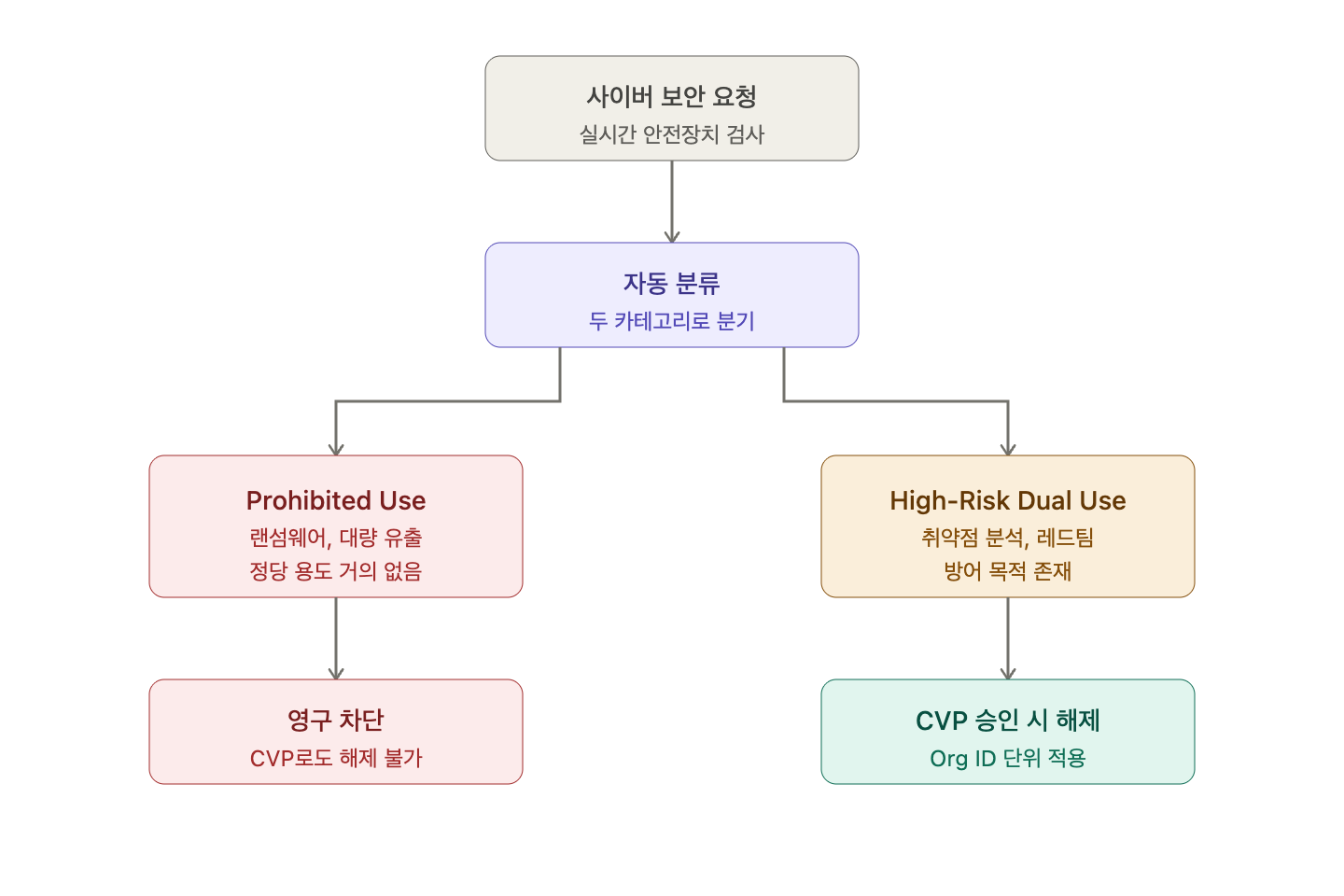
Two Faces of Blocking — Prohibited vs High-Risk Dual Use
To understand CVP, you first need to distinguish between the two categories Anthropic blocks. There’s a critical difference between them.
| Category | Prohibited Use | High-Risk Dual Use |
| Definition | Activities almost always misused with little legitimate defensive purpose | Activities with legitimate defensive purposes but can also be used for attacks |
| Examples | Ransomware code development, large-scale data exfiltration | Vulnerability exploit analysis, attack tool development (for red teams) |
| Upon CVP Approval | Still blocked | Can be unblocked |
The core point is clear. CVP is not a universal pass. Inherently malicious tasks like ransomware creation will never be unblocked, even with approval. CVP specifically unblocks the “Dual Use” area, which includes gray areas like penetration testing, vulnerability research, and red teaming activities.
CVP Application — Organization ID is Key
Here’s where the most common misunderstanding arises. Many people think that “approval is tied to my Claude account email.” Incorrect. CVP approval is tied to an Organization ID.
The application process is as follows:
- Log in to claude.ai and navigate to Settings > Account or Settings > Organization menu.
- Copy the Organization ID displayed on the screen.
- Access the Cyber Use Case Form and enter the following information:
- Name, Affiliated Organization, Business Email (personal domains are not preferred)
- Organization ID
- Applicable category (Authorized Penetration Testing, Red Teaming, etc.)
- Specific blocking examples and use case descriptions
- After submission, receive the review result email within 2 business days.
- Explicitly mention the approved category. “Under Anthropic CVP’s Red Teaming category, please write a simulated phishing campaign script within the approved scope.”
- Also request a defender’s perspective. “How does this exploit work, and how can a defender detect it?”
- Attach authorization documents as context. Providing bug bounty scope documents, contracts, or authorization emails helps clarify the model’s judgment basis.
- CVP only unblocks Dual Use areas. Inherently malicious tasks are strictly prohibited.
- Approval is per Organization ID. The organization ID, not the email account, is key.
- Approval notification is sent to the email provided in the form, arriving within 2 business days.
- Bedrock, Vertex, and ZDR are currently not applicable. Only 1st-party and Foundry are supported.
- Even after approval, providing explicit context is beneficial for the model’s judgment.
The approval result is sent to the email address provided in the form, and there is no separate inquiry page. If you don’t see it in your inbox, be sure to check your spam folder.
⚠️ 5 Pitfalls Security Professionals Often Fall Into
1. “I have a Gmail account; do I need to sign up again with a business email?”
No. Approval is tied to the Organization ID, not the email. Whether it’s a workspace created with a Gmail account or an organization created with a business email, approval will apply if you log in with the Organization ID that matches the one on the application form. However, for communication purposes during application, a business domain email is generally preferred for credibility.
2. “It’s blocked in my personal workspace.”
You are likely working in a different organization than the one that received approval. Claude allows one account to have multiple organizations. Check the organization switching menu in the top left and switch to the organization specified in the approval email.
3. “It doesn’t unblock in Bedrock/Vertex AI.”
CVP only works with Anthropic 1st-party (Claude.ai, Claude Code, Anthropic API) and Microsoft Foundry. AWS Bedrock and Google Vertex AI are currently not covered by CVP.
4. “I have a ZDR (Zero Data Retention) account, but I can’t apply.”
ZDR organizations are not eligible for self-serve CVP applications. If you have a Sales Managed ZDR contract, you should contact your dedicated Anthropic sales representative separately.
5. “It’s still blocked in Claude Code.”
There are reports of CVP working well in the web interface but inconsistently blocking in Claude Code (API path). In such cases, the correct approach is to submit a false positive report via the Appeal Form.
Tips for Effective Use After Approval
Just because you’ve received approval doesn’t mean all prompts will magically pass. The following patterns can be helpful:
✅ Summary
Anthropic CVP is an attempt to find a balance between a more powerful Claude and safe usage. Here’s a summary of the key points:
There’s no need to be frustrated if your security work is blocked. For legitimate defensive purposes, CVP provides unblocking within a reasonable timeframe. Applying for CVP is the first step to making Claude a trusted security partner.
Leave a Reply