Hello! This guide is prepared for those who want to build an advanced cloud-native environment using Argo Workflows and Argo Rollouts.
The Argo ecosystem has various Templates. Each template defines a step in a workflow or verifies the safety of a deployment, performing its unique role. Today, we will delve into four of these templates that are critically important in practice. 🚀
If you only knew Argo as a “container execution tool,” the templates introduced today will broaden your perspective. Shall we explore automated analysis, data processing, and complex container execution one by one? 💡
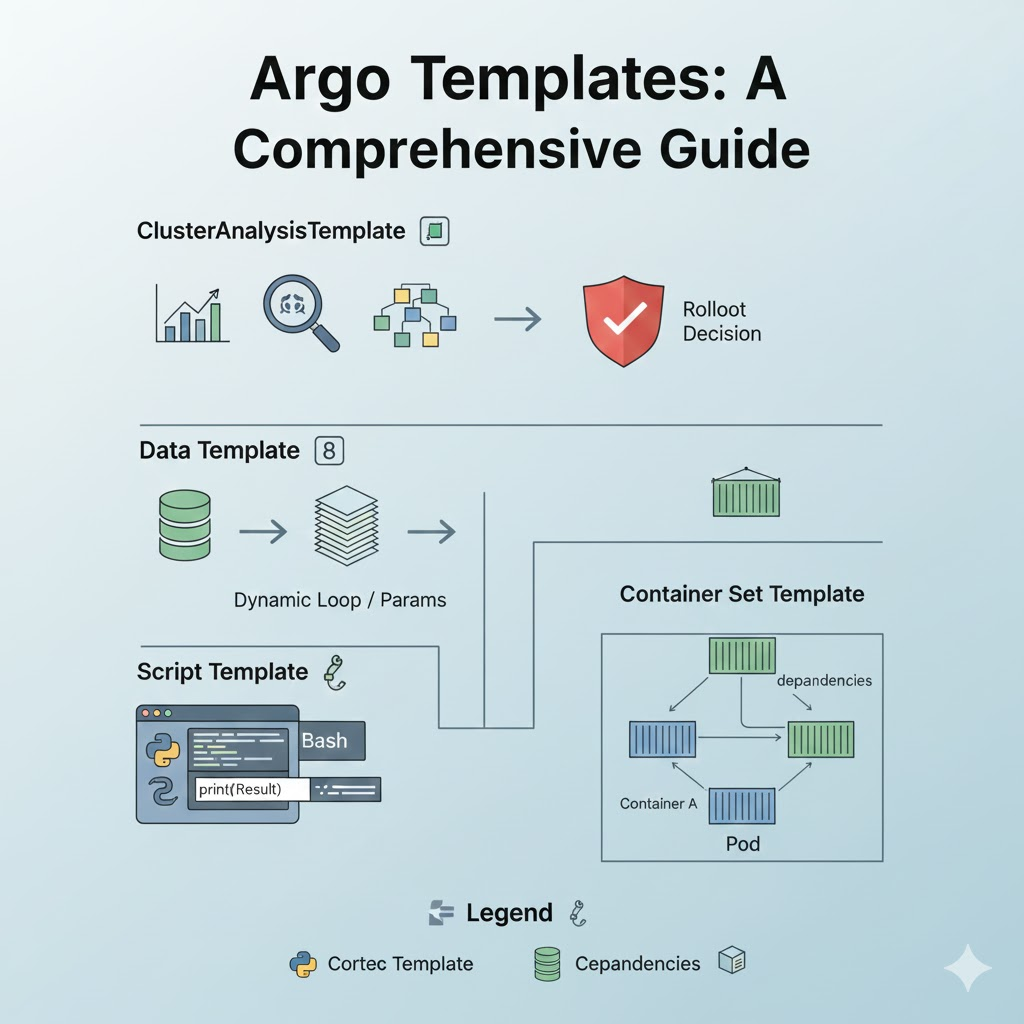
1. 📊 ClusterAnalysisTemplate: A Smart Validator at the Cluster Level
ClusterAnalysisTemplate is a powerful template primarily used in Argo Rollouts. As its name suggests, it defines reusable analysis logic at the ‘cluster-wide’ level.
🧐 Key Features
- Reusability: Can be shared across multiple Rollout resources throughout the cluster, not tied to a specific namespace.
- Metric-based: Queries data from external monitoring systems like Prometheus, Datadog, and New Relic to determine the success of a deployment.
- Automatic Rollback: If the analysis result is deemed a failure (Error/Failure), Argo Rollouts automatically stops the deployment and rolls back to the previous version.
💻 YAML Example and Explanation
YAML
apiVersion: argoproj.io/v1alpha1
kind: ClusterAnalysisTemplate
metadata:
  name: global-error-rate-check  # Name to be called from anywhere in the cluster
spec:
  metrics:
  - name: error-rate
    interval: 1m             # Check metrics every 1 minute
    successCondition: result[0] < 0.01  # Success if error rate is less than 1%
    failureLimit: 3          # Final failure if it fails more than 3 times
    provider:
      prometheus:
        address: http://prometheus.monitoring.svc.cluster.local
        query: |
          sum(rate(http_requests_total{status=~"5.*"}[1m]))
          /
          sum(rate(http_requests_total[1m]))
Tip: Unlike AnalysisTemplate, this template with the Cluster prefix is very useful for creating common monitoring rules with administrator privileges.
2. 🔢 Data Template: The Core of Data-Driven Decision Making
In Argo Workflows, a Data Template is used to read data from external sources (S3, HTTP artifacts, etc.) and utilize it as variables within a workflow or to determine control flow.
🧐 Key Features
- Dynamic Generation: By reading data and combining it with
withParam, you can dynamically loop as many times as there are data items. - Filtering: Excellent at extracting specific values (using JSONPath, etc.) from read JSON data.
💻 YAML Example and Explanation
YAML
- name: data-fetch-example
  data:
    source:
      artifact:
        s3:
          endpoint: s3.amazonaws.com
          bucket: my-bucket
          key: user_list.json  # File containing data to be analyzed
    transformation:
      # Extract only the IDs of 'active' users from JSON data as a list
      jsonPath: "{$.users[?(@.status == 'active')].id}"
3. 📜 Script Template: Python, Bash, Anything You Want
The Script Template is one of the most popular and powerful templates. It is similar to a general Container template, but differs in that you can write the source code directly (Inline) within the YAML.
🧐 Key Features
- Simple Logic Implementation: You don’t need to build a separate Docker image every time; you can load a standard image and modify only the internal script to execute the logic.
- Result Capture: It’s very easy to save the standard output (Stdout) of a script as a variable and pass it to the next step.
💻 YAML Example and Explanation
YAML
- name: generate-report-script
  script:
    image: python:3.9-slim    # Execution environment image
    command: [python]        # Interpreter to use
    source: |                # Source code to execute (Inline)
      import json
      import sys

      # Perform complex calculation logic
      data = {"status": "success", "score": 95}

      # If the result is output to Stdout, Argo captures it as a return value
      print(json.dumps(data))
Caution: If the logic becomes too long, YAML readability decreases, so it’s better to include complex code in an image. ⚠️
4. 📦 Container Set Template (Graph): Orchestration of Composite Containers
The Container Set Template allows you to run multiple containers within a single Pod and define their dependencies.
🧐 Key Features
- More than just a Sidecar: Beyond simply running together, you can create a ‘Pod internal workflow’ where container B runs only after container A finishes.
- Resource Efficiency: Processing multiple tasks on a single Pod node results in lower network latency and efficient resource management.
💻 YAML Example and Explanation
YAML
- name: complex-job-set
  containerSet:
    containers:
    - name: setup
      image: alpine
      command: [sh, -c, "echo 'Initializing...' > /shared/init.txt"]
      volumeMounts:
      - name: workdir
        mountPath: /shared

    - name: main-process
      image: my-app:latest
      dependencies: [setup]  # Runs only if the setup container succeeds
      volumeMounts:
      - name: workdir
        mountPath: /shared

    - name: reporter
      image: curlimages/curl
      dependencies: [main-process] # Runs after main-process
      command: [curl, -X, POST, "http://notify.me"]
💡 Summary and Selection Guide
| Template Type | Primary Use Case | One-liner |
| — | — | — |
| ClusterAnalysis | Deployment stability verification (Rollouts) | “Company-wide common deployment acceptance criteria” |
| Data | Dynamic data processing and loop generation | “A brain that moves according to data” |
| Script | Simple logic and script execution | “A Swiss Army knife used immediately without building” |
| Container Set | Control multiple containers within a Pod | “Collaboration of multiple workers under one roof” |
—
🏁 Conclusion
The Argo ecosystem is vast, but by understanding and combining the characteristics of these four templates, you can implement true GitOps and workflow automation. I recommend starting with the Script Template and gradually expanding to data-driven Data Templates or ClusterAnalysisTemplates for cluster-wide common analysis! 🌟
Leave a Reply