If you’re considering ‘safe deployment’ beyond zero-downtime deployment in a Kubernetes environment, Argo Rollouts’ Analysis feature is not an option, but a necessity.
Today, we will thoroughly analyze the differences between the four core triggers that determine the success or failure of a deployment: Pre/PostSyncAnalysis and Pre/PostPromotionAnalysis, and provide a complete guide on when and how to use each feature. 🚀
The era of pressing the deployment button and praying “please, no problems” is over. Argo Rollouts executes an AnalysisRun at each stage of deployment to check metrics (Prometheus, Datadog, etc.) and automatically approves or rolls back.
Among these, we will delve deeply into the four analysis timings that are particularly easy to confuse.
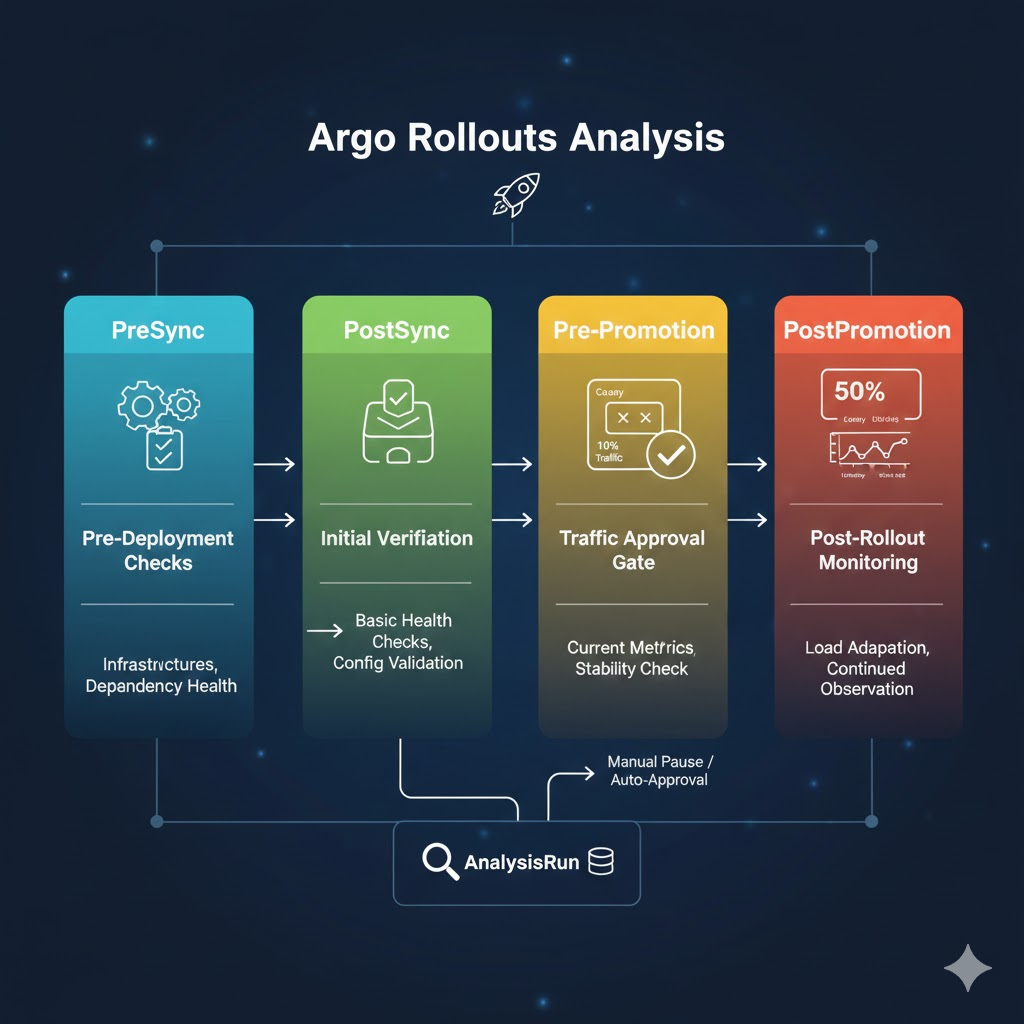
1. Sync and Promotion: Let’s clarify the terms first! 💡
Before we dive into a full comparison, we need to clarify the meaning of these two terms.
- Sync: Refers to the act itself of a user performing `kubectl apply` or a GitOps tool reflecting a new state to the cluster.
- Promotion: Refers to the stage in a Canary deployment where the first step (e.g., 10% traffic) succeeds and moves to the next step (e.g., 50% traffic or full deployment).
2. PreSync & PostSync Analysis: “Monitor the beginning and end of deployment” 🔍
These features primarily operate based on the deployment timing.
① PreSyncAnalysis (Analysis Before Synchronization)
It runs just before a new version of the Pod is created.
- When to use it?
- When checking if the current cluster’s health is ready to accept a new application.
- When checking if external dependencies (DB, API server, etc.) are active.
- Feature: If it fails here, the new version deployment itself will not start.
② PostSyncAnalysis (Analysis After Synchronization)
It runs immediately after new resources are created in the cluster.
- When to use it?
- Immediately after a new version of the Pod becomes Ready, to perform a very basic health check.
- Before significant traffic shifting, to verify that configuration values are correctly applied.
3. PrePromotion & PostPromotion Analysis: “Guard the gateway to success” 🚪
These features are related to step transitions within the deployment strategy.
① PrePromotionAnalysis (Analysis Before Promotion)
It runs just before shifting more traffic to the next stage in a Canary deployment.
- When to use it?
- When asking, “Okay, we’re going from 10% to 50% traffic now, is the 10% traffic data received so far clean?”
- Immediately after a manual pause is released, to automate final verification tasks.
② PostPromotionAnalysis (Analysis After Promotion)
It runs immediately after increasing the traffic weight.
- When to use it?
- Immediately after a significant increase in traffic (e.g., 10% -> 100%), to instantly detect latency or error rates caused by inability to handle the load.
- When monitoring for stability for a certain period after a full promotion.
4. Practical Code Example: Defining a Rollout 💻
To aid understanding, we’ve prepared a Rollout YAML example that includes each analysis stage. Check the comments to see each timing.
YAML
apiVersion: argoproj.io/v1alpha1
kind: Rollout
metadata:
  name: advanced-canary-rollout
spec:
  replicas: 5
  strategy:
    canary:
      # 1. Analysis executed before/after deployment starts (Sync related)
      analysis:
        templates:
          - templateName: cluster-health-check
        # PreSync: Check before deployment starts
        preSync: {}
        # PostSync: Check after deployment resources are created
        postSync: {}

      steps:
        - setWeight: 20
        - pause: {duration: 5m}

        # 2. Analysis executed during stage transition (Promotion)
        - analysis:
            templates:
              - templateName: http-error-rate
            # PrePromotion: Executed just before moving from 20% to 50%
            prePromotion: {}
            # PostPromotion: Executed immediately after moving from 20% to 50%
            postPromotion: {}

        - setWeight: 50
        - pause: {} # Wait for manual approval
        - setWeight: 100
5. Key Summary Table: What to choose? 📊
| Feature | Execution Timing | Main Purpose | Analogy |
| — | — | — | — |
| PreSync | Before deployment starts | Final check of infrastructure/dependencies | “Can we open the stadium gates?” |
| PostSync | Immediately after deployment | Verification of initial environment settings | “Are the players’ uniforms on correctly?” |
| PrePromotion | Before moving to the next stage | Pass/fail judgment based on current traffic data | “We did well in Set 1, shall we go to Set 2?” |
| PostPromotion | After moving to the next stage | Monitoring stability with expanded traffic | “Audience increased, no accidents?” |
—
6. Conclusion: Strategic Analysis Design 🏁
- Most Important: PrePromotionAnalysis. This is because it determines whether to proceed to the next stage based on the results of “testing only a subset of users,” which is the essence of Canary deployment.
- If infrastructure is unstable: Actively use PreSyncAnalysis to block unnecessary deployment attempts.
- If sudden load is a concern: Use PostPromotionAnalysis to respond immediately to traffic spikes.
Now, leverage Argo Rollouts’ Analysis features to build an automated deployment system that you can trust even while you sleep! 🛠️
Tags: ArgoRollouts, Kubernetes, GitOps, CanaryDeployment, AnalysisRun, DevOps, ZeroDowntimeDeployment, Automation, CloudNative, Prometheus
Leave a Reply