Hello! We’re going to dive deep into Argo Events, the core of event-driven automation in the Argo ecosystem.
This post goes beyond simple conceptual explanations, detailing the entire process from event occurrence to actual workflow execution, and even advanced techniques for designing and controlling multiple conditions. It’s a lot of information, so please focus and follow along! 🚀
In modern cloud-native environments, an Event-Driven Architecture that automatically performs tasks in response to specific events (e.g., GitHub push, S3 file upload, message queue reception) is essential. In the Argo project, Argo Events handles this.
Today, we’ll explore the key resources that determine the flow of events and their sophisticated configuration methods.
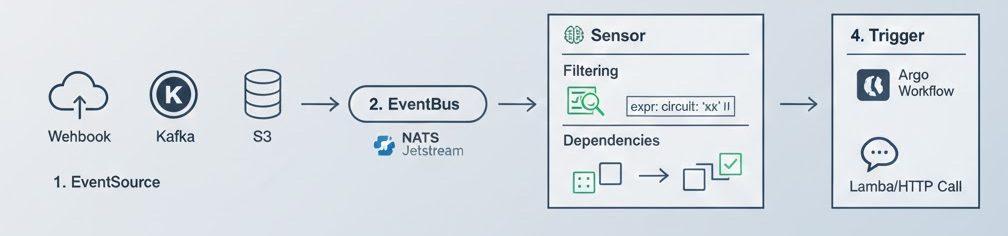
1. 🌊 Workflow Trigger Order: The Journey of an Event
The flow of events in Argo Events is broadly divided into 3 (or 4) stages.
- EventSource: Detects external events. (e.g., Webhook, Kafka, S3, SNS, etc.)
- EventBus: Acts as a transport channel between EventSource and Sensor. It operates based on messaging systems like NATS Jetstream, ensuring reliable event delivery.
- Sensor: Filters and analyzes events delivered via EventBus. It acts as the brain, checking “Are the conditions met?”
- Trigger: Defines the action to be actually performed when all conditions are met. (e.g., executing an Argo Workflow, invoking a Lambda)
2. 🚌 EventBus: The Highway for Events
EventBus is the backbone of the Argo Events infrastructure. In the past, Sensor and EventSource communicated directly, but now EventBus reduces coupling and increases stability.
- Resource Characteristics: * Primarily uses nats options, internally creating high-performance message queues.
- Prevents event loss and ensures order.
YAML
apiVersion: argoproj.io/v1alpha1
kind: EventBus
metadata:
  name: default
spec:
  nats:
    native:
      # Ensure high availability by setting the number of message replicas
      replicas: 3
      # Configure persistent volume for data storage
      auth: token
3. 🧠 Sensor: Sophisticated Filtering and Logic Control
Sensor is the most complex and crucial resource. Beyond simply receiving events, it can be designed to combine multiple events or execute triggers only when specific conditions are met.
🔍 Using Filters and expr (Expression)
Sometimes, simply “an event has arrived” is not enough. When you want to execute only “for GitHub pushes to the main branch” or “when a specific value in JSON data is 100 or more,” you use filters and expr.
- data: Compares specific field values in the payload.
- expr: Handles complex logical expressions (comparisons, operations).
⛓️ Setting Multiple Conditions (Dependencies)
When you want to execute a trigger only when events from multiple EventSources have all arrived, you use dependencies.
4. 🛠️ Practical Code Example: Multi-Condition and Filtering Sensor
The code below is an advanced configuration example that executes an Argo Workflow only when two events (Webhook A and Webhook B) both occur, and specific conditions are met.
YAML
apiVersion: argoproj.io/v1alpha1
kind: Sensor
metadata:
  name: complex-sensor
spec:
  template:
    serviceAccountName: argo-events-sa
  # 1. Define event dependencies (which incoming events to wait for)
  dependencies:
    - name: dep-webhook-a
      eventSourceName: webhook-source
      eventName: endpoint-a
      # Filter settings: data content validation
      filters:
        data:
          - path: "body.status"
            type: "string"
            value:
              - "confirmed" # Only pass if status is confirmed
    - name: dep-webhook-b
      eventSourceName: webhook-source
      eventName: endpoint-b

  # 2. Logical conditions (expr): Determine the combination of multiple dependencies
  # Can be set to execute when dep-webhook-a succeeds OR dep-webhook-b succeeds
  circuit: "dep-webhook-a && dep-webhook-b" # AND condition: both must be satisfied

  # 3. Define triggers (what to do)
  triggers:
    - template:
        name: workflow-trigger
        k8s:
          operation: create
          source:
            resource:
              apiVersion: argoproj.io/v1alpha1
              kind: Workflow
              metadata:
                generateName: event-driven-job-
              spec:
                entrypoint: main
                templates:
                  - name: main
                    container:
                      image: alpine:latest
                      command: [sh, -c]
                      # Pass event data as workflow parameters
                      args: ["echo 'Event received from A and B!'"]
          # 4. Parameters: Inject event data into resource definitions
          parameters:
            - src:
                dependencyName: dep-webhook-a
                dataKey: body.user_id
              dest: spec.arguments.parameters.0.value # Pass to a specific location in the workflow
5. 💡 Summary of Key Resource Characteristics
- EventSource (Input): * Characteristics: Supports various protocols (HTTP, MQTT, Calendar, etc.).
- Tip: When using Webhooks, always configure security authentication via Secrets.
- Sensor (Decision): * Characteristics: The most computationally intensive resource.
- Tip: Effective use of filters can reduce unnecessary workflow executions, saving costs.
- Trigger (Output): * Characteristics: In addition to creating Kubernetes resources, it can perform HTTP calls, send Kafka messages, and send Slack notifications.
- Tip: When using k8s triggers, granting appropriate RBAC (ServiceAccount) permissions to perform the task is essential.
📝 Conclusion
Argo Events allows you to build intelligent pipelines beyond simple automation. By leveraging the stability of EventBus, the sophisticated expr filtering of Sensor, and multi-dependencies settings learned today, you can implement any complex business logic on Kubernetes. 🏆
Start with a single Webhook. You’ll gradually enjoy combining various conditions to make your system robust!
Leave a Reply