“Rotate your keys periodically” sounds simple enough… but does it mean re-encrypting terabytes of data? 😱
##

##
🎯 What this article covers
- What “key rotation” actually means in Cloud KMS
- The concept of Envelope Encryption — without it, you’ll never understand key rotation
- Comparison of key rotation behavior in AWS KMS vs Azure Key Vault
- Precautions when rotating self-implemented keys (BYOK/CMK)
- Why behavior differs across services
📌 Introduction / Background
When you look at cloud security guides, there’s always a phrase that comes up:
“Rotate your encryption keys periodically, at least once a year.”
Those who see this guide for the first time naturally have a question:
“Does that mean I have to re-encrypt all existing encrypted data with a new key? If I have 100TB on S3, does it mean I have to process all of that?”
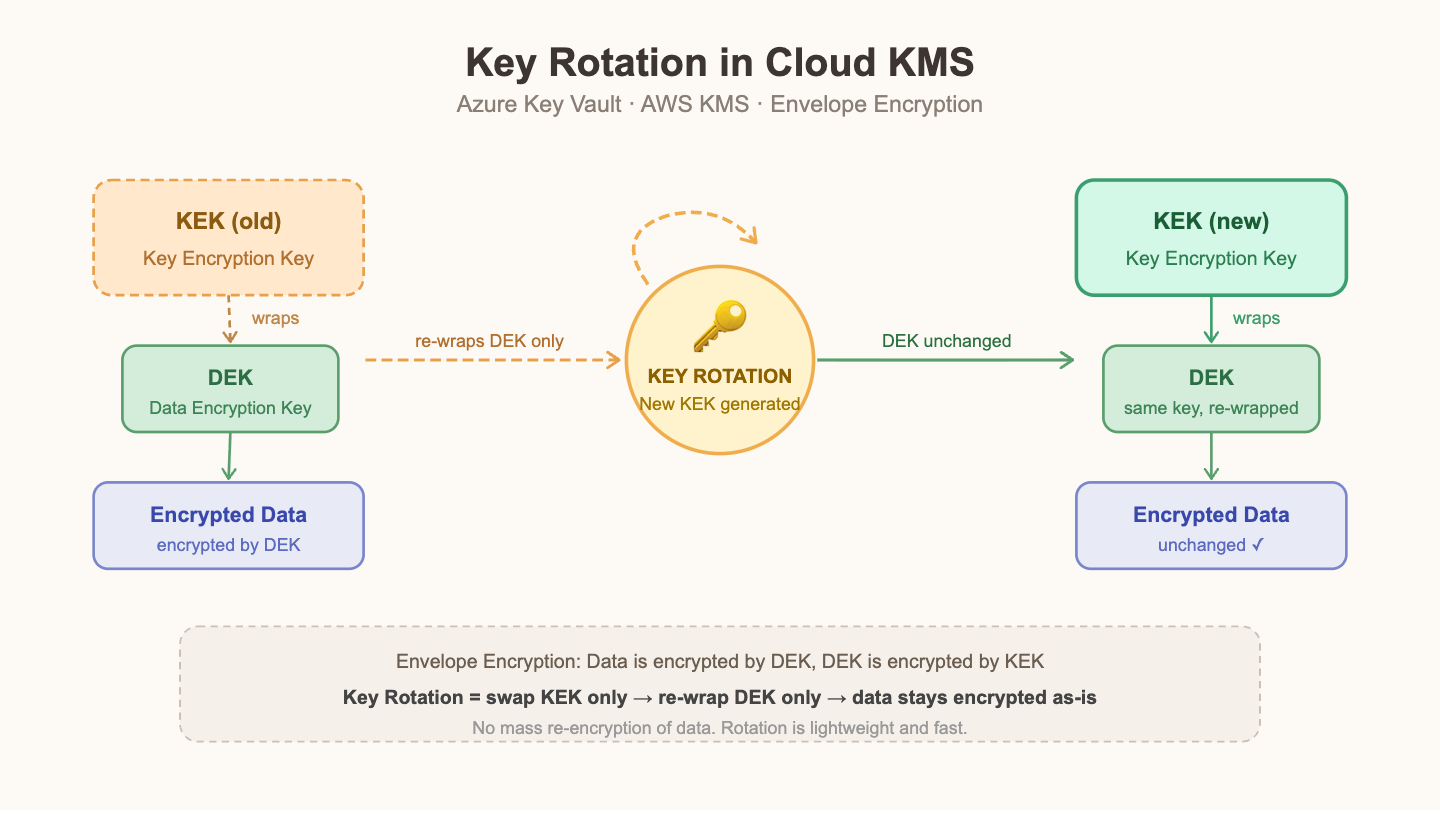
To put it simply, in most cases, no. The reason is that cloud KMS uses a structure called Envelope Encryption. Understanding this concept will immediately make it clear why key rotation is a lightweight and fast operation.
🔍 Core Concept: Envelope Encryption
Keys are two-tiered.
Cloud KMS does not use a single key structure. It is divided into two layers.
[ 실제 데이터 ]
       ↑ 암호화
[ DEK: Data Encryption Key ]   ← 실제 데이터를 암호화하는 키
       ↑ 암호화 (wrapping)
[ KEK: Key Encryption Key ]    ← DEK를 암호화하는 키 (KMS가 관리)
Diagrammatically, it looks like this:
- DEK (Data Encryption Key): This key actually encrypts the data. It’s typically an AES-256 symmetric key.
- KEK (Key Encryption Key): This key encrypts (wraps) and protects the DEK itself. Services like KMS and Key Vault manage it.
What is stored in storage is the encrypted DEK + encrypted data. The KEK exists only within the KMS and does not leave it.
The “Envelope” Analogy
Let’s imagine writing a letter.
- Write the letter content (data).
- Place the letter in an envelope (DEK) and seal it.
- Place the envelope in another secure safe (KEK) and lock it.
Key rotation means only replacing the lock mechanism of the safe (KEK). The envelope and letter content remain unchanged.
🔍 What Actually Happens During Key Rotation
AWS KMS — Automatic Key Rotation
What happens when you enable automatic rotation for a CMK (Customer Managed Key) in AWS KMS?
# Enable automatic key rotation with AWS CLI
aws kms enable-key-rotation
  --key-id arn:aws:kms:ap-northeast-2:123456789012:key/abcd-1234-...
When enabled, AWS generates new key material every year. Important points here:
- Existing data encrypted with this key is not automatically re-encrypted.
- Existing data can still be decrypted with older versions of the key material. AWS internally maintains previous versions.
- New encryption requests will use the new key material.
# boto3 example: Encrypt data with KMS
import boto3

kms = boto3.client('kms', region_name='ap-northeast-2')

# Encryption: KMS generates DEK, wraps DEK with KEK (CMK)
response = kms.generate_data_key(
    KeyId='arn:aws:kms:ap-northeast-2:123456789012:key/abcd-1234-...',
    KeySpec='AES_256'
)

plaintext_dek = response['Plaintext']      # DEK used for actual encryption (used only in memory)
encrypted_dek = response['CiphertextBlob'] # Encrypted DEK to be stored

# Then, encrypt actual data with AES using plaintext_dek
# plaintext_dek is immediately deleted from memory
# Store encrypted_dek + encrypted data together
When decrypting:
# Decryption: Send stored encrypted_dek to KMS to get plaintext_dek
decrypt_response = kms.decrypt(
    CiphertextBlob=encrypted_dek
    # KeyId explicit specification unnecessary: AWS internally knows which key version was used for encryption
)
plaintext_dek = decrypt_response['Plaintext']
# Decrypt data with plaintext_dek
AWS KMS includes metadata within the CiphertextBlob indicating which key version was used for encryption, allowing seamless decryption of older data even after rotation.
Azure Key Vault — Key Versioning Method
Unlike AWS KMS, Azure Key Vault manages keys by version.
# Create a new key version with Azure CLI (= key rotation)
az keyvault key create
  --vault-name myVault
  --name myEncryptionKey
  --kty RSA
  --size 2048
# When this command is executed, a new version is created and automatically becomes the "current" version

# Check all versions of the current key
az keyvault key list-versions
  --vault-name myVault
  --name myEncryptionKey
When a version is rotated:
- Previous key versions: can be disabled, but usually kept enabled for decrypting existing data.
- New encryption: uses the new key version.
- Existing data: no re-encryption (can be decrypted with previous versions).
# Encrypt with a specific version
az keyvault key encrypt
  --vault-name myVault
  --name myEncryptionKey
  --version <old-version-id>   # Decryption is also possible with older versions
  --algorithm RSA-OAEP
  --value "base64-encoded-data"
🔍 Does it differ by service?
Yes, it does. Key rotation behavior varies across services and implementation methods, falling into three cases.
Case 1: Fully Automatic — No Data Re-encryption (Most Common)
These are services based on envelope encryption managed by KMS/Key Vault.
| Service Key | Rotation Behavior |
|---|---|
| AWS S3 SSE-KMS | Only KEK is rotated, no data re-encryption |
| AWS EBS Volume Encryption | Only KEK is rotated, no re-encryption of existing volumes |
| Azure Blob Storage (CMK) | New key version specified, DEK automatically re-wrapped |
| Azure SQL Database TDE | New protector key specified, no data re-encryption |
Case 2: Automatic DEK Re-wrapping — No Data Re-encryption
Some services, such as Azure Storage and Azure Disk Encryption, automatically re-wrap the stored DEK with the new KEK when the KEK is rotated. Since the DEK itself does not change, there is no data re-encryption.
[이전] 데이터 ← DEK ← KEK(v1)
[이후] 데이터 ← DEK ← KEK(v2)  ← DEK가 새 KEK로 재래핑됨
       (데이터는 동일)
Case 3: Full Re-encryption — Rare but Exists
This case applies when keys are managed directly by the application or when a master key is rotated in a specific database.
# Pattern requiring re-encryption when managing keys directly in the app
def rotate_dek(data_store, old_key, new_key):
    """
    앱이 직접 DEK를 관리할 경우, 기존 데이터를 모두 재암호화해야 함
    → 봉투 암호화를 쓰지 않는 경우의 안티패턴
    """
    for record in data_store.all():
        plaintext = aes_decrypt(record.ciphertext, old_key)  # Decrypt with old key
        record.ciphertext = aes_encrypt(plaintext, new_key)  # Re-encrypt with new key
        data_store.save(record)
Such cases are either due to a flawed design that doesn’t use envelope encryption, or an intentional need to change the data’s encryption key itself. If cloud managed services are used correctly, this situation rarely occurs.
⚠️ Precautions / Common Mistakes
🚨 When rotating BYOK (Bring Your Own Key), do not delete previous key versions too quickly.
This is the most common mistake. If you delete the old key after rotating to a new one, you will be unable to decrypt DEKs encrypted with the old key, leading to permanent inaccessibility of existing data.
# AWS KMS: Key deletion has a 7-30 day waiting period (intentional safety measure)
aws kms schedule-key-deletion
  --key-id <old-key-id>
  --pending-window-in-days 30  # Minimum 7 days, maximum 30 days

# Azure Key Vault: Recommended to enable soft-delete + purge protection
az keyvault update
  --name myVault
  --enable-soft-delete true
  --enable-purge-protection true
🚨 Key rotation ≠ immediate improvement in data security level
Key rotation reduces the scope of damage if a key is compromised, but it does not re-protect data that has already been decrypted with a compromised key. If a compromise is suspected, key rotation alone is insufficient; the entire scope of data accessible with that key must be reviewed.
🚨 Do not hardcode key versions on the application side.
# Bad example: Hardcoding a specific version
KEY_ID = "arn:aws:kms:...:key/abcd-1234"
KEY_VERSION = "version-2023-01"  # App code modification required after rotation → Risk

# Good example: Use alias (AWS), automatic reference to latest version (Azure)
KEY_ID = "arn:aws:kms:ap-northeast-2:123456789012:alias/my-app-key"
# Alias always points to the current key
✅ Summary / Conclusion
| Question | Answer |
|---|---|
| Does key rotation re-encrypt all existing data? | ❌ Mostly unnecessary |
| Can existing data be decrypted after rotation? | ✅ Yes, because old key versions are maintained |
| What about new data after rotation? | ✅ Uses the new KEK |
| Does it differ by service? | ✅ Yes, there are differences in behavior (e.g., re-wrapping) |
| If the app manages keys directly? | ⚠️ Re-encryption may be necessary |
The core point can be summarized in one sentence:
In an envelope encryption structure, key rotation only replaces the KEK that wraps the DEK, and does not touch the DEK used for actual data encryption or the data itself.
If you are using cloud managed services (S3, EBS, Azure Blob, etc.) correctly, key rotation is a lightweight and secure operation. The fear of having to re-encrypt all data disappears once you understand envelope encryption.
For further study, we recommend HSM (Hardware Security Module), FIPS 140-2/3 compliant key stores, and multi-region key replication strategies.
Leave a Reply