“AWS migration tools are like a moving company. Terraform is the blueprint of a house. If you just need to move, call a moving company. But if you need to renovate and live in the house after moving, it’s a different story.”

##
🎯 What this article covers
- Limitations of AWS-specific migration services (MGN, DMS, etc.)
- What Terraform is and why you should learn it now
- Vendor Lock-in issues and exit strategies
- Declaring AWS infrastructure with real Terraform code examples
- The value of Terraform from an operational perspective after migration
📌 Introduction / Background
Organizations facing AWS migration often first look for AWS-specific migration services like AWS Migration Hub, Application Migration Service (MGN), and Database Migration Service (DMS).
This is an understandable choice. Since these tools are built by AWS, they seem like they would work best, have abundant official documentation, and appear to operate with just a few clicks in the AWS console.
But wait, we need to ask one question first:
“What will you do after the migration is complete?”
Migration is not a destination, but a starting point. The moment you move from on-premises to AWS is not the end; you will need to operate, expand, and sometimes even migrate to another cloud for many years to come on AWS.
From this perspective, the reason to learn Terraform now becomes clear.
🔍 Why AWS Migration Services Alone Are Not Enough
What AWS-specific services do well and what they don’t
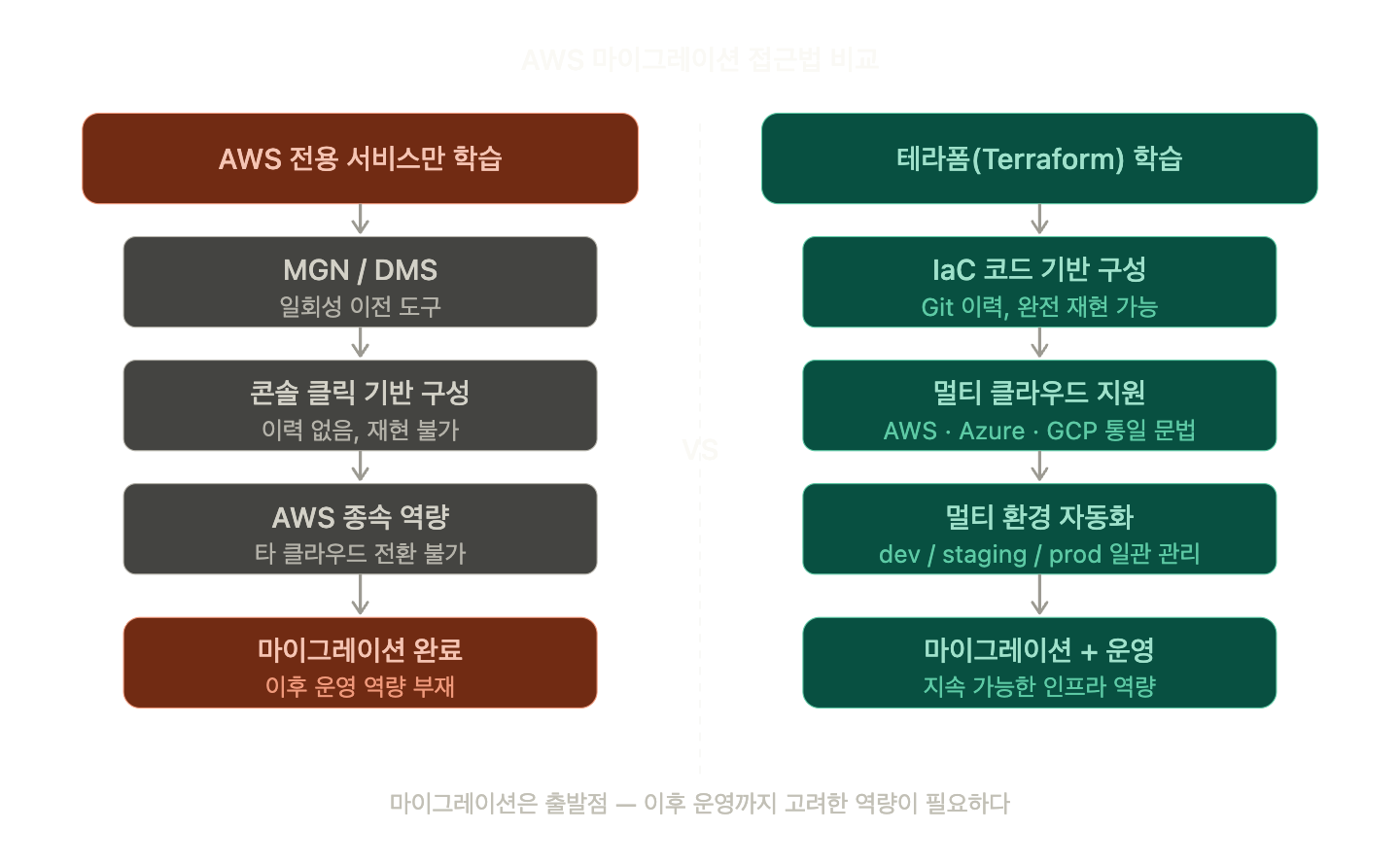
The migration tools provided by AWS are like “moving trucks”. They are specialized in quickly moving your belongings to a new house.
| Service | Role | Limitation |
| MGN (Application Migration Service) | Replicates servers as-is and converts them to EC2 | No role after migration completion |
| DMS (Database Migration Service) | Migrates DBs to AWS RDS/Aurora | Dependent on AWS DB services |
| Migration Hub | Tracks migration progress | Monitoring tool, cannot manage infrastructure |
| SCT (Schema Conversion Tool) | Converts DB schemas | Operation after conversion is a separate issue |
The commonality of these tools is their “one-time” nature. They are optimized for a specific event—on-premises to AWS migration—but are not suitable for post-migration infrastructure operations, change management, or multi-environment (dev/staging/prod) configurations.
🚨 The Real Problem: Infrastructure Built with Clicks is Not Documented
Many organizations configure their infrastructure by clicking around in the AWS console. Creating VPCs, subnets, launching EC2 instances, connecting RDS…
But six months later, situations like these arise:
- 👨💼 “Why is this VPC configured this way?”
- 😰 “Uh… the migration specialist left the company.”
- 👨💼 “Can we create an identical environment for staging?”
- 😰 “…I guess we’ll have to recreate it piece by piece by looking at the console.”
- Development Team: “Please create another staging environment.”
- Security Team: “Someone changed a security group rule yesterday, but we don’t know who or why.”
- Management: “Costs have surged, but we can’t identify which resource is causing the problem.”
- Disaster Recovery Manager: “How quickly can we reproduce the same environment in another region if the Seoul region fails?”
This is the reality of click-based infrastructure management: irreproducible, untraceable, uncollaborative…
🧩 What is Terraform?
Terraform is an Infrastructure as Code (IaC) tool created by HashiCorp. Simply put, it’s a way to declare your infrastructure as code.
“Create an EC2 instance” instead of clicking in the console, you write it like this:
# main.tf — EC2 Instance Declaration
provider "aws" {
  region = "ap-northeast-2"  # Seoul Region
}

resource "aws_instance" "web_server" {
  ami           = "ami-0c9c942bd7bf113a2"  # Amazon Linux 2023
  instance_type = "t3.medium"

  tags = {
    Name        = "web-server"
    Environment = "production"
    ManagedBy   = "terraform"
  }
}
If you commit this file to Git and run `terraform apply`, an EC2 instance will be created in AWS.
The key is that this file remains. Who created it, what its settings are, when it was changed — everything is recorded as code.
💡 5 Reasons to Learn Terraform During Migration
1️⃣ Migration = An Opportunity to Design Infrastructure from Scratch
Migrating from on-premises to AWS is not just about copying servers. It’s an opportunity to design new infrastructure from scratch: VPCs, subnets, security groups, IAM, load balancers, databases…
If you design with Terraform at this stage, you will have infrastructure managed as code from the very beginning. This saves you the effort of converting legacy console configurations into code later.
2️⃣ Multi-environment configuration becomes as easy as copy-pasting
Most organizations operate separate environments for development (dev), staging, and production. Configuring each of these manually through the console requires three times the effort and often leads to configuration differences between environments.
Terraform cleanly separates environment-specific configurations using Variables and Workspaces:
# variables.tf — Define environment-specific variables
variable "environment" {
  description = "배포 환경 (dev, staging, prod)"
  type        = string
}

variable "instance_type" {
  description = "EC2 인스턴스 타입"
  type        = string
  default     = "t3.micro"
}

# terraform.tfvars (for production environment)
environment   = "prod"
instance_type = "t3.large"
The dev and prod environments differ only in variable values, while the infrastructure structure itself is managed by the same code. Consistency is ensured.
3️⃣ Prevent Vendor Lock-in from the start
If you only learn AWS migration services, your team will gain AWS console operation skills. But what if, three years later, you need to adopt some Azure or GCP services due to cost issues, or consider a multi-cloud strategy?
Terraform manages hundreds of clouds/services like AWS, Azure, GCP, NCP with the same syntax. The way you declare an AWS EC2 instance has the same structure as declaring an Azure VM. The mindset you learn applies directly.
# AWS EC2
resource "aws_instance" "web" { ... }

# Azure VM — Same syntax structure
resource "azurerm_virtual_machine" "web" { ... }

# GCP Compute Engine
resource "google_compute_instance" "web" { ... }
You can build Cloud Agnostic capabilities, not dependent on AWS.
4️⃣ Change history remains in Git, enabling audit and collaboration
For organizations concerned with security compliance, infrastructure change history is essential. It must be possible to track “who, when, what, and why” a change was made.
Console clicks are recorded in CloudTrail logs, but it’s difficult for humans to track them in a readable format. Managing Terraform code with Git enables a PR (Pull Request)-based infrastructure change process.
# Infrastructure change workflow
git checkout -b feature/add-rds-replica
# Modify terraform code
git commit -m "feat: RDS 읽기 복제본 추가 (트래픽 분산 목적)"
git push origin feature/add-rds-replica
# Create PR → Team Review → Approval → Merge → terraform apply
Now, infrastructure changes also become subject to code review.
5️⃣ Essential foundation for post-migration operational automation
Once migration is complete, real operations begin. Adding new services, scaling up/down, building disaster recovery (DR) environments, changing instance types for cost optimization…
In an environment managed by Terraform, all these tasks are accomplished with just one line of code modification + apply. In a console-based environment, it involves dozens of clicks and the risk of errors.
💻 Practical Example — Basic AWS Network Configuration with Terraform
Let’s write the basic VPC configuration, which is often the first thing needed during migration, using Terraform.
# vpc.tf — Network base configuration for the migration target environment

# Create VPC
resource "aws_vpc" "main" {
  cidr_block           = "10.0.0.0/16"
  enable_dns_hostnames = true
  enable_dns_support   = true

  tags = {
    Name = "migration-vpc"
  }
}

# Public Subnet (for web servers, ALBs)
resource "aws_subnet" "public" {
  count             = 2
  vpc_id            = aws_vpc.main.id
  cidr_block        = "10.0.${count.index}.0/24"
  availability_zone = data.aws_availability_zones.available.names[count.index]

  map_public_ip_on_launch = true

  tags = {
    Name = "public-subnet-${count.index + 1}"
    Tier = "public"
  }
}

# Private Subnet (for DB, backend servers)
resource "aws_subnet" "private" {
  count             = 2
  vpc_id            = aws_vpc.main.id
  cidr_block        = "10.0.${count.index + 10}.0/24"
  availability_zone = data.aws_availability_zones.available.names[count.index]

  tags = {
    Name = "private-subnet-${count.index + 1}"
    Tier = "private"
  }
}

# Availability Zone data source
data "aws_availability_zones" "available" {
  state = "available"
}
Executing this code:
- `terraform init` — Downloads provider plugins
- `terraform plan` — Previews changes (review before actual application)
- `terraform apply` — Actually creates infrastructure in AWS
# terraform plan output example
Plan: 5 to add, 0 to change, 0 to destroy.

# + aws_vpc.main
# + aws_subnet.public[0]
# + aws_subnet.public[1]
# + aws_subnet.private[0]
# + aws_subnet.private[1]
The fact that Terraform shows you what will be created/changed/deleted in the `plan` stage beforehand is a major advantage. In the console, you only know the result after clicking.
⚠️ Cautions / Common Mistakes
❌ “We can adopt Terraform after the migration is done.”
This is the most common mistake. The process of reverse-converting infrastructure configured via the console into Terraform code (terraform import) is very cumbersome and error-prone. Configuring with Terraform from the beginning is overwhelmingly more efficient.
❌ Storing the state file (terraform.tfstate) locally
Terraform records the current infrastructure state in the `.tfstate` file. Keeping this file locally makes team collaboration impossible and poses a significant problem if lost. Remote backend configuration using S3 + DynamoDB is essential.
# backend.tf — Store state file in S3
terraform {
  backend "s3" {
    bucket         = "my-terraform-state-bucket"
    key            = "migration/terraform.tfstate"
    region         = "ap-northeast-2"
    dynamodb_table = "terraform-state-lock"  # Lock to prevent concurrent modifications
    encrypt        = true
  }
}
❌ Hardcoding AWS credentials in Terraform code
# Never do this
provider "aws" {
  access_key = "AKIAIOSFODNN7EXAMPLE"  # ❌ Danger
  secret_key = "wJalrXUtnFEMI/K7MDENG"  # ❌ Danger
}
Authenticate via AWS CLI profiles, environment variables, or IAM roles.
✅ Summary / Conclusion
AWS migration services (MGN, DMS, etc.) are moving trucks. They are useful for moving belongings, but living in a new house requires different skills.
Terraform is the method for managing your new house.
| Comparison Item | AWS Migration Services Only | Terraform-based Approach |
| Migration Speed | Fast | Initial learning curve |
| Post-migration Operations | Console-click dependent | Automated with code |
| Environment Reproducibility | Unstable | Perfectly reproducible |
| Vendor Lock-in | High | Low |
| Audit/Tracking | Limited | Fully traceable with Git history |
| Team Collaboration | Difficult | PR-based collaboration |
Don’t let the opportunity of migration end as a simple “move.” If you treat it as a starting point to codify your infrastructure in the right way from the beginning, subsequent operations, security, and cost optimization will all become much smoother.
Next steps for learning:
- Terraform Official Tutorial (registry.terraform.io)
- Familiarize yourself with AWS Provider documentation
- Manage large-scale modules with Terragrunt
- Integrate `terraform plan/apply` into CI/CD pipelines (GitHub Actions, GitLab CI)
Leave a Reply