📋 Table of Contents
- What is a DaemonSet? 🤔
- Why use DaemonSet? 💡
- Hands-on: Creating a DaemonSet 🛠️
- Want to deploy to the Control Plane too? (Taint & Toleration) 🔐
- Conclusion and Summary 🏁
1. What is a DaemonSet? 🤔
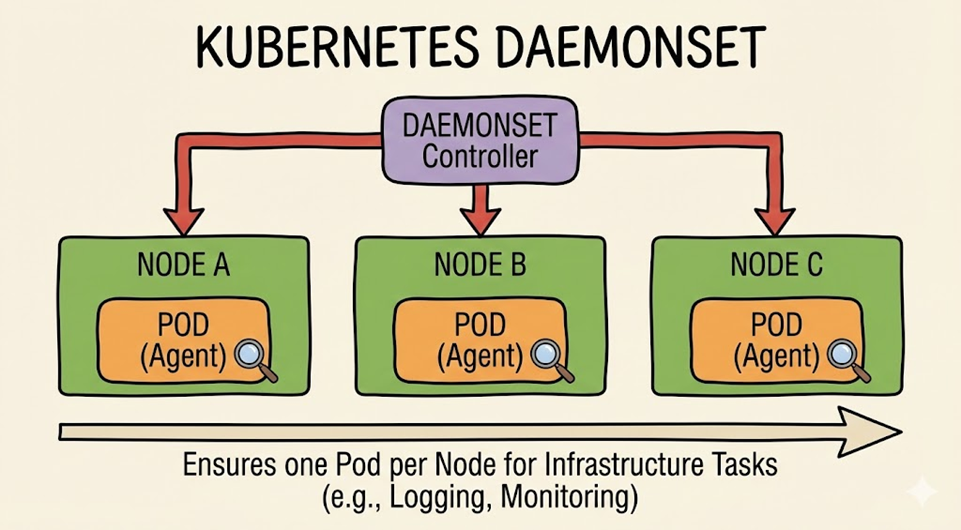
In Kubernetes, a DaemonSet is a controller that ensures exactly one Pod is maintained on all (or specific) nodes.
While a typical Deployment distributes Pods appropriately based on available node resources, a DaemonSet can be seen as a dedicated administrator that “automatically runs a Pod on a new node when it is added.”
2. Why use DaemonSet? 💡
When would you need to run the same service on all nodes? Primarily for system operation-related tasks.
- Log Collection: fluentd or logstash to collect logs from each node.
- Monitoring: Prometheus Node Exporter to monitor node status.
- Network Configuration: CNI plugins like kube-proxy or Calico that configure the cluster network.
3. Hands-on: Creating a DaemonSet 🛠️
Let’s look at the most basic form of a DaemonSet YAML file. This example is a simple nginx DaemonSet that runs on all nodes.
apiVersion: apps/v1
kind: DaemonSet
metadata:
  name: fluentd-elasticsearch
  namespace: kube-system
  labels:
    k8s-app: fluentd-logging
spec:
  selector:
    matchLabels:
      name: fluentd-elasticsearch
  template:
    metadata:
      labels:
        name: fluentd-elasticsearch
    spec:
      containers:
      - name: fluentd-elasticsearch
        image: quay.io/fluentd_elasticsearch/fluentd:v2.5.2
Applying this file will create one Pod on each of the typical Worker Nodes. However, one problem arises: Pods are not created on the Control Plane (Master Node).
4. Want to deploy to the Control Plane too? (Taint & Toleration) 🔐
The Master Node (Control Plane) in Kubernetes is a very important place. Therefore, it is configured with a Taint by default, which “forbids” general Pods from entering.
① Check Master Node’s Taint
First, let’s check what ‘stain’ is on the Master Node.
kubectl describe node <마스터-노드-이름> | grep TaintsYou usually get a result like this: Taints: node-role.kubernetes.io/control-plane:NoSchedule
This means “This node is a control-plane role, so do not schedule unauthorized Pods (NoSchedule).”
② Configure Toleration
To allow a DaemonSet to run on the Master Node, you need to add ‘tolerance’ (Toleration) to the Pod configuration to withstand this ‘stain’ (Taint).
Check the spec section of the modified YAML.
apiVersion: apps/v1
kind: DaemonSet
metadata:
  name: fluentd-elasticsearch
spec:
  # ... (omitted)
  template:
    spec:
      # This is the key!
      tolerations:
      - key: node-role.kubernetes.io/control-plane
        operator: Exists
        effect: NoSchedule
      - key: node-role.kubernetes.io/master
        operator: Exists
        effect: NoSchedule
      containers:
      - name: fluentd-elasticsearch
image: quay.io/fluentd_elasticsearch/fluentd:v2.5.2- key: The key value of the Taint confirmed on the Master Node.
- operator: Exists means that it is sufficient for the key to simply exist.
- effect: Allows ignoring and entering even in a NoSchedule state.
With this setting, the DaemonSet will now run proudly not only on general nodes but also on Control Plane nodes.
5. Conclusion and Summary 🏁
DaemonSet is a core component responsible for cluster-wide maintenance and operation.
- DaemonSet ensures 1 Pod per node.
- Automatically scales when nodes are added.
- To deploy to the Control Plane, you must check the Taint of that node and configure a corresponding Toleration.
Now you can deploy the necessary services to every corner of your cluster! 🚀
Leave a Reply