Hello, everyone interested in web security and penetration testing! 🕵️♀️ Have you ever seen a “Your connection is not secure” warning in your address bar while web surfing, even when it shows https://? This warning might be even more familiar if you’ve used proxy tools like Burp Suite.
Today, we’ll delve into why this “Your connection is not secure” warning appears and its relationship with Burp Suite’s proxy settings. 🔒
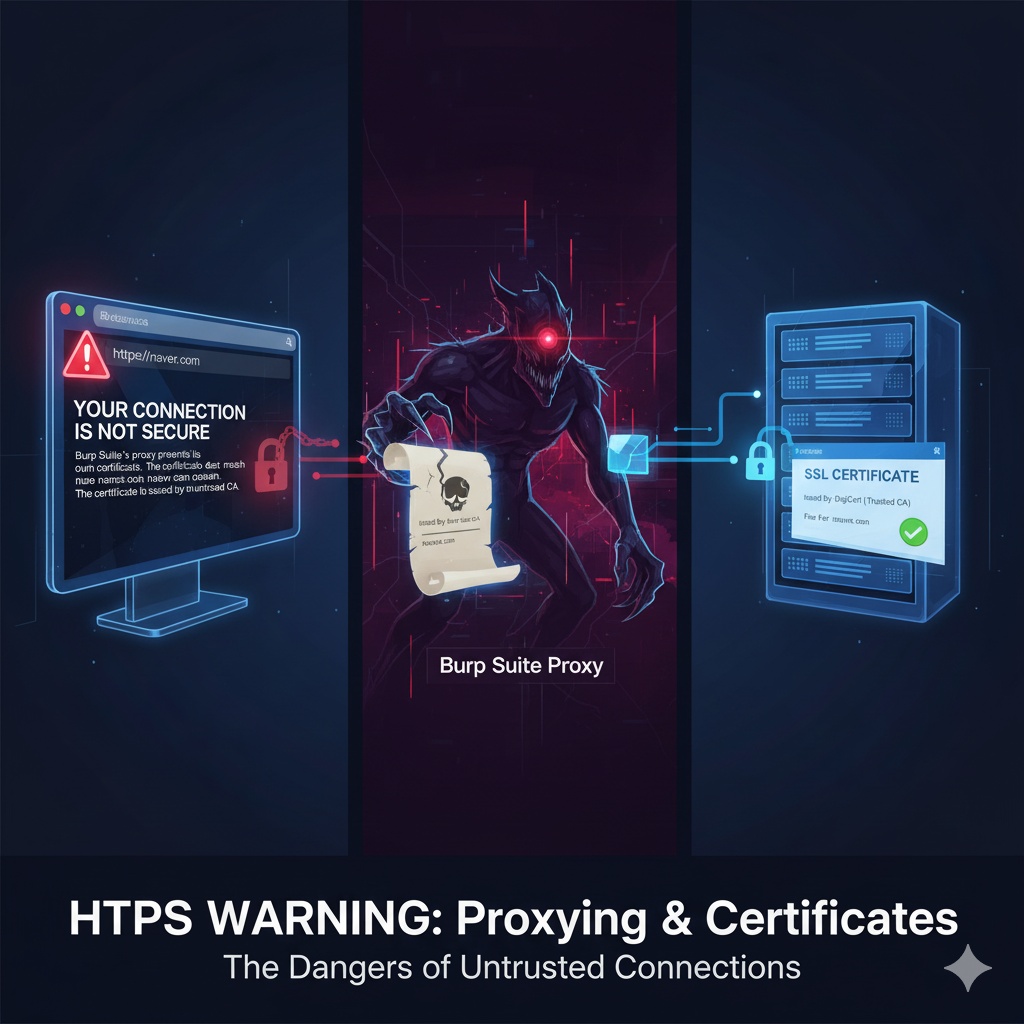
🌐 HTTPS and the Promise of a Secure Connection
First, let’s define what a ‘secure connection’ means on the web. When you access websites where you exchange important information, such as banking sites or online stores, you’ll see https:// in the address bar and a padlock (🔒) icon next to it.
This https:// indicates that the SSL/TLS (Secure Sockets Layer/Transport Layer Security) protocol is applied, ensuring three things:
- Encryption: All communication between the client (browser) and the server is encrypted, so even if intercepted, the content remains unreadable. 🛡️
- Integrity: Ensures that data has not been tampered with during transmission.
- Authentication: Verifies that the server you are connecting to is the genuine server, preventing access to fake phishing sites.
To guarantee these three, the server uses a ‘Certificate’. This certificate is issued by a trusted Certificate Authority (CA) and acts like an ID card, proving, “I am naver.com, and this is my public key!” 📜
The browser validates the certificate’s authenticity to determine the server’s trustworthiness and establish a secure connection.
😈 The Role of Burp Suite Proxy: Intercepting in the Middle
Now, let’s introduce a web proxy tool like Burp Suite. Burp Suite interposes itself between the client (browser) and the server, allowing it to intercept, inspect, and modify all HTTP/HTTPS communication between the two parties. It’s extremely useful for penetration testing. 🔗
The typical communication flow is like this:
Browser <-------> naver.com Server
However, when using a Burp Suite proxy, the flow changes to this:
Browser <-------> Burp Suite Proxy <-------> naver.com Server
This is where the problem arises.
The browser doesn’t connect directly to naver.com; instead, it perceives itself as connecting to the Burp Suite proxy. Burp Suite then communicates with the naver.com server on behalf of the browser.
🚨 Why the “Your connection is not secure” Warning Appears
Now, let me explain specifically why the “Your connection is not secure” warning appears.
- CA Mismatch:
- The naver.com server has obtained a valid SSL certificate for the naver.com domain from a trusted CA (e.g., Let’s Encrypt, DigiCert, etc.).
- However, the Burp Suite proxy does not simply forward this certificate to the browser. Instead, it presents the browser with a self-generated SSL certificate. 📄
- This certificate generated by Burp Suite is signed by the Burp Suite’s own CA. This Burp Suite CA is not registered as a “trusted CA” in your operating system or browser. ❌
- Therefore, the browser determines, “This certificate was issued by an unknown (untrusted) authority,” and displays the warning.
- Domain Mismatch:
- Burp Suite that presents to the browser states, “This certificate is for naver.com.” (Because Burp Suite knows it’s a request for naver.com and generates it dynamically.)
- However, because this certificate is signed by the “untrusted Burp Suite CA,” the browser cannot be sure if this certificate is truly for naver.com. ❓
- Strictly speaking, the domain itself matches, but due to the issue of the issuing authority’s trustworthiness, the entire certificate chain validation fails, and thus the domain’s validity cannot be guaranteed. It’s as if the browser is saying, “This ID card says naver.com, but it seems to be issued by a forged authority! I can’t trust it!”
Consequently, the browser warns the user, “This connection is not secure because it was issued by an untrusted CA, and therefore the domain match cannot be reliably verified!” ⚠️
👨🏫 Solution: Installing the Burp Suite CA Certificate
So, how can you intercept HTTPS traffic without these warnings while using Burp Suite?
The most common solution is to manually install Burp Suite’s own CA certificate into your operating system’s or browser’s Trusted Root Certification Authorities store. ➕
By doing this, the browser will trust the Burp Suite CA, and consequently, it will trust all certificates dynamically generated by Burp Suite. As a result, you can intercept and inspect HTTPS traffic without the “not secure” warning.
Note: This process is only necessary when using security tools, and installing CA certificates from unknown sources can be a security risk for general users, so caution is advised. 🛑
🎯 Conclusion: The Warning is For You!
The “Your connection is not secure” warning is not just an annoying message; it’s your browser’s crucial alarm to protect your security. 🔔
Especially when using proxy tools like Burp Suite, it’s important to understand that these warnings are intentional and occur due to the proxy’s operation. Whether to ignore this warning and proceed or to install the CA certificate to establish trust will depend on the situation and purpose.
A deep understanding of web security begins with comprehending the meaning of these small warnings. 😉
Tags: Burp Suite, Web Security, HTTPS, SSL, TLS, Certificate, Proxy, CA, Certificate Authority, Domain Mismatch, Security Warning, Penetration Testing, Cybersecurity
Leave a Reply