Hello! Today, I’d like to talk about Gateway’s TLS modes, which are crucial yet often confusing when dealing with Istio, the standard for Kubernetes service mesh.
To securely receive external traffic into our cluster, a secure connection (HTTPS) is essential. How does Istio Gateway adjust this security level?
I will thoroughly explore the differences between the most commonly used SIMPLE and MUTUAL modes, and even solutions for common CLI errors encountered during configuration. 🚀
1. Wait! Did you get an error while creating a secret? 🚨
To apply a certificate to an Istio gateway, you must first create a Kubernetes Secret. However, you often encounter errors like the one below:
error: flag needs an argument: --from-file
bash: tls.crt=/root/certificates/booking.example.com.crt: No such file or directory
This usually happens when line breaks (Enter) are handled incorrectly in long commands. This is because the terminal assumes the command has ended and executes it if there’s no backslash () before the line break.
✅ Correct Solution
Either write the options on a single line or make sure to add a when breaking lines. Especially for mTLS, don’t forget that the CA certificate (ca.crt) must also be included!
# Example of mTLS secret creation (cleanly in one line!)
kubectl create secret generic booking-credential-mutual -n istio-system
  --from-file=ca.crt=/root/certificates/example.com.crt
  --from-file=tls.crt=/root/certificates/booking.example.com.crt
  --from-file=tls.key=/root/certificates/booking.example.com.key
Now that the ingredients (certificates) are ready, shall we start cooking (configuring TLS modes)? 👨🍳
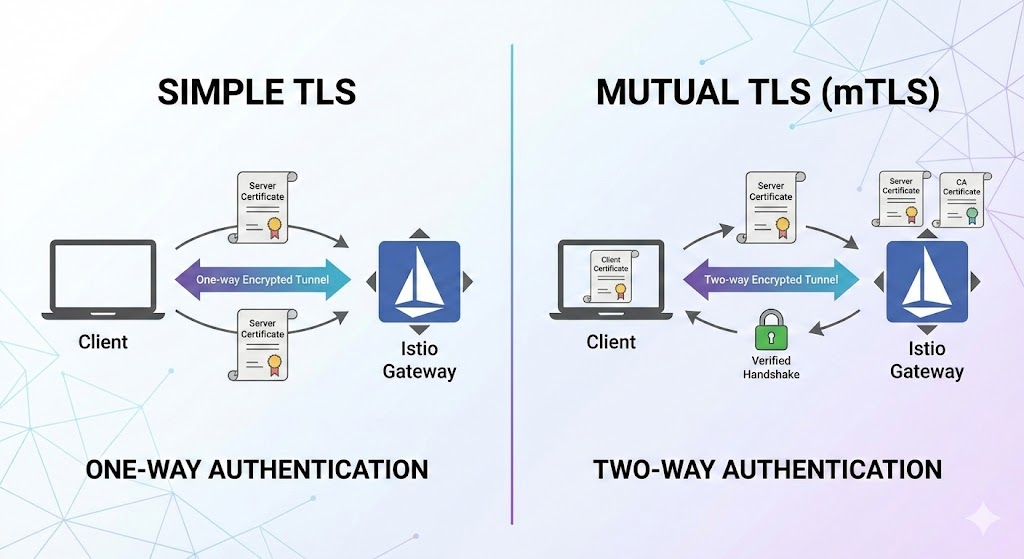
2. mode: SIMPLE (One-way TLS) 🌐
SIMPLE mode is the standard HTTPS method we commonly encounter when browsing the internet.
💡 How it works
This method means “only the server (Gateway) presents its ID.”
- Client (User) ➡️ Gateway: “I’d like to connect.”
- Gateway ➡️ Client: “Yes, I am indeed that site (Server). Please check my certificate.” 📜
- Client: “Hmm, issued by a trustworthy authority (CA). Approved!” ✅
- 🔒 Encrypted communication begins
🎯 Features and Use Cases
- The gateway does not verify who the client is. (Anyone can connect)
- Use Cases: General web services, shopping malls, blogs, and other publicly accessible services.
📝 YAML Configuration Example
You only need to specify the secret (credentialName) containing the server’s certificate and key.
apiVersion: networking.istio.io/v1beta1
kind: Gateway
metadata:
  name: my-simple-gateway
spec:
  selector:
    istio: ingressgateway
  servers:
  - port:
      number: 443
      name: https
      protocol: HTTPS
    hosts:
    - "example.com"
    tls:
      mode: SIMPLE  # 👈 Here!
      credentialName: booking-credential # Only server certificate (tls.crt, tls.key) is needed
3. mode: MUTUAL (Two-way TLS / mTLS) 🤝
MUTUAL mode is a much more enhanced security method. As the name suggests, “Mutual” authentication occurs. It is commonly referred to as mTLS.
💡 How it works
This method means “both the server and the client exchange IDs.”
- Client ➡️ Gateway: “Connection request!”
- Gateway ➡️ Client: “First, please check my ID (Server Cert).” 📜
- Gateway ➡️ Client: “But who are you? Please show me your ID (Client Cert) too.” 👮♂️
- Client ➡️ Gateway: “Here is my certificate.” 🪪
- Gateway: (Verifies with its CA certificate) “Oh, you are indeed our company partner. Approved!” ✅
- 🔒 Two-way encrypted communication begins
🎯 Features and Use Cases
- The client must also have a valid certificate to connect. (Otherwise, it will be rejected with a 400 error, etc.)
- Use Cases: Financial APIs, partner-exclusive systems, internal administrator pages, IoT device communication, etc., when only trusted entities should connect.
📝 YAML Configuration Example
Here, not only the server certificate but also the CA certificate for client verification must be included in the secret.
apiVersion: networking.istio.io/v1beta1
kind: Gateway
metadata:
  name: my-mutual-gateway
spec:
  selector:
    istio: ingressgateway
  servers:
  - port:
      number: 443
      name: https
      protocol: HTTPS
    hosts:
    - "booking.example.com"
    tls:
      mode: MUTUAL  # 👈 Strong security!
      credentialName: booking-credential-mutual # ca.crt must be included here!
4. Summary at a Glance 📊
| Category | SIMPLE (One-way) | MUTUAL (Two-way) |
|---|---|---|
| Authentication Subject | Client verifies server | Each party verifies the other |
| Client Requirements | None (just a browser) | Client Certificate |
| Gateway Requirements | Server certificate + key | Server certificate + key + CA certificate |
| Security Strength | Normal (data encryption) | Highest (data encryption + access control) |
| Recommended Scenario | Public websites | Security-critical internal/B2B systems |
—
🏁 Conclusion
One of the main reasons for adopting Istio is precisely this powerful security feature.
- If serving general users 👉 SIMPLE
- If only verified systems should communicate 👉 MUTUAL
Choosing between these two based on the situation is the first step in Istio security. I hope today’s summary helps you build a secure cluster! Thank you for reading. 😊
Leave a Reply