Hello! 👋 Today, we’re going to delve into how to securely and efficiently manage outbound traffic to external services when using Istio in a Kubernetes environment.
The provided code demonstrates a scenario where an application inside the cluster accesses external Yahoo Finance (finance.yahoo.com) using Istio’s key feature, the Egress Gateway.
But it’s not just a simple access! 🤫 The application conveniently sends requests via HTTP, but when exiting the cluster, Istio automatically upgrades it to secure HTTPS, handling TLS Origination configuration.
Shall we break down how this configuration works and what role each YAML file plays? 🔍
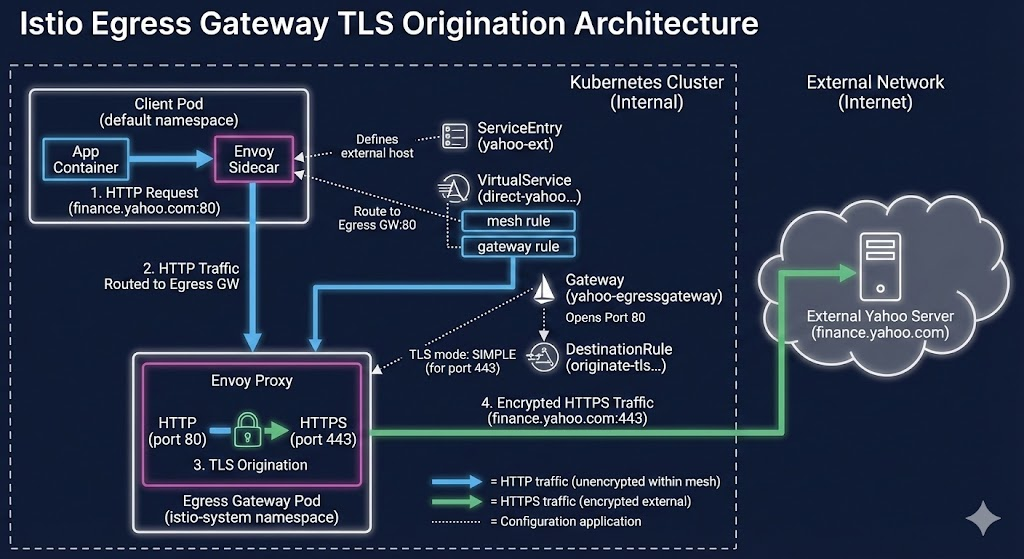
🎯 Goal Scenario
- Our app (Pod) sends a request to the outside world, http://finance.yahoo.com (port 80).
- This request does not go directly outside the cluster but is first forwarded to the Istio Egress Gateway, which acts as a gatekeeper.
- The Egress Gateway receives this HTTP request, encrypts it with HTTPS(TLS), and then sends it to the actual Yahoo server (port 443).
This method allows applications to communicate securely with the outside world without the complexity of certificate management or encryption. Cool, right? 😎
🧩 Code Detailed Analysis
The provided YAML code consists of a total of 4 Istio resources. Let’s look at how each puzzle piece fits together.
1️⃣ ServiceEntry: “Yahoo! You’re under my management.”
The first to appear is ServiceEntry. Istio service mesh may block or fail to properly manage traffic to the outside world it doesn’t know by default.
apiVersion: networking.istio.io/v1beta1
kind: ServiceEntry
metadata:
  name: yahoo-ext
spec:
  hosts:
  - finance.yahoo.com
  location: MESH_EXTERNAL
  ports:
  - number: 80
    name: http
    protocol: HTTP
  - number: 443
    name: https
    protocol: HTTPS
resolution: DNS- Role: Registers an external service (finance.yahoo.com) in Istio’s internal service registry.
- location: MESH_EXTERNAL: Specifies that this service is outside our mesh (cluster). 🌐
- ports & resolution: DNS: Informs Istio that Yahoo Finance uses ports 80 (HTTP) and 443 (HTTPS), and that DNS queries should be used to find this address.
- 💡 Summary: “Hey Istio, there’s an external friend called finance.yahoo.com, and we’ll use ports 80 and 443 to communicate with it. Please manage it well!”
2️⃣ Gateway: “Egress Gatekeeper, open this door.”
Next is the Gateway resource. The Gateway here refers to the configuration for the Egress Gateway Pod, which is a dedicated exit for traffic leaving the cluster.
apiVersion: networking.istio.io/v1beta1
kind: Gateway
metadata:
 name: yahoo-egressgateway
 namespace: default
spec:
 selector:
   istio: egressgateway
 servers:
 - port:
     number: 80
     name: http
     protocol: HTTP
   hosts:
- finance.yahoo.com- Role: Instructs the Egress Gateway (Envoy proxy) that handles actual traffic to open a specific port and wait.
- selector: istio: egressgateway: Determines who this setting applies to. Pods with the label istio: egressgateway (actual Egress Gateway instances) will apply this setting. 🎯
- servers: Commands the Egress Gateway to “open port 80 (HTTP) to handle traffic going to Yahoo Finance (finance.yahoo.com).”
- 💡 Summary: The door for Yahoo-bound port 80 traffic has been wide open at the cluster’s exit (Egress Gateway). 🚪
3️⃣ DestinationRule: “Change into HTTPS clothes when you go out!” (Core ⭐)
This is one of the most important parts of this scenario, the DestinationRule responsible for TLS Origination.
apiVersion: networking.istio.io/v1beta1
kind: DestinationRule
metadata:
  name: originate-tls-for-yahoo-com
spec:
  host: finance.yahoo.com
  trafficPolicy:
    portLevelSettings:
    - port:
        number: 443
      tls:
mode: SIMPLE- Role: Defines what policy to apply when traffic exits to the destination (finance.yahoo.com).
- portLevelSettings -> port: 443: Applies settings only to traffic destined for port 443 of the destination.
- tls: mode: SIMPLE: This is the core! 💥 It means “when exiting to port 443, initiate standard TLS (HTTPS) encryption.” The Egress Gateway sees this rule and upgrades the HTTP request to an HTTPS request.
- 💡 Summary: “When connecting to Yahoo’s port 443, you must wear a secure HTTPS coat!” 🔒
4️⃣ VirtualService: “Traffic Navigation Path”
Finally, the most complex but important VirtualService. This acts as a navigator, guiding where traffic comes from and where it should go. Here, two paths are defined.
apiVersion: networking.istio.io/v1beta1
kind: VirtualService
metadata:
  name: direct-yahoo-through-egress-gateway
spec:
  hosts:
  - finance.yahoo.com
  gateways:
  - yahoo-egressgateway
  - mesh
  http:
# ... (Detailed explanation below)- gateways: [yahoo-egressgateway, mesh]: This means this routing rule applies to two places:
- mesh: Application sidecars inside the cluster.
- yahoo-egressgateway: The Egress Gateway we configured above.
Path 1: Application → Egress Gateway (Internal Movement)
  - name: mesh
    match:
    - port: 80
      gateways:
      - mesh
    route:
    - destination:
        host: istio-egressgateway.istio-system.svc.cluster.local
        port:
number: 80- Description: Intercepts requests when applications within the mesh send requests to finance.yahoo.com on port 80. It then redirects this traffic not to actual Yahoo, but to port 80 of the Egress Gateway service within the cluster.
- 💡 Summary: “Apps, if you call Yahoo (HTTP), I’ll send you to the Egress Gateway first.” ➡️
Path 2: Egress Gateway → Actual Yahoo Server (External Movement)
  - name: yahoo-egressgateway
    match:
    - port: 80
      gateways:
      - yahoo-egressgateway
    route:
    - destination:
        host: finance.yahoo.com
        port:
number: 443- Description: This rule applies when traffic arrives at yahoo-egressgateway on port 80. It then sends it to the actual destination, external finance.yahoo.com, importantly changing the destination port to 443 (HTTPS port).
- 💡 Summary: “Egress Gateway, send Yahoo traffic that came in on port 80 to the actual Yahoo address’s port 443 for final transmission!” ↗️
🚀 Overall Traffic Flow at a Glance
Now let’s summarize what actually happens when all these settings are combined.
- Application Request: Internal Pod calls http://finance.yahoo.com (port 80). 🗣️
- Sidecar Intervention (VirtualService – Path 1): The Envoy sidecar next to the Pod intercepts the traffic and sends it to the istio-egressgateway service (port 80).
- Egress Gateway Arrival (Gateway): The Egress Gateway Pod opens port 80 and waits, then receives the traffic. 👂
- External Routing Decision (VirtualService – Path 2): The Egress Gateway decides to send the traffic to the actual finance.yahoo.com’s 443 port.
- TLS Encryption (DestinationRule): As it tries to exit on port 443, the DestinationRule applies. “Wait! Port 443 must be converted to TLS (HTTPS) before exiting!” and encrypts HTTP to HTTPS. 🔐
- Final Exit: The encrypted HTTPS request is securely transmitted to the Yahoo server via the internet. ✈️
✨ Conclusion
Through this configuration, we have enhanced the security of external communication without modifying any application code. Applications only need to care about simple HTTP communication, while complex certificate management and secure connections are centrally managed at the infrastructure level (Istio).
This is one of the powerful reasons for using a service mesh! 👍
If you have any questions, please leave a comment!
Leave a Reply