The reason AI coding tools are useful in security tasks is not simply because they know many commands. It’s because different tasks, such as reconnaissance, vulnerability diagnosis, malware analysis, and incident response, each require a verification order, evidence format, termination conditions, and authorization boundaries. The public repository that bundles these operational procedures into SKILL.md and auxiliary scripts and provides them to Claude Code is Masriyan/Claude-Code-CyberSecurity-Skill.
As of August 8, 2026, this article has verified commit ce0c629 on the main branch. The repository documentation guides on v3.0.0, 19 security Skills, and Python 3.10 or higher. The actual tree contains 19 SKILL.md files and 32 Python auxiliary scripts. However, as this is a collection of security tools, it is safer to follow the sequence of commit pinning → source review → installing only necessary Skills within the project scope → read-only practice, rather than a “copy and run immediately” approach.

First, Distinguish This: This Repository is a Collection of Skills for Claude Code
The Skills in this repository are instruction documents written for Claude Code to read. The repository’s README and Usage Guide explain how to place each Skill directory under .claude/skills/ in a project or ~/.claude/skills/ in the user’s scope.
Here, a Skill does not mean a single executable file. Each directory generally includes the following elements:
- SKILL.md: Name, description, activation conditions, step-by-step methodology, result format, and safety rules
- scripts/: Python scripts to automate repetitive tasks
- examples/, resources/: Examples and reference materials provided depending on the Skill
- Connecting adjacent Skills: A flow for passing analysis results to other security tasks
Codex’s Agent Skills are similar in that they are SKILL.md-centric reusable procedures, but the installation paths, runtime, tools, and permission models differ for each product. Therefore, you should not assume that this repository can be copied and used directly like Codex Skills. The installation practice in this article is based on the Claude Code environment that the repository targets.
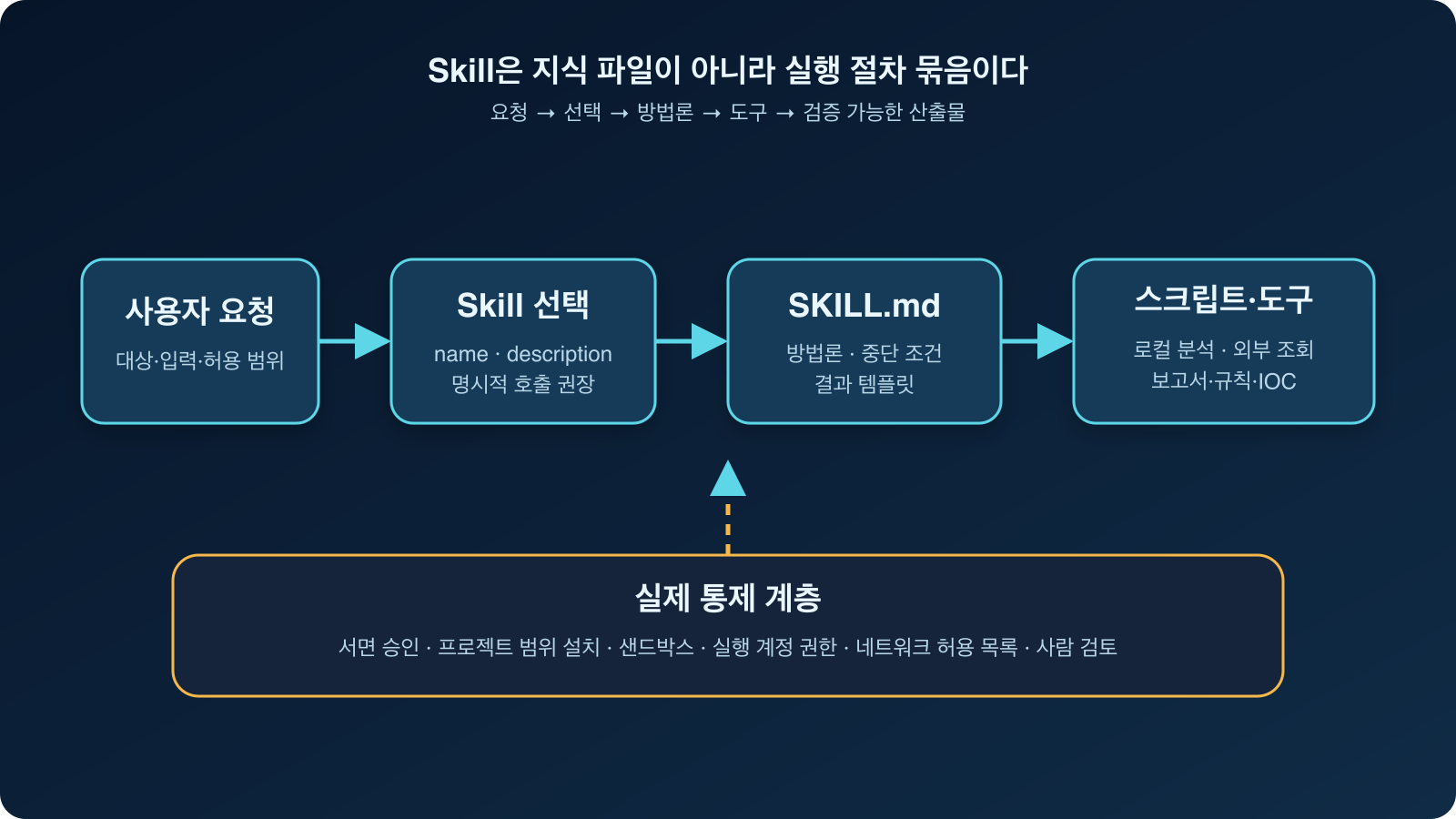
Figure: Reconstructing the Skill processing flow based on this repository’s README and USAGE documents — Original
19 Security Domains Included in the Repository
v3.0.0 added AI·LLM, Mobile, OT·ICS, and GRC to the existing 15 domains. The overall configuration from an operational perspective is as follows:
| No. | Skill | Representative Task |
| — | — | — |
| 01 | Recon & OSINT | Subdomain, DNS, technology stack, and public information investigation |
| 02 | Vulnerability Scanner | Dependency/configuration check, CVSS calculation, vulnerability report |
| 03 | Exploit Development | PoC and exploit research in approved environments |
| 04 | Reverse Engineering | Binary, firmware, protocol reverse engineering |
| 05 | Malware Analysis | Static/dynamic analysis, IOC extraction, YARA rules |
| 06 | Threat Hunting | IOC and TTP extraction, ATT&CK mapping, hunting queries |
| 07 | Incident Response | PICERL procedure, evidence collection, timeline, and report |
| 08 | Network Security | PCAP analysis, IDS rules, firewall review |
| 09 | Web Security | Web, API, JWT security checks from an OWASP perspective |
| 10 | Cloud Security | AWS·Azure·GCP, container, Kubernetes, and IaC checks |
| 11 | CSOC Automation | Alert classification, escalation, shift reports |
| 12 | Log Analysis & SIEM | Log parsing, anomalies, SPL·KQL·EQL, and Sigma |
| 13 | Cryptographic Analysis | TLS and crypto settings, hash, PQC review |
| 14 | Red Team Operations | Approved Red Team scope, RoE, ATT&CK-based planning |
| 15 | Blue Team Defense | Linux·Windows hardening, detection engineering, and baselines |
| 16 | AI & LLM Security | Prompt injection, RAG·tool permissions, model supply chain |
| 17 | Mobile Security | Android·iOS, MASVS·MASTG, APK static analysis |
| 18 | OT / ICS / SCADA | Purdue model, industrial protocols, IEC 62443 |
| 19 | GRC & Compliance | Risk registry, control mapping, gap analysis, and policies |
What stands out more than a simple collection of commands is that each Skill provides both a methodology and a result format. For example, the Malware Analysis Skill bundles file identification, hash, strings, imports, entropy, IOCs, MITRE ATT&CK mapping, and YARA rules into a single analysis flow. The Vulnerability Scanner Skill requires CVE, CVSS, affected versions, non-destructive evidence, and remediation methods for each finding.
What’s New in v3.0
According to the CHANGELOG, v3.0.0 was released on June 23, 2026. The key changes are as follows:
- AI·LLM, Mobile, OT·ICS, and GRC Skills have been added.
- Vulnerability prioritization has been enhanced with perspectives such as CVSS 4.0, EPSS, CISA KEV, SBOM·VEX, and reachability.
- A model supply chain scanner has been added to statically check for pickle deserialization risks in AI models.
- Approval or safety verification procedures have been emphasized for high-risk areas such as Exploit Development, Red Team, AI·LLM, and OT·ICS.
The main branch also includes unreleased fixes after v3.0.0. The verified commit contains corrections for field mismatches between log parsers and anomaly detectors, handling of expired TLS certificates, CVSS rounding calculations, and dependency severity mapping. To reproduce a stable release, it is best to use tags; if the latest fixes are needed, it is better to pin a specific commit and review the changes.
Practice 1: Pinning the Repository to a Specific Commit
First, download the repository into the `vendor` directory within your working project. The key is not to copy it directly to the global Skill directory.
mkdir -p vendor
git clone https://github.com/Masriyan/Claude-Code-CyberSecurity-Skill.git
  vendor/Claude-Code-CyberSecurity-Skill
cd vendor/Claude-Code-CyberSecurity-Skill

# Fixed to the snapshot confirmed in this article
git checkout ce0c629236ec17292d7567877398a1d5c591f91c
git log -1 --oneline
To start based on a release version, you can select a tag as follows:
git tag --list
git checkout v3.0.0
Commit pinning does not guarantee a “safe version.” Instead, it allows you to identify which source was used during the installation, review, and reproduction process.
Practice 2: Reviewing Skills and Scripts Before Installation
First, check the count and structure.
find skills -name SKILL.md | sort
find skills -name SKILL.md | wc -l
find skills -path '*/scripts/*.py' | sort find skills -path '*/scripts/*.py' | wc -l
The verified commit should show 19 and 32 respectively. Next, read the frontmatter, safety rules, and execution commands of the Skill you intend to install.
sed -n '1,220p' skills/05-malware-analysis/SKILL.md
sed -n '1,220p' skills/16-ai-llm-security/SKILL.md
sed -n '1,220p' skills/18-ot-ics-security/SKILL.md
Also, statically search whether auxiliary scripts use network or operating system commands.
rg -n 'subprocess|os.system|shell=True|requests.(get|post)|socket.|pickle|eval(|exec('
  skills --glob '*.py'
This search result itself does not imply a vulnerability. For example, `subprocess.run()` in Blue Team hardening scripts is used to read `systemctl`, `sysctl`, and `lsmod` states, and `pickletools` in AI model scanners is used to inspect opcodes without deserializing the model. On the other hand, scripts that communicate with external targets, such as web scanners, prompt injection tests, and TLS audits, must have their targets and scope re-verified before execution.
The repository also includes some .pyc files under `__pycache__`. Installation review should be based on SKILL.md and Python source code, rather than trusting cache files, and if necessary, a copy policy that excludes cache files should be applied.
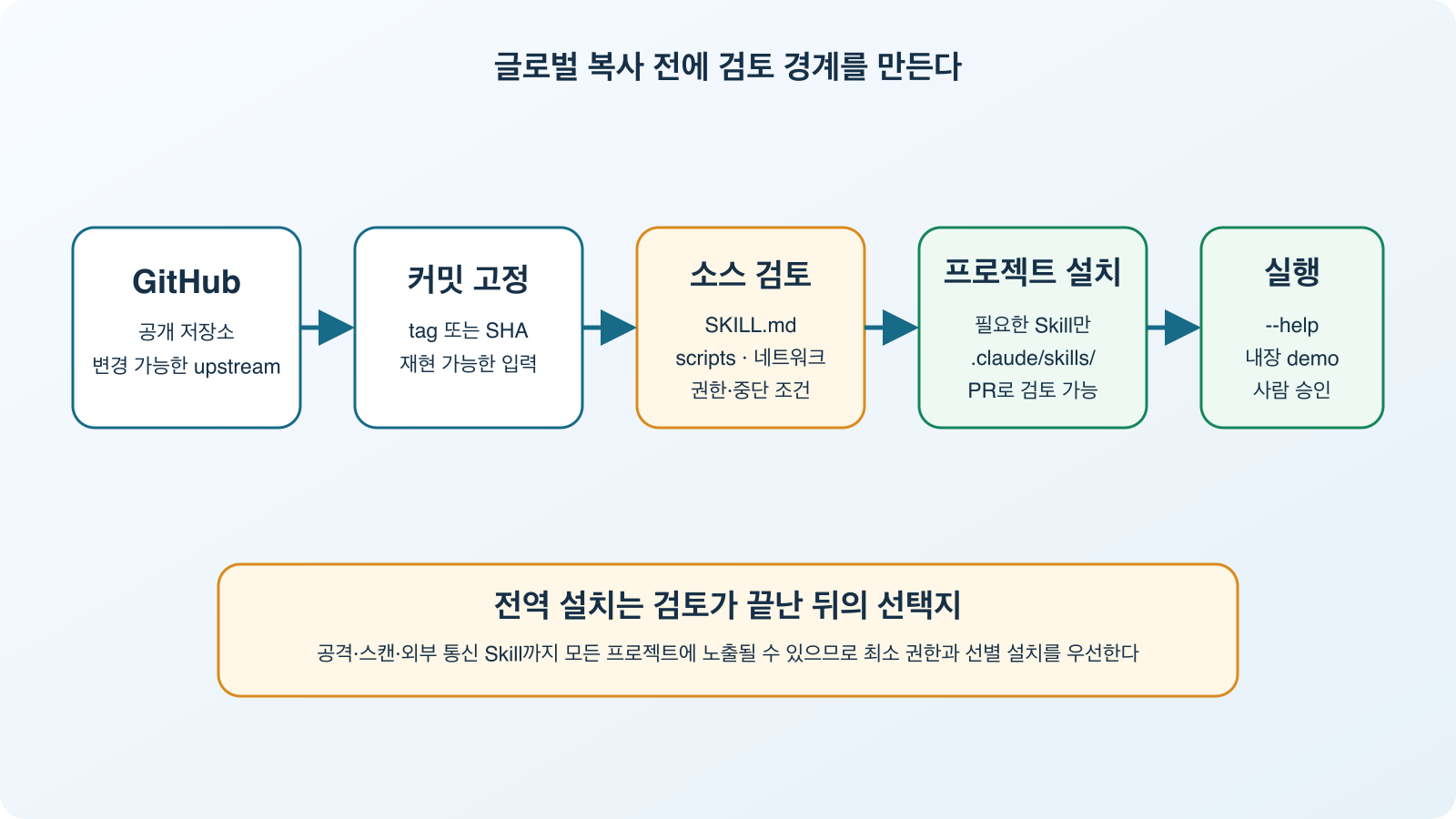
Figure: Reconstructing safe installation boundaries based on the repository’s INSTALL and SECURITY documents — INSTALL, SECURITY
Practice 3: Installing Only Necessary Skills within the Project Scope
The repository’s installation documentation also guides on global installation, which involves copying all Skills to ~/.claude/skills/. However, if you are reviewing security Skills for the first time, it is easier to control by selecting only the defense areas necessary for the current project.
# Run from the application project root
mkdir -p .claude/skills

cp -R vendor/Claude-Code-CyberSecurity-Skill/skills/05-malware-analysis
  .claude/skills/
cp -R vendor/Claude-Code-CyberSecurity-Skill/skills/06-threat-hunting
  .claude/skills/
cp -R vendor/Claude-Code-CyberSecurity-Skill/skills/16-ai-llm-security
  .claude/skills/

find .claude/skills -name SKILL.md -print
The advantage of project-scope installation is that attack/scan-related Skills are not unnecessarily exposed to other work projects, and you can code review which Skills were used along with the repository. In a team environment, it is advisable to treat changes to .claude/skills/ as PR review and approval targets, just like regular code.
Practice 4: Smoke Test Without Network Usage
Auxiliary scripts are first verified via paths that do not touch external targets, such as `–help` or built-in demos.
python3 skills/02-vulnerability-scanner/scripts/cvss_calculator.py
  --vector 'AV:N/AC:L/PR:N/UI:N/S:U/C:H/I:H/A:H'

python3 skills/12-log-analysis/scripts/anomaly_detector.py --demo

python3 skills/16-ai-llm-security/scripts/model_supply_chain.py --help
When writing this article, direct execution from the same commit showed that the first command output CVSS v3.1 9.8 / Critical, and the anomaly detection demo found 11 anomalies in sample events. The help message for the model supply chain script was also displayed correctly.
The important point is to distinguish between smoke tests and actual security assessments. A successful `–demo` does not mean that the detection quality is sufficient in a specific organization’s logs, nor does a successful CVSS calculation validate the actual reachability or exploitability of a vulnerability.
Practice 5: Explicitly Calling from Claude Code
Relying solely on automatic Skill selection can lead to similar-named Skills being mixed up or the scope becoming too broad. For the first practice, it is better to include the Skill name, input file, allowed actions, and prohibited actions together in the prompt.
Use the Malware Analysis & Sandboxing skill.
Analyze only the supplied text report and extracted strings.
Do not execute the sample, do not contact external services, and do not modify files.
Return hashes and IOCs only if they are present in the input, map observed behavior to MITRE ATT&CK,
and mark every inference with a confidence level.
Log analysis can fix inputs and outputs as follows:
Use the Log Analysis & SIEM skill on ./lab/auth.log.
First explain which parser and fields you will use.
Run only the local parser and anomaly detector after I approve the command.
Save the final findings to ./reports/auth-log-review.md and include the evidence lines.
AI·LLM security checks first declare target ownership and network call boundaries.
Use the AI & LLM Security skill for a threat model only.
The target is our local RAG design document, not a live third-party service.
Map trust boundaries to the OWASP LLM Top 10 and identify excessive-agency risks.
Do not send test prompts or call any endpoint.
Writing it this way leaves not only “which Skill to use” but also “what not to do” in the execution context.
Connecting Skills Creates a Security Workflow
The real advantage of this repository becomes apparent when passing results to the next stage, rather than viewing each of the 19 Skills individually. For example, an incident response flow can be structured as follows:
- Incident Response defines the scope of collection and evidence preservation procedures.
- Malware Analysis extracts static features and IOCs from suspicious files.
- Threat Hunting links IOCs and TTPs to ATT&CK and creates environment-wide search queries.
- Log Analysis refines detections with SPL·KQL·EQL or Sigma rules.
- Blue Team Defense organizes hardening and recurrence prevention baselines.
At this point, fixing the output format of each stage transforms “conversational advice” into reviewable security deliverables. Conversely, if AI-generated IOCs, CVEs, and ATT&CK IDs are passed to the next stage as facts without input evidence, errors will also be automated. It is essential to link supporting files, command outputs, official vulnerability documents, and human-approved judgments.
Essential Safety Limitations to Know
1. Authorization Gate is Not an Operating System Enforcement Policy
Exploit Development and Red Team Skills specify approval verification procedures in SKILL.md, and OT·ICS Skills emphasize manual, non-intrusive methods as defaults. These are good lines of defense but are document-based instructions. They do not replace execution account permissions, network allow lists, sandboxes, or approval workflows.
2. Global Installation Broadens the Context for All Projects
Copying all 19 Skills to the user scope is convenient, but attack/scan/external communication-related instructions and scripts can also be found in all projects. Minimal installation and project-scope installation are advantageous for review, retrieval, and auditing.
3. Many Optional Dependencies and External Tools
INSTALL.md guides on optional Python packages like requests, pyyaml, boto3, yara-python, scapy, and tools such as Nmap, Wireshark, Ghidra, Volatility, Trivy, and Frida. The executable scope of the same Skill varies depending on the operating system and installation status. WSL2 is recommended for Windows due to some Linux commands.
4. Analysis Scripts Are Not Replacements for Professional Products
Static analyzers, dependency auditors, and log anomaly detectors are useful for quick initial classification and repeatable practices. However, they do not fully replace the entire detection logic and quality assurance of commercial EDR, SAST·SCA, SIEM, or forensic tools. Results should be used not as conclusions, but as candidates for investigation and starting points for evidence collection.
5. Check License and No-Warranty Conditions
The repository is released under the MIT License, allowing modification and redistribution, but the software is provided without warranty. Organizational policies, data export, third-party tool licenses, and written approvals for actual assessment targets must be managed separately.
Which Teams Would This Be a Good Fit For?
This can be a good starting point for the following teams:
- Teams looking to standardize security analysis procedures in SKILL.md format
- Teams aiming to automate the generation of repetitive reports, rules, and checklists in Claude Code
- Educational environments practicing the connection of deliverables between offensive and defensive security tasks
- Individuals who want to compare structures across AI·LLM, Mobile, OT·ICS, and GRC within a single repository
Conversely, it is not suitable for cases where one attempts to globally install all Skills without verification, mistakes authorization boundaries for operating system permissions, or deploys generated detection rules to production without testing.
Conclusion
Claude-Code-CyberSecurity-Skill is not just a repository of knowledge across 19 security domains, but a practical example that bundles the operational sequence, output format, auxiliary scripts, and safety verification statements that Claude Code should follow. Especially, v3.0 expands its scope to include AI·LLM, Mobile, OT·ICS, and GRC, making it excellent for comparing the diverse roles of a security organization at a glance.
The safest way to start is not to perform a global installation of everything. Pin a specific commit, read SKILL.md and the Python source code, install only the necessary defense Skills within the project scope, and then run demos without network access. After that, by specifying the Skill name, input scope, prohibited actions, and result format in the prompt, you can use the AI security copilot more predictably.
References
- Claude-Code-CyberSecurity-Skill Repository
- README — 19 Skills Overview and Quick Start
- INSTALL — Installation Location, Dependencies, Verification, and Removal
- USAGE — Skill Lifecycle and Connection Usage
- SECURITY — Approved Use and Vulnerability Reporting Policy
- CHANGELOG — v3.0 and Main Branch Changes
- AI & LLM Security Skill
- Malware Analysis Skill
Leave a Reply