Hello! Today, I’d like to delve deep into ‘Egress (Outbound) Traffic Control,’ which is one of the first security considerations when adopting Istio.
What if malware secretly hidden inside a Kubernetes Pod transmits data to an external hacker’s server? 😱 It’s a terrifying thought. Istio can completely block such ‘data exfiltration’ attempts with a very simple configuration change.
Let’s explore the differences between the default setting (ALLOW_ANY) and the secure setting (REGISTRY_ONLY), along with practical configuration methods! 🚀
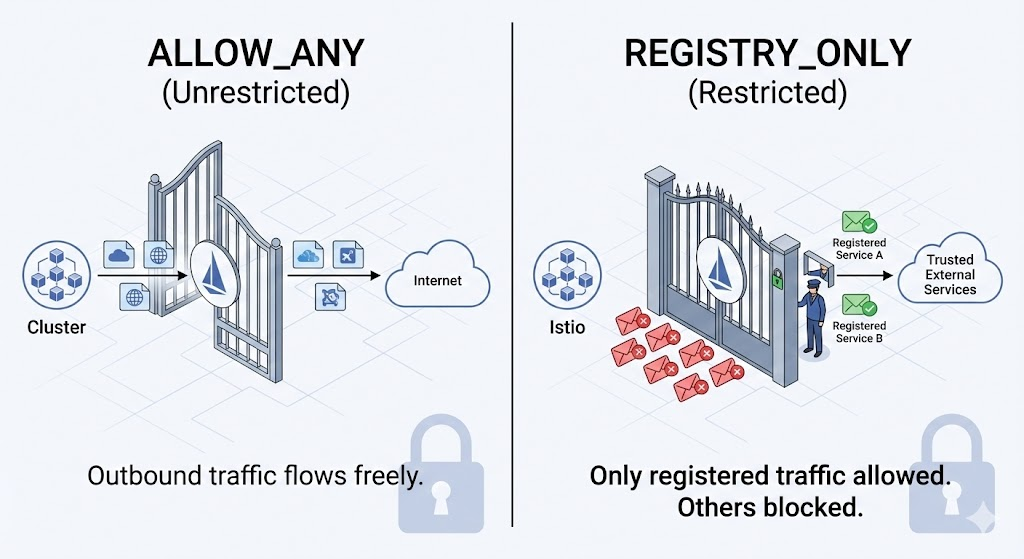
1. Istio’s Default Behavior: “The Door is Wide Open?” 🔓
What happens if a Pod with Istio installed sends a request to the external internet (e.g., google.com, api.slack.com)?
If no special settings are applied, communication succeeds by default.
- Setting: outboundTrafficPolicy.mode = ALLOW_ANY
- Behavior: The sidecar proxy (Envoy), upon receiving a request to an unknown destination (an address not in the Service Registry), “passes it through”.
- Pros: Convenient for development. You can call external APIs freely.
- Cons: Vulnerable to security breaches. It cannot prevent a compromised Pod from communicating with an external C&C server (attacker’s server).
2. Enhanced Security: “Only Registered Places Allowed!” 🛡️
In a production environment where security is critical, a whitelist approach should be used. That is, declaring, “You can’t go anywhere except where I’ve allowed!”
- Setting: outboundTrafficPolicy.mode = REGISTRY_ONLY
- Behavior: The sidecar proxy checks the request destination. If it’s registered in Istio’s internal Service Registry, it allows the request; otherwise, it ruthlessly blocks it.
- Pros: Prevents data exfiltration and provides strong Egress security.
- Cons: The inconvenience of having to manually register a ServiceEntry every time external communication is needed.
3. Hands-on: Applying Security Policies 👨💻
Let’s directly use istioctl to change the outbound policy for the entire cluster.
Step 1: Check Current Status (ALLOW_ANY)
Currently, it’s in the default setting. Let’s try connecting to the external service httpbin.org from a test Pod (tester).
kubectl exec tester --
    curl -sS -o /dev/null -D - http://httpbin.org/status/200 |
    grep "HTTP/"

# Result: HTTP/1.1 200 OK (Success!)
External communication works well without any restrictions.
Step 2: Change Policy (Switch to REGISTRY_ONLY) 🔥
Now, use the istioctl install command to change the global settings. Modify meshConfig to block unknown traffic.
istioctl install --set profile=demo
    -y --manifests=/root/istio-${ISTIO_VERSION}/manifests
--set meshConfig.outboundTrafficPolicy.mode=REGISTRY_ONLY- –set meshConfig.outboundTrafficPolicy.mode=REGISTRY_ONLY: This option is key!
Step 3: Verify Blocking 🚫
Wait a few seconds for the setting to apply, then try connecting again in the same way.
Bash
kubectl exec tester --
    curl -sS -o /dev/null -D - http://httpbin.org/status/200 |
    grep "HTTP/"
Result:
curl: (56) Recv failure: Connection reset by peer
command terminated with exit code 56
Did you see that? Instead of 200 OK, a Connection reset by peer error appeared. This isn’t a network disconnection; it means the Istio sidecar proxy forcibly terminated the connection (TCP Reset), essentially saying, “Hey, you’re trying to go to an unregistered place? No way!”
4. So, How Do We Communicate Externally Now? 🤔
“If we can’t reach Naver or Google, how will our services work?”
Don’t worry! In REGISTRY_ONLY mode, we can inform Istio about our necessary external destinations as “trustworthy places” through a resource called ServiceEntry.
apiVersion: networking.istio.io/v1alpha3
kind: ServiceEntry
metadata:
  name: external-httpbin
spec:
  hosts:
  - httpbin.org  # Register external domains to allow
  ports:
  - number: 80
    name: http
    protocol: HTTP
Once registered like this, httpbin.org becomes a “known site” and can be accessed again. This is the true beginning of Zero Trust security!
🏁 Conclusion
Will you use ALLOW_ANY for convenience, or accept the management overhead of REGISTRY_ONLY for security?
The answer depends on your environment, but remember that security incidents strike without warning. Even if it’s a bit cumbersome, using the REGISTRY_ONLY and ServiceEntry combination is the shortcut to building a secure cluster. 🛣️
Great job with today’s practice! Next time, I’ll bring more details on how to handle ServiceEntry. Goodbye! 👋
Leave a Reply