Hello! Today, I’d like to talk about a somewhat special routing method you might encounter when dealing with Istio.
Usually, an Ingress Gateway’s main role is to decrypt (Terminate) incoming HTTPS encryption, check the content, and then forward it to internal services.
But here’s the thing…🤔 If the gateway declares, “I won’t decrypt! I’ll just pass it through as is!” (PASSTHROUGH), then the gateway cannot see the URL path or headers inside the packet at all.
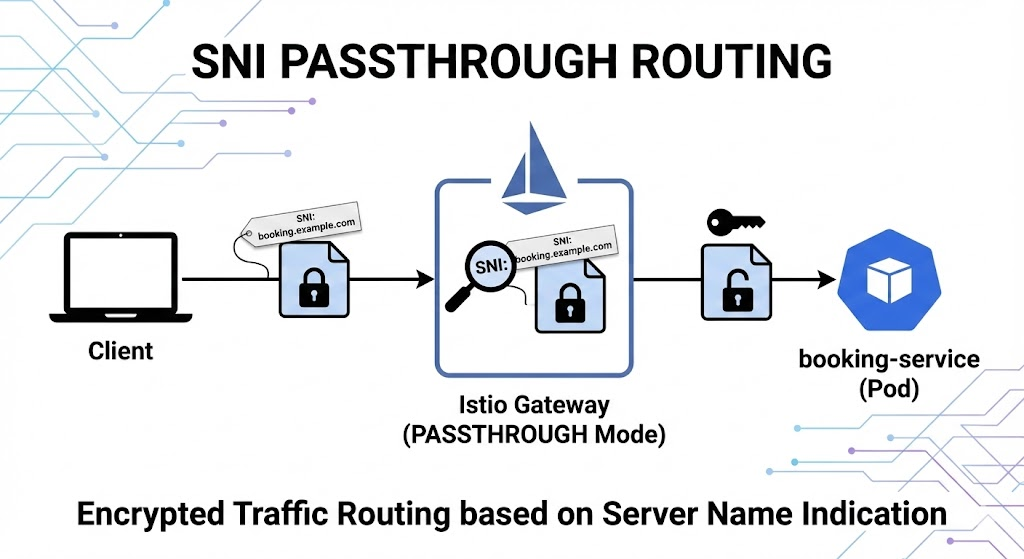
If it can’t see the content, how does it know and find the destination service (booking-service)? This is where SNI comes in.
1. What is SNI (Server Name Indication)? 📨
SNI stands for Server Name Indication. To put it simply, it’s like a “recipient’s name tag” Post-it note attached to the outside of an encrypted safe (packet).
💡 Why was it created?
HTTPS communication encrypts data for security. In the past, before an encrypted connection (TLS Handshake) was established, the server had no way of knowing “which domain the client wanted to connect to.” This became a problem when multiple domains (e.g., [suspicious link removed], b.com) were connected to a single server IP.
So, SNI is a technology agreed upon to “slightly inform the server of the desired domain address (Hostname) in plain text during the initial greeting (Client Hello) phase to start encrypted communication!”
2. Diving into the Code: PASSTHROUGH and SNI Collaboration 🤝
The YAML code you’ve shown is an excellent example of how Istio utilizes this SNI information. Let’s break it down.
1️⃣ Gateway Configuration: “I won’t look at the content (PASSTHROUGH)”
apiVersion: networking.istio.io/v1alpha3
kind: Gateway
metadata:
  name: booking-gateway
spec:
  servers:
  - port:
      number: 443
      protocol: HTTPS
    hosts:
    - booking.example.com
    tls:
mode: PASSTHROUGH # 👈 This is the key!- mode: PASSTHROUGH: Instructs the gateway “Do not terminate TLS encryption here.”
- Since the gateway passes encrypted data through as is, it cannot read HTTP headers or URL Paths (/login, /pay, etc.) at all.
2️⃣ VirtualService Configuration: “Deliver based on the name written on the outside (SNI)!”
apiVersion: networking.istio.io/v1beta1
kind: VirtualService
spec:
  hosts:
  - booking.example.com
  tls:                # 👈 Use tls rules, not http!
  - match:
    - port: 443
      sniHosts:       # 👈 Check the label on the outside of the encrypted packet
      - booking.example.com
    route:
    - destination:
        host: booking-service
        port:
number: 443- tls: Since HTTP content cannot be seen, we use tls (TCP level) routing rules instead of http routing rules.
- sniHosts: Instead of seeing the content, the gateway checks the SNI field (booking.example.com) sent by the client during the TLS handshake.
- It decides, “I don’t know the content, but it says ‘booking’ on the outside, so let’s send it to booking-service!”
3. Summary of Overall Operation Flow 🚀
When this configuration is applied, traffic travels as follows:
- Client (Browser) 💻: Attempts to connect to
- Istio Gateway 🛡️: Traffic arrives! In PASSTHROUGH mode, it doesn’t decrypt. Instead, it subtly checks the SNI.
- Routing Decision 🔀: The VirtualService indicates “If SNI is booking, send it to booking-service.”
- Forwarding 📦: The encrypted box is delivered as is to the booking-service pod.
- Booking Service (Pod) 🔓: The final destination pod directly decrypts the request and processes it.
4. When to Use This Method? (Use Cases)
Usually, the gateway decrypts the traffic, but in the following cases, this method (SNI routing) is essential:
- End-to-End Security (Zero Trust) 🔐: When even the gateway cannot be trusted, and the encryption must absolutely not be broken until the traffic reaches the pod.
- Per-Service Certificate Management 📜: When each service (Pod), rather than the gateway, needs to manage its own unique certificate directly.
🏁 Conclusion
In summary, SNI is like a navigation address that helps us not get lost in an encrypted world.
Using PASSTHROUGH in Istio turns the gateway into a “simple delivery person,” and the sniHosts setting is the only clue that helps this delivery person find the right house. Please remember this! 😉
If this was helpful, please give it a like!
Leave a Reply