Hello everyone interested in the latest technology trends! Today, I’d like to talk about the core secret of eBPF, often called a game-changer in Observability, Networking, and Security.
You’ve probably heard a lot about eBPF performing powerful functions in the kernel. But have you ever wondered:
“How on earth do eBPF programs, running deep within the kernel, communicate with us (users)?” 🤔
How do eBPF programs show us the data they collect, or how can we control their behavior? Today, we’ll delve into the answer to this very question: eBPF Map, in an easy-to-understand yet in-depth way!
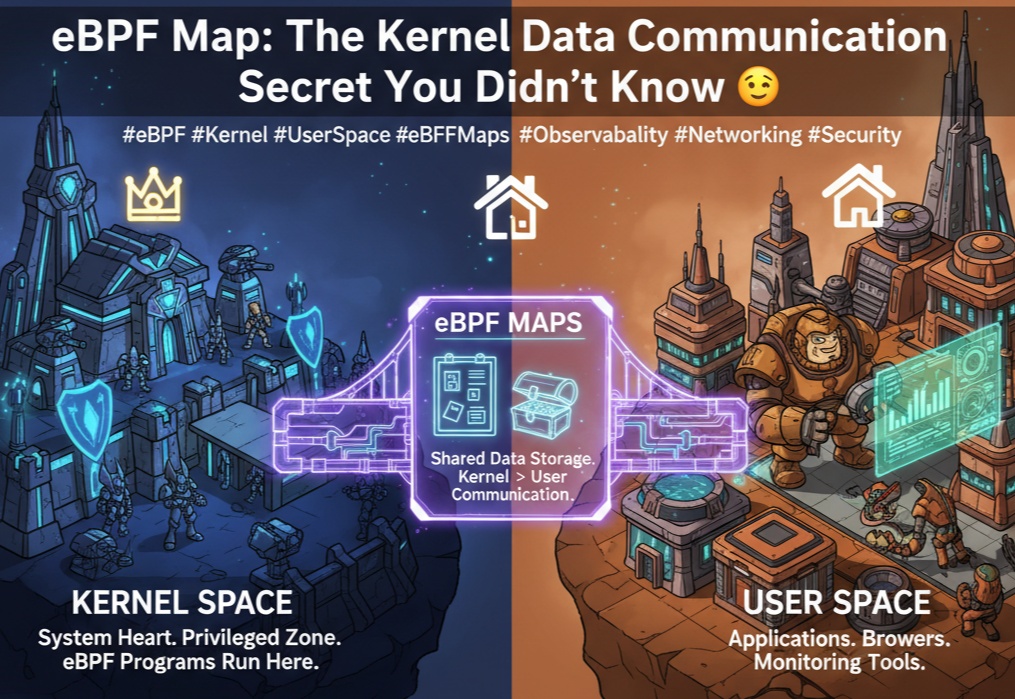
💻 An Unbreakable Wall? Kernel Space vs. User Space
To understand eBPF Map, we first need to know about the fundamental structure of our computers: Kernel Space and User Space.
- 👑 Kernel Space
- It’s the heart of the operating system.
- It’s a privileged area that directly communicates with hardware and controls everything in the system.
- It’s strictly protected for stability and security. eBPF programs run right here!
- 🏠 User Space
- This is the general area where applications we commonly use, such as browsers, editors, and server applications, run.
- It’s protected by the kernel and cannot directly access hardware.
These two spaces are designed never to directly reference each other’s memory or call each other’s functions. They are strictly separated, much like the President’s office and our homes. This “wall” necessitates a special communication method.
🌉 The Secret Passage Connecting Two Spaces: eBPF Map!
eBPF Map is a ‘shared data store’ created to allow Kernel Space and User Space to exchange data, overcoming this robust wall.
To put it simply, you can think of it as a special shared bulletin board 📬 between the kernel and user space.
- eBPF programs in Kernel Space write or update data on this bulletin board whenever an event occurs.
- Applications in User Space (Agents, monitoring tools, etc.) can read data from this bulletin board at any time, or write new policies to control the behavior of eBPF programs.
eBPF Maps exist in various forms such as hash tables, arrays, and LRU caches, and can be chosen according to their purpose.
🔧 How does it actually work? (feat. Code)
Seeing is believing! Let’s look at how eBPF Map works through a simple scenario: counting packets coming from a specific IP address.
1. Defining the Map (Drawing the Blueprint)
First, we need to define the structure of the Map so that both the kernel and user space can understand it.
// BPF_MAP_TYPE_HASH: A hash table in Key-Value form
// key: 32-bit IP address (u32)
// value: 64-bit packet count (u64)
// max_entries: Track up to 1024 IPs
struct {
    __uint(type, BPF_MAP_TYPE_HASH);
    __uint(max_entries, 1024);
    __type(key, u32);
    __type(value, u64);
} ip_packet_counts SEC(".maps");
2. eBPF Program (Kernel Space 👑)
This program runs every time a packet arrives at the network interface.
// Fictional eBPF program code
SEC("xdp")
int count_packets(struct xdp_md *ctx) {
    // Extract IP header information from packet (omitted)
    void *data_end = (void *)(long)ctx->data_end;
    void *data     = (void *)(long)ctx->data;
    struct ethhdr *eth = data;
    struct iphdr *ip = data + sizeof(*eth);

    // Use IP address as Key
    u32 src_ip = ip->saddr;
    u64 *count;

    // 1. Look up counter for current IP in Map
    count = bpf_map_lookup_elem(&ip_packet_counts, &src_ip);

    if (count) {
        // 2. If counter exists, increment by 1
        __sync_fetch_and_add(count, 1);
    } else {
        // 3. If counter does not exist, create new and initialize to 1
        u64 init_val = 1;
        bpf_map_update_elem(&ip_packet_counts, &src_ip, &init_val, BPF_ANY);
    }

    return XDP_PASS;
}
This code runs quietly and very quickly in the kernel, steadily accumulating data in a Map called ip_packet_counts.
3. User Space Application (User Space 🏠)
Now it’s our turn. An application written in Go periodically reads the contents of the Map and prints them.
// Fictional Go application code
func main() {
    // Get eBPF Map handle (omitted)
    ipMap := getMapByName("ip_packet_counts")

    // Print Map contents every 2 seconds
    for range time.Tick(2 * time.Second) {
        var key uint32
        var value uint64

        iterator := ipMap.Iterate()
        fmt.Println("--- Packet Counts per IP ---")

        // Iterate and print all Key-Value pairs in the Map
        for iterator.Next(&key, &value) {
            // 192.168.1.10: 1520 packets
            fmt.Printf("%s: %d packets
", intToIP(key), value)
        }
        fmt.Println("--------------------------")
    }
}
Raw Data Example
The data output by the Go program above would look something like this:
--- Packet Counts per IP ---
192.168.1.10: 1520 packets
10.0.0.5: 887 packets
172.17.0.1: 4312 packets
--------------------------
This is how real-time data collected from the kernel is safely transferred to user space and transformed into meaningful information.
✨ Why is this important? Understanding the Bigger Picture
The role of eBPF Map goes beyond simply exchanging data. This mechanism dramatically increases the potential uses of eBPF.
- State Sharing and Storage 💾 eBPF programs run ‘statelessly’, meaning they execute independently each time an event occurs. However, by using Maps, the results of previous executions can be stored and referenced in subsequent executions. For example, it becomes possible to perform ‘stateful’ operations such as storing session information for specific connections or recording cumulative traffic per IP.
- Dynamic Configuration and Control ⚙️ It’s also possible to write data to Maps from user space. For instance, if a list of IPs to block is written to a Map, the eBPF program in the kernel can reference this list in real-time to filter malicious traffic. This allows for flexible policy changes without restarting the agent or modifying kernel code.
- High-Performance Data Export 📊 Existing methods for bringing kernel data to user space (e.g., /proc file system, system calls) can be complex or cause performance degradation. eBPF Map is an optimized method for sharing data with the kernel, efficiently extracting vast amounts of data with minimal overhead, enabling real-time monitoring.
Conclusion: The Key to Unlocking eBPF’s Potential
In summary, eBPF Map is a crucial bridge connecting the separated worlds of kernel and user space.
Thanks to this bridge, we can leverage the powerful performance and security of the kernel, while also viewing collected data in a user-friendly format and controlling kernel operations as we intend. Numerous eBPF-based Observability, Security, and Networking tools are being born on top of this eBPF Map.
Next time an eBPF-based tool shows you a real-time dashboard, remember that an eBPF Map is diligently working behind the scenes! 😉
Leave a Reply