Hello everyone! 👋
When studying Istio or preparing for the ICA (Istio Certified Associate) certification, what’s the most daunting moment? It’s when you find yourself wondering, “Which YAML resource should I use in this situation?” 🤯
VirtualService, DestinationRule, Gateway, ServiceEntry… their names are similar, and their roles can be confusing, right? That’s why today, I’ve prepared a scenario-based Istio resource mapping cheatsheet that you absolutely must have in your head before entering the exam room.
If you thoroughly read this one article, you won’t be afraid of complex scenario questions! 🏃♂️💨
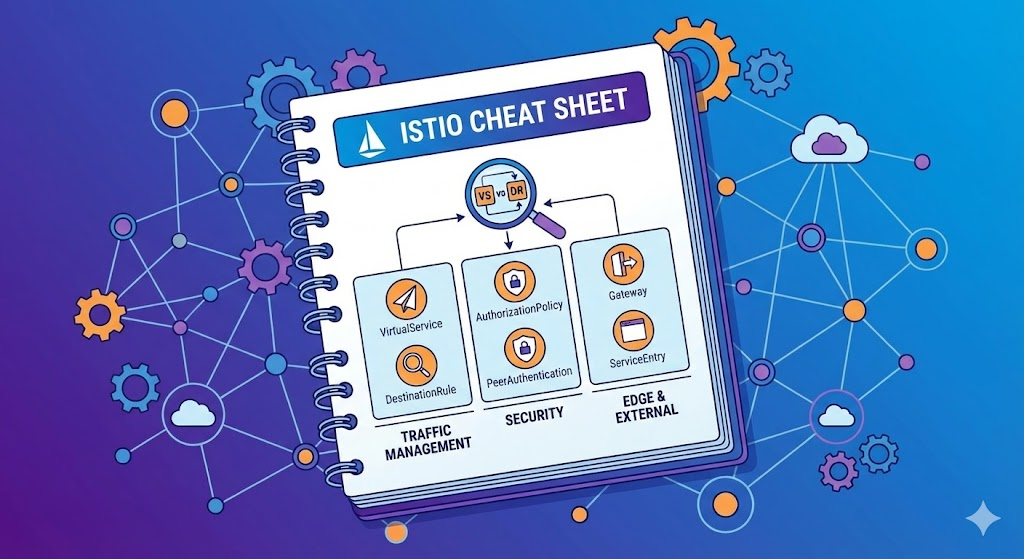
🚦 1. Traffic Management
Q. “Where and how should requests be sent?”
Traffic control issues are a common topic on the ICA exam. When requirements related to deployment strategies or network resilience come up, think of the following resources.
🔀 VirtualService (Navigation)
This is a core resource that determines where traffic will go.
- Canary Deployment: “Send only 10% of traffic to the new version (v2)” 👉 Use the route > weight field
- Conditional Routing: “Send iPhone users (header) to the mobile page” 👉 Use the match > headers field
- Network Resilience: “If there’s no response, retry 3 times (Retry)” or “If no response within 2 seconds, cut off (Timeout)” 👉 Use the retries, timeout fields
- Traffic Mirroring: “I want to test without affecting the live production environment” 👉 Use the mirror field
🛑 DestinationRule (Post-Arrival Rules)
This defines how traffic will be handled after it arrives at its destination (Pod group).
- Version Segmentation (Subsets): “Logically divide v1 Pods and v2 Pods” 👉 subsets (distinguish by labels)
- Circuit Breaker: “Temporarily block Pods with too many concurrent connections or frequent errors” 👉 trafficPolicy > outlierDetection, connectionPool
- Load Balancing: “Distribute traffic using a random method instead of round robin” 👉 trafficPolicy > loadBalancer
🛡️ 2. Security
Q. “Who can enter, and how do they communicate?”
Security questions are typically phrased as “Allow someone, block someone” or “Encrypt it.”
👮 AuthorizationPolicy (Access Control)
This is the most commonly used security resource. It defines who (Who) can do what (What).
- Whitelist: “Allow only the ‘Product’ service to access” 👉 action: ALLOW, rules > from
- Method Restriction: “Allow only GET requests and block POST” 👉 rules > to > operation > methods: [“GET”]
- Total Block: “Close all doors in this namespace” 👉 spec: {} (empty rule = Deny All)
🔐 PeerAuthentication (mTLS)
This sets the encryption level for service-to-service communication.
- Mandatory Encryption: “All communication must strictly use mTLS” 👉 mtls > mode: STRICT
- Flexible Mode: “Allow both plain text and mTLS (during migration)” 👉 mode: PERMISSIVE
🆔 RequestAuthentication (JWT)
- User Authentication: “Validate JWT tokens” 👉 jwtRules (Configure Issuer, JWKS URI)
🌐 3. External Connectivity & Gateway (Edge & External)
Q. “How are the inside and outside of the cluster connected?”
This area deals with the boundaries (Edge) of the Istio Mesh.
🚪 Gateway (Front Gate)
- Open the Gate: “Accept incoming traffic on port 80 from outside” 👉 servers > port, hosts
- Caution: Creating only a Gateway just opens the gate. A VirtualService is needed to determine where to go!
🗺️ ServiceEntry (External Address Book)
- Register External Services: “Need to call Google or Yahoo APIs from within the mesh” 👉 hosts, resolution: DNS
- Istio by default blocks or does not manage unknown external addresses, so registration is required.
📤 Egress TLS (Encryption on Exit)
- TLS Origination: “Internal apps send via HTTP, but convert to HTTPS when exiting” 👉 DestinationRule‘s trafficPolicy > tls > mode: SIMPLE
💡 4. The Most Confusing Point: VS vs DR
Here’s a clear explanation of the two most commonly confused resources in the exam!
| Resource | Role Analogy | Key Feature Keywords |
| — | — | — |
| VirtualService (VS) | 🚗 Navigation | Pathfinding, % distribution, retry, timeout |
| DestinationRule (DR) | 🅿️ Parking Lot Rules | Version grouping (Subset), circuit breaker, mTLS configuration |
– Tip: If you’re controlling “paths” or “flow,” it’s VS; if it’s “Pod group settings” or “fault blocking,” it’s DR.
📝 Exam Tips for Passing
- Mandatory Namespace Check: Double-check whether the task required by the problem is in ‘default’ or ‘istio-system’. Creating it in the wrong place will result in 0 points. 😱
- Apply is Life: It’s useless to just create and save a pretty YAML file. You must execute kubectl apply -f
to create the resource. - Gateway Connection: Many mistakes happen when creating a VirtualService by not specifying the name of the newly created Gateway in the ‘gateways’ field, leading to external access failures. Always check the connection! 🔗
Summary
🚦 1. Traffic Management
“Where and how should requests be sent?”
| Scenario | Required Resource | Key Configuration Fields |
| — | — | — |
| A/B Testing, Canary Deployment (Traffic % split) | VirtualService | route > weight (e.g., 90, 10) |
| When you want to send traffic to different places based on URL path, headers | VirtualService | match > uri, headers |
| Retry, Timeout settings | VirtualService | retries, timeout |
| Define specific version (v1, v2) groups | DestinationRule | subsets (distinguish Pods by labels) |
| Change Load Balancing Algorithm (RoundRobin, Random, etc.) | DestinationRule | trafficPolicy > loadBalancer |
| Circuit Breaker (Connection limits, fault blocking) | DestinationRule | trafficPolicy > connectionPool, outlierDetection |
| Traffic Mirroring (Duplicate actual requests for testing) | VirtualService | mirror |
—
🛡️ 2. Security
“Who can enter, and how do they communicate?”
| Scenario | Required Resource | Key Configuration Fields |
| — | — | — |
| Allow access only to specific services (Whitelist) | AuthorizationPolicy | action: ALLOW, rules > from, to |
| Block specific paths/methods (Deny) | AuthorizationPolicy | action: DENY, rules (higher priority) |
| mTLS mode setting (Strict, Permissive) | PeerAuthentication | mtls > mode: STRICT |
| JWT Token Authentication (End-user authentication) | RequestAuthentication | jwtRules > issuer, jwksUri |
| When you want to close off the entire namespace | AuthorizationPolicy | spec: {} (empty rule = Deny All) |
—
🌐 3. External Connectivity & Gateway (Edge & External)
“Connection between outside and inside the cluster”
| Scenario | Required Resource | Key Configuration Fields |
| — | — | — |
| Receive external traffic (Open Ingress Port) | Gateway | servers > port, hosts |
| Route received traffic to internal services | VirtualService | Specify Gateway name in gateways |
| Register external services (Google, Yahoo, etc.) | ServiceEntry | hosts, ports, resolution: DNS |
| Convert outgoing traffic to HTTPS (TLS Origination) | DestinationRule | trafficPolicy > tls > mode: SIMPLE |
| Force traffic to exit only through a specific node (Egress Gateway) | Gateway (for Egress) + VirtualService | gateways: [mesh, egress-gw] |
I hope this cheatsheet helps you pass your ICA exam! Istio may seem complex, but you can definitely conquer it by matching the right tools to the right scenarios. Good luck! 💪✨
If you have any questions or topics you’d like me to cover, please leave a comment!
Leave a Reply