It’s easy to launch a container with a single podman run command. However, when you start adding operational concerns like automatic startup after server reboot, restart on abnormal termination, execution order, log viewing, and resource limits, shell scripts quickly become complex.
Podman Quadlet bridges this gap. By writing short declarative files like .container, .network, and .volume, the systemd generator converts them into regular service units. After that, containers can be started and stopped with systemctl and observed with journalctl, just like any other systemd service.
In conclusion, if you want to operate containers like OS services on a single or a small number of Linux servers, Quadlet is the most natural choice. While it doesn’t schedule workloads across multiple nodes like Kubernetes, it allows you to leverage systemd’s existing boot order, restart policies, dependencies, logs, and permission models.
What is Quadlet?
Podman’s official documentation describes Quadlet as a feature for declaratively managing containers, Pods, volumes, networks, and images as systemd unit files. The key words here are declarative and systemd.
A typical podman run command is a procedure: “run this container now with these options.” A Quadlet file records the desired state: “this host should have a service with this image, port, volume, and restart policy.” The actual execution command is generated by the Quadlet generator.
In the past, podman generate systemd would create long .service files based on already created containers or Pods. This functionality is now marked as deprecated in the official command list, and Quadlet is recommended for new configurations.
How it Works: Quadlet as Source, systemd as Executor
Quadlet is not a separate daemon that runs continuously. When systemd boots or systemctl daemon-reload is performed, Podman’s generator reads Quadlet files from its search paths. It then generates systemd-understandable service units at runtime. This process and the search paths are defined in the podman-systemd.unit official documentation.
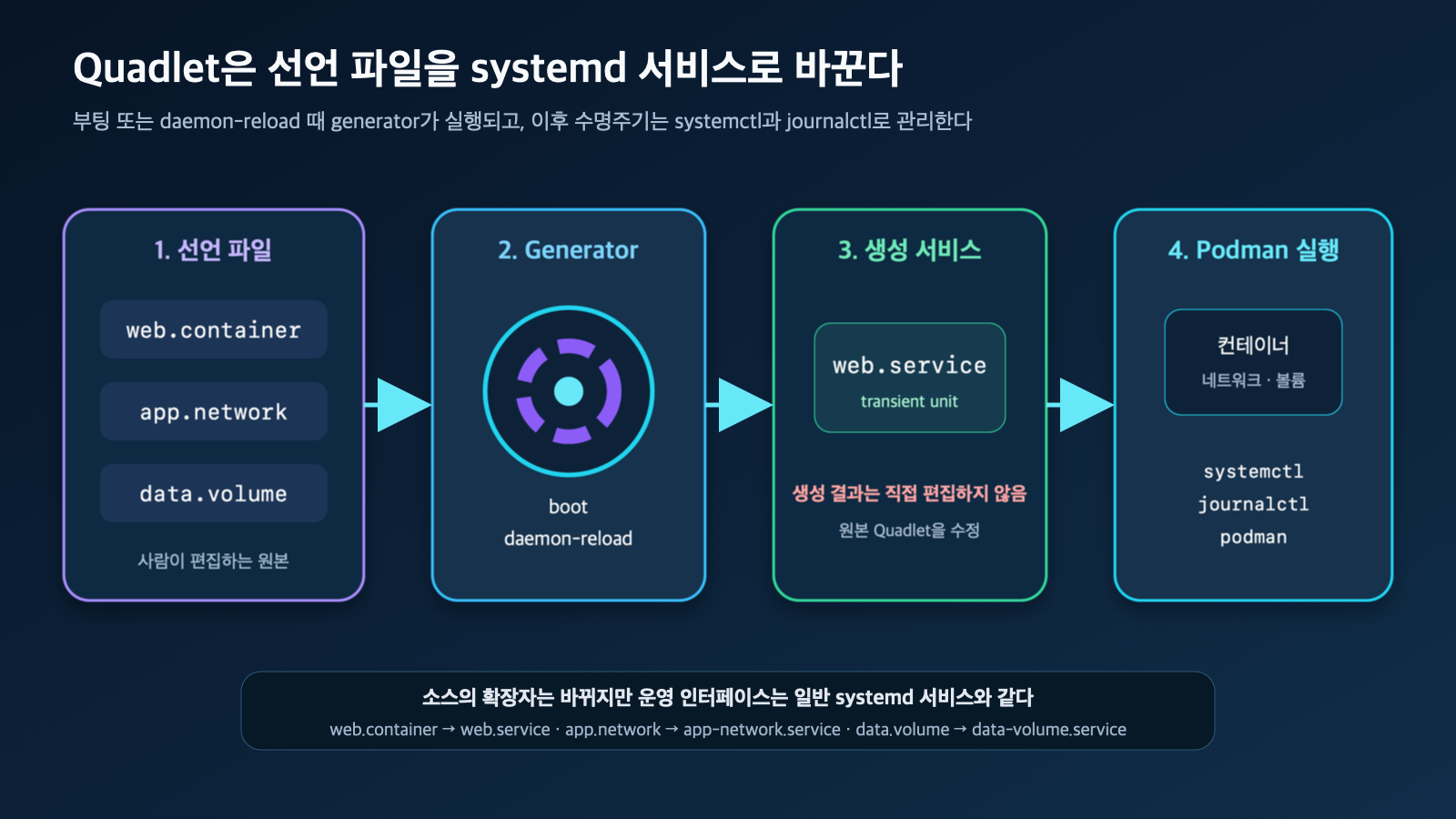
Figure: Quadlet Generation Flow · Reconstructed based on Podman systemd unit official documentation
For example, web.container becomes web.service, app.network becomes app-network.service, and data.volume becomes data-volume.service. The generated results are transient units, so they should not be edited directly. To change settings, you must modify the original Quadlet or a .d/*.conf drop-in and then perform another daemon-reload.
This structure clarifies roles:
- Human-managed source:
*.container,*.pod,*.network, etc. - Conversion point: Boot or
systemctl daemon-reload - Lifecycle management:
systemctl start,stop,restart,status - Logs and fault analysis:
journalctl,systemd-analyze, Podman commands
Supported Quadlet File Types
Currently, the official documentation defines the following eight types:
| Extension | Dedicated Section | Role |
| — | — | — |
| .container | [Container] | Run a single container as a service |
| .pod | [Pod] | Create a Pod for multiple containers to join |
| .network | [Network] | Create a Podman network |
| .volume | [Volume] | Create/ensure persistent volume |
| .image | [Image] | Pre-fetch and cache an image |
| .build | [Build] | Build a local image with a Containerfile |
| .kube | [Kube] | Run Kubernetes YAML with podman kube play |
| .artifact | [Artifact] | Fetch OCI artifact for use by other units |
Quadlet files use both general systemd syntax and dedicated sections. [Unit], [Service], and [Install] are handled by systemd, while dedicated sections like [Container] are converted by the Podman generator into podman run options. This allows you to combine familiar systemd policies like Restart= and TimeoutStartSec= with container settings like Image=, PublishPort=, and Volume= in a single file.
Where to Place Files
The search path varies depending on whether the operating entity is root or a regular user.
| Execution Method | Common Path | systemctl Command |
| — | — | — |
| Rootless user service | ~/.config/containers/systemd/ | systemctl --user ... |
| Rootful system service | /etc/containers/systemd/ | sudo systemctl ... |
| Rootful temporary test | /run/containers/systemd/ | sudo systemctl ... |
| Distribution-provided rootful unit | /usr/share/containers/systemd/ | sudo systemctl ... |
| Admin-deployed per-user | /etc/containers/systemd/users/${UID}/ | systemctl --user ... for that user |
For rootless, this also includes $XDG_RUNTIME_DIR/containers/systemd/, $XDG_CONFIG_HOME/containers/systemd/, and the /etc/containers/systemd/users/ and /usr/share/containers/systemd/users/ families. If the same name exists in multiple paths, priority rules apply, so avoid name conflicts between operational files and temporary test files.
Quadlet requires cgroup v2. It’s best to check your environment with the following two commands before starting:
podman --version
podman info --format '{{.Host.CgroupsVersion}}'
The second result should be v2. Also, since Quadlet is a systemd feature, it does not run directly on macOS or Windows hosts. In these environments, you should configure it based on the target Linux server or a Linux VM inside Podman Machine.
Hands-on: Running Rootless Nginx with Quadlet
The safest starting point is a rootless service with regular user privileges. The following example exposes Nginx only on the local address 127.0.0.1:8080 and mounts static files from the home directory as read-only.
First, create the directory and a test page:
mkdir -p ~/.config/containers/systemd ~/quadlet/site
printf '<h1>Hello from Podman Quadlet</h1>
' > ~/quadlet/site/index.html
Create the ~/.config/containers/systemd/web.container file:
[Unit]
Description=Rootless Nginx managed by Podman Quadlet

[Container]
Image=docker.io/library/nginx:alpine
PublishPort=127.0.0.1:8080:80
Volume=%h/quadlet/site:/usr/share/nginx/html:ro,Z
LogDriver=journald

[Service]
Restart=on-failure
TimeoutStartSec=900

[Install]
WantedBy=default.target
The meaning of each item is as follows:
Image=specifies the image including the registry, instead of a short name.PublishPort=127.0.0.1:8080:80binds only to the local host, not all interfaces.%his systemd’s user home directory specifier.ro,Zmeans read-only mount and SELinux private relabel. If multiple containers share the same path, the meaning ofzshould be reviewed.- The first image pull might exceed systemd’s default start timeout, so
TimeoutStartSec=900provides ample time. Official documentation also uses this setting as an example for slow pulls/builds. [Install] WantedBy=default.targetmakes this service a desired state when the user’s systemd starts.
Make the file readable and start the service:
systemctl --user daemon-reload
systemctl --user start web.service
systemctl --user status web.service --no-pager
curl http://127.0.0.1:8080
Logs and container status can be checked as follows:
journalctl --user -u web.service -n 50 --no-pager
podman ps --filter name=systemd-web
If ContainerName= is not explicitly specified, Quadlet typically uses names prefixed with systemd- to reduce conflicts with manually created containers.
Why Not Run systemctl enable
The most common mistake here is running systemctl --user enable on the generated web.service. Services created by Quadlet are transient units and cannot be enabled like regular services. Instead, the generator reads the [Install] section of the original Quadlet and creates the same kind of link as enable.
Therefore, if automatic startup is needed at boot/login, add the following to the original file and then perform a daemon-reload:
[Install]
WantedBy=default.target
The rootless user manager usually starts with the login session. If services need to be brought up before login and persist after logout, check your management policy and use systemd lingering. The loginctl official documentation explains that enabling lingering creates the user’s user manager at boot and keeps it running even after logout.
sudo loginctl enable-linger USER_NAMELingering allows long-running processes to persist even when the user is not logged in, so it’s best applied only to necessary service accounts.
Connecting Networks and Volumes with Separate Quadlets
As scale increases, networks and volumes can also be separated into declarative files. If you create app.network and data.volume and reference them by file name in the container, Quadlet adds not only Podman arguments but also dependencies between the generated services.
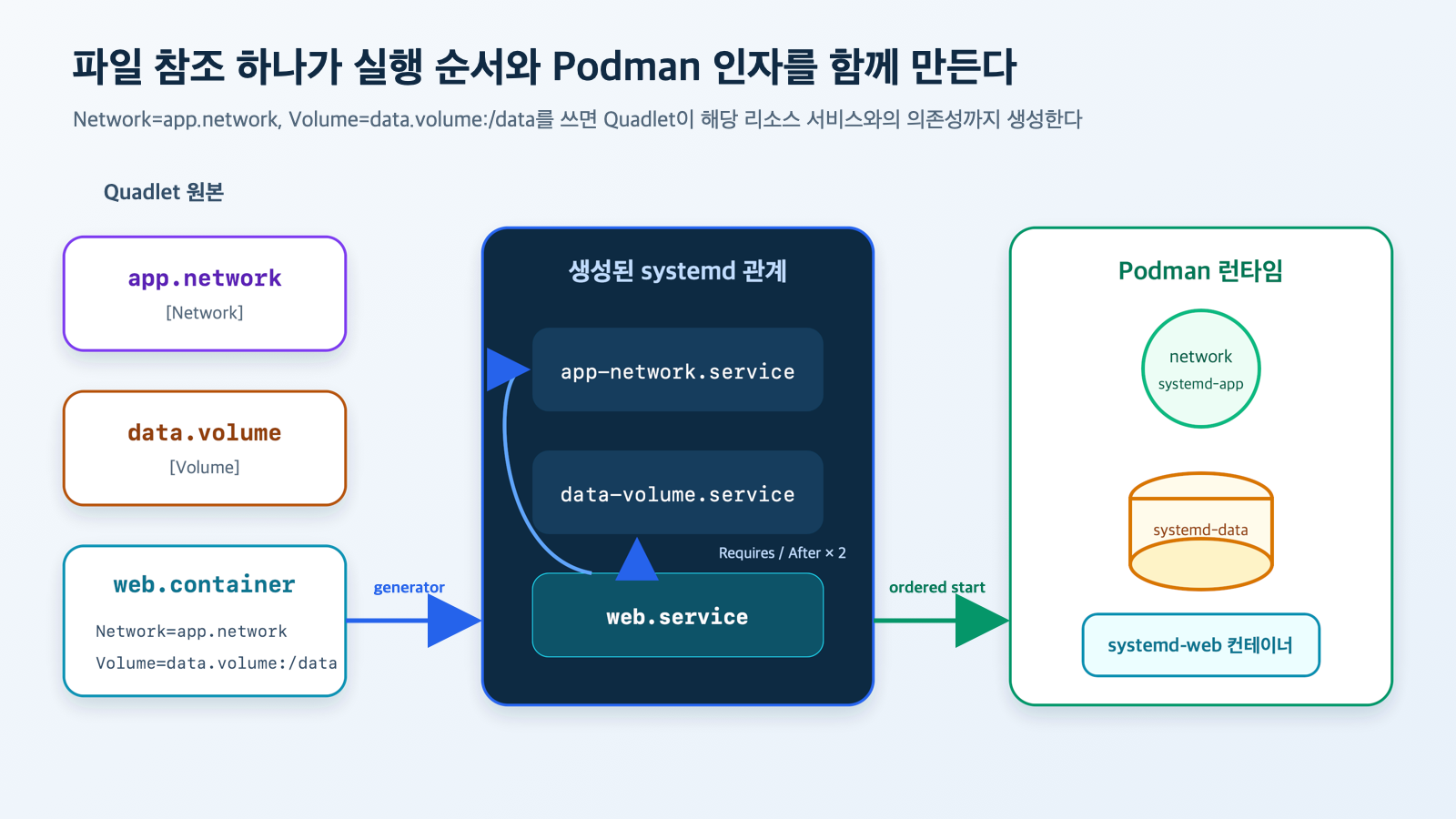
Figure: Quadlet Resource Reference and Dependencies · Reconstructed based on Podman systemd unit official documentation
app.network can be created minimally as follows:
[Network]
Label=app=quadlet-demo
For data.volume, if a separate name is not enforced, Quadlet generates a name to avoid conflicts.
[Volume]
Label=app=quadlet-demo
In the container, you reference the Quadlet file name, not the actual Podman name of the resource.
[Container]
Image=docker.io/library/alpine:latest
Exec=sh -c "while true; do date >> /data/heartbeat.log; sleep 60; done"
Network=app.network
Volume=data.volume:/data

[Service]
Restart=always

[Install]
WantedBy=default.target
If you save this file as worker.container and perform systemctl --user daemon-reload, a relationship will be created such that worker.service starts after the network and volume services. A major advantage of Quadlet is that users don’t have to manually align long Requires= and After= lists.
In the same way, you can reference other Quadlets like Pod=backend.pod, Image=app.build, Image=base.image. Complex service execution order can be explicitly defined with Requires=, After=, Before= in [Unit], and dependencies between Quadlet file names are also converted to generated service names.
Operational Flow for Installation, Modification, and Deletion
In addition to manually copying files to search paths, supported Podman versions can use the podman quadlet command.
podman quadlet install ./web.container
podman quadlet list
podman quadlet print web.container
podman quadlet rm web.container
podman quadlet install installs files to the current user’s path and typically performs a systemd reload as well. It also has the ability to install multiple Quadlets and configuration files as a single application, which is useful for consistent packaging in deployment tools rather than copying individual files.
For manual management, the modification sequence is simple:
# 1. Modify the original web.container
# 2. Update generated service
systemctl --user daemon-reload

# 3. Apply new settings to running service
systemctl --user restart web.service
daemon-reload only regenerates definitions; it does not automatically replace already running containers. A separate restart is required to apply changes.
Troubleshooting: Start by Checking for “service not found”
If Quadlet syntax is incorrect or new options are used that are not supported by the installed Podman version, the generator might fail to create the .service. In such cases, it’s easy to misinterpret “Unit web.service not found” as an image issue.
First, run the verification command guided by the official documentation:
systemd-analyze --user --generators=true verify web.serviceIf you want to see both the generated output and errors, use the generator’s dry-run. The executable path may vary by distribution, so check the actual installation path.
/usr/lib/systemd/system-generators/podman-system-generator --user --dryrunThen, check layer by layer:
# Check generated systemd definition
systemctl --user cat web.service

# systemd status and recent logs
systemctl --user status web.service --no-pager
journalctl --user -u web.service -b --no-pager

# Container status as seen by Podman
podman ps --all --filter name=systemd-web
podman inspect systemd-web
If the first run fails near 90 seconds, suspect image pull time. If there’s a port binding error, check if an existing process or container is using the same port. In an SELinux environment, if bind mount access is denied, instead of immediately disabling security labels, first check if :Z or :z for sharing purposes is appropriate.
Automatic Updates are Convenient, but a Deployment Policy
Quadlet’s [Container] section allows specifying AutoUpdate=registry or AutoUpdate=local. According to the Podman auto-update documentation, the registry policy checks if the remote image digest has changed, pulls the new image, and then restarts the corresponding systemd service. This policy requires the full image name, including the registry.
[Container]
Image=quay.io/example/myapp:stable
AutoUpdate=registry
You can check for update availability without actually making changes:
podman auto-update --dry-runPodman provides podman-auto-update.service and a timer, but before enabling automatic updates, you need to decide the following:
- Is it acceptable to immediately accept mutable tags, or should versions be fixed by digest?
- Who detects and rolls back if a new image fails?
- Are data migration and backward compatibility guaranteed?
- Are the lifespan and permissions of private registry authentication files appropriate?
Automatic updates can quickly apply security patches, but they can also automatically deploy unverified changes to production. For critical services, a method of verifying images in CI and updating digests might be more predictable.
Settings to Enhance Security and Stability
Just because Quadlet makes rootless easier doesn’t mean containers are automatically secure. The boundaries of images, ports, mounts, capabilities, and secrets still need to be designed.
1. Default to rootless
If you don’t need root-specific features like privileged ports, device access, or host networking, start with a regular user Quadlet. Changing a rootful Quadlet to rootless by adding [Service] User= is not supported. Rootless requires using user search paths and systemctl --user.
2. Explicitly define port exposure range
PublishPort=8080:80 can open to all IPv4 interfaces. For services behind a reverse proxy or local management UIs, explicitly specify the binding address like 127.0.0.1:8080:80.
3. Do not write secrets directly in Environment=
Quadlet supports Secret= to connect Podman secrets. Instead of leaving passwords and tokens in plain text in declarative files, generated services, and status outputs, manage them separately with podman secret create and pass them only to the necessary containers.
4. Reduce write access, permissions, and resources
If the application allows, consider the following options:
[Container]
NoNewPrivileges=true
DropCapability=all
ReadOnly=true
Memory=512m
PidsLimit=256
When applying ReadOnly=true, paths that the application needs to write to must be separated into volumes or tmpfs. After removing all capabilities, only add back the permissions actually required with AddCapability=.
5. Fix image names and change strategies
In production, avoid short image names and explicitly specify the registry, repository, tag, or digest. Tag-based automatic updates and digest-based reproducibility are different operational strategies, so don’t carelessly mix them in one file.
Quadlet, Compose, or Kubernetes: Which to Choose?
| Method | Best Fit Situation | Advantages | Limitations |
| — | — | — | — |
podman run · Shell scripts |
One-off tests, debugging | Fast and direct | Manual reboot, dependency, state management |
| Podman Quadlet | Long-running services on a single Linux host | systemd integration, rootless, declarative files, journal | Not a multi-node scheduler |
| Compose | Multi-container bundles for dev/test, Compose ecosystem | Express service relationships in one file, high familiarity | Requires separate integration for host boot · systemd operation |
| Kubernetes | Multi-node, replication, rolling deployments, service discovery | Cluster-level automation and ecosystem | High complexity and cost for setup · operation |
Quadlet is not a “mini-Kubernetes.” It does not re-schedule workloads to other servers in case of node failure or maintain the desired state of multiple replicas across a cluster. Instead, it allows containers to be operated in the same way as other OS services on a Linux host where systemd is already standard.
It is particularly well-suited for homelabs, edge devices, build servers, internal tools, web services on a single VM, and small-scale operational environments where Kubernetes would be overkill.
Six Common Mistakes
- Editing the generated
.service. It will be regenerated on the nextdaemon-reload, so you must modify the original Quadlet or a drop-in. - Running
systemctl enable. PlaceWantedBy=in the[Install]section of the original Quadlet. - Placing rootless files in
/etc/systemd/system. Use~/.config/containers/systemd/andsystemctl --user. - Using short image names and open ports as-is. Include the registry and bind only to necessary addresses.
- Thinking
daemon-reloadis enough to apply changes. Running services require a separaterestart. - Expecting Quadlet to be a cluster orchestrator. If cross-host scheduling and high availability are needed, another layer like Kubernetes is required.
Conclusion
The core of Podman Quadlet lies in not treating containers as special entities outside of systemd. Short declarative files managed by humans are converted into services by a generator, systemd handles booting, ordering, restarts, and logging, and Podman executes containers, networks, and volumes.
Start with a single web.container. Then, separate networks and volumes into separate Quadlets, and refine rootless operation, port ranges, secrets, and resource limits. If you want to create reproducible container services on a single Linux host without significantly increasing operational complexity, Quadlet is a very practical starting point.
Leave a Reply