When using AI agents, terms like ‘skill’, ‘Agent Skills’, ‘skills.sh’, ‘MCP’, and ‘system prompt’ often appear together. Although their names are similar, suggesting they might be from the same organization or product, their roles are distinct.
The first thing to clarify is that Agent Skills is not an organization name. It is the name of an open file format for adding specific task procedures, reference materials, and executable code as a package to an AI agent. Anthropic initially developed and released it, and currently, various agent products, including Claude, ChatGPT, and Codex, support this format.
However, it is not an international standard established by standardization bodies like ISO, IEC, IETF, or W3C. More precisely, it is closer to an open interoperability format or open specification adopted by various implementations.
This article explains three distinctions:
- What the Agent Skills public specification actually defines
- Practical design for reliably creating skills for security and auditing tasks
- skills.sh for searching and installing public skills, and supply chain security

Who created Agent Skills?
The official Agent Skills documentation explains that this format was initially developed by Anthropic and, after being released as an open format, was adopted by various agent products. The common specification and documentation are being openly developed in the agentskills/agentskills repository.
The relationship can be simplified as follows:
Anthropic
└── Agent Skills 형식 최초 개발·공개

Agent Skills 공개 사양
├── agentskills.io 문서
├── agentskills/agentskills 사양 저장소
├── Claude의 스킬 구현
├── ChatGPT·Codex의 스킬 구현
└── 기타 호환 에이전트 구현
Anthropic’s skills repository is currently focused on implementations and examples used in Claude. The repository itself directs users to agentskills.io for information on common standards.
OpenAI also did not create a new, proprietary specification with the same name. OpenAI’s skills documentation explicitly states that ChatGPT and Codex skills are based on the open Agent Skills specification.
Therefore, the following statement is the most accurate:
Agent Skills is a lightweight skill package format for AI agents, initially developed and released by Anthropic, and is currently an open interoperability specification adopted by various products.
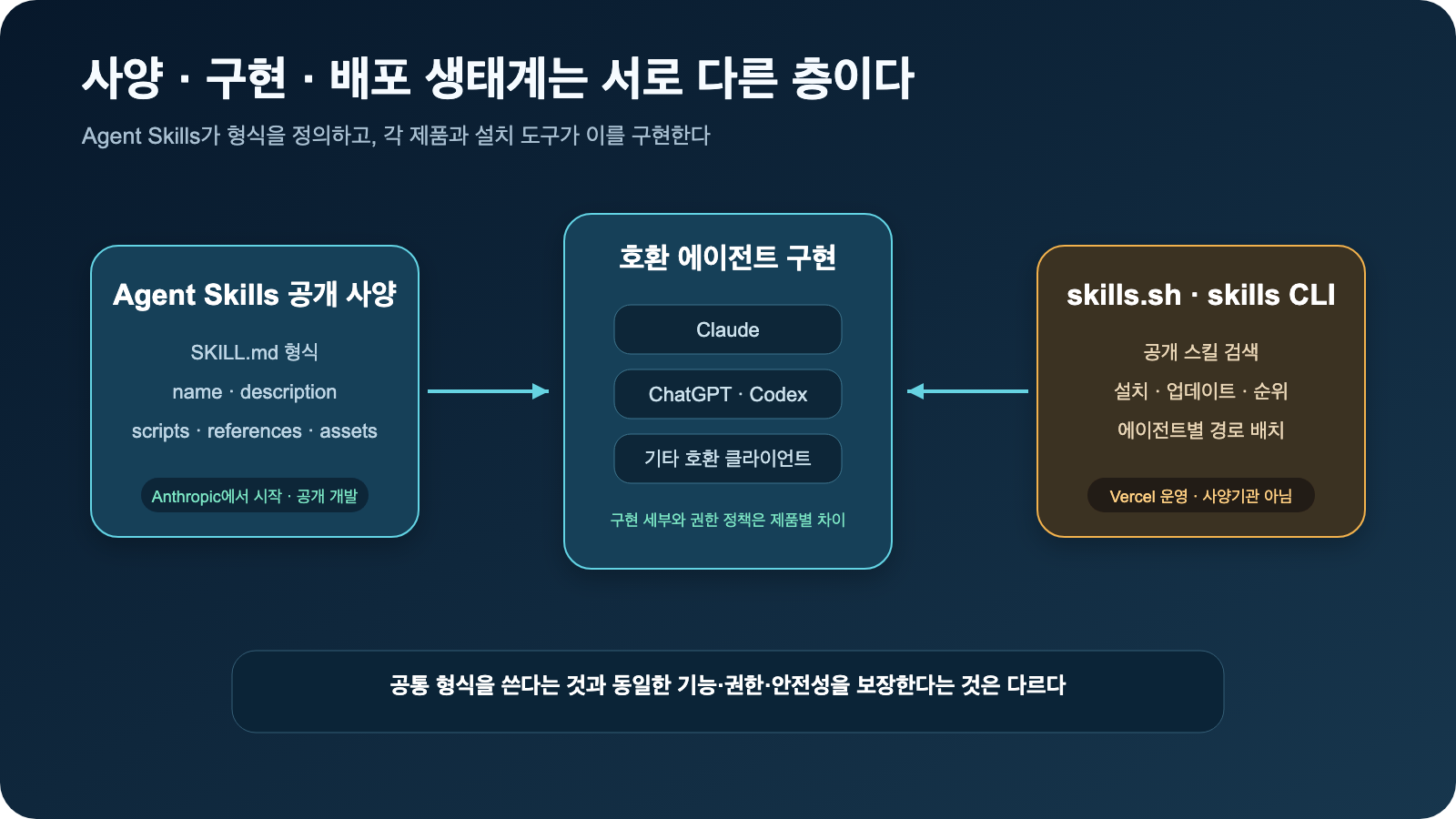
Figure: Relationship between Agent Skills specification, product implementations, and skills.sh role · Reconstructed based on Agent Skills Overview, OpenAI Build skills, and skills.sh Documentation
Minimum Structure Defined by Agent Skills Specification
The core of a skill is a single directory and its SKILL.md file.
aws-iam-policy-review/
├── SKILL.md              # Required
├── scripts/              # Optional: Executable code
├── references/           # Optional: Policies, documents, knowledge
├── assets/               # Optional: Templates, samples
└── 그 밖의 파일          # Can be added as needed
SKILL.md consists of YAML Frontmatter and Markdown body.
---
name: aws-iam-policy-review
description: >
  Review AWS IAM policies for excessive permissions, privilege escalation,
  unsafe trust relationships, and missing conditions.
  Use when a user asks to assess or harden an IAM policy.
---

# AWS IAM Policy Review

1. 정책 문법을 확인한다.
2. Action, Resource, Principal, Condition을 분석한다.
3. 권한 상승 가능성을 분석한다.
4. 근거와 최소 권한 수정안을 제안한다.
The official Agent Skills specification essentially requires only two Frontmatter fields: name and description.
| — | — | — | — |
name |
Required | 1-64 characters, lowercase English letters, numbers, hyphens, matches directory name | Skill identification |
description |
Required | 1-1,024 characters | Explains what it does and when to use it |
license |
Optional | License name or file reference | Distribution and usage conditions |
compatibility |
Optional | 1-500 characters | Execution environment, packages, network requirements |
metadata |
Optional | String key-value pairs | Extended information like author, version |
allowed-tools |
Optional | Support differences per implementation | Pre-allowed tools, experimental features |
You should not assume that all agents interpret allowed-tools the same way just because it’s in the specification. This field is experimental, and implementation-specific support and permission models must be checked separately.
How do agents discover skills?
A key design principle of Agent Skills is Progressive Disclosure.
1. Discovery
   모든 스킬의 name과 description만 확인

2. Activation
   사용자 요청과 맞는 스킬의 SKILL.md 전체 로드

3. Execution
   필요한 scripts·references·assets만 추가 사용
If an agent reads the long body of every skill from the start, its context will be quickly consumed. Therefore, the description should not be a simple introduction but rather written like a skill routing rule.
A good description includes these three elements:
무엇을 수행하는가
+ 언제 호출해야 하는가
+ 비슷해 보이지만 호출하지 말아야 할 경우
For example, instead of “Helps with AWS,” “Reviews excessive permissions and privilege escalation in IAM policies, and is not used for general AWS cost or network reviews” provides a much more accurate trigger.
The official specification recommends keeping the entire SKILL.md under 500 lines, or approximately 5,000 tokens, and separating long materials into separate files. This is a recommendation for context efficiency, not a mandatory limit.
Distinguishing Official Specification from Practical Design
The following items are not officially required Frontmatter for Agent Skills:
역할
목표
입력 조건
허용 범위
금지 범위
판단 기준
출력 형식
오류 처리
완료 기준
테스트 사례
This does not mean they are unnecessary. These are useful prompt engineering and agent design patterns for tasks where consistency and reproducibility of results are important, such as security reviews, audits, and code reviews.
| Category | Agent Skills Official Specification | Practical Recommended Design |
| — | — | — |
| Purpose | Define a compatible skill package format | Ensure consistency and safety of task results |
| Required Elements | SKILL.md, name, description |
Purpose, workflow, safety boundaries, output contract, etc. |
| Body Table of Contents | Not enforced | Structured according to task characteristics |
| Tests | Not an official required directory | Recommended trigger, normal, risk, and edge cases |
| Tool Permissions | Some metadata and implementation policies | Explicitly design read, write, and approval scopes |
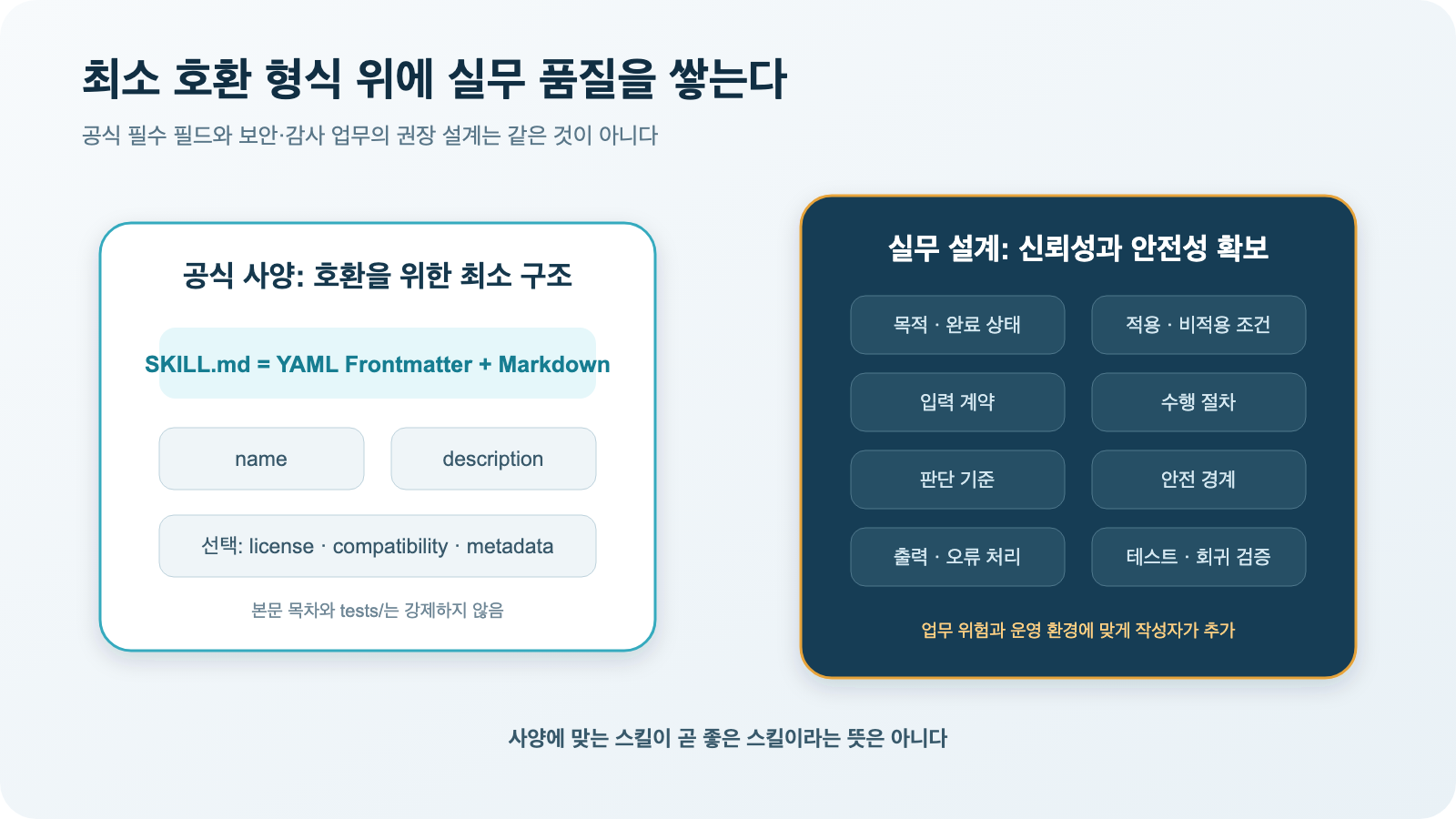
Figure: Boundary between official specification and practical recommended design · Reconstructed based on Agent Skills Specification and Best practices for skill creators
Practical Structure Required for Security and Audit Skills
For security-related skills, the following structure can be recommended:
| — | — | — |
| Component | Importance | Description |
| Metadata | Required | Name, trigger description, version, compatible environment |
| Purpose | Required | The final outcome to be produced |
| Applicability/Exclusion Conditions | Required | Situations when it should be called and when it should be excluded |
| Input Contract | Recommended | Required inputs, optional inputs, behavior when inputs are insufficient |
| Execution Procedure | Required | Order of operations and decision-making flow |
| Judgment Criteria | Important | Basis for determining issues/risk levels |
| Safety Boundaries | Important | Prohibited actions and actions requiring approval |
| Tool Usage Policy | Required when using tools | Read, write, and external transfer scope |
| Output Contract | Required | Structure of results for human reading or system processing |
| Error Handling | Recommended | Handling failures, uncertainties, and lack of information |
| Verification Criteria | Important | Completion conditions and testing methods |
Purpose should be written as a completed state
Bad example:
IAM 정책을 분석한다.Good example:
제공된 IAM 정책에서 과도한 권한, 권한 상승 경로,
신뢰 정책 오류와 조건문 누락을 식별하고,
각 발견의 근거와 최소 권한 수정안을 제공한다.
Define behavior even when input is insufficient
확인 가능한 위험은 먼저 분석한다.
확인할 수 없는 항목은 추정하지 않고 검토 제한 사항으로 표시한다.
SCP와 권한 경계가 없으면 전체 유효 권한을 확정하지 않는다.
Safety boundaries are written as action permissions
읽기 작업                  자동 수행 가능
정책 수정안 생성            자동 수행 가능
실제 정책 변경              사용자 승인 필요
정책 삭제·권한 확대          기본 실행 금지
인증정보 원문 재출력          금지
Rather than abstractly stating “act safely,” it is necessary to specify which actions are performed automatically, which require approval, and which are not executed.
Fix output contract and error handling
A human-readable report can be structured as follows:
1. 검토 요약
2. 주요 발견 사항 표
3. 발견별 근거와 영향
4. 권한 상승 경로
5. 최소 권한 수정안
6. 검토 제한 사항
7. 추가로 필요한 정보
If automatic post-processing is required, it is more stable to fix the types of severity, confidence, location, evidence, and recommendations using JSON Schema.
It is good to divide directories by role
Instead of putting all policies and examples into one long skill, you can separate them as follows:
aws-iam-policy-review/
├── SKILL.md
├── references/
│   ├── severity-criteria.md
│   ├── privilege-escalation-patterns.md
│   ├── sensitive-actions.md
│   ├── condition-key-guidance.md
│   └── output-schema.json
├── scripts/
│   ├── validate_policy.py
│   └── normalize_statements.py
├── assets/
│   ├── report-template.md
│   └── sample-policy.json
└── tests/
    ├── trigger-evals.json
    ├── policy-cases/
    └── expected-results/
tests/ is not a required directory by the official specification but can be added for operational quality. Keeping the core workflow in SKILL.md, long decision tables in references/, deterministic verification in scripts/, output skeletons in assets/, and regression verification in tests/ makes management easier.
What is the difference between System Prompt, Agent Skills, and MCP?
These three elements are not in competition but rather represent different layers.
| — | — | — | — |
| Category | System Prompt | Agent Skills | MCP |
| Question | How should it always behave? | How should it perform a specific task? | How should it connect with what data/tools? |
| Scope | All requests | Only for relevant tasks | Resources/tools on connected servers |
| Main Content | Overall principles and top-level boundaries | Domain procedures, judgments, examples | Resources·Prompts·Tools communication |
| Loading | From the start of conversation | When needed | Upon connection/invocation |
| Scripts/Materials | Usually not included | Can be packaged together | External systems provide functionality |
Taking AWS IAM review as an example, they combine as follows:
시스템 프롬프트
└── 승인 없는 변경 금지, 비밀 보호

Agent Skill
└── 정책 수집 → 정규화 → 위험 판단 → 수정안 작성 절차

MCP Tools
├── IAM 정책 조회
├── Access Analyzer 결과 조회
├── 공식 문서 검색
└── 보고서 저장
Skills are not protocols for accessing tools, and MCP does not define the security review procedure itself.
What is skills.sh?
skills.sh is not the Agent Skills specification itself. It is a public skill search directory operated by Vercel, and it is connected to the skills CLI released by vercel-labs/skills.
In one sentence, the distinction is as follows:
Agent Skills
= 스킬을 어떤 파일 형식으로 작성할 것인가

skills.sh
= 작성된 스킬을 어디서 찾고 여러 에이전트에 어떻게 설치할 것인가| — | — | — |
| Category | Agent Skills | skills.sh·skills CLI |
| Nature | Authoring format·Public specification | Search directory·Installation tool |
| Core | SKILL.md structure |
npx skills command |
| Role | Skill definition·Loading | Discovery·Installation·Updates·Ranking |
| Origin·Operation | Started by Anthropic, open development | Vercel |
| Storage Location | Each Git repository and local directory | Locates original repository and places it in agent path |
| International Standard Body | No | No |
| Analogy | Package specification | Search directory and universal installer |
How to use the skills CLI?
To check the list of skills in the public repository:
npx skills add vercel-labs/agent-skills --listTo install a specific skill within the project scope:
npx skills add vercel-labs/agent-skills
  --skill web-design-guidelines
To install only for Codex:
npx skills add vercel-labs/agent-skills
  --skill web-design-guidelines
  --agent codex
To use temporarily without installing:
npx skills use
  vercel-labs/agent-skills@web-design-guidelines
  --agent claude-code
Management commands:
npx skills list
npx skills update
npx skills remove <skill-name>
npx skills init aws-iam-policy-review
The CLI currently supports over 70 agent installation paths, including Claude Code, Codex, Cursor, GitHub Copilot, and Gemini CLI. The default installation scope is the current project; using -g or --global installs it globally for the user. Installation methods can be chosen between symbolic links pointing to a common copy and individual file copying.
Meaning of skills.sh Ranking and Official
According to the skills.sh documentation, rankings are based on anonymous installation statistics collected by the CLI. Therefore, rankings indicate popularity and discoverability, not scores for accuracy, security, or maintenance quality.
If you wish to opt out of telemetry, you can use the environment variables guided by the CLI:
DISABLE_TELEMETRY=1 npx skills add owner/repoDONOTTRACK is also provided as an alternative setting.
The Official list is a feature that gathers skills provided by the organization that created the product or technology. However, the following three sentences are different:
공식 제작자가 배포했다                 가능
Vercel이 내용 전체를 보증한다           아님
보안상 무조건 안전하고 최신이다          보장되지 않음
Prioritizing official creator skills is a good starting point, but you should check the current commit, scripts, and permission requirements before installation.
Why are public skills a supply chain risk?
Skills may not be simple descriptive texts.
SKILL.md
├── 명령 실행 절차
├── 파일 변경 지침
├── 외부 도구 사용 규칙
└── 기존 지침과 충돌할 수 있는 문장

scripts/
├── Python·Bash·JavaScript 실행 코드
├── 의존성 설치
└── 외부 통신
Skills themselves do not create new operating system permissions. However, they can induce an agent to use its existing file, shell, network, repository, and cloud permissions in specific ways.
Malicious or careless skills can lead to the following actions:
- Reading sensitive files and environment variables
- Transferring data to external servers
- Modifying repository code and settings
- Installing packages or executables
- Changing and deploying cloud policies
- Attempting to bypass security checks or higher-level guidelines
The skills.sh security audit page aggregates results from Gen Agent Trust Hub, Socket, Snyk, and others. However, each tool has different judgment criteria, and the skills.sh documentation explicitly states that it cannot guarantee the quality and security of all skills, recommending direct review before installation.
How should enterprises adopt them?
Rather than immediately installing public skills globally, it is safer to establish an approved supply chain.
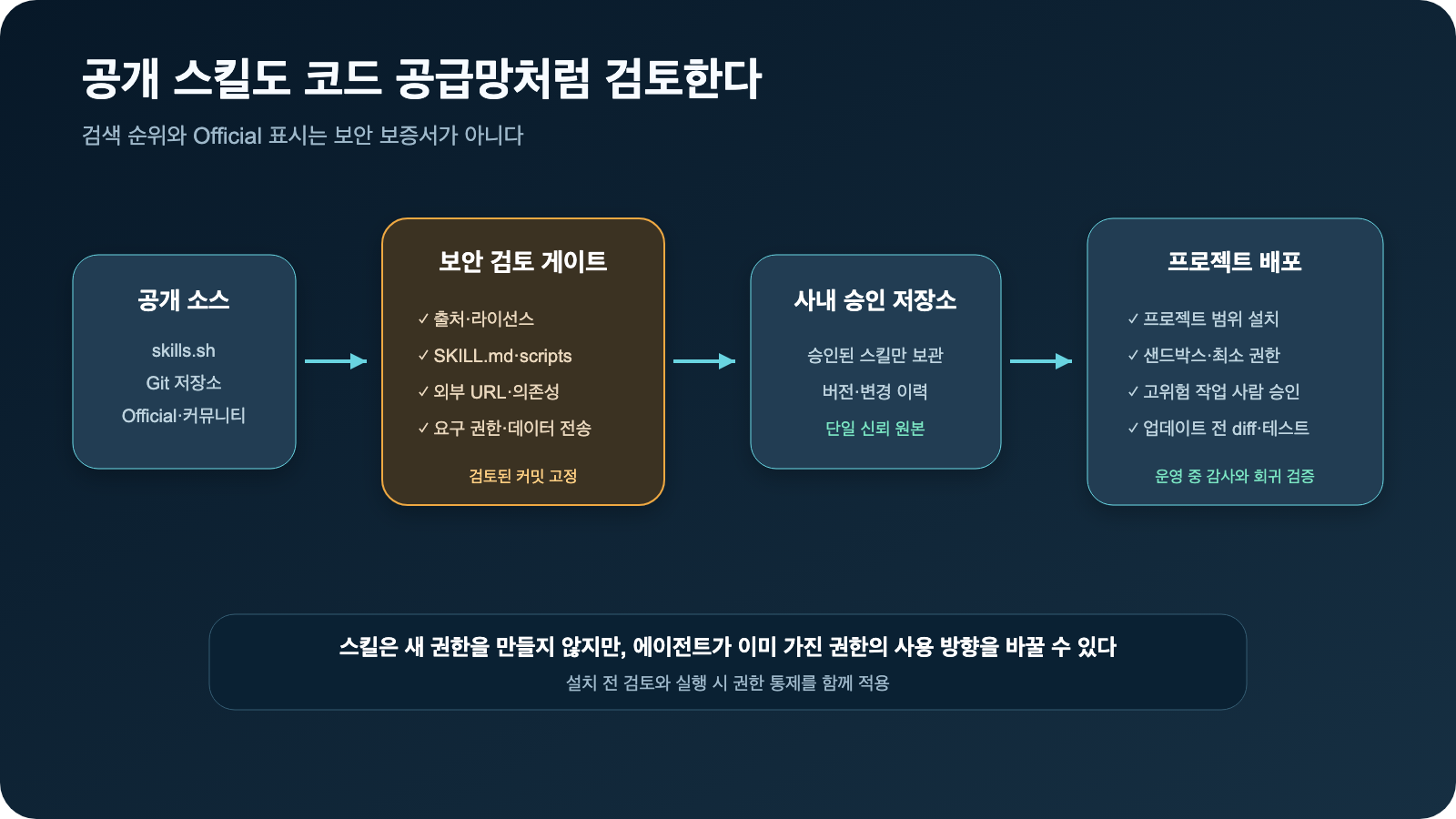
Figure: Enterprise adoption review and deployment flow for public skills · Reconstructed based on skills.sh Documentation and vercel-labs/skills README
공개 skills.sh·Git 저장소
        ↓
출처·라이선스 확인
        ↓
SKILL.md와 scripts 전체 검토
        ↓
외부 URL·의존성·요구 권한 분석
        ↓
검토된 커밋 고정
        ↓
사내 승인 저장소
        ↓
프로젝트 범위 설치
        ↓
샌드박스·최소 권한·사람 승인
        ↓
업데이트 전 diff와 회귀 테스트| Control Item | Recommended Approach |
| — | — |
| Source | Prioritize official organizations or verified repositories |
| Version | Fix to reviewed commit instead of latest branch |
| Installation Scope | Prioritize project-level over global |
| Code Review | Check entire scripts/, not just SKILL.md |
| External Communication | Review domains, transmitted data, and dependency installations |
| Execution Permissions | Minimize shell, network, and cloud write permissions |
| Secrets | Remove unnecessary credentials from agent environment |
| High-Risk Operations | Apply human approval for policy changes, deployments, and deletions |
| Updates | Diff review and re-verification rather than automatic following |
| Deployment | Operate internal mirrors or approved Git repositories |
In particular, the following command is convenient but should not be used with unreviewed repositories:
npx skills add unknown-owner/unknown-repo --all -g -yThis is because it’s a combination that installs all skills globally without verification. It is safer to first check skills with --list, review the SKILL.md, scripts/, external URLs, and licenses of the original commit, and then install only the necessary skills within the project scope.
Is it the same as npm?
There are similarities, but they are not entirely the same.
| — | — | — |
| Category | npm | skills.sh |
| Original Distribution | Publish packages to a registry | Primarily discovers and links skills from Git repositories |
| Installation Target | JavaScript packages and dependencies | Instructions, scripts, reference materials, assets |
| Installation Location | node_modules |
Agent-specific skill directories |
| Main Management | Package versions·dependencies | Agent-specific deployment·discovery·installation statistics |
| Execution Risk | Installation·runtime code | Instructions followed by agent and executable code |
Therefore, rather than simply calling skills.sh “npm for Agent Skills,” it is more accurate to describe it as a service that combines a search directory with a universal installation manager for various agents.
Final Summary
The roles of Agent Skills, skills.sh, system prompts, and MCP can be summarized as follows:
Agent Skills
= 업무 절차를 패키징하는 공개 파일 형식

SKILL.md 실무 설계
= 그 형식 안에 목적·절차·판단·안전·출력 기준을 채우는 방법

skills.sh
= 공개 스킬을 검색하고 여러 에이전트에 설치하는 디렉터리·CLI

시스템 프롬프트
= 모든 요청에 적용되는 상위 행동 원칙

MCP
= 외부 데이터와 도구를 연결하는 통신 프로토콜
The minimum elements officially enforced by Agent Skills are small. However, actual operational quality is determined by the workflow, judgment criteria, safety boundaries, error handling, and testing within SKILL.md.
skills.sh’s search rankings or
Leave a Reply