Lately, when I give Claude Code long tasks, I sometimes find myself thinking, “Why did it die again when it was going so well?” Responses stop, context compression takes a long time, I suddenly have to reopen the terminal, or a perfectly fine model starts throwing 529 Overloaded and 429 errors.
On the other hand, Codex sometimes gives the impression that its processes last longer for the same type of tasks, managing intermediate states and seeing them through to completion. For a while, this might lead one to think, “Isn’t Codex better if you only consider stability?”
However, recently, my conclusion has shifted slightly. Even if Claude appears to stop more frequently in the middle, when you include the results obtained by reviving the session and resuming the context, Claude can ultimately feel like a more stable and better tool.
This article will categorize Claude’s “dying” phenomenon into service outages, local process issues, context compression, usage limits, and external tool failures, and examine how far the stability of Claude Code and Codex can be compared using publicly available statistics.

Figure: A process stopping and an entire task disappearing are different problems.
First, the term ‘dying’ must be divided into four categories
The symptoms users see may all be similar, but the causes can be entirely different.
| Symptoms seen by user | Actually possible causes | Location to check |
| — | — | — |
| Response suddenly cuts off | Model API failure, streaming connection termination, network/proxy issues | Status page, error codes |
| Claude Code stutters or freezes | Local CPU/memory usage, large repository, excessive tool output | Activity Monitor, /doctor, /context |
| Compressing for a long time | Context grows, performing auto-compaction | /context, /compact |
| Model selection or call rejected | Usage limits, incorrect entitlement, 429/529 | Error message, plan/status page |
| Command is alive but cannot proceed with work | MCP server, hook, shell command, permission request pending/failed | MCP/hook logs, terminal |
Therefore, “Claude model is unstable” and “Claude Code process is unstable” are not the same statement. Even if the model service is normal, the local CLI might freeze while processing large logs, and even if the CLI is fine, errors can occur in the Anthropic API.

Figure: Even if it appears as the same ‘freeze’, the causes are divided into service, API, local resources, and external tool layers.
First Cause: Actual Claude Service Outage
Some of the reasons Claude dies are clearly on the service side. Anthropic publicly lists claude.ai, Claude API, and Claude Code as separate components on Claude Status.
As of July 30, 2026, the publicly reported uptime for Claude Code is as follows:
| Period | Claude Code Public Uptime |
| — | — |
| May 2026 | 99.49% |
| June 2026 | 99.45% |
| July 2026 | 99.43% |
| Last 90 days | 99.44% |
99.44% may seem like a high number, but when converted to 90 days, it corresponds to approximately 12 hours of abnormal status. Of course, this calculation is only a component-level aggregation from the status page and does not exactly match the actual experience of specific users, regions, or pricing plans.
The July incident history records not only elevated errors per model but also several service disruptions that affected Claude Code and web/remote functionalities. Specifically, on July 14, 21, and 22, outages were reported that could directly impact agent operations such as Claude Code or container creation.
In other words, when you feel like “Is it just my Claude that’s acting up?”, there’s a good chance that overall service issues are mixed in. If similar errors occur across multiple repositories and sessions at the same time, it’s faster to check Claude Status before trying to fix local settings.
Second Cause: 429, 529, and Usage Limits
Claude Code calls the Claude API for model responses. The official error documentation explains that most runtime errors seen in the CLI are linked to API error codes.
Typical examples include:
429 Too Many Requests
→ 짧은 시간의 요청량 또는 계정 사용 한도와 관련

529 Overloaded
→ Anthropic 서비스가 과부하 상태

500·502·503
→ 서버 또는 중간 네트워크 계층 오류 가능성
From a user’s perspective, they all appear as “Claude stopped,” but the response should differ. If it’s a 429, blindly restarting might worsen the situation, while for a 529, it’s better to wait a bit and then retry.
There was also an issue where models included in a pricing plan suddenly demanded usage credits. Anthropic reported an incident in July 2026 where Fable 5 incorrectly displayed credit demands for some Max users and advised restarting Claude Code after recovery.
Therefore, the experience of “it was fixed by restarting the process” doesn’t always mean a local bug was resolved. It’s possible that the server’s entitlement or model routing status normalized during the restart.
Third Cause: Large Repositories and Excessive Tool Output
Anthropic’s official Claude Code troubleshooting documentation addresses high CPU/memory usage, hangs, and auto-compact thrashing as separate stability issues.
Claude Code is not just a simple chat window. It processes repository searches, file reads, diff generation, shell executions, MCP calls, and hook execution results within a single agent loop.
사용자 요청
  ↓
저장소 검색
  ↓
여러 파일 읽기
  ↓
명령 실행과 대량 로그
  ↓
도구 결과를 대화 컨텍스트에 추가
  ↓
다음 판단
If you perform an unscoped search in a large monorepo or pass tens of thousands of lines of build logs directly, local memory and model context will grow simultaneously. If multiple MCP servers and hooks are attached, tool definitions and persistent instructions will occupy context from the start.
The official documentation recommends the following actions in such cases:
- Summarize large outputs and old conversations with /compact.
- Restart Claude Code after each large task.
- Specify what to keep, such as /compact keep only the plan and the diff.
- Separate large file operations into a separate subagent’s context.
- Use /clear if previous conversations are not needed.
- Check installation, settings, MCP, and context usage with /doctor.
What’s important here is that “giving Claude more context always makes it better” is not true. Irrelevant logs, old failures, and redundant instructions can accumulate, degrading not only speed but also judgment quality.
Fourth Cause: Auto-compaction Appears to Be Dead
When the context window grows, Claude Code summarizes previous conversations to free up space. Users may perceive this as a long waiting time or a frozen response.
긴 대화와 도구 출력 누적
  ↓
컨텍스트 한계에 접근
  ↓
이전 기록 요약
  ↓
중요 지침과 현재 상태 재구성
  ↓
작업 계속
The problem isn’t just the compression itself. If Claude misses detailed conditions immediately after compression, re-reads files, and repeatedly compresses, users will feel like the agent has died.
It’s best to check what’s occupying space with /context and manually run /compact at natural task boundaries. If you process large build logs, summarizing them before moving on to the next feature development makes it more predictable than sudden auto-compaction.
CLAUDE.md in the project root is re-read after compression, but instructions given only in conversation or instructions in subdirectories not yet accessed may feel like they’ve disappeared. Rules that must be maintained should be placed in an appropriate CLAUDE.md rather than just in a single conversation for stability.

Figure: Context is compressed, but work can be resumed using session history and checkpoints.
Fifth Cause: MCP, Hook, or Shell Dies, Not Claude
An agent is only as stable as the weakest link among its connected components.
Claude Code
  ├─ shell
  ├─ Git
  ├─ ripgrep
  ├─ MCP server A
  ├─ MCP server B
  ├─ pre-tool hook
  └─ post-tool hook
If an MCP server doesn’t respond or a hook doesn’t terminate, the Claude Code screen might appear as if the model has frozen. The same can happen if a permission confirmation window is hidden behind other windows.
In this case, changing models multiple times is not very helpful. The following sequence is more efficient:
- Check if the current task can be canceled with Ctrl+C.
- Check MCP and configuration status with /doctor.
- Temporarily disable recently added MCP servers and hooks to see if the issue reproduces.
- Run long-running shell commands in a separate terminal to check for termination.
- If in a proxy, VPN, or TLS inspection environment, check API and package download paths.
Claude Code’s official documentation also states that if a command hang doesn’t resolve, you can close the terminal and restart.
Important Fact: Even if the Process Dies, the Session Usually Survives
Claude Code continuously saves sessions to a local transcript as conversations progress. According to the official documentation, CLI sessions are recorded as project-specific JSONL files.
Therefore, closing the terminal does not necessarily mean that the work history is lost.
# Continue the latest session for the current project
claude --continue

# Open session selector
claude --resume

# Continue by name or session ID
claude --resume auth-refactor
When Claude Code stops, official troubleshooting also advises, “Even if you close and restart the terminal, you won’t lose your conversation, and you can recover it with claude –resume in the same directory.”
This is the core reason why Claude feels stable again. Process survival rate and task recoverability are different metrics.
Is Codex Really More Stable?
There are reasons why Codex might feel more stable. Its product structure, which manages long tasks in stages and states, continuously communicates with the user during tool execution, and separates tasks into different environments or threads, reduces the impression that “a process has stopped.”
However, Codex also has a fair number of public incidents. From May to July 2026, the OpenAI status page recorded the following cases:
| Period | Publicly reported Codex-related cases |
| — | — |
| May | Codex Cloud·Code Review high failure rate, Codex 5.5 high error rate, context compaction latency, rate limit issues |
| June | Codex capacity errors, Cloud task errors, access token issues, usage limits depleting faster than expected |
| July | 5.6-sol overload, Desktop·CLI access denied, GitHub dependent workflow errors, Codex Review errors |
On June 2, 2026, an outage caused rate-limiting dependencies to become abnormal, leading to Codex requests being incorrectly rejected with HTTP 429. On July 19, some Codex requests failed due to regional database capacity issues.
In other words, there is no basis to conclude that Codex is structurally invulnerable to crashes. However, it may feel more stable due to how its UI displays status when errors occur, how it separates tasks, and how it preserves retries and intermediate results.
Can Claude and Codex Be Directly Compared Statistically?
To conclude, a fair direct comparison is difficult with currently available public data.
Anthropic publishes monthly and 90-day uptime for Claude Code as a separate component. In contrast, the OpenAI status page publishes Codex components and incident history, but does not provide comparable monthly uptime percentages for Codex on the same screen.
Furthermore, incident reporting criteria differ between companies.
| Comparison Item | Anthropic | OpenAI |
| — | — | — |
| Product Status | Claude Code component provided separately | Codex component provided separately |
| Monthly Uptime Percentage | Publicly available for Claude Code | Comparable Codex figures not available on public page |
| Incident History | Highly granular by model and product | Incidents bundling multiple products mixed with Codex-specific incidents |
| User-specific differences | May vary by plan, region, model | Stated to vary by tier, model, feature |
Therefore, simply counting incidents and saying “Claude is less stable” could unfairly penalize a company with a more granular disclosure policy. Conversely, assuming individual sessions are stable based solely on Claude Code’s 99.44% uptime is also incorrect. The status page does not capture all local process crashes, MCP hangs, or memory issues caused by large logs.
For a fair comparison, the same team should directly measure the following:
- Percentage of initiated tasks completed without human intervention
- Number of forced restarts per session
- Number of 429, 5xx, and stream disconnects
- Context compaction time and failure rate
- Percentage of original tasks recovered after restart
- Percentage of tasks completed with tests passed and reviews finished
- Amount of code modified and changes reverted by humans
This data is needed to compare “work success rate” rather than “service uptime.”
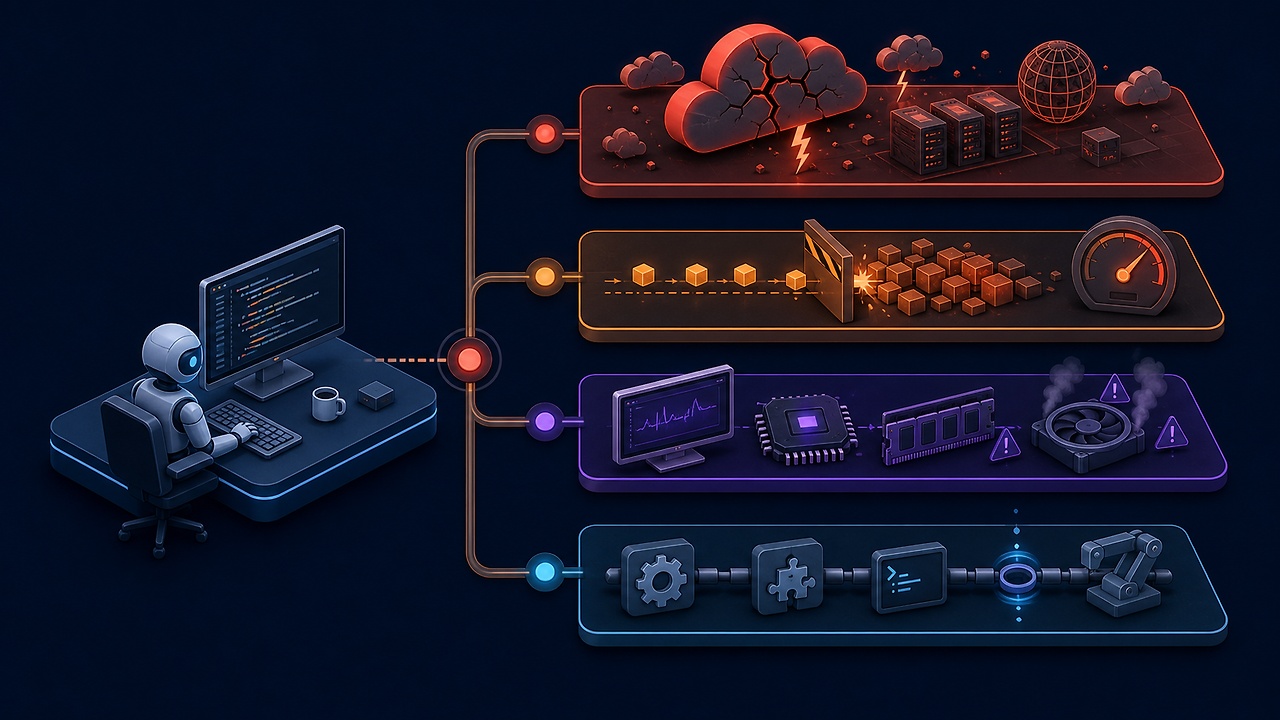
Figure: Practical stability should be measured not just by uptime, but also by recoverability, result quality, and human rework.
Why Does Claude Ultimately Feel More Stable and Better?
If stability is defined simply as a process never stopping, there are days when Codex might seem better. However, in actual development work, the following questions are more important:
한 번도 멈추지 않았는가?
보다
멈춰도 작업을 잃지 않았는가?

오래 실행됐는가?
보다
원하는 수준의 결과를 만들었는가?
Claude Code continuously saves sessions, can be recovered with –resume, and allows context management with /compact, /clear, and subagents. If Claude’s code understanding and output better suit one’s workflow, overall productivity might be higher even with occasional restart costs.
Ultimately, the recent conclusion is this:
Codex sometimes appears to last longer, but Claude is easier to recover tasks after stopping and offers higher confidence in results, ultimately feeling like a more stable and better tool.
This conclusion is not an objective ranking applicable to all users. Nor can one definitively state which is more stable based solely on public statistics. However, if stability is defined not as “process uptime” but as “the ability to reach desired results without losing work,” then the reason for continuously choosing Claude becomes clear.
Practical Operating Methods When Claude Frequently Dies
Finally, here are practical operating methods:
Break down tasks into smaller pieces
Do not handle investigation, implementation, large-scale testing, and documentation all in one session. Create a commit or checkpoint at each feature boundary and move to the next session.
Save large outputs to files
Do not put tens of thousands of lines of logs directly into the conversation; save them to a file and then search only for error sections.
pytest -vv > /tmp/test-output.log 2>&1
rg -n "FAILED|ERROR|Traceback" /tmp/test-output.log
Manually compact at natural breakpoints
After a task is finished, compact as follows before the next request:
/compact 구현된 파일, 남은 실패 테스트, 다음 단계만 유지Name your sessions
/rename auth-refactorThis makes it easier to find them with the next command even after a stop:
claude --resume auth-refactorSeparate status page and local diagnostics
If multiple sessions fail simultaneously, check the status page first. If it only reproduces in one repository, check /doctor, /context, and MCP/hook settings.
Directly record result stability
Use Claude and Codex for the same types of tasks and briefly record completion rates, restarts, test passes, and modification amounts. While subjective feeling is important, having records helps you more quickly determine which tool fits your workflow.
Conclusion
The feeling that Claude keeps dying is not wrong. There have been actual service outages, and official documentation acknowledges high CPU/memory, hang, and auto-compaction issues, recommending restarts and resumes as solutions.
However, it’s difficult to conclude that Claude is a less stable tool based solely on that. Codex also experienced overload, access denied, compaction latency, rate limits, and Cloud task failures, and the two companies do not publish uptime statistics based on identical criteria.
Therefore, practical stability is closer to the following equation:
실무 안정성
= 서비스 가용성
+ 로컬 프로세스 안정성
+ 세션 복구 가능성
+ 결과 품질
+ 사람이 다시 해야 하는 작업의 양
By this standard, if Claude occasionally stops but can recover sessions and continue to produce good results, then for the user, Claude may ultimately be a more stable and better tool.
References
- Claude Status
- Claude Code Uptime History
- Claude Incident History
- Claude Code Troubleshooting
- Claude Code Error Reference
- Claude Code Session Management
- Claude Code Memory
- OpenAI Status
- OpenAI Status History
- OpenAI incident: Codex·ChatGPT·Responses API elevated errors
- OpenAI incident: Some Codex requests failed
Leave a Reply