Hello! Today, we’ll delve deeply into Argo Workflows’ core design philosophies: DAG and Steps, and Artifact, the key means of exchanging data between workflows. 🚀
By the time you finish reading this article, you’ll have a complete understanding of how to design complex pipelines and how to safely pass results from previous stages to the next.
There are two main ways to arrange tasks in Argo Workflows: Steps (sequential) and DAG (dependency-based). While they may seem similar, there are significant differences in their use cases and data referencing methods.
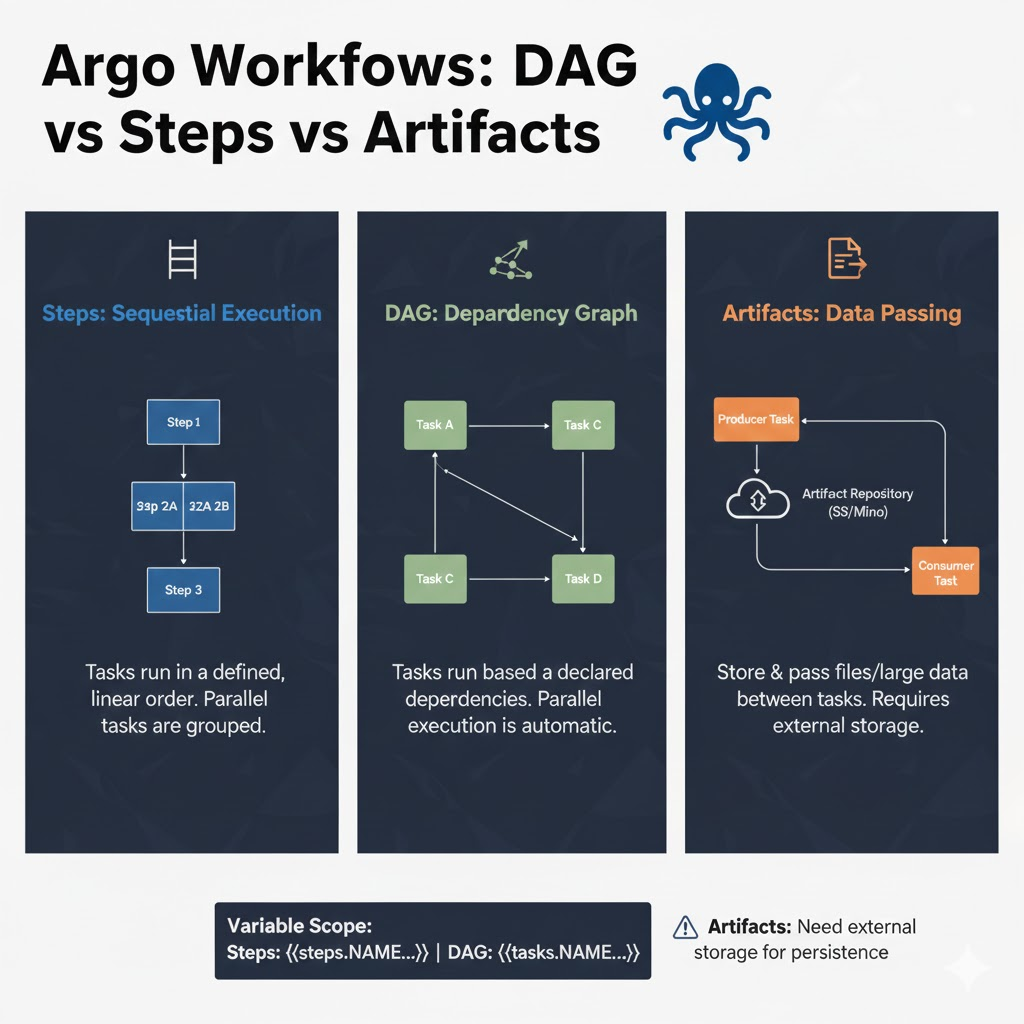
1. Steps: Sequential Step-by-Step Execution 🪜
Steps, as the name suggests, is a method of listing tasks ‘step by step’.
✅ When to use it?
- When the workflow clearly flows from top to bottom.
- When multiple tasks need to be executed simultaneously (in parallel), or when a specific group must complete before moving to the next group.
- When designing simple and intuitive pipelines.
📝 Code Example and Explanation (Steps)
YAML
apiVersion: argoproj.io/v1alpha1
kind: Workflow
metadata:
  generateName: steps-example-
spec:
  entrypoint: main
  templates:
  - name: main
    steps:
    - - name: step1 # First step (parallel group 1)
        template: echo
        arguments: {parameters: [{name: message, value: "Step 1"}]}
    - - name: step2-a # Second step (parallel execution A)
        template: echo
        arguments: {parameters: [{name: message, value: "Step 2-A"}]}
      - name: step2-b # Second step (parallel execution B)
        template: echo
        arguments: {parameters: [{name: message, value: "Step 2-B"}]}

  - name: echo
    inputs:
      parameters: [{name: message}]
    container:
      image: alpine:latest
      command: [echo, "{{inputs.parameters.message}}"]
2. DAG: Complex Dependency-Based Execution 🕸️
DAG (Directed Acyclic Graph) explicitly defines the
‘dependencies’
between tasks.
✅ When to use it?
- When tasks are complexly intertwined, making sequential listing difficult.
- When a specific task depends on the results of multiple preceding tasks.
- When efficient parallel processing is extremely important (tasks without dependencies are executed immediately).
📝 Code Example and Explanation (DAG)
YAML
apiVersion: argoproj.io/v1alpha1
kind: Workflow
metadata:
  generateName: dag-example-
spec:
  entrypoint: main
  templates:
  - name: main
    dag:
      tasks:
      - name: A
        template: echo
      - name: B
        depends: "A" # Execute only if A succeeds
        template: echo
      - name: C
        depends: "A" # Execute only if A succeeds (in parallel with B)
        template: echo
      - name: D
        depends: "B && C" # Execute only if both B and C succeed
        template: echo

  - name: echo
    container:
      image: alpine:latest
      command: [echo, "Running task"]
3. Differences in How Previous Results (Output) Are Retrieved 🔄
The two methods differ in their variable referencing syntax (Variable Scope). Be careful, as an incorrect reference will prevent the workflow from executing!
① Referencing in Steps
Use the format steps.
- Example: {{steps.generate-id.outputs.parameters.id}}
② Referencing in DAG
Use the format tasks.
- Example: {{tasks.generate-id.outputs.parameters.id}}
💡 Key Difference: The core difference is whether the prefix for referencing is ‘steps’ or ‘tasks’. You must use the correct keyword appropriate for the structure.
4. Artifact: Key to Large Data Transfer 📦
While Parameters are used to pass short strings or numbers, Artifacts are used to transfer files, directories, and large-scale data. (External storage like S3, GCS, Minio is required.)
✅ Characteristics of Artifacts
- Input/Output: One step generates files (outputs.artifacts), and the next step receives them as input (inputs.artifacts).
- Persistence: Even if a pod is deleted, the data remains in external storage, allowing results to be checked later.
📝 Practical Code: Passing Artifacts
YAML
apiVersion: argoproj.io/v1alpha1
kind: Workflow
metadata:
  generateName: artifact-passing-
spec:
  entrypoint: main
  templates:
  - name: main
    dag:
      tasks:
      - name: generate-file
        template: producer
      - name: consume-file
        depends: "generate-file"
        template: consumer
        arguments:
          artifacts:
          # Connect output of previous task as input
          - name: input-file
            from: "{{tasks.generate-file.outputs.artifacts.result-file}}"

  - name: producer # Template for creating a file
    container:
      image: alpine:latest
      command: [sh, -c]
      args: ["echo 'important data' > /tmp/out.txt"]
    outputs:
      artifacts:
      - name: result-file # Create artifact with this name
        path: /tmp/out.txt # Actual path inside the container

  - name: consumer # Template for receiving a file
    inputs:
      artifacts:
      - name: input-file # Define input artifact
        path: /tmp/in.txt # Where to place inside the container
    container:
      image: alpine:latest
      command: [cat, /tmp/in.txt]
5. Summary and Selection Guide 📊
| Category | Steps | DAG |
| — | — | — |
| Philosophy | Sequential Flow | Dependency Network |
| Readability | Good for simple flows | Good for understanding complex relationships |
| Variable Reference | {{steps.NAME.outputs…}} | {{tasks.NAME.outputs…}} |
| Parallel Processing | Defined as a list of lists ([ [A, B] ]) | Automatic parallel execution if no ‘depends’ |
Which one should you choose?
- If the flow is simple, choose Steps to enhance intuitiveness.
- If the inter-task relationships are complex and the pipeline is non-linear, DAG is the answer.
- If the data is in file format, don’t hesitate to configure Artifacts.
The power of Argo Workflows comes from this structural flexibility. Try designing the most suitable structure for your business logic! 🛠️
Leave a Reply