For a long time, the method used to access EC2 instances in a cloud environment was a Bastion Host.
Administrators would first connect to the Bastion Host via SSH, and then connect again to servers in the internal Private Subnet. While this structure is simple and familiar, as the scale of operations grows, so do the management burden and security risks.
Recently, in AWS environments, the use of Bastion Hosts is being reduced or eliminated, and AWS Systems Manager Session Manager is widely used to access EC2 instances.
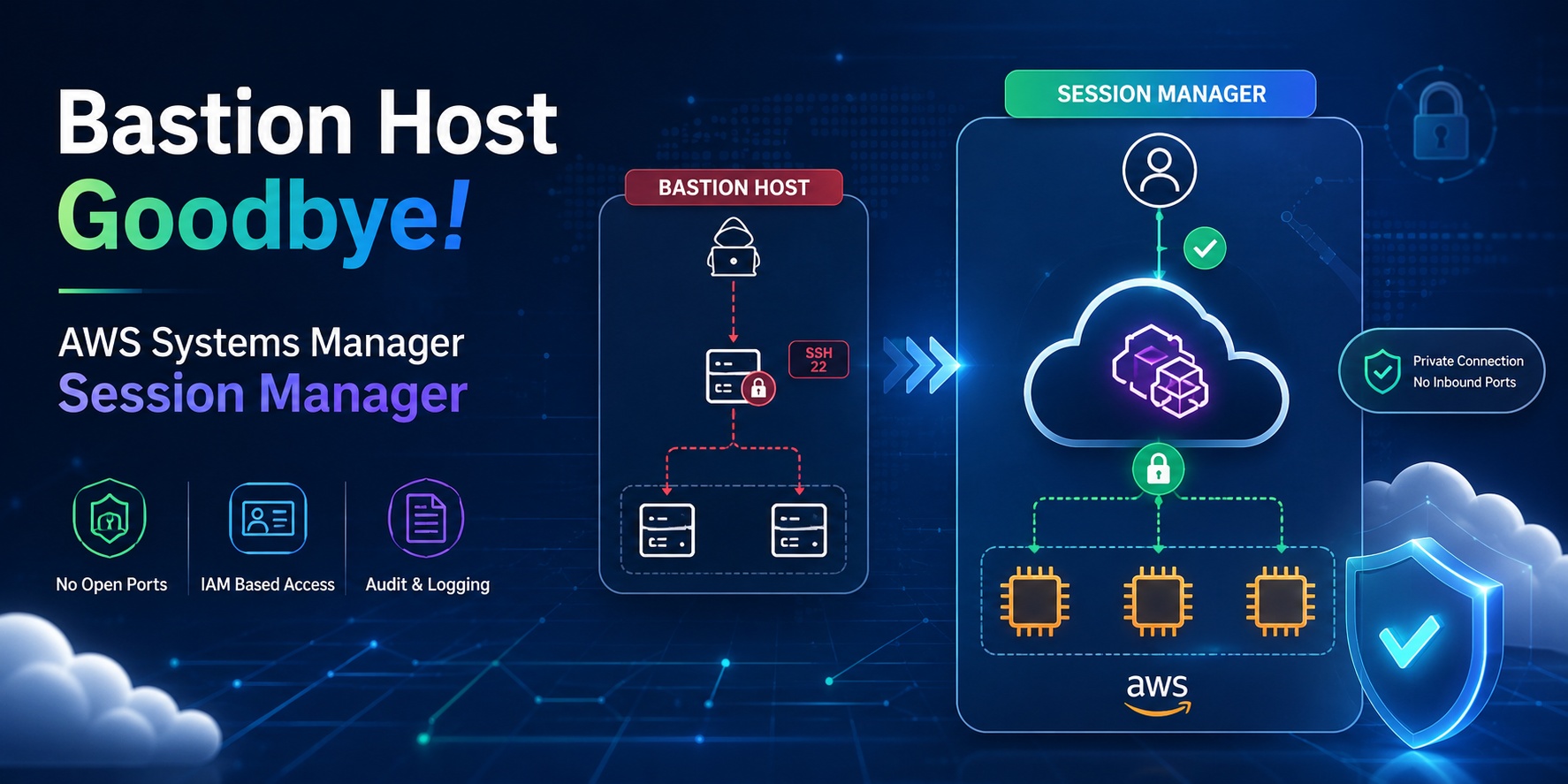
Limitations of the Bastion Host Approach
A Bastion Host acts as a gateway for entering internal servers from the outside. However, this structure has several problems.
First, the Bastion Host itself becomes an attack surface.
To allow external access, SSH port 22 or RDP port 3389 must be opened, and if this server is compromised, the internal network access path can be exposed.
Second, SSH Key management is required.
Management tasks such as issuing, revoking, responding to loss, and removing keys for departing employees continuously arise.
Third, tracking access history is difficult.
While it’s possible to partially confirm who accessed which server and when, consistent command-level audit logs require separate configuration.
Fourth, operational costs and management burden arise.
Since a Bastion Host is ultimately an EC2 instance, it requires patching, security configuration, monitoring, and incident response.
What is Session Manager?
AWS Systems Manager Session Manager is a managed access feature that allows you to connect to EC2 instances without an SSH Key.
Users initiate a Session Manager session via the AWS Console, AWS CLI, or SDK. The instance must have the SSM Agent installed and be able to communicate with AWS Systems Manager endpoints.
The connection flow is as follows:
사용자
  ↓
AWS IAM / AWS SSO 인증
  ↓
AWS Systems Manager Session Manager
  ↓
SSM Agent
  ↓
Private EC2 Instance
The key point is that users do not directly SSH into EC2.
This means there is no need to open port 22 in the EC2 security group.
Why Session Manager Replaces Bastion Hosts
Using Session Manager, you can access EC2 instances in a Private Subnet without a Bastion Host.
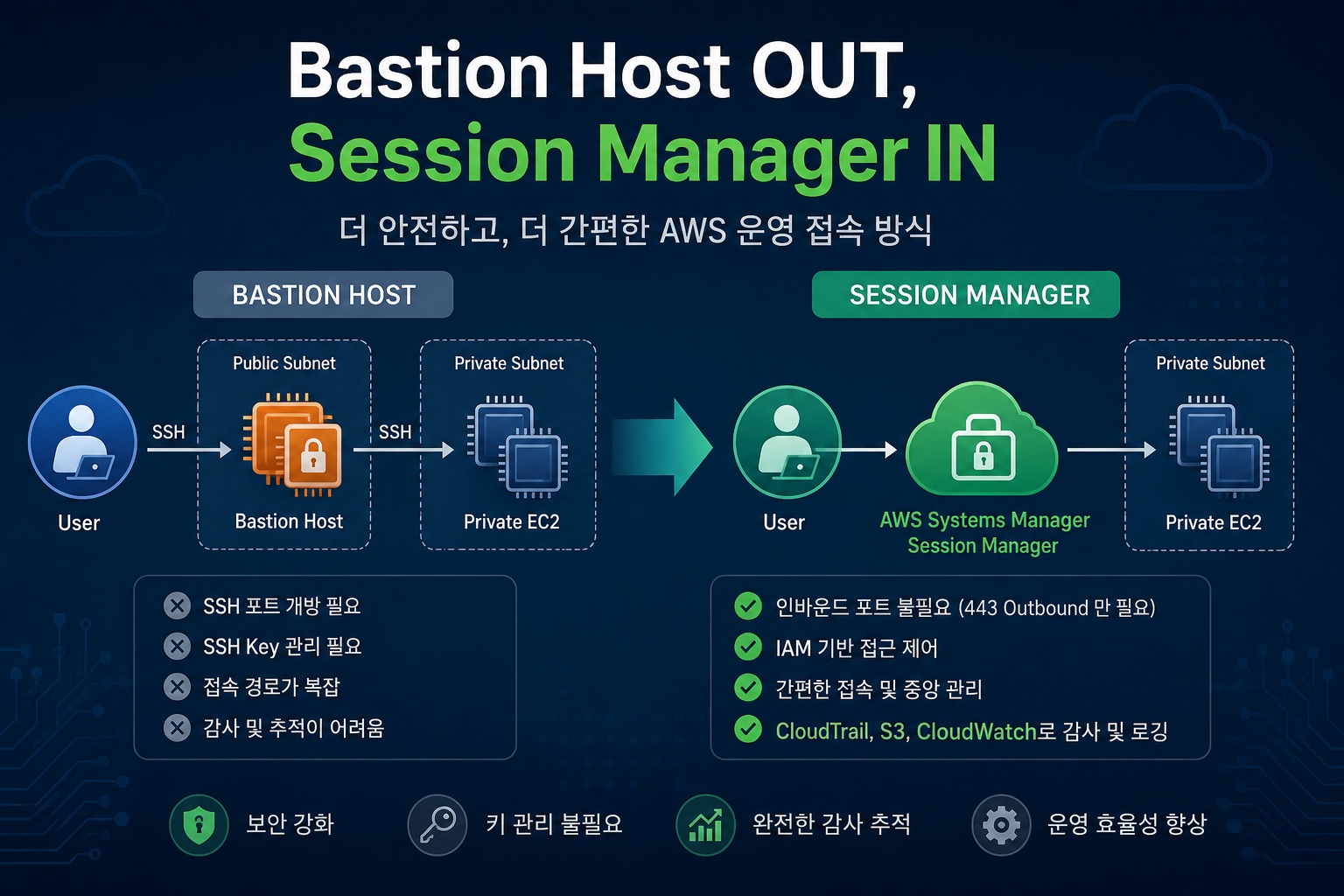
The traditional Bastion structure is as follows:
관리자 PC
  ↓ SSH
Bastion Host - Public Subnet
  ↓ SSH
Private EC2 - Private Subnet
The Session Manager structure is as follows:
관리자 PC
  ↓ AWS 인증
Session Manager
  ↓ SSM Agent
Private EC2 - Private Subnet
With this method, there is no need to place a Bastion Host in the Public Subnet.
You don’t need to assign a Public IP to Private EC2 instances, nor do you need to open SSH port 22.
Ultimately, the focus of access security shifts from network-based access control to IAM-based access control.
Security Advantages
1. Inbound ports can be closed
Using Session Manager, you don’t need to open SSH port 22 or RDP port 3389 on EC2 instances.
A security group example can be simplified as follows:
Inbound:
  없음

Outbound:
  HTTPS 443 허용
Of course, for application servers, ports required for ALB, NLB, internal service communication, etc., must be allowed separately.
However, the SSH port for operator access can be removed.
2. Reduced SSH Key Management
Session Manager’s default connection does not use SSH Keys.
Access permissions are controlled by IAM policies.
For example, operations team A can be allowed to access only development servers, and the security team can be allowed read-only access to production servers.
Revoking permissions can also be handled by removing IAM permissions, not by deleting SSH Keys.
3. CloudTrail-based Auditing is Possible
Session Manager connections are recorded as AWS API calls.
You can check who started a session on which instance and when in CloudTrail.
Additionally, session logs can be saved to S3 or CloudWatch Logs depending on the configuration.
In an operational environment, it is recommended to configure an audit system like this:
Session Manager 접속
  → CloudTrail 기록
  → CloudWatch Logs 또는 S3 저장
  → EventBridge로 접속 이벤트 탐지
  → SNS 또는 Slack 알림
4. Suitable for Private Subnet-centric Architectures
Session Manager is also suitable for EC2 instances in Private Subnets.
Instances do not need direct internet access; by configuring VPC Endpoints, they can communicate with Systems Manager via AWS PrivateLink.
To use Session Manager reliably in a Private Subnet, the following VPC Endpoints are usually configured:
com.amazonaws.<region>.ssm
com.amazonaws.<region>.ssmmessages
com.amazonaws.<region>.ec2messages
If you save session logs to CloudWatch Logs or S3, related endpoints should also be considered.
Required Components for Configuration
To use Session Manager, four main components are needed:
1. EC2 IAM Role
EC2 instances require an IAM Role that can communicate with Systems Manager.
Typically, the AWS managed policy `AmazonSSMManagedInstanceCore` is attached.
An example policy attachment structure is as follows:
EC2 Instance
  → IAM Role
    → AmazonSSMManagedInstanceCore
2. SSM Agent
The SSM Agent must be installed inside the EC2 instance.
It is often pre-installed on Amazon Linux 2, Amazon Linux 2023, some Ubuntu AMIs, and Windows Server AMIs.
However, in a production environment, it is recommended to keep the SSM Agent version up to date.
The check command is as follows:
sudo systemctl status amazon-ssm-agentIf it’s not running, you can start it as follows:
sudo systemctl enable amazon-ssm-agent
sudo systemctl start amazon-ssm-agent
3. Network Path
The instance must be able to communicate with Systems Manager endpoints over HTTPS 443.
If there is an internet path, communication can occur via a NAT Gateway.
If you want to remove the internet path, configure VPC Endpoints.
In security-critical operational environments, a VPC Endpoint-based configuration is cleaner than a NAT Gateway.
4. User IAM Permissions
Users must have permission to start a Session Manager session.
Example permissions are as follows:
{
  "Version": "2012-10-17",
  "Statement": [
    {
      "Effect": "Allow",
      "Action": [
        "ssm:StartSession",
        "ssm:TerminateSession",
        "ssm:ResumeSession"
      ],
      "Resource": [
        "arn:aws:ec2:ap-northeast-2:123456789012:instance/i-xxxxxxxxxxxxxxxxx",
        "arn:aws:ssm:ap-northeast-2:123456789012:document/SSM-SessionManagerRunShell"
      ]
    }
  ]
}
In an operational environment, it is recommended to control access based on instance tags.
For example, you can allow developers to access only instances with `Environment=Dev`, or allow only the operations group to access instances with `Environment=Prod`.
Connection Methods
The basic command to connect to Session Manager from the AWS CLI is as follows:
aws ssm start-session
  --target i-xxxxxxxxxxxxxxxxx
Once connected, you can execute commands like a regular shell.
whoami
hostname
ip addr
You can also connect from the EC2 console by selecting an instance and then choosing Session Manager from the Connect menu.
When to Use Like SSH
By default, Session Manager connects without SSH.
However, existing tools may operate based on SSH.
For example, tools like SCP, rsync, Ansible, and IDE Remote SSH may require the SSH protocol.
In this case, Session Manager can be used as an SSH tunnel.
An example of local SSH configuration is as follows:
Host i-* mi-*
    ProxyCommand sh -c "aws ssm start-session --target %h --document-name AWS-StartSSHSession --parameters 'portNumber=%p'"
You can then connect as follows:
ssh ec2-user@i-xxxxxxxxxxxxxxxxxHowever, since this method involves Session Manager tunneling SSH traffic, there are limitations to command-level session logging.
In operational environments where audit logs are important, it is better to prioritize the default Session Manager shell connection and logging configuration.
Utilizing Port Forwarding
Session Manager also supports port forwarding.
For example, you can connect port 8080 of an EC2 instance in a Private Subnet to port 8080 on your local PC.
aws ssm start-session
  --target i-xxxxxxxxxxxxxxxxx
  --document-name AWS-StartPortForwardingSession
  --parameters '{"portNumber":["8080"],"localPortNumber":["8080"]}'
You can then access the following address from your local browser:
http://localhost:8080This method is useful for internal administration pages, temporary debugging, accessing Private RDS, and checking internal APIs.
Bastion vs. Session Manager Comparison
| Category | Bastion Host | Session Manager |
| Connection Method | Direct SSH/RDP connection | AWS API-based session |
| Public IP | Usually required | Not required |
| Inbound Ports | 22/3389 required | Not required |
| SSH Key Management | Required | Not required for default connection |
| Access Control | Security Groups, Keys, OS Accounts | IAM Policies |
| Audit Logs | Separate configuration needed | CloudTrail, S3, CloudWatch Logs integration |
| Operational Burden | EC2 patching/operation required | Managed service-centric |
| Private Subnet Access | Via Bastion | Directly possible |
| Cost | Bastion EC2 cost incurred | Low basic usage cost, separate consideration for logs/VPC Endpoint costs |
Recommended Configuration for Production Environments
For production environments, the following configuration is recommended:
1. EC2는 Private Subnet에 배치
2. EC2에는 Public IP 미부여
3. 보안 그룹에서 SSH/RDP Inbound 제거
4. EC2 IAM Role에 AmazonSSMManagedInstanceCore 연결
5. SSM Agent 최신 버전 유지
6. VPC Endpoint 구성
   - ssm
   - ssmmessages
   - ec2messages
7. Session Manager 로그를 CloudWatch Logs 또는 S3에 저장
8. CloudTrail로 StartSession, TerminateSession 이벤트 추적
9. IAM Identity Center 또는 IAM Role 기반으로 사용자 접근 제어
10. 운영 서버 접속은 태그 기반 IAM 정책으로 제한
Points to Note
While Session Manager can often completely replace Bastion Hosts, it doesn’t mean Bastion Hosts are unnecessary in all situations.
For example, highly specialized network device access, legacy SSH-based automation, or environments with strict network isolation policies may require separate access structures.
Also, even if Session Manager is adopted, granting broad IAM permissions is risky.
Policies like the following should be avoided:
{
  "Effect": "Allow",
  "Action": "ssm:StartSession",
  "Resource": "*"
}
In production environments, access should be restricted based on the principle of least privilege, allowing only specific instances, specific tags, or specific SSM Documents.
Conclusion
AWS Systems Manager Session Manager is a highly suitable feature for replacing Bastion Hosts.
The biggest advantage is that you don’t need to open an SSH port on EC2 for operator access.
It also reduces the burden of SSH Key management and allows centralized control of access permissions based on IAM.
While the traditional Bastion Host approach was “opening a door in the network and managing it,” Session Manager is closer to “opening a session only when needed through AWS authentication and permissions.”
Therefore, in AWS operational environments, it is recommended to prioritize a Session Manager-based access structure for new systems rather than defaulting to a Bastion Host.
Leave a Reply