When you hear “VPN” in AWS, many people often first think of Site-to-Site VPN. However, Site-to-Site VPN is used to connect a company’s IDC, branch offices, or on-premises networks with an AWS VPC. On the other hand, when “individual user devices” such as those of developers, operators, or partners need to access internal AWS resources, AWS Client VPN can be used.
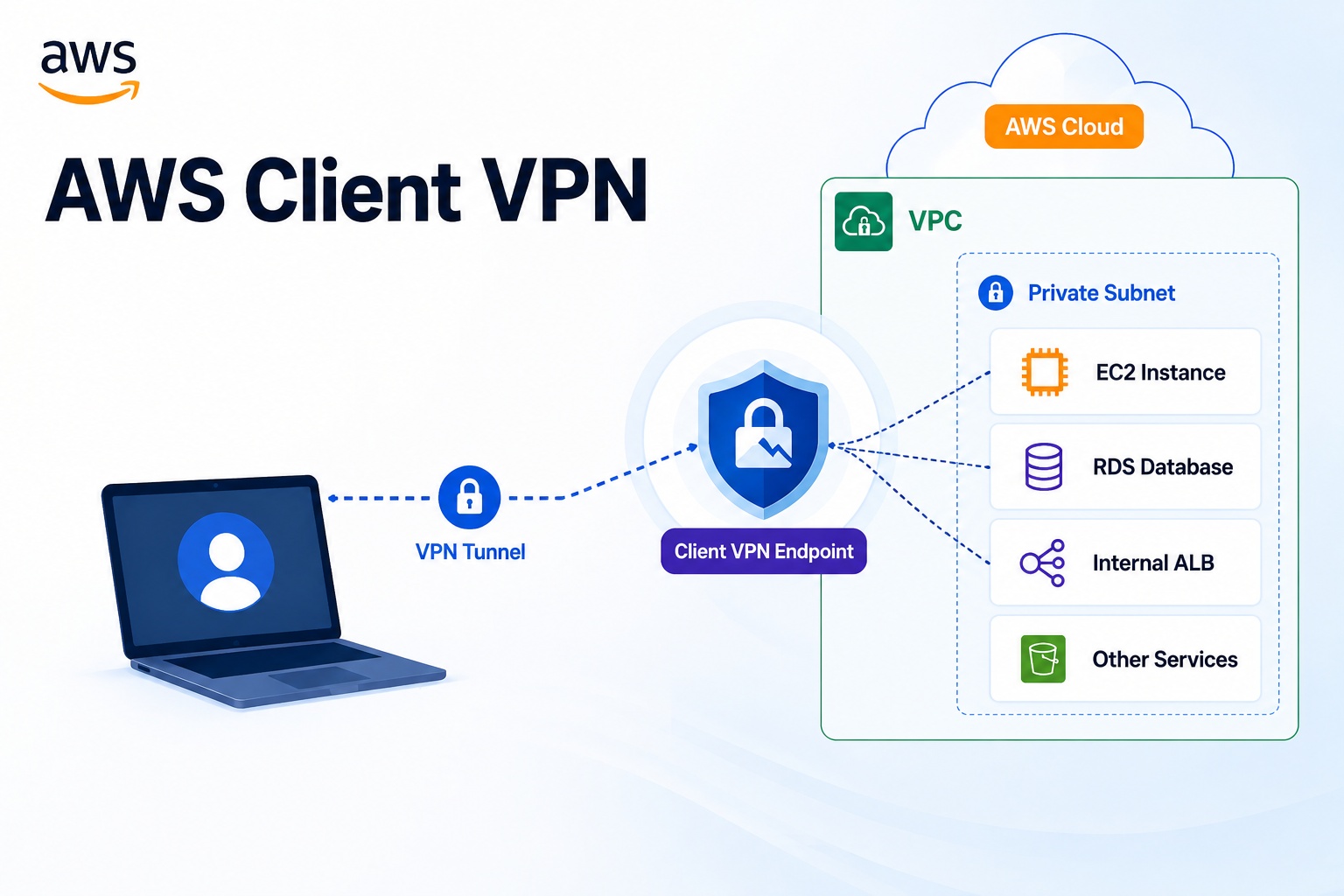
AWS Client VPN is a managed client-based VPN service that allows users to securely connect from their laptops or desktops to an AWS VPC or on-premises network. Simply put, it’s a method where users run a VPN client to enter the AWS internal network.
Why is AWS Client VPN needed?
Within an AWS VPC, there are many resources that should not be directly accessed from the external internet.
For example, such resources might include:
Private EC2
Private RDS
Internal ALB
EKS Private Endpoint
관리용 웹 콘솔
사내 업무 시스템
모니터링 대시보드
Assigning Public IPs to these resources or opening ports like 22, 3389, or 3306 in security groups to the outside is not good practice from a security perspective.
Traditionally, a Bastion Host was used for access as follows:
사용자 PC
  -> Bastion Host
      -> Private EC2 / RDS / 내부 서비스
However, if a user’s device needs to access the VPC’s internal network itself, the Client VPN method can be more natural.
사용자 PC
  -> AWS Client VPN Endpoint
      -> VPC 내부 리소스
Basic Structure of AWS Client VPN
The core components of AWS Client VPN are as follows:
사용자 PC
  -> VPN Client
      -> Client VPN Endpoint
          -> Target Network
              -> VPC 내부 리소스
Here, the Client VPN Endpoint is the point where the user’s VPN connection terminates. Users connect to this endpoint via a VPN client, and AWS allows access to internal VPC resources according to configured routing and authorization rules.
Key Components
To understand AWS Client VPN, you need to know the following components:
| Component | Description |
|---|---|
| Client VPN Endpoint | The AWS-side VPN endpoint where user VPN sessions connect |
| Target Network | The VPC Subnet connected to the Client VPN Endpoint |
| Client CIDR | The IP range to be assigned to VPN connected users |
| Route Table | Defines which networks VPN users can access |
| Authorization Rule | Defines which users or groups can access which networks |
| Security Group | Network firewall controlling access to VPC resources |
| Client Configuration File | A configuration file that users import into their VPN client |
For example, assuming the VPC CIDR is 10.0.0.0/16 and VPN users are assigned the 172.16.0.0/22 range, the structure would be as follows:
사용자 PC VPN IP: 172.16.0.10
VPC 내부 대역: 10.0.0.0/16

사용자 PC
  -> Client VPN Endpoint
      -> Private EC2 10.0.1.10
      -> RDS 10.0.2.20
Authentication Methods
Client VPN uses authentication methods to verify if a user can connect to the VPN.
Typical authentication methods include:
| Authentication Method | Description |
|---|---|
| Mutual Authentication | Uses client certificates and server certificates |
| Active Directory Authentication | User authentication based on AWS Directory Service or AD |
| Federated Authentication | User authentication via SAML-based IdP |
In practice, certificate-based Mutual Authentication is often used for simple tests or labs, while in enterprise environments, SAML-based integration or Active Directory-based authentication is frequently considered.
The important point is that authentication determines “whether VPN access is possible.” Only if authentication is successful can the user connect to the Client VPN Endpoint.
Authorization and Access Control
In Client VPN, not all access is granted by authentication alone. After connecting, access scope must be controlled through Authorization Rules and Security Groups.
For example, the operations team might have access to the entire VPC, while the development team is restricted to only the development server range.
운영팀:
  10.0.0.0/16 전체 접근 허용

개발팀:
  10.0.10.0/24 개발 서버 대역만 접근 허용

협력사:
  10.0.20.10/32 특정 서버만 접근 허용
By dividing access scope by user groups in this way, you can prevent the entire internal network from being unconditionally exposed even if VPN access is granted.
Routing Methods: Full Tunnel and Split Tunnel
One of the important concepts in Client VPN is the routing method.
By default, all user traffic can be routed through the VPN tunnel. This is known as the Full Tunnel method.
사용자 인터넷 트래픽
사용자 AWS 접속 트래픽
모두 VPN 터널 경유
On the other hand, if Split Tunnel is enabled, only traffic destined for AWS travels through the VPN tunnel, while general internet traffic uses the user PC’s existing internet route.
AWS VPC 트래픽 -> VPN 터널
일반 인터넷 트래픽 -> 사용자 로컬 인터넷
In practice, Split Tunnel is often preferred. This is because only access to AWS internal resources is sent via VPN, and the user’s general internet traffic does not pass through AWS. This method simplifies traffic paths and helps reduce unnecessary data transfer costs.
However, organizations with security policies that require all traffic to be controlled through central security devices or proxies might choose Full Tunnel.
Client VPN Connection Flow
From a user’s perspective, the Client VPN connection flow is as follows:
1. 관리자가 Client VPN Endpoint 생성
2. 인증 방식과 서버 인증서 설정
3. Target Network로 VPC Subnet 연결
4. Route Table에 접근 대상 네트워크 추가
5. Authorization Rule로 접근 허용 범위 설정
6. 필요한 Security Group 규칙 설정
7. Client Configuration File 다운로드
8. 사용자가 VPN Client에 설정 파일 가져오기
9. VPN 연결 후 Private 리소스 접속
For example, after connecting to the VPN, a user can SSH into a Private EC2 instance or access a web application via an Internal ALB address.
ssh ec2-user@10.0.1.10Or, they can access internal web services.
http://internal-service.example.localDifferences between Bastion Host and Client VPN
Both Bastion Host and Client VPN are methods for accessing internal resources, but their purposes differ slightly.
| Item | Bastion Host | AWS Client VPN |
|---|---|---|
| Access Method | Via jump server | User PC connects to VPC via VPN |
| Primary Purpose | Server SSH/RDP access | VPC internal network access |
| Operational Target | Requires Bastion EC2 management | Uses AWS managed VPN Endpoint |
| User Experience | Connect to Bastion, then internal server | Connect to VPN, then directly access internal resources |
| Access Scope | Typically server access-centric | Extendable to VPC, Peering VPC, on-premises |
| Security Control | SG, OS accounts, SSH Key, PAM, etc. | Authentication, authorization rules, SG, routing control |
If only EC2 shell access is needed, Session Manager might be more suitable. On the other hand, if users need to access multiple services, web consoles, databases, and internal APIs within the VPC, Client VPN is a more natural choice.
Differences between Session Manager and Client VPN
AWS Systems Manager Session Manager is a feature that allows connecting to EC2 without a Bastion Host. However, the primary target for connection is typically the EC2 shell.
In contrast, Client VPN connects the user’s device to the AWS internal network.
| Item | Session Manager | AWS Client VPN |
|---|---|---|
| Purpose | EC2 administrative access | VPC internal network access |
| Connection Target | Primarily EC2 instances | EC2, RDS, Internal ALB, EKS, corporate network, etc. |
| User Device IP | Not directly entering VPC structure | Assigned a VPN Client CIDR IP |
| SSH Key | Not required | May be required depending on the access target |
| Suitable Situation | Operator accessing EC2 shell | User accessing multiple internal services |
Therefore, it’s difficult to say that one is the sole correct answer.
If an operator needs to access an EC2 instance, Session Manager is a good choice, while if a user’s device needs to access internal VPC services, Client VPN is appropriate.
Practical Design Considerations
When designing AWS Client VPN, the following points should be considered:
- First, the Client CIDR must not overlap with the VPC CIDR or on-premises network ranges. If the IP range assigned to VPN users overlaps with existing networks, routing issues may occur.
- Second, it is advisable not to open Authorization Rules too broadly. While full access to 10.0.0.0/16 might be allowed for testing, it’s better to divide access scope by user groups in production.
- Third, Security Groups must also be designed in conjunction. Allowing access in Client VPN does not automatically open the security groups of target EC2 or RDS instances. The security groups of the target resources must also allow traffic coming from the Client VPN path.
- Fourth, carefully decide whether to use Split Tunnel. While Split Tunnel is efficient for general operational access, Full Tunnel should be considered if security policies require all user traffic to be controlled centrally.
- Fifth, it is recommended to enable connection logs. Being able to track who connected to the VPN, when, and which users accessed it is beneficial for security audits and troubleshooting.
Cost Perspective
AWS Client VPN typically incurs costs based on Client VPN Endpoint connection time and active VPN connection time. Additional costs may arise from data transfer, CloudWatch Logs, Public IPv4 addresses, and Lambda-based connection handlers if used.
Therefore, after testing, unused Client VPN Endpoints and Subnet Associations should be cleaned up. Especially in educational lab environments, if the Endpoint is not deleted after the lab, hourly costs can continue to accrue.
When is AWS Client VPN a good choice?
AWS Client VPN is suitable for the following situations:
원격 근무자가 AWS VPC 내부 서비스에 접근해야 할 때
개발자가 Private RDS 또는 Internal ALB에 접속해야 할 때
협력사에게 제한된 내부 시스템 접근을 제공해야 할 때
Bastion Host 없이 내부 네트워크 접근 환경을 제공하고 싶을 때
온프레미스와 AWS 내부 자원을 함께 접근해야 할 때
Conversely, if only shell access to one or two EC2 instances is needed, Session Manager might be simpler and more secure.
Conclusion
AWS Client VPN is a managed VPN service that enables remote users to securely access internal AWS VPC resources. Unlike a Bastion Host, which requires going through a specific server, Client VPN connects the user’s device directly to the AWS internal network via VPN.
Therefore, it’s good to understand the distinction: Session Manager for simple server administrative access, Client VPN for accessing internal VPC services, and Site-to-Site VPN for connecting branch offices or IDCs with AWS.
To summarize in one sentence:
AWS Client VPN은 원격 사용자 PC를 AWS VPC 내부 네트워크에 안전하게 연결해주는 관리형 클라이언트 VPN 서비스다.
Leave a Reply