In the past, when connecting to EC2 instances in a Private Subnet on AWS, it was common to set up a Bastion Host or Jump Server. Administrators would first connect to a Bastion EC2 in a Public Subnet via SSH/RDP, and then connect to the server in the Private Subnet. However, in recent AWS environments, rather than operating a separate Bastion Host for simple administrative access, using AWS Systems Manager Session Manager or EC2 Instance Connect Endpoint is preferred. The official AWS documentation also explains that Session Manager allows access to managed nodes like EC2 without opening inbound ports, maintaining a Bastion Host, or managing SSH keys. (AWS Documentation)
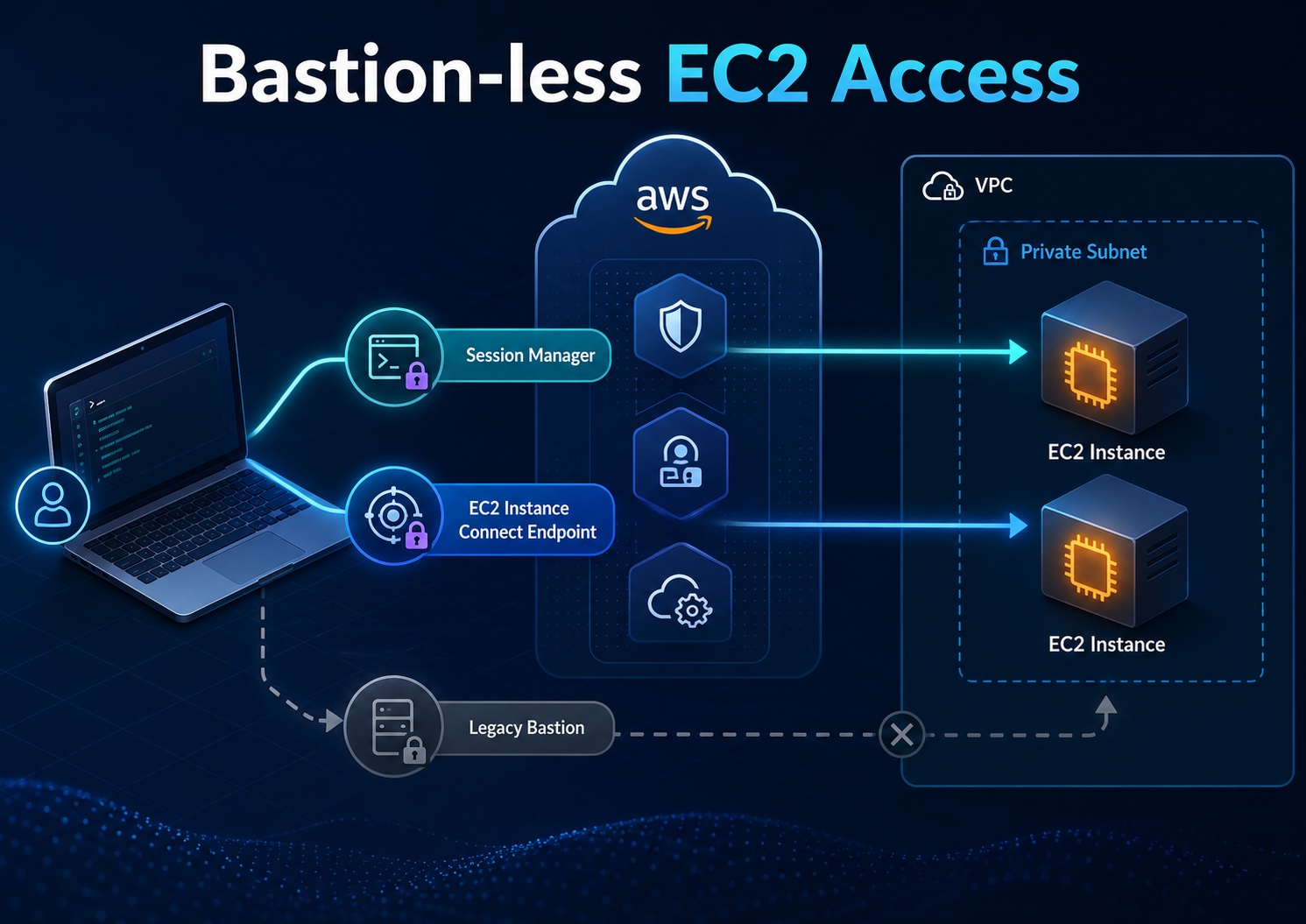
Why Reduce Bastion Hosts?
A Bastion Host acts as a gateway to servers in a Private Subnet. While the structure itself is simple and familiar, it ultimately involves operating an additional EC2 instance that is accessible from the internet. This server becomes subject to security patching, access control, SSH key management, log collection, incident response, and cost management.
The traditional architecture is as follows:
관리자 PC
  -> Public Subnet Bastion Host
      -> Private Subnet EC2
The problem is that if a Bastion Host is compromised, the path to internal servers can be opened. Therefore, while security groups are used to allow only company IPs, and MFA, access approval, and session recording are added, the operational burden remains.
AWS blogs also explain that replacing a Bastion Host with Systems Manager can reduce the attack surface and increase visibility into commands executed on the host. (Amazon Web Services, Inc.) A 2024 AWS blog further states that the Bastion Host method involves burdens of deployment, hardening, maintenance, monitoring, and EC2 running costs, while using Session Manager helps improve security and audit posture and reduces management overhead. (Amazon Web Services, Inc.)
Key Alternative 1: AWS Systems Manager Session Manager
Session Manager is a feature of AWS Systems Manager that allows you to connect to server shells via the console or AWS CLI without directly opening SSH ports on EC2. According to AWS documentation, Session Manager supports browser-based shells and AWS CLI connections, and IAM policies can be used to control which users can connect to which instances. (AWS Documentation)
The architecture is as follows:
관리자 PC
  -> AWS Systems Manager Session Manager
      -> SSM Agent
          -> Private EC2
The core of this method is that the SSM Agent inside the EC2 instance communicates with the AWS Systems Manager service, rather than opening inbound SSH to the EC2. Therefore, there is no need to open SSH port 22 or RDP port 3389 to the internet in the security group.
To use Session Manager, the following conditions are usually required:
WRIMO-MD-TABLE-0
EC2 instances typically have an IAM Role attached that includes the AmazonSSMManagedInstanceCore policy. AWS documentation also guides the procedure for selecting this policy when configuring individual instance profiles. (AWS Documentation)
aws ssm start-session
  --target i-xxxxxxxxxxxxxxxxx
  --region us-east-1
  --profile my-sso
If you want to create a completely isolated architecture in a Private Subnet without a NAT Gateway, you can use VPC Endpoints. Configuring VPC Endpoints for Systems Manager allows managed instances to communicate with Systems Manager via AWS PrivateLink without an internet gateway or NAT device. AWS documentation also explains that when using PrivateLink, traffic between managed instances and Systems Manager, EC2 is handled within the Amazon network, and internet access is not required. (AWS Documentation)
The typically required endpoints are as follows:
com.amazonaws.<region>.ssm
com.amazonaws.<region>.ssmmessages
com.amazonaws.<region>.ec2messages
According to AWS documentation, managed nodes must be able to communicate outbound via HTTPS 443 to ssm, ssmmessages, and ec2messages endpoints. When using VPC Endpoints, the ssmmessages endpoint is necessary for Session Manager’s secure data channel communication. (AWS Documentation) (AWS Documentation)
Key Alternative 2: EC2 Instance Connect Endpoint
While Session Manager is closer to “connecting without SSH,” EC2 Instance Connect Endpoint is closer to “maintaining SSH/RDP usability without a Bastion Host.”
EC2 Instance Connect Endpoint allows secure connection to Private IP instances from the internet and can be used without a Bastion Host or direct internet connection for the VPC. AWS documentation describes this feature as an “identity-aware TCP proxy,” explaining that it creates a private tunnel from the user’s PC to the endpoint using IAM credentials, and traffic is authenticated and authorized before reaching the VPC. (AWS Documentation)
The architecture is as follows:
관리자 PC
  -> EC2 Instance Connect Endpoint
      -> Private EC2
This method is suitable for organizations that need to maintain existing SSH clients, SSH keys, and operational tools. However, EC2 Instance Connect Endpoint is intended for management traffic and not for large-volume data transfer. AWS documentation also states that high-volume data transfer may be limited, and there are restrictions on the number of concurrent connections per endpoint and connection duration. (AWS Documentation)
Comparison of Bastion Host, Session Manager, and EC2 Instance Connect Endpoint
| Item | Bastion Host | Session Manager | EC2 Instance Connect Endpoint |
|---|---|---|---|
| Public IP Required | Required for Bastion | Not required | Not required for target EC2 |
| SSH Port 22 Open | Required for Bastion | Not required | Allow endpoint path in target security group |
| SSH Key Management | Required | Not required for basic connection | Required depending on usage method |
| Access Control | OS account, SSH key, SG-centric | IAM-centric | IAM + Network control |
| Operational Burden | High | Low | Medium |
| Usability | Familiar | Console/CLI based | Similar to traditional SSH method |
| Recommended Scenario | Legacy, special environments | General operational access | Need to maintain SSH usability |
Practical Recommendation
For general EC2 operational access, it is advisable to prioritize Session Manager. This is because it allows the removal of SSH/RDP inbound rules from security groups and enables integrated access control based on IAM. AWS documentation also highlights Session Manager’s advantages such as centralized IAM access control, elimination of inbound ports, no need for Bastion Host and SSH key management, one-click access via console/CLI, and session activity logging. (AWS Documentation)
However, Session Manager is not the solution for all situations. If existing operational automation is heavily tied to SSH, or if compatibility with scp, SSH tunnels, and existing management tools is crucial, EC2 Instance Connect Endpoint might be a more natural fit. AWS documentation also states that while SSH connections and SCP usage are possible through Session Manager, sessions using SSH or port forwarding methods have a limitation: Session Manager cannot log session content because SSH encrypts the data. (AWS Documentation)
Conclusion
Bastion Hosts can still be used in AWS. However, if the sole purpose is to connect to Private EC2 instances, considering Session Manager or EC2 Instance Connect Endpoint first is a more modern design than creating a new Bastion Host.
Especially when considering operational access, security audits, minimizing key management, and Private Subnet-centric design, Session Manager is the cleanest option. Conversely, if you want to maintain existing SSH usability while eliminating the Bastion EC2, EC2 Instance Connect Endpoint is a good alternative.
To summarize in one sentence:
과거에는 Private EC2 접속을 위해 Bastion Host를 두는 구성이 일반적이었지만,
최근 AWS 환경에서는 Session Manager나 EC2 Instance Connect Endpoint를 사용해
Bastion Host 없이 접근하는 방식이 더 선호된다.
Leave a Reply