Docker Skills is a collection of official operational guidelines that AI coding agents refer to when performing Docker tasks. It provides the necessary procedures and examples for creating Dockerfiles, building images, or connecting multiple containers with Compose, in a format that agents can read.
When you ask an AI, “Run this project in a container,” it can start by creating a few files. However, if you also need to consider build cache, database readiness, and execution permissions, the items to check increase. Docker has released official Skills to allow these repetitive decisions to be reused. They can be used with compatible agents, including Claude Code and Codex. Docker Official Introduction
This article examines the features provided, installation methods, and practical tasks that can be requested, based on official documentation and repositories verified on September 27, 2026. The central question is simple: “What more specific tasks can agents be entrusted with if Docker Skills are installed?”

1. Agents Read Docker Task Standards Together
A Dockerfile is a file that describes how to create a container image. Compose deals with configurations for running multiple services together, such as applications, databases, and caches. Even if an agent knows the syntax of these two files, it still needs to determine what configuration is appropriate for each project.
For example, to reduce the size of a web application image, you need to check if compilation tools are also required in the runtime environment. If you add a database, you must define not only the connection address but also the data persistence location and startup conditions. Instead of repeatedly writing these conditions in each request, Skills provide a way to bundle relevant operational guidelines for agents to read when needed.
In the Agent Skills format, a skill is a folder containing SKILL.md. This file includes the name, a description of the situations to which it applies, and operational guidelines. If necessary, execution scripts, detailed reference documents, and configuration templates are also included. Therefore, a skill can contain a broader range of operational data than a single short prompt. Agent Skills Overview
Agents compare user requests with skill descriptions to retrieve relevant guidelines. Docker’s official documentation also states that users can request desired results in natural language without explicitly mentioning skill names. However, the actual discovery and invocation methods, as well as supported features, vary depending on the client used. How Docker Skills Work
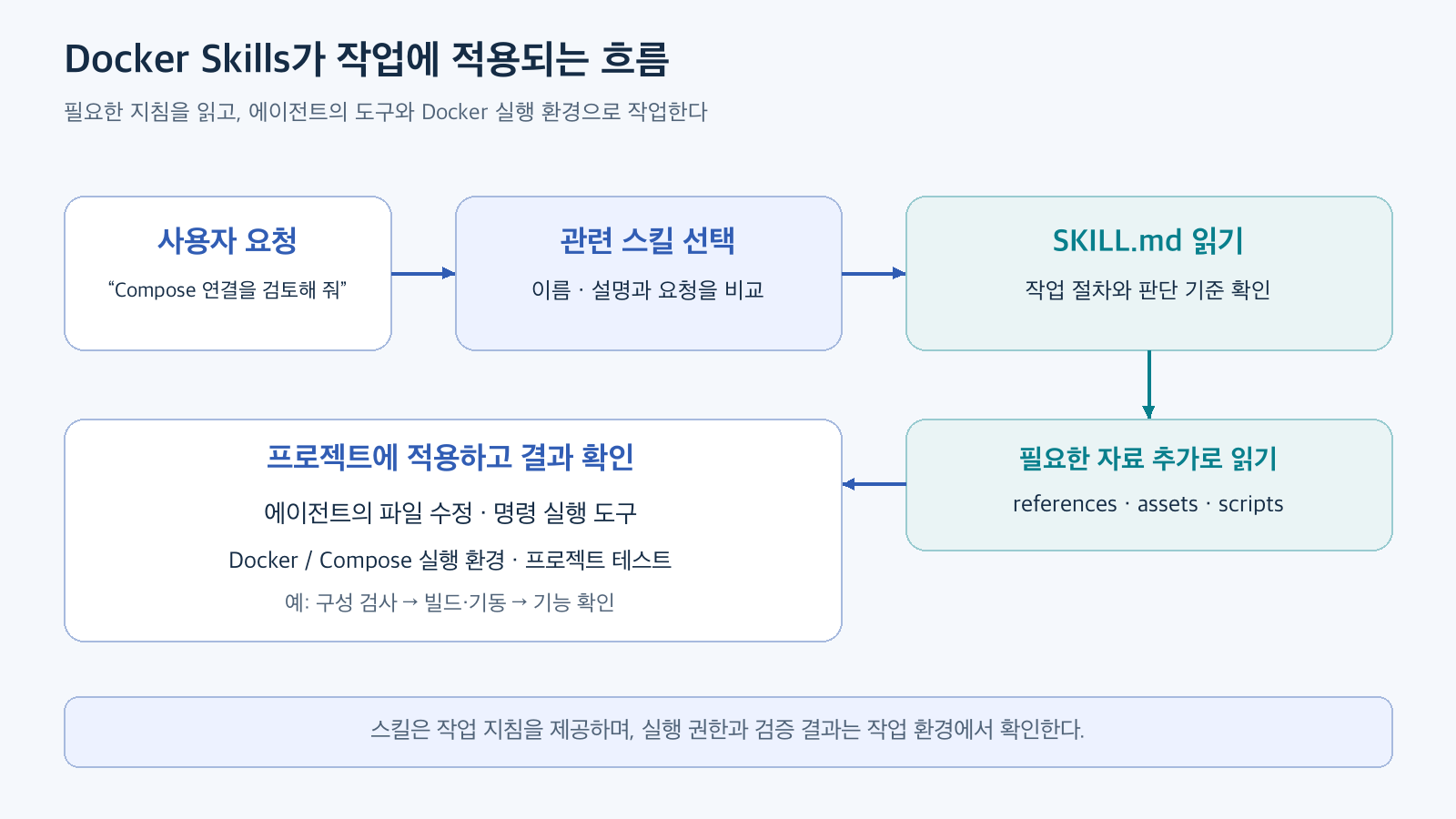
Figure 1. Flow of reading necessary guidelines for a request and applying them to the task. Reconstructed based on Agent Skills Specification and Docker Skills Introduction official documents. File modification and verification are examples to explain Docker development tasks.
The Agent Skills specification describes a structured approach to reading the name, description, overall guidelines, and additional materials incrementally. Instead of including all reference files from the start, it reads materials to the depth required for the task. This is also why the entire folder should be kept when moving a skill folder, as copying only SKILL.md might omit linked templates or scripts. Agent Skills Specification
In this structure, Docker Skills guide decision-making and task sequences. Actual file changes and command execution occur within the agent’s tools and permissions, while image building and container execution are handled by the Docker environment. Even after installing skills, a Docker execution environment and project testing must be set up separately.
2. What Tasks Are Currently Supported?
As of the verification date, the official catalog lists 11 skills. Divided by product, they are as follows. The names in the table are identifiers used when selecting skills to install. Official Catalog
For general application development, it is natural to start by understanding the first three skills. They correspond to “Initial Configuration,” “Refining Image Builds,” and “Connecting Multiple Services,” respectively.
For Initial Containerization: docker-project-foundations
This skill starts with a project that has no Docker configuration. It primarily guides the creation of .dockerignore, Dockerfile, and compose.yaml together. .dockerignore serves to exclude unnecessary items from files sent for building.
It also suggests configuring development databases or caches as Compose services. This allows developers to run these services within the project configuration instead of installing each service separately on the host. It also includes standards for local development ports and service deployment. Project Foundations Skill
For example, you can request as follows. The request sentences in this article are examples of usage and do not quote execution results.
이 웹 애플리케이션을 로컬에서 Docker Compose로 실행할 수 있게 구성해 줘.
기존 실행 방법과 의존성을 먼저 확인하고,
Dockerfile, compose.yaml, .dockerignore의 변경안을 설명해 줘.
데이터베이스는 개발용으로 사용하며 데이터를 재시작 후에도 유지하고 싶어.
Here, the desired outcome is more specific than “Dockerfile generation.” It includes the scope of work for how other developers should run the project after downloading it.
For Refining Existing Images: docker-build-strategies
This skill covers multi-stage builds, cache utilization, build target files, and running as a regular user. Multi-stage builds separate the stages requiring build tools from the final execution stage, moving only the necessary artifacts to the final image. Build Strategies Skill, Docker Multi-stage Build Documentation
Consider scenarios where caching can be helpful. If changing just one line of source code causes external packages to be reinstalled every time, it’s worth examining which file changes affect the dependency installation stage. Docker explains an example of reducing unnecessary cache invalidation by first copying and installing dependency definition files, then copying frequently changing source code. Docker Build Cache Optimization
이 Dockerfile의 빌드 캐시와 최종 이미지 구성을 검토해 줘.
의존성 설치가 다시 실행되는 조건과 실행 이미지에 남는 파일을 설명하고,
동작을 유지하면서 바꿀 수 있는 부분을 제안해 줘.
수정 후에는 기존 테스트와 이미지 실행 확인 방법도 정리해 줘.
How much image size or build time is reduced depends on the project and cache state. For comparison, it’s easier to judge by keeping the same code and execution conditions, and recording the first build without cache separately from subsequent builds with only source changes. This is an example of a measurement method to confirm the effectiveness of adoption.
For Refining Service Connections: docker-compose-patterns
The Compose skill covers service dependencies, health checks, volumes, networks, and separating development configurations. For example, it can be applied when investigating an issue in a web service connected to a database where “all containers are up, but the app reports a connection error.”
This skill also includes auxiliary scripts and inspection materials for checking configurations. Such materials help agents not only generate files but also proceed to the verification process. Compose Patterns Skill
3. Compose Example: Started vs. Ready
Consider a situation where a web application needs to connect to a database. Immediately after the database container starts, internal initialization might still be in progress. If the web service attempts to connect at that moment, it might fail.
Compose’s default startup order and a service’s readiness state are different conditions. Docker’s official documentation explains a configuration where healthcheck is used to check readiness, and condition: service_healthy is specified in dependencies to start dependent services only after the health check passes. Compose Startup Order Documentation
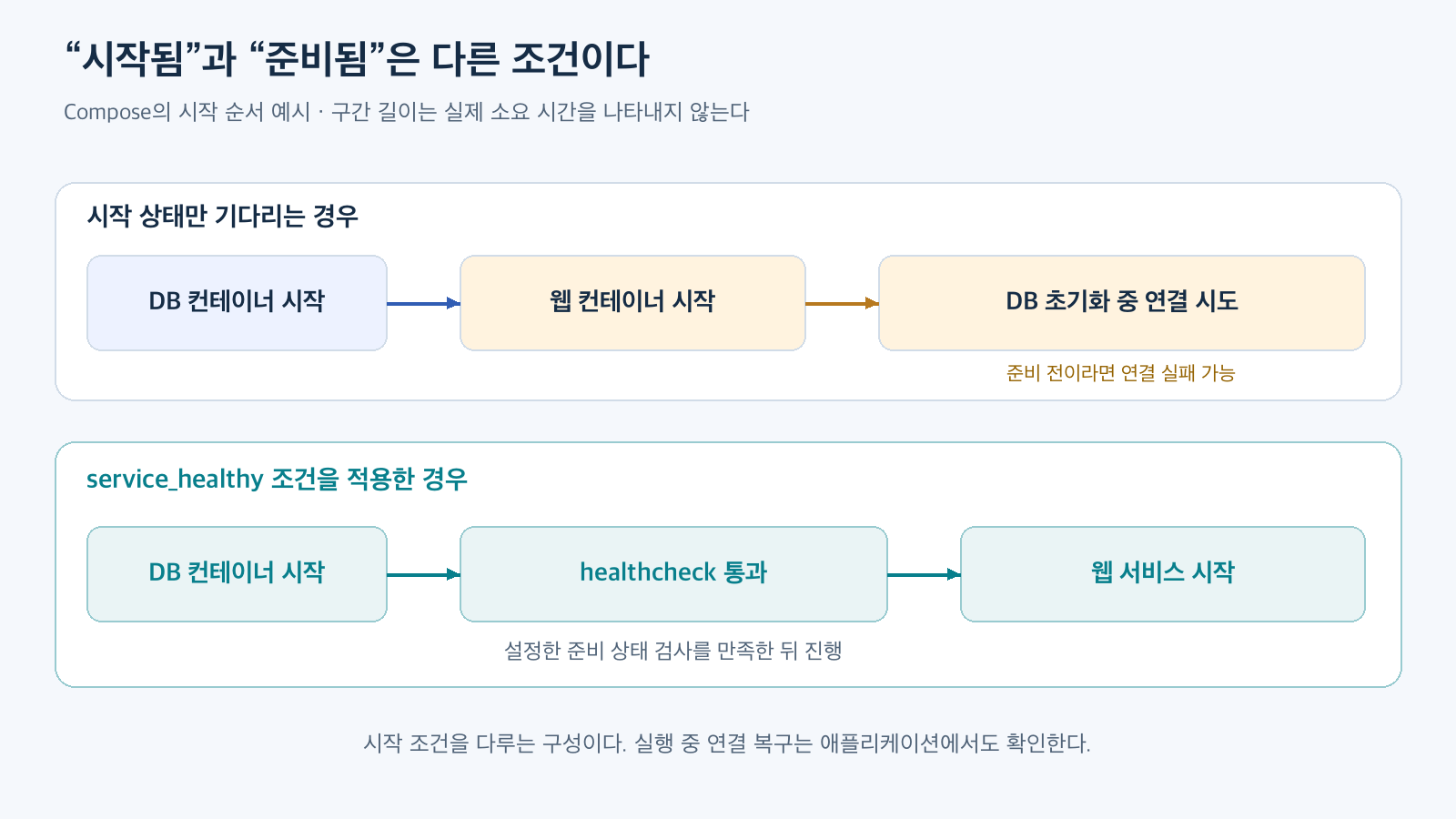
Figure 2. Difference between container startup and health check pass. Reconstructed based on Docker Compose Startup Order official documentation. Time intervals are for conceptual explanation and are not measured values.
You can request the agent as follows:
Compose로 서비스를 시작할 때 웹 애플리케이션이 가끔 DB 연결에 실패해.
compose.yaml의 의존성과 DB 준비 상태 검사를 확인해 줘.
원인을 설명한 뒤 필요한 healthcheck와 시작 조건을 제안하고,
현재 데이터 볼륨을 유지하면서 검증하는 방법을 알려 줘.
In this example, the important outcome is the operational conditions explained along with a few lines of YAML. To review the changes, it’s essential to understand what checks determine the database is ready and how a failed check affects the web service startup.
Furthermore, this condition addresses startup-time dependencies. Reconnection if the connection is lost during operation, or application-level error handling, are separate items to check. By looking at the settings guided by skills and the actions the application needs to handle together, the scope of requests and verification becomes clearer.
4. Installation: Choose Necessary Skills and Scope First
Docker provides several installation paths, including agent-specific plugins and extensions, the skills CLI installable on various clients, and manual copying. Here, we’ll look at the common CLI method usable with Claude Code and Codex. CLI refers to a tool used via commands in the terminal. Official Installation Guide
The commands below are installation examples summarized based on the official guide. A Node.js/npm environment capable of using npx and a supported coding agent are required. To actually execute Docker tasks, a Docker·Compose environment suitable for those tasks must also be prepared.
First, you can check the list of available installations.
npx skills add docker/skills --listExecuting the following command in the project directory will initiate the process of selecting skills to install and target agents.
npx skills add docker/skillsThe default scope is the current project. User-scope installation can be selected with the --global option. Project scope is good for distinguishing configurations used in a specific repository, while user scope is suitable for common use across multiple projects. Knowing which scope a skill is installed in makes it easier to find targets for future updates. skills CLI Installation Scope
You can also explicitly specify the target, such as installing a specific skill for Codex. The following is an example combining skill and agent selection options from the official README.
npx skills add docker/skills --skill docker-compose-patterns --agent codexTo select Claude Code, change the target option.
npx skills add docker/skills --skill docker-compose-patterns --agent claude-codeSupported targets and options can be checked based on the CLI guide at the time of installation. It is also possible to first review the entire list and then add only the necessary skills. Docker Skills README Installation Examples, skills CLI Target/Skill Selection Options
Claude Code also provides a client plugin path. Use the following command in the Claude Code prompt:
/plugin marketplace add docker/skills
/plugin install docker-skills@docker
In versions where the plugin details screen opens after command execution, select the installation scope and confirm the completion status. Subsequent deactivation or removal can be done from Claude Code’s plugin management screen. Claude Code Plugin Management Documentation
Plugin installation and CLI installation are separate choices. If your organization already has a managed installation method, follow that method. The paths for each client, including Codex, are summarized in Docker’s agent-specific installation documentation.
5. Separate Installation Verification from Actual Usage Verification
Seeing a name in the installation list and an agent actually reading that skill for a task are separate verifications. In the CLI method, you can check the installation list with the following command:
npx skills listThen, open a new agent session and request a task suitable for the skill, such as reviewing a Dockerfile. Asking the agent to also provide the skill name used and the path to the SKILL.md it read can help confirm the applied target. If the client shows skill usage history, check that record; otherwise, you can compare the agent’s explained guidelines with the installed files. If not found, check the target agent, project/user scope, and search path. Docker’s Installation Verification Procedure
Verification of the task result also requires an additional step. For example, if you’ve changed a Compose configuration, you can validate the configuration itself with the following command:
docker compose config --quiet--quiet is an option to validate without printing the entire configuration content. If this validation passes, you get confirmation of the configuration as interpreted by Compose. Actual image building, service startup, database connection, and normal operation of business functions are confirmed through separate execution and testing. docker compose config documentation
When documenting review results, it’s good to link “modified” and “verified” to specific outcomes. This involves noting the changed files, executed checks, success status, and any unverified items. This approach can be directly integrated into a team’s code review and testing processes even after skill adoption.
If you want to revert a CLI installation, you can initiate the removal process by specifying the installed skill name, like npx skills remove docker-compose-patterns. If installed in user scope, use the corresponding scope option. skills CLI Removal Command
6. Deletion Policies and Updates Are Also Part of Operational Guidelines
Docker tasks can include stopping containers, deleting images/caches, and cleaning up data volumes, in addition to file creation. The official collection includes docker-destructive-guardrails specifically for these actions. It provides criteria for explaining and confirming impacts, and distinguishes cases that meet conditions, such as limited test container cleanup. Deletion/Stop Task Policy Skill
Deletion actions related to Compose are specifically covered by the Compose skill. For example, docker compose down -v can delete named volumes managed by the project, which needs to be reviewed alongside data retention requirements. Targets not managed by Compose, like external volumes, have a different scope of application. These guidelines instruct agents to differentiate between “restart,” “troubleshoot,” and “delete data” when performing tasks. Compose Skill Deletion Command Explanation
This policy is a behavioral guideline for agents to read. Actual command execution permissions and approval settings are determined by the agent and execution environment used. When adopting official skills, applying the team’s data retention policies and operational permissions together clarifies the scope of responsibility.
Update paths should match the installation method. For skills installed via skills CLI, you can use the following command:
npx skills updateIf installed in user scope, apply --global accordingly. Plugins and extensions are managed by their respective clients, and manually copied folders are not automatically updated. The main branch of the Docker repository is a development channel where changes are reflected, and a method is provided to select and use official release tags to reproduce reviewed configurations. Docker Skills Release Guide
If a team adopts this, they can record the installation method, selected skills, tags or versions used, and representative projects for verification. When moving to the next version, comparing generated files and test results in the same project makes it easier to confirm how changed guidelines affect the team’s work. This is an example of how to operate versioned operational guidelines.
7. The Significance of Official Skills Release
Docker Skills is an example of distributing operational guidelines from the product creators in a format usable by AI coding agents. Developers request desired outcomes, and agents propose or perform changes by referring to project files and relevant skills. Since the guidelines are managed on GitHub, it’s also possible to examine which rules are being referenced.
In practice, the ability to link repeatedly explained conditions to specific review items is useful. Starting with clearly defined tasks like “Configure for initial execution,” “Refine build cache,” and “Wait for DB readiness” makes it easier to verify results.
The criterion for judging effectiveness is the task result, rather than the number of installed skills. You can examine whether the generated configuration fits the project, passes verification procedures, and reduces the burden of review and modification. Docker Official Skills provide publicly available standards and resources that can be used when starting such tasks.
Official Repository: docker/skills · Usage Guide: Docker Skills · Installation Guide: Install Docker Skills
Leave a Reply