ARTEX is a security research system that connects LLMs with execution tools, web interfaces, and databases. To install it, you need not only the source code but also executable files, dependencies, configurations, and data storage. If the deployment path is broken, you must re-verify which parts can be secured.
Upon re-verification on October 9, 2026, the GitHub public API for the original Autumn-27/ARTEX and the `latest` tag query for the existing Docker Hub image returned 404. The Korean fork is accessible, but the default Compose file still references the original image. Therefore, simply changing the repository address to the fork and running the existing Compose commands is not a solution.
The currently identified alternative is the source build path guided by the Korean fork. This article explains the results of reviewing the configuration, build order, and dependency access for a fixed commit. This is not a success story of a complete installation, including compilation, DB connection, administrator login, and model response, in a completely new environment.

AI-generated conceptual image. It does not represent the actual ARTEX screen or a fully running state.
1. Scope of This Review
The re-verification targets were the original repository and image mentioned in the previous installation guide, and the publicly accessible installation materials of jiwoochris/artex-ko. The Korean fork is categorized as a repository managed by a separate maintainer, not an official re-release of the original project.
| Item Checked | Observation | Scope of Interpretation |
| — | — | — |
| Original GitHub repository, file list, release public API | HTTP 404 | Inaccessible from current public path without authentication |
| Docker Hub autumn27/artex latest tag API | HTTP 404 | Public query for this tag failed, not actual image pull success |
| Korean fork README, Compose, Dockerfile, environment variable examples | Successfully read from fixed commit | Installation design and guidance confirmed |
| norma v0.4.3 Go proxy .info and .mod | HTTP 200 | Version info and module declaration access confirmed |
| Full dependency download, compilation, server execution, model call | Not performed in this re-verification | Cannot claim installation success |
A 404 alone cannot confirm whether the repository has been permanently deleted or made private. However, it is sufficient observation to conclude that the existing public installation path, which readers follow without authentication, is currently unavailable. Even if old files remain in search results, they do not substitute for current downloadability.
Direct verification paths: Original repository API · Original release API · Existing image tag API.
2. Why Docker Quick Start Fails Even After Downloading the Fork
The Korean fork commit reviewed is 7333fa47b9bdd89b4973992b2e15d9c393539b8c. The README at this point explains that Docker quick start does not work because the original image cannot be obtained, and the Korean version image is being prepared for distribution. The statement that the source compilation path works is a confirmation from the maintainer and is distinguished from the execution measurement results in this article. Fixed commit README
The core reference in Compose is as follows:
artex:
  image: autumn27/artex:${ARTEX_TAG:-latest}
Git repository addresses and container image addresses are separate. Even if you have the fork’s code, as long as you use this configuration, the executable will look for the original image in the repository. Changing ARTEX_TAG to an arbitrary different name does not provide evidence that such a tag is actually deployed. Fixed commit Compose
Furthermore, the Dockerfile for this commit does not automatically compile the entire source. It copies a pre-prepared `dist/${TARGETARCH}/artex` binary into the image. Simply running `docker build` without preparing the file is also not a complete alternative installation procedure. Dockerfile
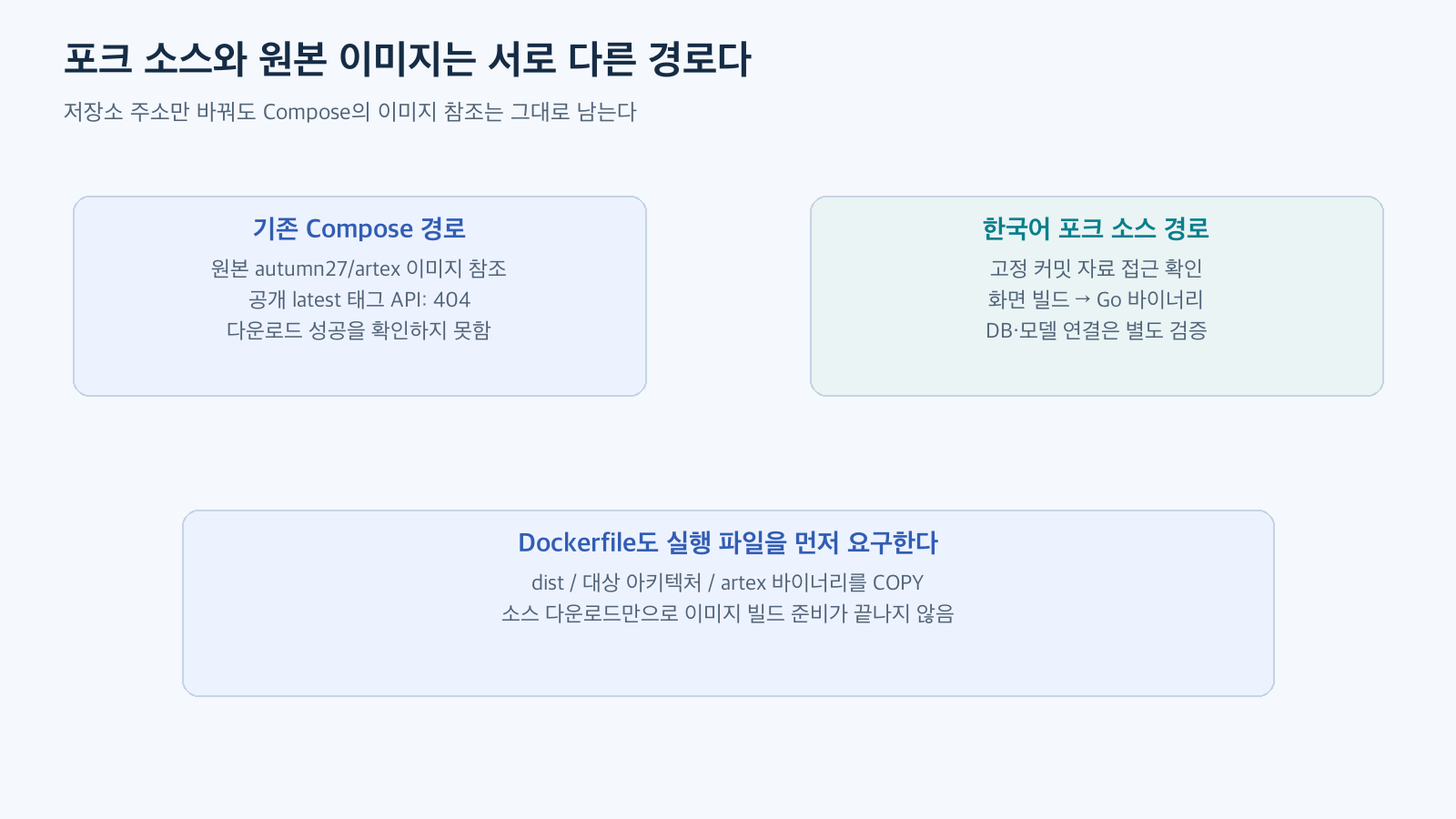
Reconstructed based on fork maintenance documentation and settings. This diagram separates the paths in README and Dockerfile, and does not represent the fork as an official distribution of the original.
3. Source Build Also Requires Passing Through Multiple Stages
The sequence guided by the Korean fork is frontend static build, copying results to the server’s embedded directory, Go binary compilation, and starting script execution. The frontend is the screen visible in the browser, and the Go binary is the server that provides that screen and handles APIs and tasks.
The `go.mod` reviewed declares Go 1.26.3 and specifies `github.com/Autumn-27/norma v0.4.3` as a dependency. Screen building uses the `build:static` task in `web/package.json`. The actual build tools must match this declaration along with the operating system and architecture being used. go.mod · Frontend settings
Even if an upstream dependency repository is closed, a specific version might remain in a module proxy. This time, we read the version information and module declaration for `norma v0.4.3` from the Go public proxy. However, the success of these two requests does not imply securing the source archive, all sub-dependencies, checksum verification, or actual compilation success.
This distinction explains the difference between an existing development PC and a fresh VM. Even if a build succeeds on an existing PC due to cached dependencies, a first-time installer might fail at the dependency retrieval stage. To create reproducible instructions, environments without caches must also be considered for verification. This point is an operational judgment derived from this data review.
4. Before Installation, Verify Source and Tools
Below are example inspection commands to be used in a separate Linux research environment. This article does not measure the execution output of that environment. It assumes that the organization has reviewed and selected the fork’s terms of use and code, and there is no need to connect work credentials or personal files to the research environment.
git --version
go version
node --version
npm --version

git clone https://github.com/jiwoochris/artex-ko.git artex-ko-lab
cd artex-ko-lab
git checkout --detach 7333fa47b9bdd89b4973992b2e15d9c393539b8c
git rev-parse HEAD
git status --short
Verify that the `rev-parse` result matches the selected commit and record the state of the working directory before making changes to files. Fixing a commit indicates which source was chosen but does not guarantee software safety or that all dependencies are fixed.
Afterward, review `go.mod`, `go.sum`, `npm` lock files, `Dockerfile`, and start scripts together. Also, check if the installation script calls other deployment paths. This is because repeatedly running an old automatic installation script in a situation where the original image is unavailable can lead back to the same failure path.
5. Review Build Order and Stop Points
The following is a candidate reproducible procedure, separated for readability from the fork’s documentation. It is not a command set presented to the reader as a verified installation method. The `npm install` process can execute dependency scripts, so it should be performed in a dedicated environment after source review is complete.
cd web
npm ci --include=dev
npm run build:static
cd ..

test -f web/out/index.html
test ! -e server/webui/dist
mkdir -p server/webui/dist
cp -a web/out/. server/webui/dist/

CGO_ENABLED=0 go build -tags embedui -o artex ./cmd/artex
Each command proceeds to the next line only if the preceding command was successful. If `server/webui/dist` already exists, the above check stops, and you should first examine whether it’s an existing result or material included in the source. This condition is to prevent paths from overlapping or old screens from mixing during repeated builds. It is not an installation script to be run all at once.
Frontend dependencies also require build packages, so `–include=dev` was specified. Even if the Go build completes, the result is an executable file targeting the current build environment. To put it into a Linux container image, a binary matching the operating system and CPU architecture must be prepared separately.
If an error occurs, record the first failure stage and message. Do not use disabling checksum verification or switching to arbitrary dependency forks as a default solution simply because the original repository is not visible. If alternative dependencies are needed, the change itself should be treated as a separate review item.
6. After Compilation, DB and Service Configuration Remain
Embedding the screen into a single binary does not mean the database is also included. The fork’s README guides how to configure PostgreSQL connection via `config.json` or `ARTEX_PG_DSN`. The address to reach the DB can differ between a server running on the host and a server running in a container. DB configuration guide
For example, the service name `postgres` inside Compose is an address that containers within the same network can use. You should not assume that a binary run directly on the host can connect to the DB using that name. First, decide which environment the DB will operate in, and then configure the actually reachable address and authentication settings for that environment.
The README guides using `start.sh` rather than direct binary execution, explaining that web/API and logging proxy addresses are received via `-addr` and `-proxy` respectively. A candidate configuration for local research is as follows, assuming the DB and necessary settings are prepared:
./start.sh -addr 127.0.0.1:8787 -proxy 127.0.0.1:8788This configuration aims to restrict the binding of incoming connections. It does not block communication that the server and tools send externally. The communication destinations for model APIs and tools must be managed by separate network policies. After actually opening the administration screen, setting up a new administrator account, and verifying that the settings persist after a server restart, installation verification can continue.
7. Model Connection and First Response Are Separate Tests
Once the administration screen opens, the next step is model connection. Verify the current model ID, API format, tool call support, and account permissions for the provider to be used. There is no need to include API keys in code or blog comments at this point. After receiving a response from the selected model in a connection test, you can verify the screen and logging flow with a small task like summarizing a synthetic sentence.
There is no need to create autonomous tasks that inspect external targets from the start. Since this is a stage to confirm what inputs the model and tools receive and what actions they can perform, small inputs without sensitive data and actual service addresses are appropriate. A small prompt that avoids using tools does not substitute for blocking execution permissions.
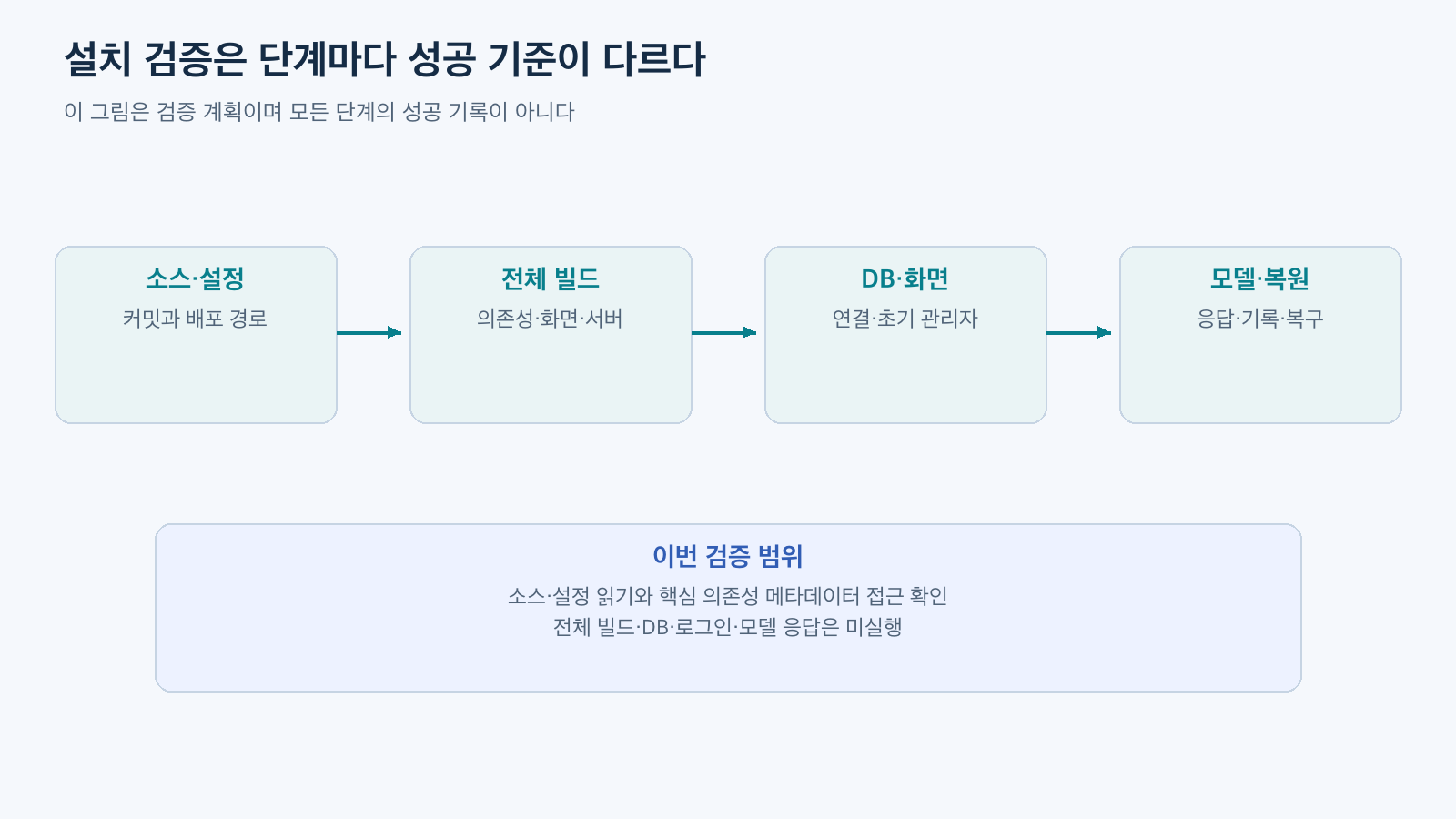
Installation verification plan reconstructed based on fork documentation. This is organized based on installation, DB, and LLM configuration guide, and is not a results table measuring the success of each stage.
8. If You Have an Existing Installation, Preserve It First
An already running environment is handled differently from a new installation. Even if public images have disappeared, local images or binaries might remain. Before checking what executables are in use, deleting them or applying one-click updates can lead to losing paths that could be recreated.
Items to preserve include source commit, executable file or image identifier, actual configuration, DB, and file data. Configurations containing passwords and keys should be separated from general documents and access restricted. You should verify not only that backup files exist but also that they can be restored in a separate environment.
Changing program files to an older version is separate from reverting a DB schema to an older state. If considering an update or fork transition, it is easier to narrow down the cause of failure by checking compatibility in a copy while leaving the existing environment intact. This section is a general suggestion for operating existing installations and is not a record of changes applied to an actual system.
Conclusion: Identified Alternatives and Remaining Verification
Based on current public paths, existing original image-based installation instructions cannot be used as is. The Korean fork has a source build path, and its configuration and access to core dependency metadata have been confirmed. However, the existence of build documentation and successful installation in a new environment are different outcomes.
The next verification involves building the fixed commit in a fresh research environment and confirming DB connection, administrator setup, model response, and even stopping and restoring. Until those results are secured, this article should be used as an installation path review and reproduction plan, and distinguished from complete hands-on guides with successful outputs.
Leave a Reply