dot is ChatGPT’s persistent task agent that continues work between conversations and notifies the user when results or decisions are needed. It goes beyond answering a single question, coordinating research, document preparation, and software tasks. The official introduction states it is based on GPT-6 Astra and has its own cloud computer and browser. Meet dots
The key is not an “AI that handles everything on its own,” but rather a method of continuing delegated responsibilities with authorized data and tools. Approvals for conversations, app connections, computer access, and external actions must be distinguished. Understanding these distinctions helps in comprehending both convenient features and user-defined boundaries.
This article is based on official documentation released on October 4, 2026. Actual user names, accounts, and work records have been excluded, and usage requests are hypothetical examples. It describes public user features and is not an article about internal implementation or actual performance measurements.

AI-generated conceptual image. It does not reproduce actual dot characters or product screens.
1. Comparing Roles with General ChatGPT and Codex
dot focuses on maintaining the state of various responsibilities and delegating necessary tasks. Codex is an execution role that investigates, modifies, and verifies code, and dot can initiate Codex tasks in a prepared environment. This comparison is for understanding roles and does not mean that the functions of the three products are completely separate. Introducing dot · Delegated Task Guide
| Usage Method | Focus of Request | Criteria for Evaluating Results |
| — | — | — |
| General Conversation | Explanation·Ideas·Current Question | Is the answer accurate and helpful? |
| Codex Coding Task | Code Changes·Commands·Verification | Do changes and tests meet requirements? |
| Delegating Responsibility to dot | Tracking Changes·Follow-up Coordination·Decision Requests | Is the state maintained and are necessary results delivered? |
In a hypothetical document project, “Summarize this draft” is a request for a current result. “If related materials change, find parts that affect the draft and show me the revised version” is a statement defining an ongoing responsibility. For the second request, it is advisable to specify the materials to be used, update conditions, and review/notification methods.
Good delegation has a clearer outcome than an abstract “handle it yourself.” Defining what materials can be read, what can be changed, and which decisions require user input makes it easier to evaluate results later.
2. Start with a Small Responsibility
Open dots in the desktop app or desktop browser to begin setup. App connections can be skipped and added later, and personal computer connections are selected in the desktop app. The same dot configured can be used in mobile apps with supported updates, but mobile web is not supported. Getting Started Guide
- Verify that dots is available in your account and proceed with the introduction.
- Share only the data necessary for the first responsibility.
- Connect only the required apps and confirm allowed actions.
- Specify the format of the output and decisions to be asked of the user.
- Review the initial results, supplement any missing conditions, and then expand the scope of responsibility.
Below are requests that can be applied to a hypothetical project.
공개 자료를 바탕으로 만드는 가상 프로젝트의 문서 초안을 관리해 주세요.
제가 지정한 자료만 사용하고 새 사실은 출처와 함께 표시하세요.
자료가 달라지면 영향받는 문단과 수정안을 준비해 주세요.
외부 전송·공개 게시·원본 삭제는 하지 말고 검토본만 보여 주세요.
판단에 필요한 정보가 없으면 필요한 결정을 알려 주세요.
This example is not a record of actually setting up schedules or connections. By starting with tasks that can be done without tool access and separating them from tasks requiring connections, you can avoid opening unnecessary account permissions first.
3. Connections are of Three Types and Do Not Substitute Each Other
Contact channels are the paths for communicating with dot, app/plugin connections are the paths for accessing service data and tools, and personal computer connections are the paths for using local files and apps. Sending a message to dot in Slack does not mean your mailbox and computer are also connected. Connection Distinctions
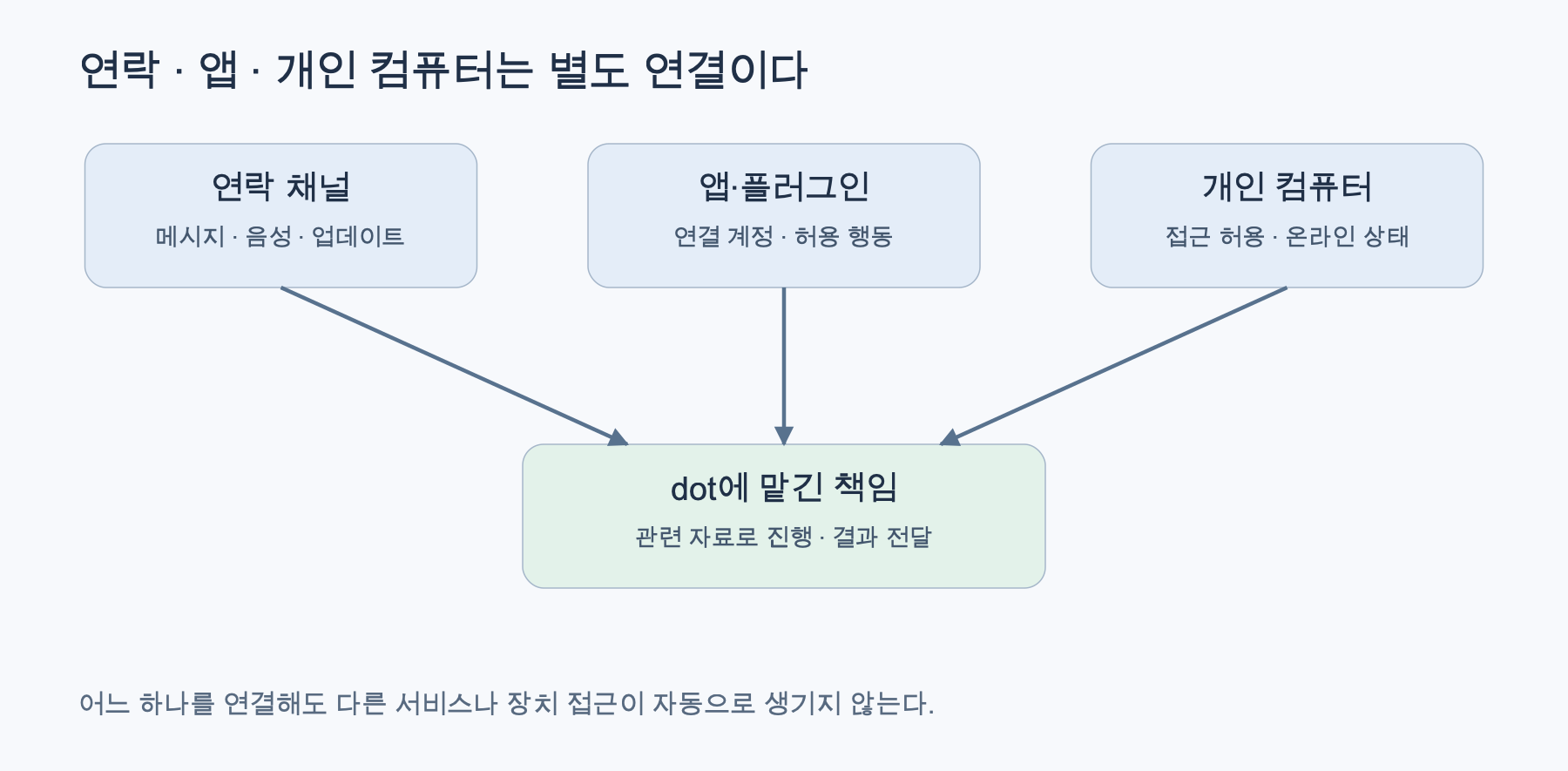
Reconstructed based on official documentation. Getting Started Guide · Computer & App Connections
| Connection | What it enables | To check separately |
| — | — | — |
| ChatGPT·Slack·Teams Contact | Delivering requests and updates | Which conversation·To whom to reply |
| Connected Apps·Plugins | Allowed service data·Actions | Connected account and read/write scope |
| Personal Computer | Using local files·Apps·Tasks | Access permission and device availability |
For example, if only read access to documents is needed, there’s no need to allow editing and sending. If you have multiple accounts, check which account’s data will be used. If there are connection expirations or administrator restrictions, explanations alone won’t resolve them, so re-examine the connection status.
4. You Can Continuously Change Direction with Voice and Messages
You can start a voice conversation by pressing the phone button in a ChatGPT dot conversation. Slack and Teams are also provided contact methods, and messages remain in each channel, allowing related context to be used continuously. Delegated tasks can continue even after a voice call ends. Outbound calls and texting for dot, which are planned for after launch, should not be introduced as currently supported features. Message & Voice Guide
Voice is a convenient input method for articulating lengthy requirements or inquiring about progress. However, it is better to clearly state important deadlines, figures, and external transmission scopes in the conversation. Confirming dates and times that include time zones, rather than vague expressions like “tomorrow morning,” can reduce discrepancies in schedule interpretation.
A change in conversation path does not alter the allowed scope of disclosure. If you want to send content summarized in a private conversation to a team channel, you must separately determine if it should be shown to those recipients. The convenience of continuing the same task and the authority to share information are different matters.
5. Differences Between Cloud Computer and Personal Computer
dot’s cloud computer has its own files, programs, and browser sessions, allowing cloud tasks to continue even if the user’s device is off. A personal computer requires separate access permission and can only be used when the ChatGPT app is open and online. Currently, one personal computer can be connected at a time. Computer Connection Guide
Opening a cloud screen is different from directly operating it. Use Take over if there are steps you need to perform directly, and Return control to let the delegated task continue. Website logins should be performed via the provided private login procedure or a direct handover screen, rather than pasting passwords into the conversation. The login status of a personal browser is not automatically transferred to the cloud browser. Login Guide
Furthermore, an ‘Offline’ indicator means the computer is unavailable, not a revocation of access permission. To remove access, check the separate revocation feature. Connecting a computer to Codex should not be considered as granting the same access to dot. Access Management
In practice, it is good to include “on which device is it running?” as part of the result review. Even for the same hypothetical document, the location to find the results may differ depending on whether a cloud copy was modified or a file on a connected computer was modified. Do not assume that changing devices moves the execution location of existing tasks.
6. Delegated Tasks, Recurring Schedules, and Context are Managed Separately
Tasks created by dot can be displayed as separate conversations, and progress, files, results, and input requests can be checked in the desktop’s Activity. Recurring tasks at fixed times require a saved schedule, so check the request details, execution time, and delivery location in Scheduled. For tasks that respond to events supported by connected services, the scope of support must also be checked. Tasks and Schedules
New delegated tasks do not automatically receive all past conversations. The context persistence of dot should not be interpreted as “collecting all conversations and all apps in my account completely.” There is a difference between the product description that relevant ChatGPT memory and ongoing work context can be utilized, and the complete provision of all records. Context Guide
A hypothetical recurring request can be specified as follows:
앞으로 2주 동안 평일 오전 9시, Asia/Seoul 기준으로
제가 지정한 공개 자료의 변경을 확인해 주세요.
변경이 초안에 영향을 주면 수정안을 준비하고 ChatGPT로 알려 주세요.
공개 게시와 외부 메시지 전송은 하지 마세요.
실제로 저장한 일정과 종료일을 확인해 주세요.
This example is not a registered automation. Do not assume that an actual schedule has been saved based solely on a reply that a request was made; verify the saved result. Also, distinguish between adding to a channel and creating a monitoring task.
7. How Do Approvals and User Controls Work?
Actions that affect an account or share information are subject to automatic review, considering guidelines, permissions, and basic safety requirements. Depending on the outcome, actions are categorized into proceeding, requiring user approval, or requiring direct user action. A request to “draft a reply” is not the same as approval to “send it.” Optional Custom rules do not supersede access permissions or basic safety requirements. Control Guide
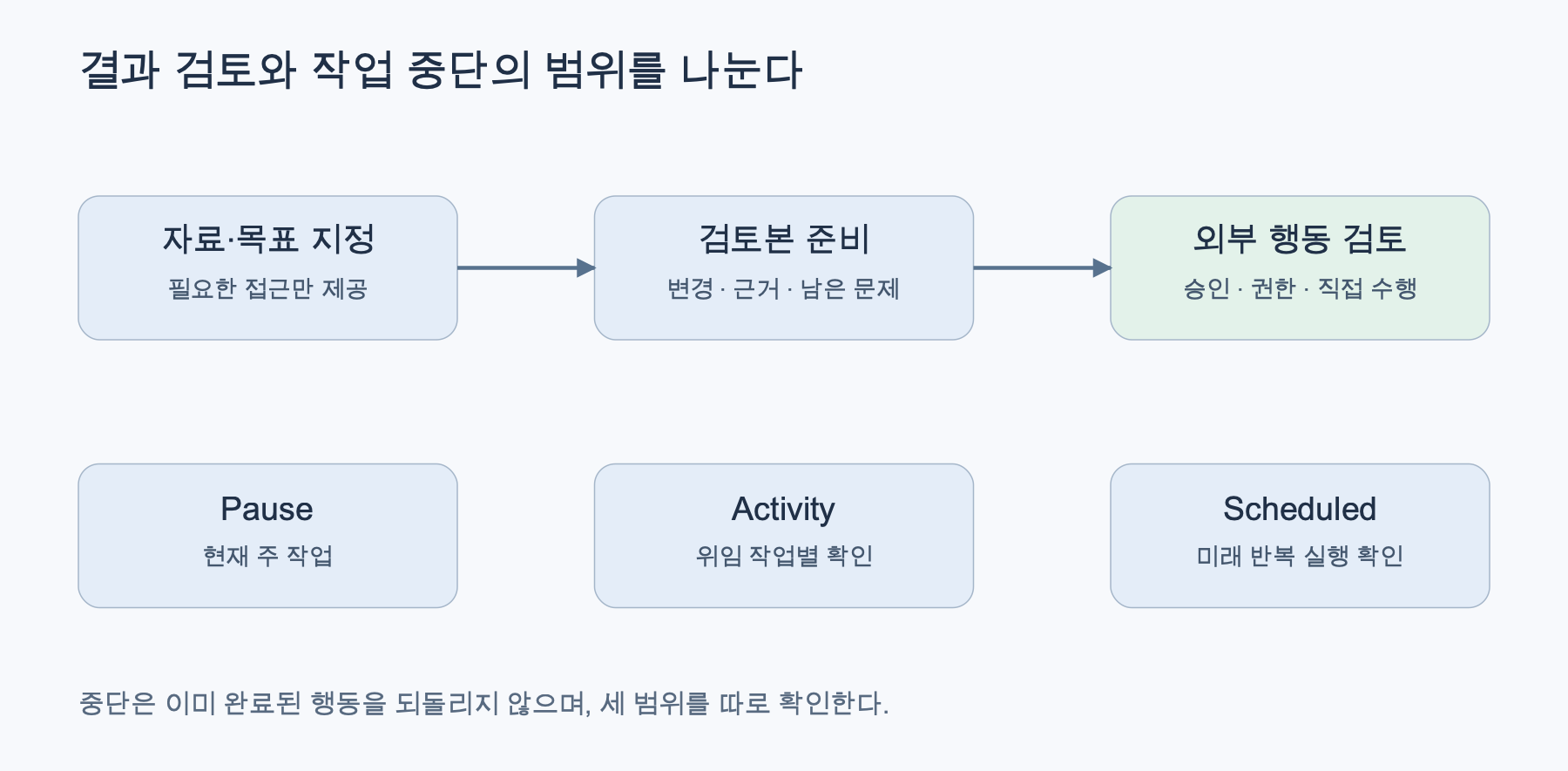
Reconstructed based on official documentation. Action Review and Interruption
Additional instructions should clearly state the action, target, and scope. “Keep document style concise” is a writing preference, while “Show me the final content before external transmission” is an action boundary. Expressing these separately can reduce the possibility of a request to change writing style being misunderstood as approval for transmission.
Interruption is also distinguished. Pause stops dot’s current main task, while delegated tasks are stopped/canceled separately in Activity, and future recurring executions in Scheduled. Actions already completed cannot be undone by interruption alone. Stopping Work
Therefore, after significant changes, it is advisable to check the status of result files and connected apps. The status of “task completed” and the judgment “requested results have been verified” can be different. Especially for irreversible actions like external transmission, deletion, or public posting, pre-define the target and the point at which the final content should be confirmed.
8. Privacy and Data Management
dot can gain more context through connected data, so it’s advisable to start with a small scope of provision. Separately review actions like moving personal data to team conversations, document editing permissions, and local computer access. For public articles, use hypothetical examples instead of actual emails, customer data, or account screens.
Official control documents explain that ChatGPT data settings apply to dot conversations and tasks performed. Processing conditions must be checked according to subscription type and organizational policy, and there is no basis to assert that “no data is stored even when connected.” Data Settings
Changing settings or deleting dot does not automatically cancel modifications or transmissions already completed in connected apps. It is advisable to preserve important outputs and read the scope of application on the deletion confirmation screen. For business accounts, prioritize checking the organization’s data processing, retention, and app permission policies.
9. Target Audience and Costs: Speak Only What’s Confirmed
As of the verification date, official documents state that it is gradually provided to users over 18 in Pro 100, 200, and 500 outside EEA, UK, and Switzerland, and Business Premium/Enterprise are provided sequentially worldwide. Enterprise requires administrator activation. It may not be immediately visible even for eligible plans. Current Availability
Conversations with dot are stated not to be included in ChatGPT usage limits, but Work/Codex tasks initiated and managed by dot use the limits of their respective products. The inclusion of deeper tasks and expanded limits for the first month of release are also specified. This explanation cannot be used to calculate the exact number of tasks or additional costs per account. Usage Guide
10. Usage Examples and FAQ
What tasks are good to delegate first? In a hypothetical document project, you could have it find changed public data and prepare revisions, or in a hypothetical software project, organize bug reports to create revision proposals for code review. These are examples of possible requests and presuppose the app connections, permissions, and environment of the respective account.
Can dot initiate contact? The product’s purpose is to notify the user via message when results or decisions are needed. Define contact channels and notification conditions. Do not extend to features announced as planned, such as outbound voice calls, as currently available. Contact Features
If I speak into my phone, can all tasks be done without a computer? Tasks possible in the cloud can proceed even if the device is off, but tasks requiring local files/apps need a connected computer to be available. The execution location must be distinguished. Computer Requirements
Does everything stop if I hang up or press Pause? No. Check the current main task, delegated tasks, and recurring schedules separately. Interruption is also not a feature that reverts already completed changes. Scope of Interruption
Does connecting mean it reads all my conversations? It does not mean that the connected computer automatically provides all conversations from all apps. You must specify the data to be used and relevant context, and provide any missing information. Context Scope
dot is easier to understand when delegating continuously managed tasks starting with small responsibilities. By defining the scope of data, connections, and decisions, reviewing the initial results, and then expanding, you can maintain both convenient delegation features and user control.
Leave a Reply