“AI writes code in the terminal? All three can do it, so what’s the difference?”
— Those who have used them know that the difference is quite significant.
>

🎯 What This Article Covers
- Key differences between Claude Code, Gemini CLI, and OpenAI Codex
- Comparison of code quality / context window / speed / price
- Which tool is advantageous for each type of task
- Summary of actual benchmarks and user reviews
- Introduction to the “Manager-Worker” pattern for combining the three
📌 Introduction / Background
Between 2025 and 2026, AI coding tools moved beyond the IDE sidebar and into the terminal itself.
Unlike IDE plugins like Copilot or Cursor, these three tools are CLI (Command Line Interface) based agents. With a single command, they can analyze an entire project, modify files, run tests, and even create pull requests.
- 🟣 Claude Code — Anthropic’s agentic coding CLI. Based on Claude Sonnet 4 / Opus 4
- 🔵 Gemini CLI — Google’s open-source CLI. Based on Gemini 2.5 Pro, with a free tier available
- 🟢 OpenAI Codex — OpenAI’s CLI + cloud agent. Based on GPT series
All three can “write code.” But where, how well, and at what cost are entirely different.
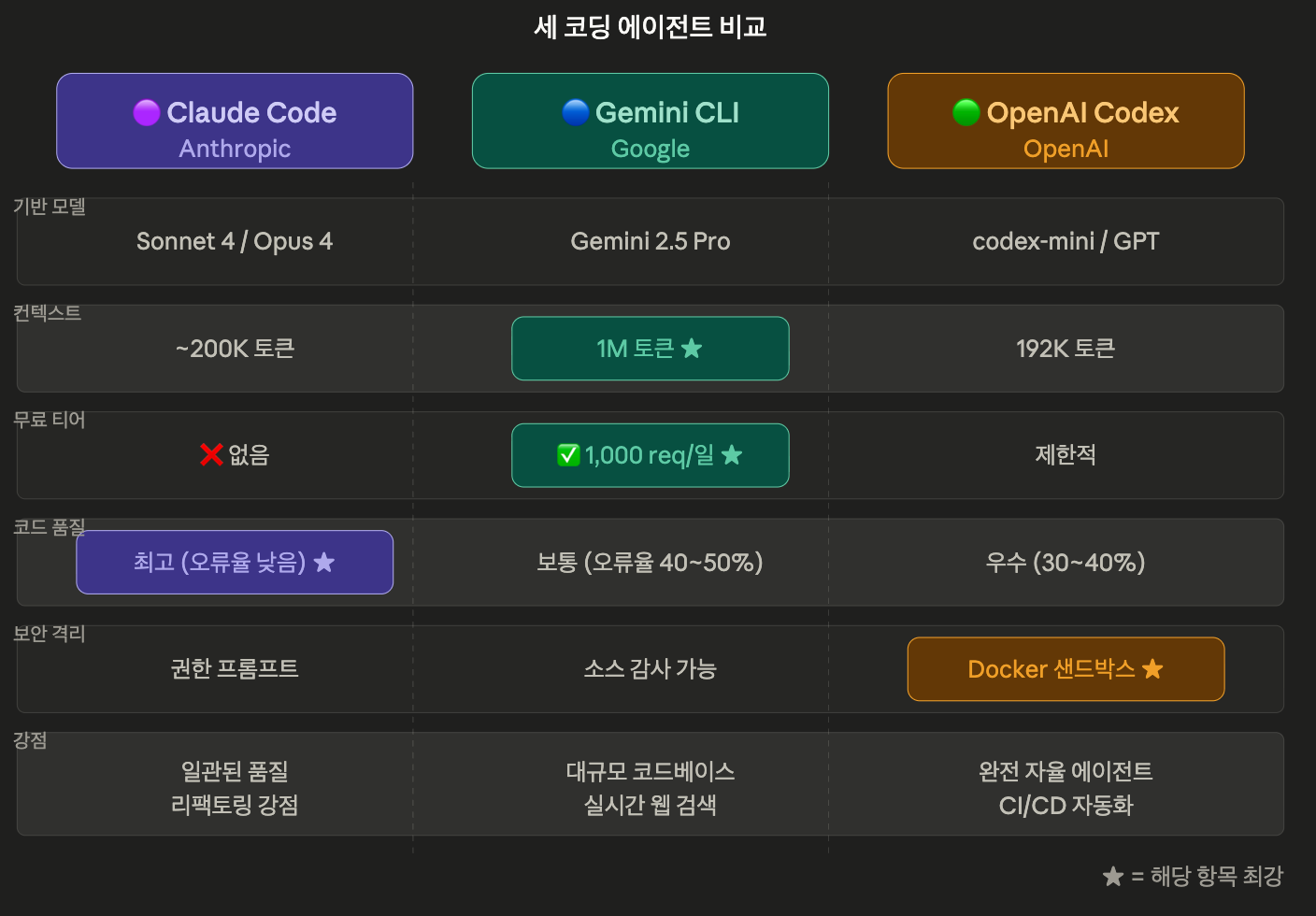
🔍 Core Spec Comparison
| Item | Claude Code | Gemini CLI | OpenAI Codex |
| Base Model | Claude Sonnet 4 / Opus 4 | Gemini 2.5 Pro | codex-mini / GPT series |
| Context Window | ~200K tokens | 1M tokens | 192K tokens |
| Free Tier | ❌ | ✅ (1,000 req/day) | Limited |
| Price | Pro $20/month, Max $100~200/month | Free~usage-based | Included with ChatGPT Plus $20/month |
| Open Source | ❌ | ✅ (Apache 2.0) | ✅ |
| Windows Support | ✅ | ✅ | ⚠️ WSL required |
| Security Sandbox | Permission prompt method | Source code auditable | Docker Sandbox |
—
🔍 Detailed Analysis of the Three Tools
🟣 Claude Code — Champion of Precision and Consistency
Claude Code consistently delivers clean, error-free code from the initial attempt. It particularly excels in understanding context between files and refactoring.
Its ability to automatically generate Git commit messages is also impressive. It logically groups changes and automatically creates commit messages like this:
git commit -m "feat: Add newsletter signup component with email validation
- Implement form validation using Zod
- Add rate limiting to prevent spam
- Include success/error state handling
- Add responsive design for mobile"
Claude Code is highly rated for rapid prototyping and a productive terminal UX, with its task planning and approval flows working especially intuitively.
Cons: The context window is relatively small, which may require chunking files for large projects. The lack of a free tier is also a barrier to entry.
🔵 Gemini CLI — Free with 1M Tokens, Strong for Large Projects
Gemini CLI’s most powerful advantage is its 1 million token context window, capable of holding over 200 files simultaneously. For tasks like MongoDB → PostgreSQL migration, which require modifying 147 files at once, it is more advantageous than Claude Code.
Gemini CLI can perform real-time information retrieval based on Google Search, always accessing the latest documentation and security recommendations.
Being open-source (Apache 2.0) is also a significant advantage in enterprise environments, as teams can directly audit or fork and customize the codebase.
Cons: Reports indicate a high error rate of 40-50%, requiring caution in professional development environments. Despite the appeal of being free, the success rate on the first attempt might be low.
🟢 OpenAI Codex — Autonomous Cloud Agent
Codex operates fundamentally differently from Claude Code or Gemini CLI. It is less of a pair programming partner and more of an autonomous software engineer that completes tasks independently.
"뉴스레터 기능 구현해줘:
- Zod 기반 이메일 유효성 검사
- IP당 시간당 10회 요청 제한
- Resend 통합
- 에러 상태가 있는 React 컴포넌트
- 전체 테스트 커버리지
- TypeScript 전체 적용"

→ 15분 후:
✅ React 컴포넌트 + 유효성 검사
✅ 속도 제한 API 엔드포인트
✅ 테스트 스위트 (95% 커버리지)
✅ TypeScript 정의 파일
✅ PR #247 리뷰 준비 완료
✅ CI 테스트 전체 통과
Codex CLI’s Docker sandbox provides the strongest security isolation by restricting filesystem access only to the project directory.
Cons: Despite having a powerful model, UX issues reduce its reliability, and it requires WSL for environments other than macOS/Linux (Windows).
💻 Recommended by Task Type
# Which tool should you choose? — Decision Guide

def choose_tool(task):
    if task == "빠른 프로토타입 / 일관된 코드 품질":
        return "Claude Code"  # Highest accuracy on first attempt

    elif task == "대규모 리팩토링 / 레거시 코드베이스":
        return "Gemini CLI"   # Utilize 1M token context

    elif task == "완전 자율 기능 개발 / CI 통합":
        return "OpenAI Codex" # Autonomous agent, automatic PR generation

    elif task == "예산 절감 / 학습 목적":
        return "Gemini CLI"   # Free 1,000 req/day

    elif task == "GCP / Google 생태계 통합":
        return "Gemini CLI"   # Native integration with Vertex AI, BigQuery

    elif task == "Python / 데이터 사이언스 / 보안 실행":
        return "OpenAI Codex" # Docker sandbox + language-specific
⚙️ How to Combine the Three — The “Manager-Worker” Pattern
Many developers use a ‘Manager-Worker’ workflow, where Claude Code acts as an orchestrator, delegating tasks to Gemini CLI (for large contexts) and Codex CLI (for scripting).
# Example: Claude Code plans the entire task
# → Delegate large file analysis to Gemini CLI
# → Delegate script/test automation to Codex
# → Final code review and commit handled by Claude Code

claude "이 프로젝트의 마이그레이션 계획을 세우고,
        대용량 파일 처리는 gemini로,
        CI 스크립트는 codex로 분리해서 진행해줘"
This approach saves Claude’s token costs while maximizing the strengths of each tool.
⚠️ Cautions / Common Mistakes
- Relying solely on Gemini CLI because it’s free may lead to higher error rates and increased debugging time.
- Codex cannot run natively on Windows — WSL2 environment is essential.
- AI-generated code must always be verified with a test suite — no exceptions for any tool.
- For sensitive API keys or SSH credentials, always check each tool’s data processing policy first.
- Gemini’s Google Workspace account integration requires separate GCP project setup, which can be cumbersome for initial configuration.
✅ Summary / Conclusion
| Priority | Recommended Tool |
| Code Quality · Consistency | Claude Code |
| Large Context · Free | Gemini CLI |
| Full Automation · CI/CD | OpenAI Codex |
| Security Sandbox | OpenAI Codex |
| Open Source Auditable | Gemini CLI |
All three tools are rapidly evolving and converging towards common directions, such as MCP protocol support and terminal-first design. Instead of sticking to just one, combining them according to the nature of the task is currently the most realistic strategy in 2026.
Leave a Reply