Terraform is a declarative tool. However, ‘when to apply’ is a much more complex issue than it seems.

🎯 What this article covers
- The exact working principle of terraform apply
- How to use apply in a migration scenario
- The role and precautions of apply when drift occurs
- Differences and common principles between the two cases
- Common pitfalls and recommended workflows
📌 Introduction: “Isn’t it just a matter of running apply?”
When you first learn Terraform, everyone thinks this way. Write code, see the plan, then apply — simple. But when you work in a real operational environment, concerns arise.
“I manually added a security group rule in the console… should I apply?”
“I want to manage existing infrastructure with Terraform, where do I start?”
These two questions are the core of what we’ll discuss today. Migration and drift correction may seem similar at first glance, but they are fundamentally different and each requires a specific apply strategy.
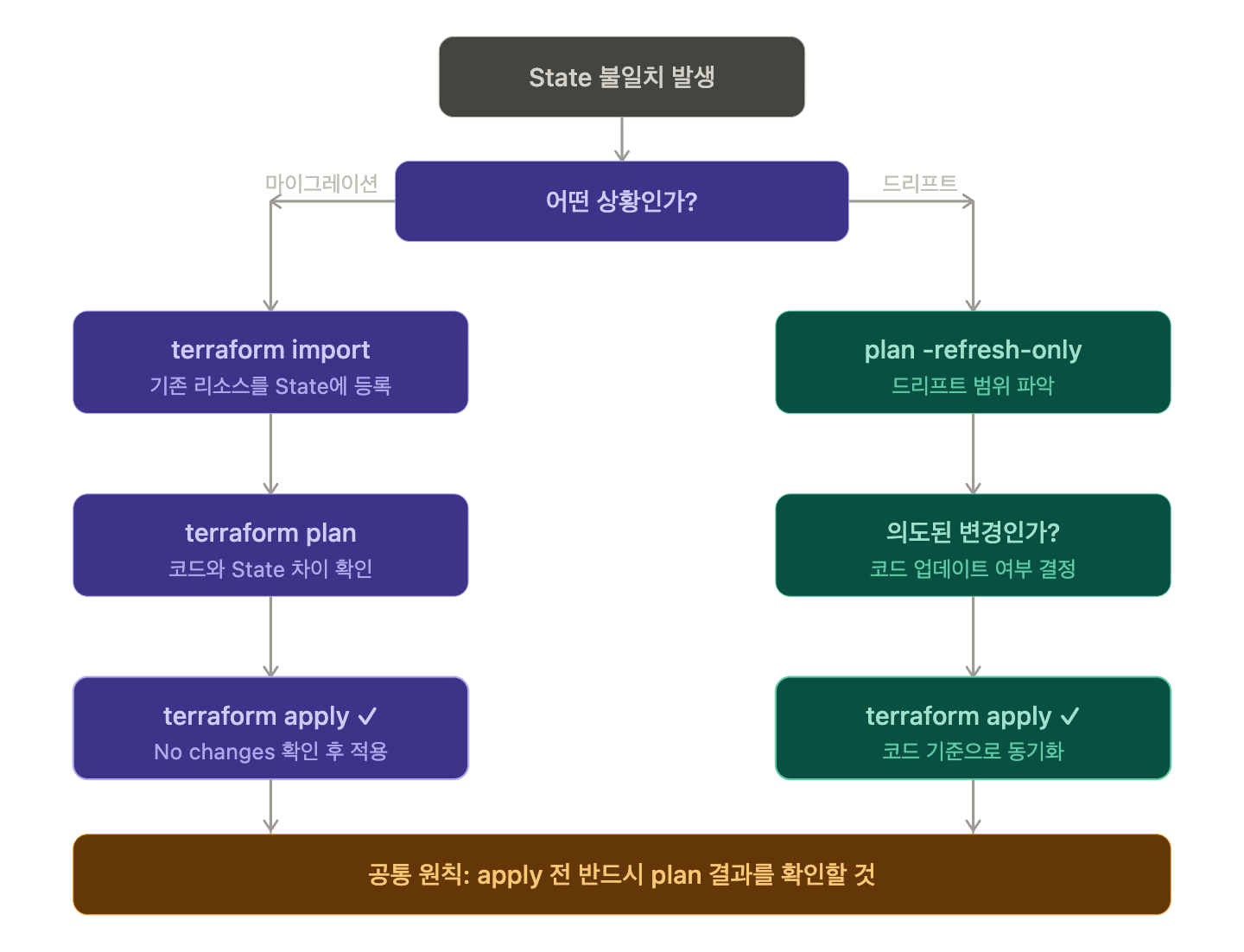
🔍 What you need to know first: Terraform’s State
Terraform records the current state of your infrastructure in a .tfstate file. When you run apply, it decides what to do by comparing the following three things:
| Comparison | Description of Target |
| Code (HCL) | My desired state |
| State file | Terraform’s known state |
| Actual infrastructure | The state that actually exists in the cloud |
If these three match, apply does nothing. When a discrepancy occurs, apply is needed.
🧳 Case 1: Migration — Bringing existing infrastructure into Terraform
When is this case?
- Existing infrastructure was manually created via console or CLI
- You now want to codify (IaC) it with Terraform
- The State file does not contain this resource
Incorrect approach: Write code and apply immediately
# ❌ Dangerous method
terraform apply
If you write code for an already existing S3 bucket or EC2 instance and then apply, Terraform will attempt to create new ones. If a resource with the same name already exists, an error will occur, and if you’re unlucky, the existing resource may be deleted and recreated.
Correct approach: terraform import first
# ✅ Correct method: Register to State first with import
terraform import aws_s3_bucket.my_bucket my-existing-bucket-name
The import command registers the actual infrastructure resource in the State file. Afterwards, run plan to check if the code and State match, and only when there are no differences can it be safely managed.
Terraform 1.5+: Declarative migration with import blocks
From Terraform 1.5, you can directly write import blocks within HCL code.
# import.tf
import {
  to = aws_s3_bucket.my_bucket
  id = "my-existing-bucket-name"
}

resource "aws_s3_bucket" "my_bucket" {
  bucket = "my-existing-bucket-name"
  # ... other attributes
}
# Preview import results with plan
terraform plan
# Apply if no issues
terraform applyIn this method, apply handles import + code synchronization at once. The import block can be deleted after migration is complete.
Summary of recommended apply timing for migration
- ✅ After completing State registration with terraform import
- ✅ When terraform plan shows No changes or only intended changes
- ✅ After reviewing the plan results with the import block method
🔄 Case 2: Drift — When State and actual infrastructure diverge
What is drift?
Configuration Drift occurs when a resource managed by Terraform is changed outside of the code or State.
Common causes:
- 👤 Someone directly modified a security group rule in the console
- 🔧 Another team member changed tags via AWS CLI
- ☁️ Cloud service automatically updates properties (e.g., EKS node group)
현재 상태:
코드(HCL)    →  포트 443만 허용
State 파일   →  포트 443만 허용  (apply 시점 기록)
실제 AWS     →  포트 443 + 8080 허용  ← 누군가 콘솔에서 추가!
What happens if you run terraform plan in this state?
terraform plan
# ~ aws_security_group_rule.allow_https will be updated in-place
#   - from_port = 8080  (to be deleted)
Terraform will attempt to remove the 8080 rule based on the code (HCL).
What to do before apply: Detect drift
# Synchronize State with actual infrastructure to detect drift
terraform refresh

# Or with plan
terraform plan -refresh-only
The -refresh-only flag only reflects the actual infrastructure state in the State, without changing the infrastructure. This is very useful for understanding where and how drift occurred.
Drift handling strategies: Two options
Strategy A: Update code to match reality (accept drift)
If the change added in the console was intentional, update the code and apply.
# Add 8080 rule to code
resource "aws_security_group_rule" "allow_8080" {
  type        = "ingress"
  from_port   = 8080
  to_port     = 8080
  protocol    = "tcp"
  cidr_blocks = ["10.0.0.0/8"]
  security_group_id = aws_security_group.main.id
}
terraform plan # Confirm
terraform apply # Align code with actual stateStrategy B: Revert infrastructure to code baseline (eliminate drift)
If it was an unauthorized change, apply to revert to the code-based state.
# Apply without modifying the code
terraform apply
# → 8080 rule is removed and restored to code state
Summary of recommended apply timing for drift scenarios
- ✅ After identifying the scope of drift with terraform plan -refresh-only
- ✅ After determining if the drift was intentional or unauthorized
- ✅ After deciding on Strategy A (code update) or Strategy B (revert)
- ❌ Do not apply blindly without knowing the cause of the drift
⚠️ Precautions: Things to check before applying
1. Applying without a plan is a shortcut to disaster
# ❌ Absolutely forbidden pattern
terraform apply -auto-approve
Even in CI/CD automation, a step for human review of plan results must be included.
2. Never manually edit the State file
If drift occurs, directly modifying the .tfstate file will lead to bigger problems. Always use terraform state commands.
# Remove specific resource from State (keep infrastructure)
terraform state rm aws_s3_bucket.old_bucket

# Check resource list in State
terraform state list
3. Using remote State is a necessity, not an option
In a team environment, using local State will make drift and conflicts commonplace.
# Configure remote State with S3 + DynamoDB
terraform {
  backend "s3" {
    bucket         = "my-terraform-state"
    key            = "prod/terraform.tfstate"
    region         = "ap-northeast-2"
    dynamodb_table = "terraform-lock"
    encrypt        = true
  }
}
4. Minimize the use of the target flag in production
# ⚠️ Avoid unless it's an emergency
terraform apply -target=aws_instance.web
Applying only specific resources can lead to tangled dependencies.
✅ Summary: Migration vs. Drift, what’s the difference?
Category Migration Drift Correction
| Category | Migration | Drift Correction |
| Situation | Bringing existing infrastructure into Terraform | Managed infrastructure changed externally |
| State status | No State for the resource | State and actual infrastructure mismatch |
| Pre-apply task | terraform import or import block | terraform plan -refresh-only |
| Apply purpose | Synchronize code and State | Restore to code baseline or update code then synchronize |
| Risk level | High (risk of accidental deletion/recreation) | Medium (risk of applying unintended changes) |
Conclusion: Both use apply. But the procedures are different.
terraform apply is just a tool. Whether it’s migration or drift correction, the key is to review the plan before applying and execute it with an understanding of what changes will occur. Terraform’s true power comes not from a single apply command, but from the plan and refresh performed beforehand.
Leave a Reply