“Have you ever been exhausted trying to delete hundreds of resources one by one from the console in a test account?”
>

🎯 What This Article Covers
- What aws-nuke is and why to use it
- Differences between deletable and undeletable resources
- How to write a config file (selecting resources to protect)
- Practical patterns for safe use with dry-run
- Common failure patterns and solutions in practice
📌 Introduction / Background
Working in a cloud environment, you’re bound to encounter situations like this.
EC2 instances, S3 buckets, RDS, Lambda, IAM Roles, EKS clusters created by the development team for testing… resources whose creation date is unknown accumulate throughout your AWS account. Trying to delete them one by one from the console is daunting with dozens of regions and hundreds of resources, and Terraform destroy is useless without a state file.
In such situations, the savior that emerges is aws-nuke.
When you need to completely reset a member account in an AWS Organizations environment, or periodically clean up accounts for learning/practice, aws-nuke is the most powerful option. However, as its name suggests, it’s a nuclear-level tool, so you must know how to use it correctly.
🔍 What is aws-nuke?
aws-nuke is an open-source CLI tool for bulk deleting resources within an AWS account. Written in Go, it detects and removes over 300 resource types via the AWS SDK.
It originally started as rebuy-de/aws-nuke, but the ekristen/aws-nuke fork is currently actively maintained. It has been rewritten to v3, operating on the libnuke library, and is being extended to azure-nuke, gcp-nuke, and more.
Why use aws-nuke?
| Situation | Reason |
|---|---|
| Periodic cleanup of test accounts | Cost savings from abandoned resources |
| Initialize Organizations member accounts | Ensure a clean state before account reuse |
| Cleanup after security audit | Remove unnecessary IAM, open SGs, etc. |
| CI/CD pipeline cleanup | Automatic cleanup after testing |
—
🔍 Scope of Deletable Resources
Since aws-nuke operates based on the AWS SDK, all resources deletable via the AWS API are targets. Summarized by major service, they are as follows:
| Category | Deletable Resources |
|---|---|
| Compute | EC2 Instance, AMI, Snapshot, Auto Scaling Group, Lambda |
| Storage | S3 Bucket/Object, EBS Volume, EFS, Glacier |
| Database | RDS, DynamoDB, ElastiCache, Redshift, DocumentDB |
| Network | VPC, Subnet, IGW, NAT GW, ELB/ALB/NLB, Transit GW |
| IAM | User, Role, Policy, Group, Access Key, MFA Device |
| Container | ECR Repository, EKS Cluster, ECS Cluster/Service |
| Serverless | Lambda, API Gateway v1/v2, EventBridge |
| Security | KMS Key (scheduled), Secrets Manager, ACM, WAF |
| Monitoring | CloudWatch Alarm, Log Group, Dashboard |
—
🔍 Resources That Cannot Be Deleted
Even aws-nuke cannot touch some things.
❌ Structurally Impossible to Delete
KMS Customer Managed Key (CMK): The AWS API itself does not have an immediate deletion function. It is deleted after a minimum 7-day waiting period via the ScheduleKeyDeletion API. aws-nuke only registers this schedule; the actual key disappears after 7 days. AWS managed keys (e.g., aws/s3, aws/rds) cannot be deleted at all.
Secrets Manager Secret: By default, there is a 7-30 day recovery waiting period. While it can be deleted immediately with the –force-delete-without-recovery option, there will be a period after deletion during which a secret with the same name cannot be recreated.
Default VPC Basic Resources: Default Security Group and Default Network ACL cannot be deleted due to AWS’s structure. They are filtered and skipped during aws-nuke execution.
AWS Managed IAM Policy: AWS-owned policies with the arn:aws:iam::aws:policy/ prefix cannot be deleted.
Root IAM User: Cannot be deleted due to the AWS account structure.
⚠️ Conditionally Failing Resources
Associated Resources Created by EKS/ECS: If ENIs, ELBs, and Security Groups created by an EKS cluster remain before the cluster is deleted, a DependencyViolation error will occur during VPC deletion.
IAM Role + Policy Dependencies: If an IAM Role has a Policy attached, an incorrect deletion order can lead to a DeleteConflict error. While aws-nuke has retry logic, it is not always perfect.
💻 Installation and Configuration
Installation
# macOS (Homebrew)
brew install ekristen/tap/aws-nuke

# Linux (Direct Binary)
wget https://github.com/ekristen/aws-nuke/releases/latest/download/aws-nuke-v3.x.x-linux-amd64.tar.gz
tar -xzf aws-nuke-*.tar.gz
mv aws-nuke /usr/local/bin/
Prerequisites
To run aws-nuke, an Account Alias must be set. This is a safety measure to prevent accidentally nuking the wrong account.
# Create Account Alias
aws iam create-account-alias --account-alias my-test-account

# Verify
aws iam list-account-aliases
Basic config file creation
# nuke-config.yaml

regions:
  - ap-northeast-2   # Seoul Region
  - global           # Global resources like IAM

# Accounts that should never be touched (e.g., production)
account-blocklist:
  - "111111111111"

accounts:
  "222222222222":   # Account ID to clean up
    filters: {}     # No filter = delete all
💻 Selecting Resources to Protect (Filtering)
A core strength of aws-nuke is its fine-grained filtering. You can protect resources in three ways:
Method 1: Exclude entire resource types
resource-types:
  excludes:
    - IAMUser          # Protect all IAM users
    - KMSKey           # Protect all KMS keys
    - Route53HostedZone
Method 2: Protect specific resources only (filter)
accounts:
  "222222222222":
    filters:
      # Protect by name
      IAMRole:
        - "OrganizationAccountAccessRole"
        - "prod-deploy-role"

      # Protect by tag
      EC2Instance:
        - type: exact
          property: tag:DoNotNuke
          value: "true"

      # Protect by glob pattern
      S3Bucket:
        - type: glob
          value: "prod-*"

      # Protect Secret
      SecretsManagerSecret:
        - "prod/db/password"
Method 3: Specify only what to delete (safest)
resource-types:
  targets:
    - EC2Instance
    - ECSCluster
    - ECSService
    - RDSInstance
    - S3Bucket
Only the specified types are deleted, and everything else is fully protected. This is the most recommended approach for first-time users.
Filter Operator Types
| Operator | Description | Example |
|---|---|---|
| exact | Exact match (default) | “my-bucket” |
| glob | Wildcard | “prod-*” |
| regex | Regular expression | “^prod-.*” |
| contains | Contains | “production” |
| dateOlderThan | Date condition | value: 7d |
—
💻 Practical Execution Patterns
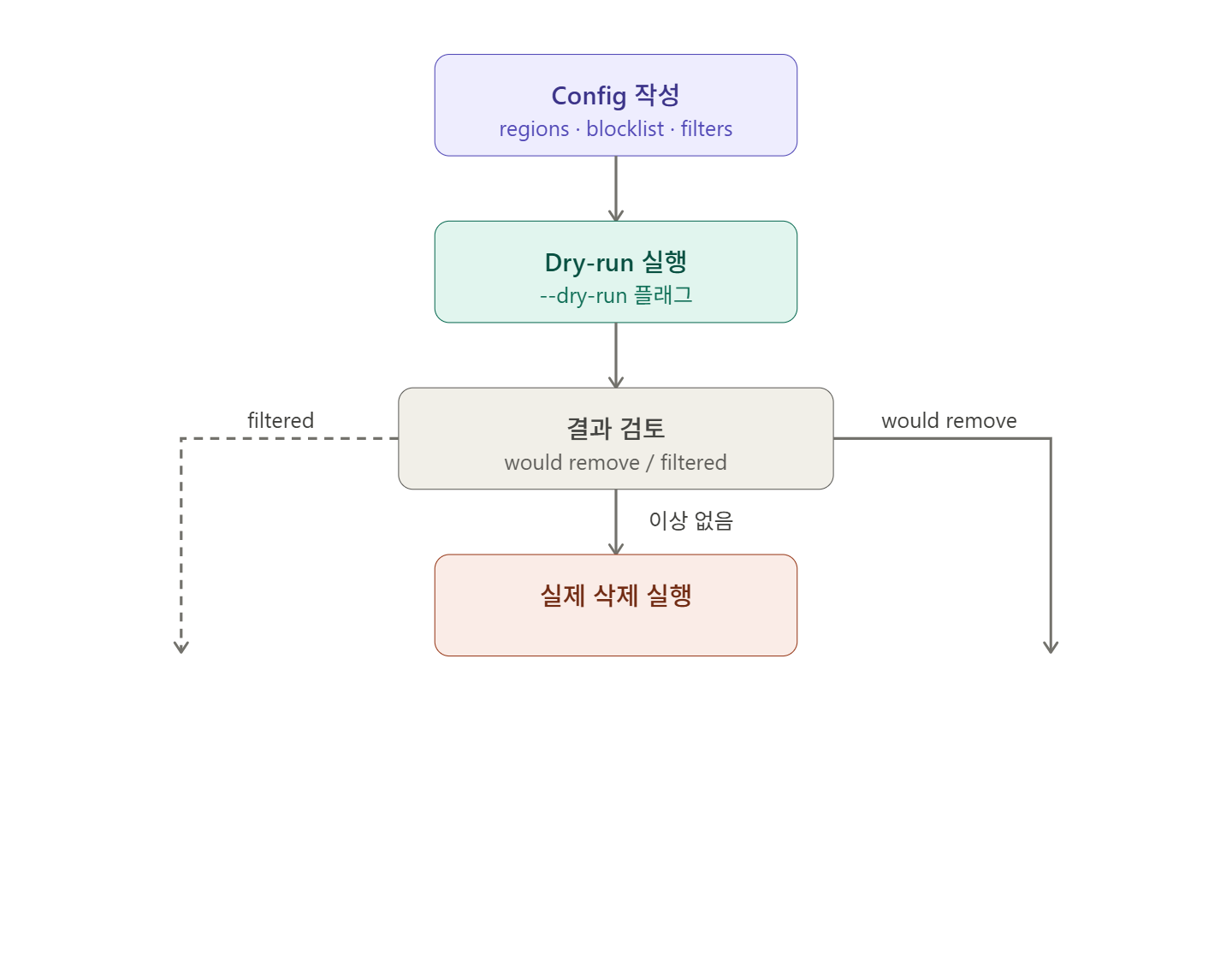
Step 1: Verify with Dry-run first
aws-nuke run --config nuke-config.yaml --dry-runOutput example:
ap-northeast-2 - EC2Instance - 'i-0abc1234def' - would remove
ap-northeast-2 - IAMRole - 'OrganizationAccountAccessRole' - filtered by config
ap-northeast-2 - EC2SecurityGroup - 'sg-default' - cannot delete group 'default'- would remove → Scheduled for deletion
- filtered by config → Protected by configuration
- cannot delete → Structurally undeletable
Step 2: Review the list and then execute
aws-nuke run --config nuke-config.yaml --no-dry-runDuring execution, you will go through a confirmation step where you must manually enter the Account Alias.
Step 3: Repeat 2-3 times for complex environments
For resources with complex dependencies like EKS and ECS, a single execution might not fully clean them up. If errors remain, repeat the same command.
⚠️ Precautions / Common Mistakes
- Always register your production accounts in the account-blocklist. If you accidentally put a production account ID in the config file, there’s no way to undo it.
- The deletion order for EKS clusters is important. If ELBs and ENIs provisioned by the cluster are not cleaned up first, VPC deletion will fail. In an EKS environment, it is safer to delete Service/Ingress objects with kubectl before running aws-nuke.
- KMS is not immediate deletion. It is normal for KMS CMKs to remain in KMS_KEY_DELETION_SCHEDULED status after running aws-nuke. They will be automatically deleted after 7 days.
- Resources with Deletion Protection require separate configuration. If deletion protection is set on RDS, EC2, etc., it must be explicitly disabled in feature-flags.
feature-flags:
  disable-deletion-protection:
    RDSInstance: true
    EC2Instance: true
    CloudformationStack: true
IAM dependency errors can be resolved by retrying. Even if a DeleteConflict error occurs, aws-nuke has retry logic. If it doesn’t work on the first try, run it again.
✅ Summary / Conclusion
aws-nuke is currently the most powerful tool for cleaning up AWS accounts. It supports over 300 resource types, allows for fine-grained filtering to select resources to protect, and enables pre-execution verification with dry-run mode.
Key principles are summarized below:
- Always register production accounts in the account-blocklist.
- Initially, specify only deletion targets using resource-types.targets.
- Always run –dry-run first and review the list.
- For EKS/ECS environments, consider running 2-3 times after resolving dependencies.
- Be aware that KMS and Secrets Manager are not immediate deletions.
As a next step, you might consider integrating aws-nuke with AWS Lambda + EventBridge to build a periodic automated cleanup pipeline, or configuring an automation script to apply it sequentially to all member accounts in AWS Organizations.
Leave a Reply