When you search for running LLMs on a local PC or an in-house GPU server, Ollama, vLLM, and llama.cpp almost always appear together. All three can download models, perform inference, and provide them via HTTP API, but their objectives are quite different.
Ollama wraps the complex model execution process like a product, making it easy to use, while vLLM focuses on serving multiple user requests with high throughput on GPUs. llama.cpp, a lightweight C/C++ based runtime, excels at finely executing GGUF models on various CPUs and GPUs.
This article compares these three tools not based on a simple speed ranking, but tailored to practical purposes such as personal experimentation, application development, in-house services, and edge deployment.

Conclusion at a Glance
| Tool | Best Fit Scenario | Model Format & Ecosystem | Key Strengths | Weaknesses to Check First |
| — | — | — | — | — |
| Ollama | Quickly run models on laptops/workstations and connect with apps | Own model library, Modelfile, GGUF import | Easy installation and model management, macOS·Windows·Linux support | Limited fine-tuning for large-scale multi-user serving |
| vLLM | Provide API with high concurrent throughput on NVIDIA·AMD GPU servers | Hugging Face model-centric, various quantization methods | PagedAttention, continuous batching, distributed inference, OpenAI compatible API | Relatively complex installation, GPU compatibility, and operational design |
| llama.cpp | Lightweight and fine-grained execution on CPU·Apple Silicon·small GPUs·edge devices | GGUF-centric | Low dependency, broad hardware support, control over quantization and offloading | Users need to understand model conversion and option selection more deeply |
The shortest summary is as follows:
Individual developers should start with Ollama, GPU-based multi-user services with vLLM, and resource-constrained environments and fine-grained local tuning with llama.cpp.
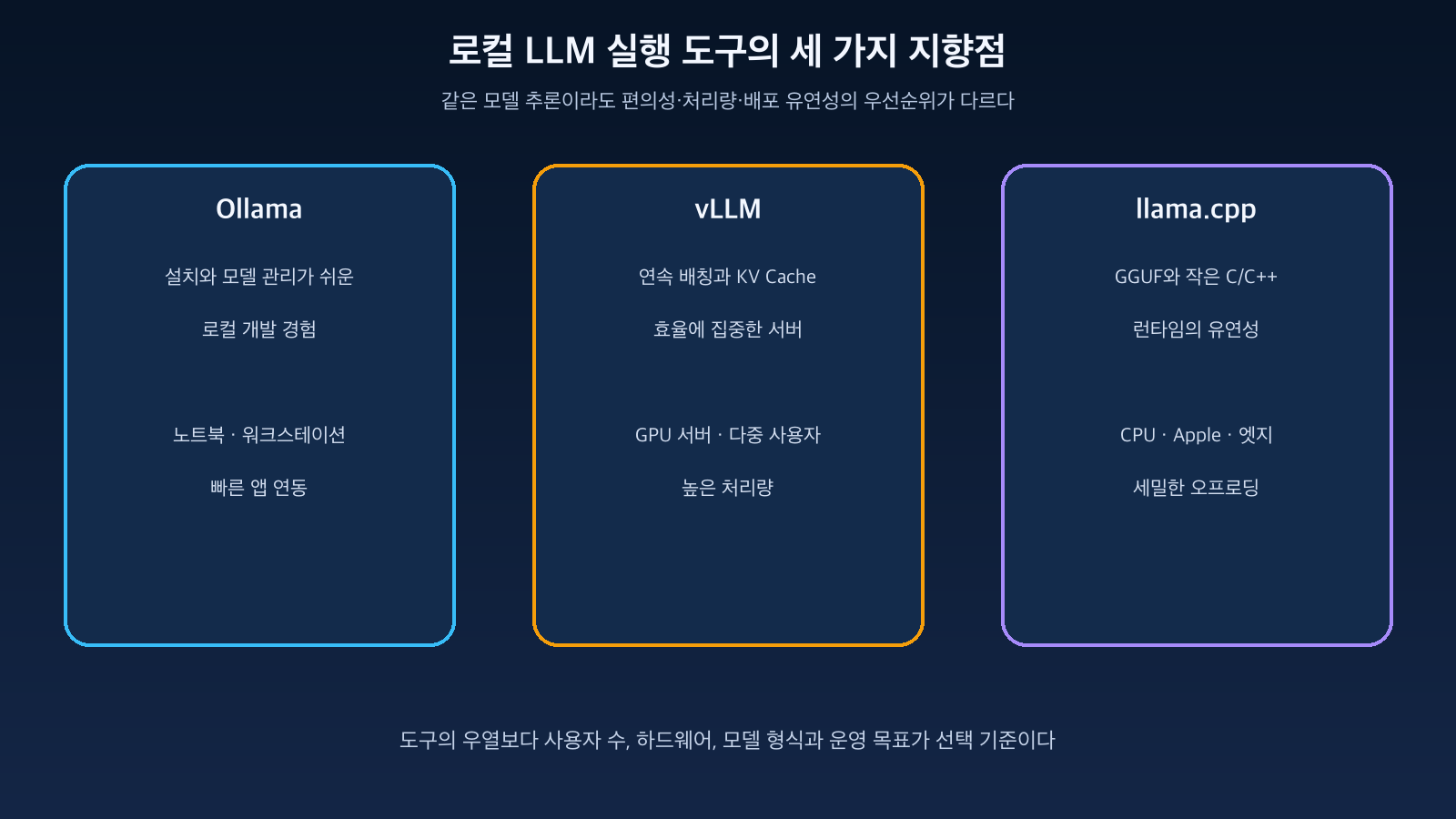
Figure: Main use cases and execution layers of the three tools · Reconstructed based on official documentation from Ollama, vLLM, and llama.cpp
Ollama — Treating Local LLMs Like Applications
Ollama’s strength lies in bundling model files, chat templates, execution options, and API servers into a single user experience. After installation on macOS, Windows, or Linux, you can simply specify a model name to handle download and execution consecutively.
ollama run gemma3The local server typically runs on http://localhost:11434 and provides its own API.
curl http://localhost:11434/api/chat -d '{
  "model": "gemma3",
  "messages": [{"role": "user", "content": "KV Cache를 설명해줘"}]
}'
The official Modelfile is a blueprint that defines the base model, system prompt, parameters, templates, and adapters together. It’s excellent for managing local model configurations that a team uses repeatedly.
FROM gemma3
PARAMETER temperature 0.2
SYSTEM 당신은 인프라 기술 문서를 설명하는 조력자다.
Ollama supports Metal acceleration for Apple GPUs, and NVIDIA, AMD ROCm, and experimental Vulkan support are also documented. It quickly addresses the need to “just chat locally and connect to an app” rather than building models directly and combining server options.
However, the local API generally does not require authentication. The official authentication documentation also states that local access to localhost:11434 has no authentication. Therefore, binding to 0.0.0.0 and exposing it directly to an internal network or the internet should be avoided; a reverse proxy, authentication, and firewall should be configured separately.
vLLM — Enabling Efficient GPU Sharing for Multiple Requests
vLLM is more akin to an inference server engine than a personal chat application. In environments where multiple users simultaneously send long prompts, the KV Cache can consume significant GPU memory, and varying request lengths lead to memory fragmentation and idle time.
vLLM manages the KV Cache like pages with PagedAttention and reduces GPU idle time by continuously batching incoming requests. The latest official documentation highlights chunked prefill, prefix caching, speculative decoding, various quantization methods, and distributed parallelism as key features.
vllm serve Qwen/Qwen2.5-7B-Instruct
  --dtype auto
  --api-key local-token
The default server runs on http://localhost:8000 and provides an OpenAI-compatible API.
from openai import OpenAI

client = OpenAI(
    base_url="http://localhost:8000/v1",
    api_key="local-token",
)

response = client.chat.completions.create(
    model="Qwen/Qwen2.5-7B-Instruct",
    messages=[{"role": "user", "content": "안녕하세요"}],
)
If an existing application uses the OpenAI SDK, it’s easy to connect to the local server by changing the base_url. While the scope of support is expanding to include not only Chat Completions but also Responses, Embeddings, and speech-related APIs, it should not be assumed that all OpenAI options will function identically. Constraints for each endpoint should be checked in the official compatibility documentation.
vLLM’s advantages become clear as the number of concurrent users increases. Conversely, if a single person runs only one request at a time on a laptop, the benefits might not outweigh the installation and operational complexity.
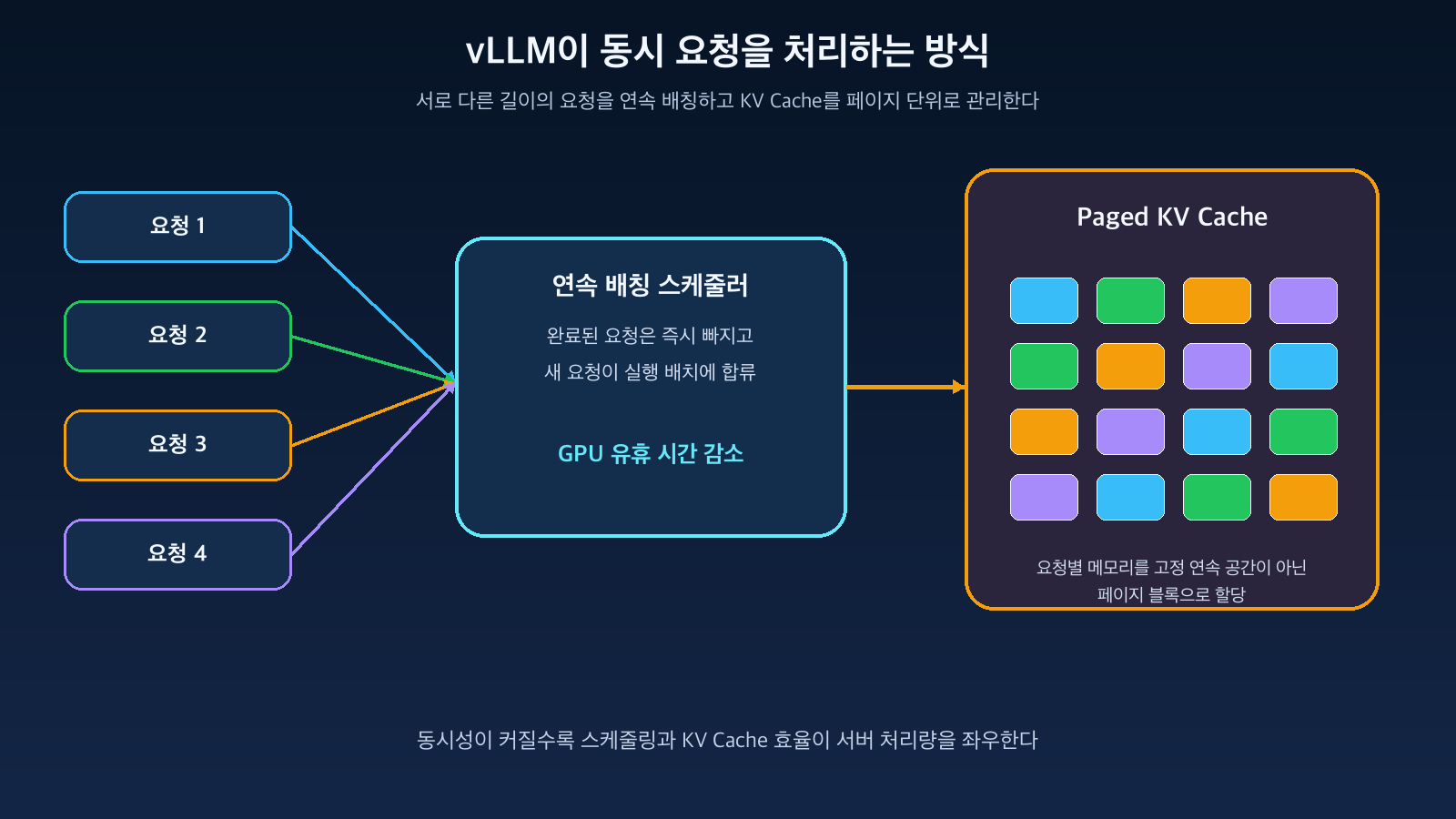
Figure: vLLM’s continuous batching and page-level KV Cache management concept · Reconstructed based on vLLM official documentation
llama.cpp — Expanding Hardware Boundaries with a Small Runtime and GGUF
llama.cpp is a C/C++ based inference project. It can run models in a wide range of environments, including CPU-only systems, Apple Silicon, consumer GPUs, and mixed CPU·GPU offloading.
The core model format is GGUF. GGUF files can contain not only model weights but also necessary metadata for execution and are distributed in various quantization levels like Q4, Q5, and Q8. Quantization is a trade-off that reduces memory usage and speed at the cost of potential accuracy loss.
llama-cli -m model.Q4_K_M.gguf -p "Self-Attention을 설명해줘"Using llama-server, you can run a lightweight HTTP server with a basic web UI and an OpenAI-compatible Chat Completions endpoint.
llama-server -m model.Q4_K_M.gguf --port 8080The official README also provides parallel decoding, embeddings, reranking, grammar-based structured output, and speculative decoding. Options like the number of GPU layers, context size, batch, and threads can be finely tuned, which is advantageous for developers looking to embed the runtime into embedded, edge, or desktop products.
On the other hand, users need to understand the model’s GGUF compatibility, quantization type, and memory budget. Even for “the same 7B model,” the required memory and output quality can vary depending on the quantization level, context length, and KV Cache precision.
Why Do the Same Models Have Different Memory and Speed?
Before considering the tool, you should look at the model size and execution conditions. Approximate weight memory can be estimated as follows:
가중치 메모리 ≈ 파라미터 수 × 파라미터당 바이트For example, a simple calculation for an 8B model in FP16 would require approximately 16GB of weight space. 4-bit quantization can theoretically reduce this to about 4GB, but actual execution requires additional space for metadata, operational buffers, KV Cache, and runtime overhead.
Specifically, as the context lengthens and concurrent requests increase, the KV Cache grows. In personal single conversations, model weights are the primary burden, but on a server, the number of concurrent users and maximum context significantly alter capacity planning.
| Comparison Criteria | Personal Single Request | Multi-user Server |
| — | — | — |
| Biggest Concern | Ease of installation, does the model fit in memory? | Throughput, latency, KV Cache and batching |
| Quantization Effect | Expands executability on low-spec devices | Potentially increases number of models/requests per GPU |
| Impact of Context Increase | KV Cache increases for one conversation | KV Cache of all active requests are summed |
| Representative Choice | Ollama or llama.cpp | vLLM-centric review |
The Three Tools Are Not Entirely Independent
Ollama and llama.cpp have common ground in GGUF and local inference, and vLLM also supports various quantization methods, including GGUF, in its latest versions. Therefore, asserting “GGUF is always llama.cpp” or “Hugging Face models are always vLLM” might lead to missing out on the latest features.
However, support and operational suitability are different. The ability to read a certain format should be distinguished from that format being the primary path for a given engine. Performance and stability vary depending on the model architecture, quantization kernel, and hardware backend, so actual candidate models should be benchmarked.
Selection Guide by Purpose
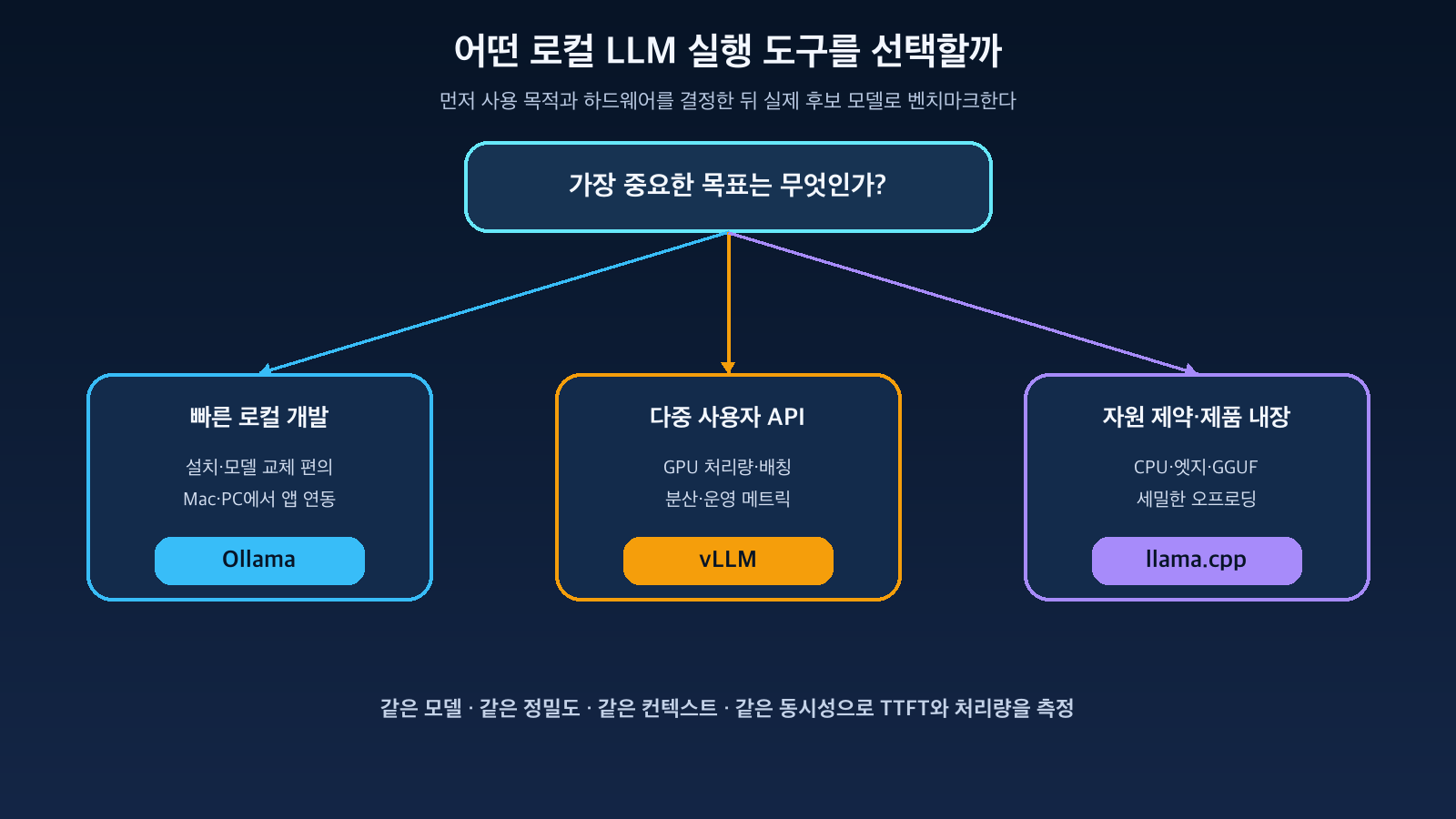
Figure: Selection flow for Ollama·vLLM·llama.cpp based on use case and hardware · Reconstructed based on the official documentation of the three projects
If a developer is testing RAG on a laptop
Ollama is the most convenient. Model installation and swapping are simple, and the local API is immediately available, making it easy to connect with tools like LangChain, LlamaIndex, and Open WebUI. It can also leverage Metal acceleration on Apple Silicon MacBooks.
If multiple people are using an in-house chatbot concurrently
It’s better to consider vLLM first on a GPU server. Its continuous batching, KV Cache management, OpenAI-compatible API, metrics, and distributed execution features are suitable for service operation. However, authentication, TLS, request limits, and tenant isolation must be designed in a separate gateway.
If embedding in a CPU server or edge device
llama.cpp is strong here. It can be included as an executable file and library, and GGUF quantization and CPU·GPU offloading can be finely tuned.
If only a few users are on a single GPU
Ollama and vLLM should be measured with the same model, context, and concurrency. If ease of setup is more important, Ollama is advantageous; if request throughput and operational metrics are more critical, vLLM is better.
Criteria Easily Overlooked During Benchmarking
You should not conclude based solely on tokens per second.
- TTFT (Time To First Token): Latency until the first token appears
- TPOT (Time Per Output Token): Interval for subsequent token generation
- Total throughput as the number of concurrent requests increases
- Prefill time for long prompts
- Memory usage at maximum context
- Model loading time and cold start
- Changes in answer quality due to quantization
- Restart on failure, metrics, logs, and deployment automation
Even with the same model name, comparisons are not fair if precision and quantization files differ. You should fix input length, output length, concurrency, and sampling parameters, and measure with actual business prompts.
Operational Security Is Not Handled by the Inference Engine
Running locally does not automatically make it secure. If you expose the API to other hosts, standard service security measures are still required.
- API Gateway with TLS and authentication
- Rate limits and usage quotas per user/application
- Access control for model files and cache directories
- Trusted model sources and hash verification
- Personal information masking in prompt/response logs
- Least privilege for containers and GPU nodes
- Separation and approval of execution permissions for tool-calling models
Specifically, configurations that directly expose the Ollama local API to the network, share a single vLLM API key across multiple systems, or connect llama-server to the internet without authentication should be avoided.
Conclusion
Ollama, vLLM, and llama.cpp are tools with different roles rather than one being superior to another.
Ollama excels in providing a local experience for easily downloading, running models, and connecting with development tools. vLLM is an inference service engine that efficiently handles multiple requests on GPU servers. llama.cpp, based on GGUF and a lightweight C/C++ runtime, caters to diverse hardware and embedded product environments.
Do not choose a tool first; instead, define the number of users, hardware, model format, context length, and operational method, then measure with actual candidate models.
If starting with personal experiments, Ollama is a good starting point; if service traffic is a concern, vLLM; and if resource constraints and deployment flexibility are key, then llama.cpp.
Leave a Reply