When logging in with a passkey, users only verify their fingerprint, face, or device PIN, without entering a long password. Although it might appear that biometric information is sent to the server, the actual structure is different.
The core of passkeys is to create a separate public-private key pair for each site and have the device digitally sign a one-time Challenge sent by the server. Only the public key is stored on the server, while the private key and biometric information never leave the secure area of the authenticator device.
This article will first clarify the relationship between passkeys, WebAuthn, FIDO2, and authenticator devices, then examine the registration and login message flows, phishing prevention principles, synchronized passkeys, and recovery design.

Are Passkeys, WebAuthn, and FIDO2 the Same Thing?
They are closely related but not the same terms.
| Term | Meaning | Scope |
| — | — | — |
| Passkey | A FIDO-based login credential used by users instead of a password | Synchronized or device-bound public key credential |
| WebAuthn | A W3C web API that web applications use to create and use public key credentials | Registration and authentication procedures between browser, RP server, and authenticator device |
| CTAP | A FIDO protocol for Clients (like browsers/OS) to communicate with external authenticator devices | Communication between USB, NFC, BLE security keys and platforms |
| FIDO2 | A public key authentication scheme combining WebAuthn and CTAP | A set of standards encompassing web and authenticator devices |
A website’s JavaScript calls navigator.credentials.create() and navigator.credentials.get(). The browser communicates with an Authenticator, such as the operating system’s passkey store or a security key, and the server verifies the returned signature.
웹 애플리케이션 ─ WebAuthn ─ 브라우저·운영체제 ─ CTAP ─ 외부 보안키
                                      └ 플랫폼 Authenticator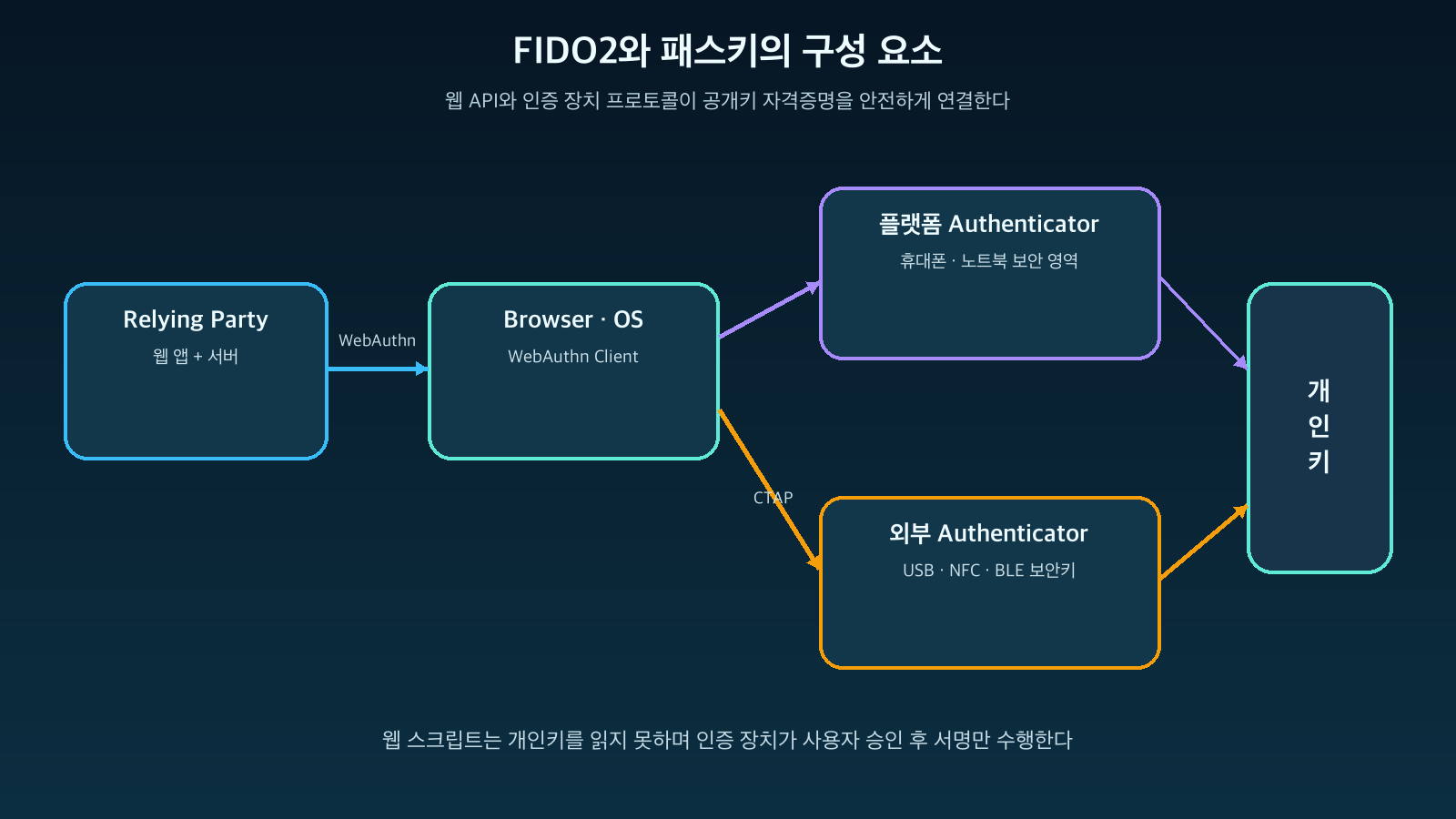
Figure: Relationship between Passkey, WebAuthn, CTAP, and FIDO2 components · Reconstructed based on W3C WebAuthn Level 3 and FIDO Alliance resources
How is it Different from Password Authentication?
In the password method, users share the same secret with the server. Even if the server stores a secure hash instead of the plaintext, users must submit their password to the site when logging in. If entered on a fake site, an attacker can reuse it.
Passkeys use asymmetric keys.
사용자 기기: 개인키 보관 + Challenge 서명
서비스 서버: 공개키 보관 + 서명 검증
The private key is generated bound to the RP ID of the site to be logged into. Users do not need to know the private key value, and the server does not receive the private key. Even if the server database is leaked and the public key is exposed, that public key alone cannot be used to create a new signature.
The role of biometric information is also easily misunderstood. Face or fingerprint data is not login data that proves identity to the server, but rather a local user verification method that authorizes the use of the private key within the device. A device PIN can serve the same role.
1. How Does Passkey Registration Work?
Passkey registration is the process by which the server links a user’s account with a new public key credential.
The Server Creates Registration Options and a Challenge
The server generates a one-time Challenge with sufficient entropy, RP information, user identifier, allowed algorithms, and user verification requirements.
{
  "challenge": "server-random-bytes",
  "rp": {"id": "example.com", "name": "Example"},
  "user": {"id": "opaque-user-id", "name": "user@example.com"},
  "pubKeyCredParams": [{"type": "public-key", "alg": -7}],
  "authenticatorSelection": {"userVerification": "required"}
}
The Challenge must be randomly generated in a server-trusted environment to prevent replay attacks and temporarily stored, linked to the session, until registration is complete.
The Browser Requests Key Generation from the Authenticator
The web application calls navigator.credentials.create(). The browser verifies the relationship between the current Origin and RP ID and displays the passkey creation UI to the user.
Once the user approves with biometrics or a device PIN, the Authenticator creates a new public-private key pair. The private key, RP ID, and Credential Source (such as user handle) are managed by the authenticator device or a secure passkey store.
The Server Verifies the Registration Response and Stores the Public Key
The browser sends the Credential ID, Attestation Object, Client Data, etc., to the server. The server verifies at least the following:
- Does the returned Challenge match the issued value?
- Is the origin an allowed HTTPS Origin?
- Does the rpIdHash match the hash of the expected RP ID?
- Do the user presence and user verification flags meet the policy?
- Was the requested public key algorithm used?
- If attestation was required, does it pass the trust policy?
After verification, the server stores the Credential ID, public key, user association information, and necessary metadata such as Sign Count and Transport. The private key is not stored.
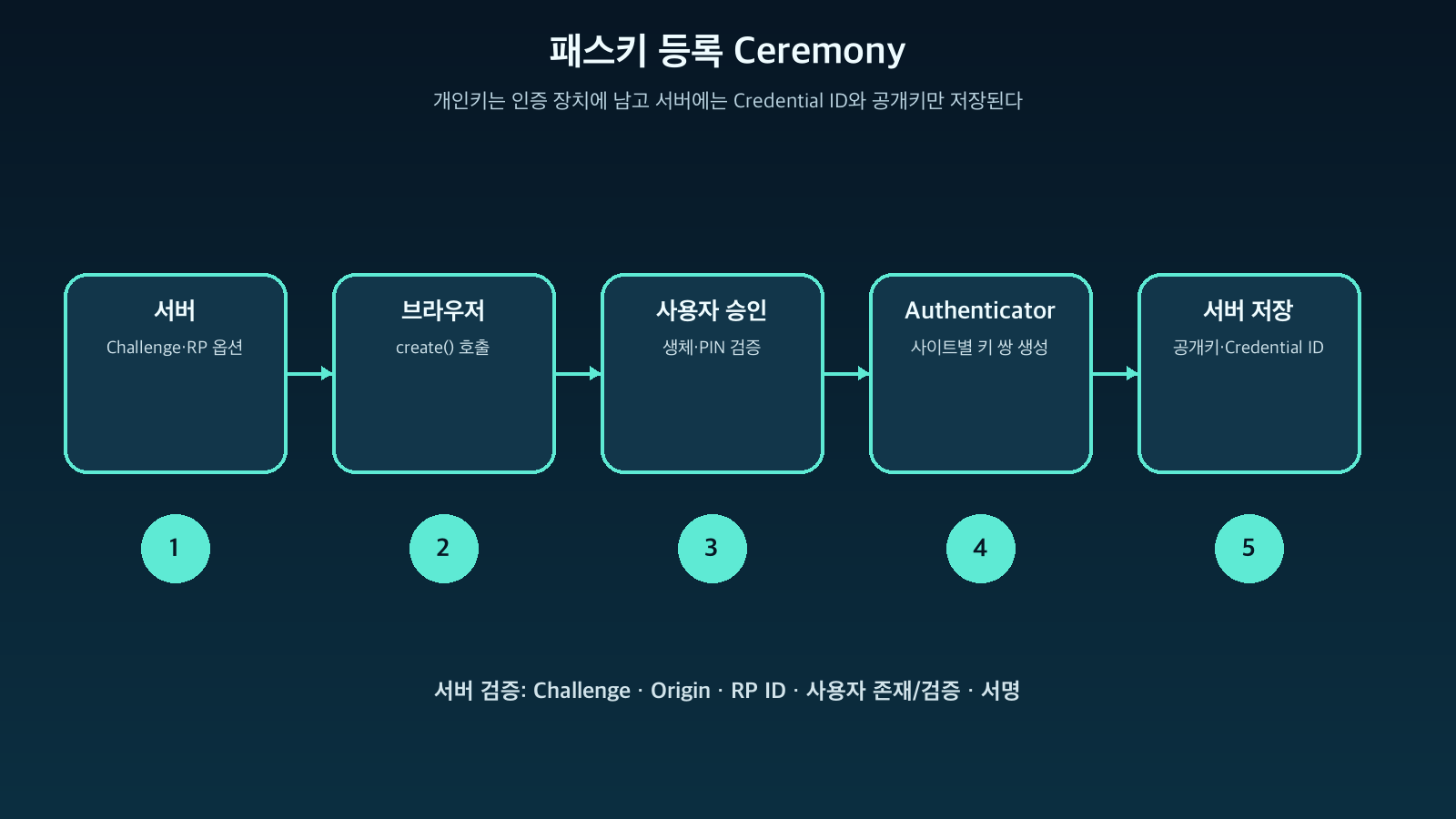
Figure: Key messages and verification items in WebAuthn Registration Ceremony · Reconstructed based on W3C WebAuthn Level 3 Registration Procedure
2. How Does Passkey Login Work?
Login is the process by which the server verifies, “Does the user actually possess the private key to sign this Challenge?”
The Server Sends an Authentication Challenge
The server provides a new Challenge, RP ID, a list of allowed Credentials, and user verification policies. With Discoverable Credentials, the browser can suggest passkeys usable for that site even if the user doesn’t enter an ID first.
The Authenticator Signs After User Approval
When the web application calls navigator.credentials.get(), the browser passes the current Origin and RP ID to the Authenticator. Once the user approves with a fingerprint, face, or PIN, the Authenticator signs the following information with the private key:
authenticatorData || hash(clientDataJSON)This includes the hash of the RP ID, user presence and verification flags, a signature counter, and data linked to the server Challenge and Origin.
The Server Verifies the Assertion with the Public Key
The server retrieves the public key stored during registration and verifies the digital signature. It issues a session only after confirming the Challenge, Origin, RP ID Hash, UP/UV flags, Credential ID, signature algorithm, and policy.
서명 유효 + Challenge 일치 + Origin 허용 + RP ID 일치 + 정책 충족
→ 로그인 성공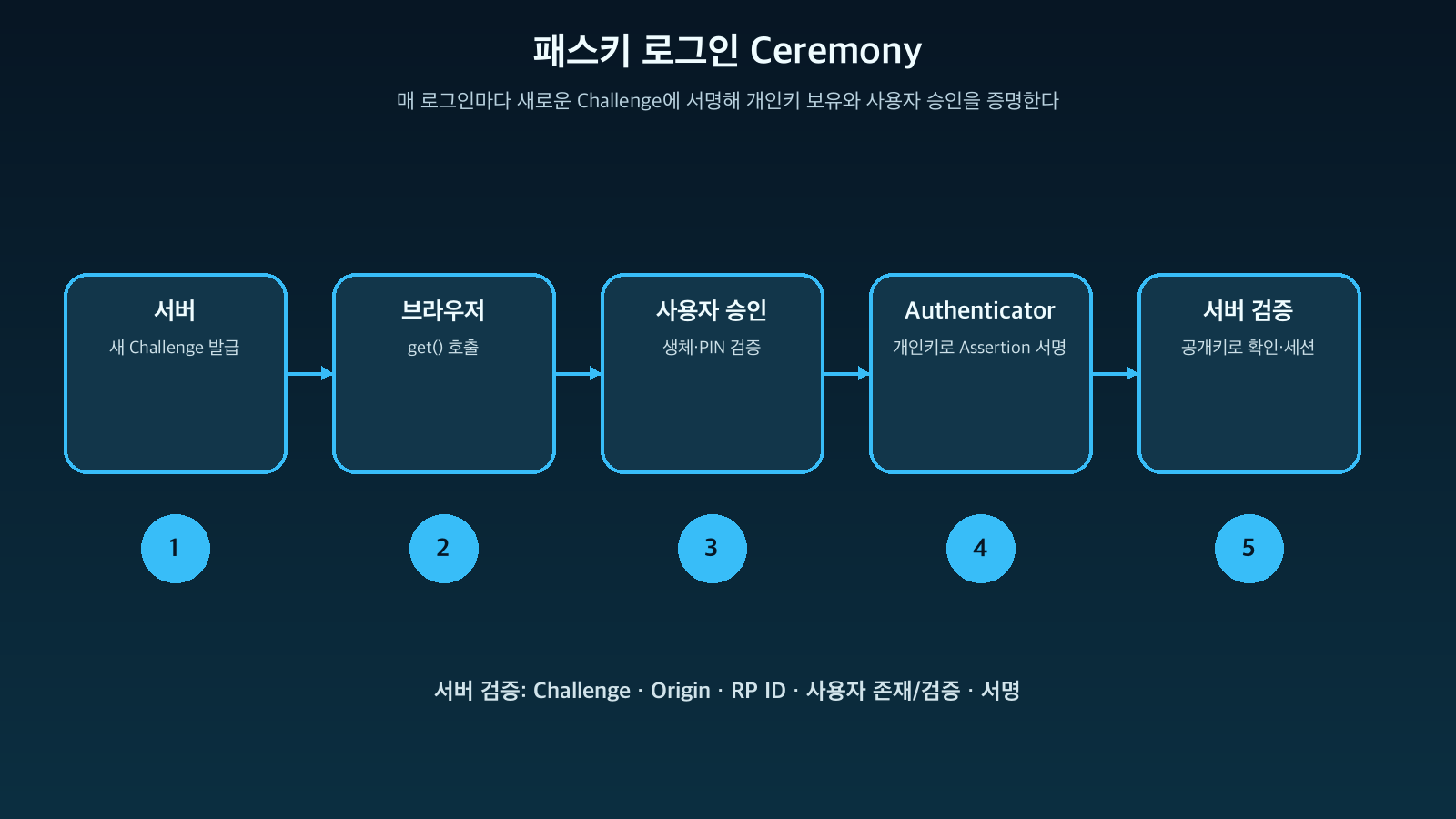
Figure: WebAuthn Authentication Ceremony and Assertion Verification Flow · Reconstructed based on W3C WebAuthn Level 3 Authentication Procedure
Why Passkeys are Resistant to Phishing
A passkey’s private key is bound to a specific RP ID. Even if an attacker tries to use a credential created on example.com on their examp1e.com, the browser and Authenticator will recognize it as a different RP ID and will not provide or use that private key for signing.
While password managers might allow users to ignore warnings and copy passwords, a WebAuthn private key is not a value that web scripts can read and copy. The W3C specification designs it so that scripts cannot access the credential itself, only receiving results in the form of a Credential object.
The server must also verify the returned origin. If RP ID scope limitation is the first line of defense, then Origin verification is an additional layer that reduces the risk of incorrect implementations and cross-origin threats.
However, passkeys do not prevent all attacks:
- Attacks where an already authenticated session cookie is stolen
- Cases where the user’s device or browser itself is compromised
- Cases where the account recovery procedure is compromised before passkey registration
- Malicious OAuth approvals or remote control scams
- Cases where the server incorrectly implements Challenge, Origin, or RP ID verification
Passkeys are a technology that significantly reduces login phishing and credential stuffing, but they are not a panacea that replaces overall account security.
Synchronized Passkeys vs. Device-Bound Passkeys
The FIDO Alliance distinguishes between passkeys that can be securely synchronized across multiple devices and those that are Device-bound to a specific device.
| Category | Synchronized Passkey | Device-Bound Passkey |
| — | — | — |
| Usability | Used across multiple devices of the same platform account | Requires the registered device or security key |
| Recovery | Utilizes the platform account’s recovery mechanism | Requires a backup security key or another registered credential |
| Main Risks | Cloud account compromise and reliance on recovery policies | Potential loss of account access if device is lost |
| Suitable Environment | General consumer services | Administrators, high-risk operations, regulated environments |
Synchronization does not mean uploading private keys in plaintext to the cloud. Platform providers apply end-to-end encryption and device/account protection, but the specific protection and recovery methods vary by ecosystem. Organizations should decide on synchronization, attestation, and device management requirements based on their risk level.
Hybrid Flow: Logging in to Another PC with Your Phone
You can use your phone’s passkey even on a public PC that doesn’t have a passkey. This involves scanning a QR code displayed on the browser with your phone, confirming proximity, and then approving with your phone’s biometrics.
The important point is that the passkey private key is not copied to the PC; rather, the phone acts as an authenticator device to sign the login ceremony. Since the final service session might remain on a public PC, logout and session management are still necessary.
Items That Must Be Verified in Server Implementation
WebAuthn is not complete just by calling browser APIs. Server verification is the core of security.
- Challenges should be sufficiently random, one-time, and managed with short expiration times on the server.
- Verify that the returned Challenge exactly matches the value stored in the session.
- Compare the origin precisely with an allowlist and do not permit unexpected subdomains.
- Verify that the rpIdHash matches the SHA-256 value of the configured RP ID.
- Confirm that the UP (User Present) and UV (User Verified) flags satisfy the service policy.
- Verify the link between the Credential ID and the user account.
- Verify the Assertion Signature with the registered public key and algorithm.
- Use the Sign Count as a signal for suspected cloning, but consider the characteristics of synchronized credentials.
- Record lifecycle events such as registration, deletion, recovery, and adding new devices in audit logs.
Rather than implementing cryptographic processing directly, use a verified server library, but the operator must understand what values and policies the library verifies.
Account Recovery Becomes More Critical with Passkey Adoption
If login is made strong but account recovery ends with a single email link, attackers will choose the weaker path.
Recommended design includes:
- Allowing multiple passkeys per account
- Users can view and delete passkey lists and last used devices
- Strong re-authentication for new passkey registration and recovery
- Administrator accounts should keep backup hardware security keys
- Secure issuance of recovery codes and auditing of re-issuance
- Notifications for suspicious registration/deletion events
- Guidance that existing phishing risks remain during the password coexistence period
If passkeys are only provided as an additional authentication method, transition is easy, but the password attack surface remains. Services should observe user conversion rates and recovery success rates and gradually expand their Passwordless policy.
Conclusion
Passkeys are not a technology that sends biometric information to the server, but rather a technology that eliminates the shared secret of passwords by using site-specific public-key cryptography.
During registration, the authenticator device creates a key pair, and the server only stores the public key. During login, the server sends a one-time Challenge, the user’s device performs local verification and signs with the private key, and the server verifies with the public key. Because credentials are bound to the RP ID and Origin, it is difficult for fake sites to obtain a signature from the same private key.
The security of passkeys is achieved not only through strong cryptographic technology but also when browser origin verification, authenticator device user approval, accurate server Ceremony verification, and secure account recovery work together.
Users no longer need to remember passwords, and services can significantly reduce the risks of password database leaks, phishing, and reuse attacks. When designing the next authentication system, it’s time to consider passkey-centric public-key authentication as the default path, rather than just patching passwords.
Leave a Reply