Hello, security analysts dedicated to research late into the night! 🌙
Today has been a whirlwind. We’ve chunked, cleaned, deobfuscated, and even predicted the future of obfuscated code. Thanks to the powerful weapon that is AI, it feels like we accomplished in just 3 hours what would have taken 3 days. ⚡️
However, before we conclude Day 1, we must have a crucial ‘discussion’.
“Can we truly trust AI’s analysis results 100%?”
Today, we will soberly examine the possibility of a fatal error AI can make, False Positives, and take time to summarize the techniques we learned today. ☕️
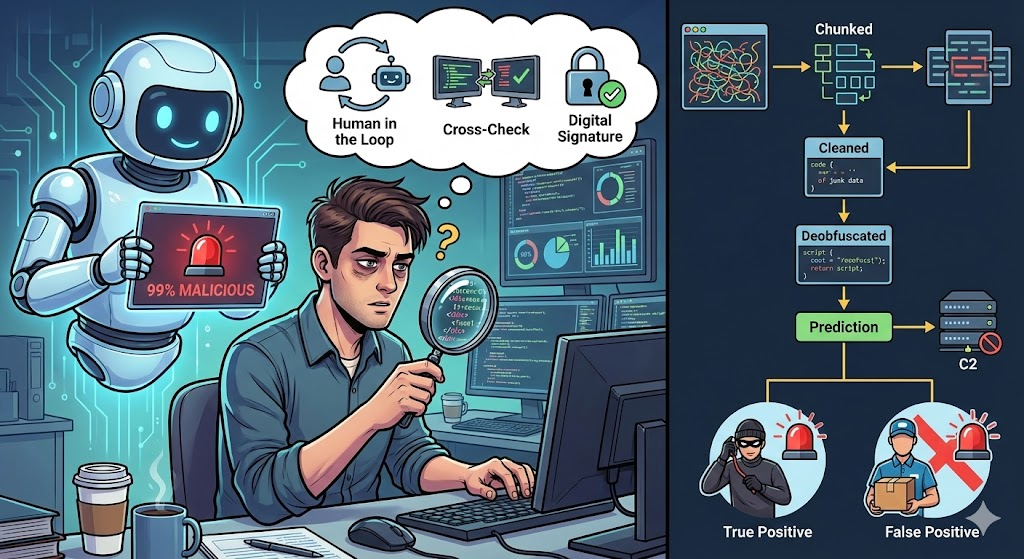
1. What is a False Positive? : The Boy Who Cried Wolf’s Warning 🚨
In security monitoring and analysis, false positives are the most troublesome issue.
- True Positive: An intruder enters, and the alarm sounds. (Good) ✅
- False Positive: A delivery person arrives, but the alarm sounds, identifying them as an intruder. (Bad) ❌
AI is fundamentally based on ‘pattern matching’ and ‘probability’. If it sees a pattern similar to malware, it tends to immediately shout, “Danger!”
As shown in the diagram above, security systems (or AI) inevitably have an area where they mistakenly identify benign files as malicious. Filtering these out is the core competency of human analysts.
2. Three Common False Positive Cases by AI 🤦♂️
Even among the things we practiced today, there were moments when AI almost made a mistake. In what cases does AI get it wrong?
① Management Tool vs. Malicious Tool (Lack of Context)
- Situation: Code using PsExec or PowerShell remote commands.
- AI’s Judgment: “Attempting remote control, so it’s malware (Backdoor)!” 🚨
- Truth: It turned out to be a legitimate management script deployed by the in-house IT team for PC maintenance.
- Reason: AI knows the ‘function’ of the code, but not the ‘context (who wrote it, why)’ in which it is executed.
② Packing and Protection Techniques
- Situation: Commercial software encrypts its code (e.g., Themida) for copyright protection.
- AI’s Judgment: “It’s hidden tightly so the inside can’t be seen? This must be ransomware.” 🚨
- Truth: It was just a legitimate game executable.
- Reason: Both malware and legitimate software use ‘analysis prevention’ techniques, making it easy for AI to get confused.
③ Hallucination
- Situation: Very rare assembly commands or obscure obfuscation techniques appear.
- AI’s Judgment: (Since it doesn’t know, it makes a plausible guess) “This matches the signature of the latest APT attack group, Lazarus.” 🚨
- Truth: It was just dummy code accidentally inserted by a developer.
- Reason: Generative AI tends to fabricate ‘plausible lies’ rather than admitting ‘I don’t know’.
3. Verifying False Positives with ‘Human in the Loop’ 🛡️
When AI reports, “This is malicious (99%),” how should we verify it?
- Cross-Check:
- Search the file hash identified by AI on threat intelligence (TI) platforms like VirusTotal or AlienVault. Do other antivirus programs also detect it?
- Digital Signature Verification:
- Is the digital signature from a trusted entity like Microsoft or Adobe valid? If the signature is intact, it’s likely legitimate.
- Combine with Dynamic Analysis:
- Don’t just rely on AI’s prediction (static analysis); actually run it in a safe sandbox. AI might say “file deletion,” but it could actually be “temporary file cleanup.”
4. [Day 1 Summary] Techniques We Acquired Today 🎒
Today, to overcome the mountain of malware, we established the following base camps:
- Step 1. [Theory] Knowing the Enemy: We understood how malicious scripts hide (obfuscation, encoding) and the C-language to assembly mapping structure.
- Step 2. [Preprocessing] Cutting into Edible Chunks: We learned how to divide code into chunks so AI doesn’t get indigestion.
- Step 3. [Refinement] Cleaning Up Junk: We removed dummy code (Junk Code) that hinders analysis and prettified cryptic variable names (Renaming).
- Step 4. [Decryption] Untangling the Knots: We flattened spaghetti-like control flow (Control Flow Flattening) into plain text using AI.
- Step 5. [Prediction] Seeing the Future: We simulated results (Emulation) without executing the code to identify C2 addresses.
- Step 6. [Verification] Being Skeptical: (What we’re doing now) We equipped ourselves with critical thinking to examine the possibility of false positives without blindly trusting AI’s results.
🚀 Next Up: Completing the Analysis, Report Writing 📄
The analysis is now complete. In my hands are the decoded code, AI’s analysis results, and my verification findings.
However, there’s a saying, “An unreported analysis is an unanalyzed one.” In tomorrow’s Day 2 session, we will integrate all this data and conjure the magic of automatically generating a “perfect malware incident analysis report” with AI, satisfying both management and technical teams.
You’ve all worked very hard today! Take a break and see you tomorrow! 👋✨
Leave a Reply